
Verify Working URLs When AI Calls Them Nonexistent (2026)
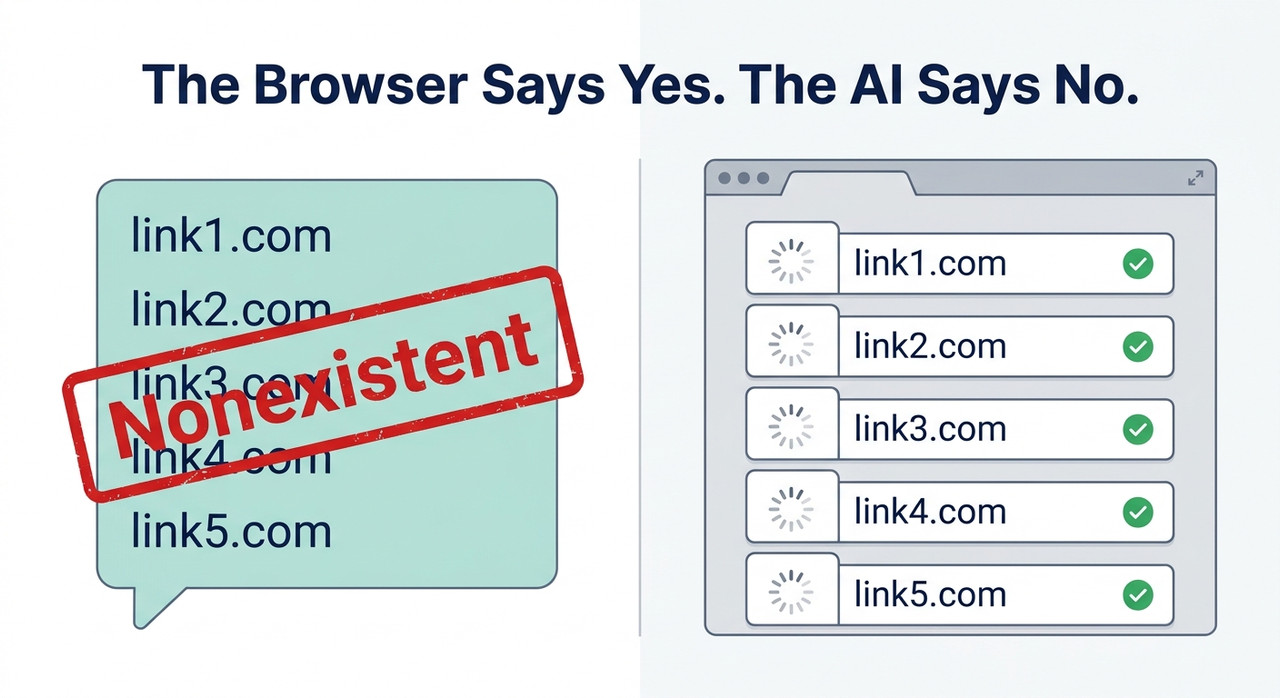
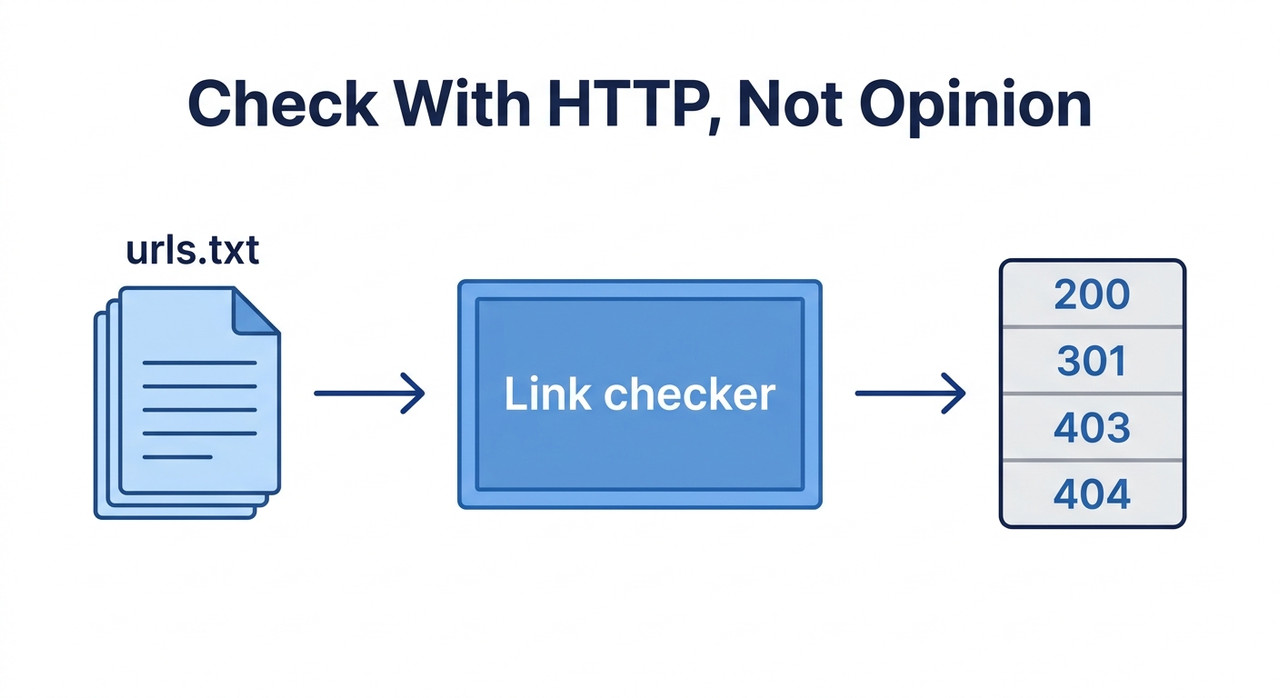
How can I verify multiple working URLs when AI incorrectly marks them as nonexistent is a job for a real HTTP check, not an AI opinion: test every URL with a link checker or curl, then interpret the status codes. For example, a 403 means the server blocked the request, not that the page doesn’t exist.
There is an old rule in monitoring: a health check is only as good as the place it runs from. A server can look dead from one network and perfectly healthy from another. How can I verify multiple working URLs when AI incorrectly marks them as nonexistent is the same problem in a new coat: the verdict sounds certain, but you need to ask where it was measured.
The fear runs in two directions. You might delete good sources because an assistant said they were fake, or publish dead or invented links because it said they were fine. I have spent 33 years in IT, and I have learned to distrust any “all clear” or “all broken” that arrives without evidence behind it.
This guide shows how to check a whole list of URLs yourself, in minutes, and how to read the results without over-trusting them. I have not tested every tool on every site. The advice draws on MDN, a link checker’s documentation and a 2023 blog post that I flag as dated, and I label which is which.
How Can I Verify Multiple Working URLs When AI Incorrectly Marks Them as Nonexistent?
Quick Answer
Don’t ask the AI whether the links exist. Save the URLs to a file, run a link checker such as lychee with a HEAD-then-GET fallback, and read the status codes: 200s loaded, 3xx redirected, 403 and 429 blocked, 404 possibly missing. Open any blocked result in a real browser before deleting it.
The main explanation of AI behavior here comes from a 2023 blog post that has since been updated, and the rest is general practice. It is not a guarantee for every site. Some pages block automated checks no matter how carefully you run them.
The next section explains why the AI gets it wrong. If you only want the fix, skip to the step-by-step list.
Why Does AI Mark Working URLs as Nonexistent?
There is no single cause. Which one applies depends on whether the assistant can fetch pages at all, and on how the target site treats automated requests. The table below sorts the usual suspects.
| Cause | How it shows up | What to do |
|---|---|---|
| The assistant has no live fetch tool | It judges from the words in the URL and sounds sure | Ask how it checked, then run a real check |
| It has a fetch tool, but the site blocks scripted requests | 403 or 429 results for pages that open in a browser | Treat as blocked, then verify in a browser |
| The server rejects HEAD requests | A 405 for a page that works | Retry with GET |
| The page loads only through JavaScript or a login | Empty or partial content for a script | Check by hand in a browser |
| The URL really is wrong or dead | 404 or 410, and a browser agrees | Fix or remove it |
A Model Without Web Access Can Guess From the URL Text
Simon Willison tested a model that could not browse and found it made judgement calls about whether a URL was “likely to exist.” Simon Willison’s Weblog It was not checking anything. It was reading the words in the address and guessing.
That is the hallucinated URLs problem in reverse. The same guessing that can invent a plausible link can also reject a real one that looks odd.
In One Test, a Model Rejected a Real-Looking URL Because It Thought the Date Was in the Future
One example from that post is worth remembering. A model rejected a URL because it believed March 2023 was still in the future. It also wrote a convincing summary for a URL that did not exist. Simon Willison’s Weblog
The lesson is that confidence tells you nothing. A fluent answer can come from a model that never touched the web.
I should be fair about the date. Willison later added an update saying the post is no longer accurate for ChatGPT, which can now browse, but that other LLM tools may still behave this way. Simon Willison’s Weblog Use it to understand the behavior, not to judge any one product today.
A Real Check Can Still Return a Misleading Code
Even when a tool really does fetch the page, the result can mislead. MDN defines 403 Forbidden as the server understanding the request and refusing it, and notes that a server may send 404 instead of 403 to hide a resource from a client that isn’t authorized. MDN Web Docs
That means a 404 is not always proof the page is gone. And 429 rate limiting means you asked too often, not that the page is missing. MDN Web Docs
Ask Which Tool Actually Did the Check
I would not assume an assistant, or a code sandbox attached to it, could reach the internet. Some can and some can’t. The honest way to find out is to ask which tool performed the check.
If it cannot name one, treat its verdict as a guess. That one question settles most of these disputes.
How Can I Verify Multiple Working URLs When AI Incorrectly Marks Them as Nonexistent, Step by Step?
Here is the sequence I would follow. It moves the judgment from the AI to the web server itself, which is the only party that really knows. Where a step is my own addition, I say so.
Step 1 — Put Every URL in a Plain Text File
Copy the URLs into a file called urls.txt, one per line. Do not paste them into a chat and ask for a verdict.
This removes the AI from the decision. It also gives you a record you can re-run later.
Step 2 — Ask the Assistant How It Checked
Before you trust any “nonexistent” label, ask the assistant which tool it used. If it had no web or fetch tool, its verdict was a guess based on the URL text. Simon Willison’s Weblog
That does not make the AI useless. It just means its output is an opinion, not a measurement.
Step 3 — Run lychee on the File
A link checker does the job properly. lychee is an open-source one, and you can point it at a plain list of URLs:
lychee --no-progress urls.txtlychee falls back to plain-text mode for file formats it does not recognize and extracts URLs on a best-effort basis. lychee on GitHub By default it treats status codes 100–103 and 200–299 as valid.
Step 4 — Add a HEAD-Then-GET Fallback
A HEAD request asks for headers only, which is quicker. Some servers reject it with a 405 even though the page works. Tell lychee to retry with GET:
lychee --no-progress --method head,get urls.txtThis one option removes a whole class of false failures. lychee on GitHub A 405 means the method isn’t allowed, not that the page is missing. MDN Web Docs
Step 5 — Use curl if You Can’t Install a Tool
No time to install anything? curl can do a rough check. This loop prints the status code and the final URL for each line:
while read -r u; do
curl -s -o /dev/null -L -m 20 -w "%{http_code} %{url_effective}\n" "$u"
done < urls.txt
(Illustrative example, my adaptation)
curl does not follow redirects unless you pass -L, and -m 20 gives up after 20 seconds. It is slower and less careful than a dedicated checker, but it works anywhere curl exists.
Step 6 — Sort the Results by Status Code
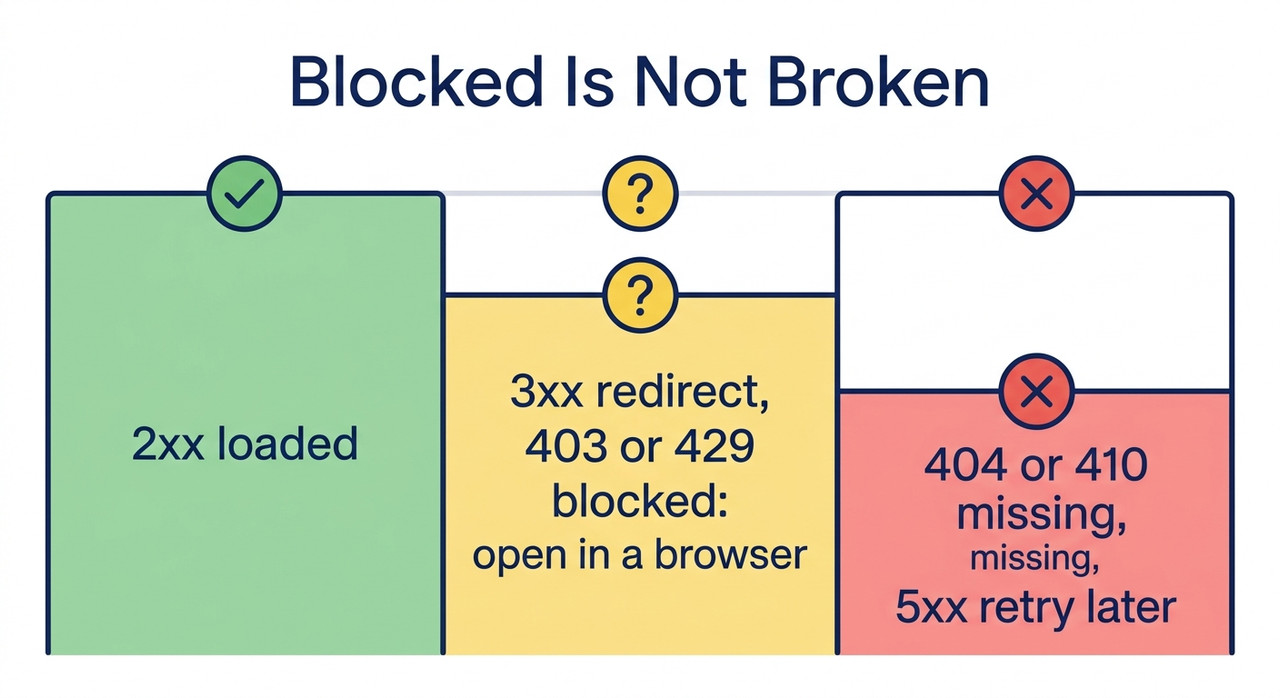
Now read the output. Every HTTP status code falls into a group. 200–299 means the page loaded. 301, 302 and 308 are a redirect chain, so check where they end up. 404 and 410 suggest the page is missing or gone, though a 404 can hide a 403. MDN Web Docs
401, 403 and 429 mean blocked or rate-limited, not proven nonexistent. 5xx and timeouts mean retry later. The next section turns this into a table.
Step 7 — Open Blocked Results in a Real Browser
Take every 401, 403 and 429 and open it in a normal browser. A page that loads there but returns 403 to a script was blocking the script.
One unrated guide goes further and recommends treating 401, 403, 429 and 999 as "blocked, not broken." I'd treat that as practical advice, not a standard. The browser check is what settles it.
Step 8 — Confirm Redirects Land on the Intended Page
A redirect can hide a problem. A link that now forwards to a homepage is a soft 404: the server says 200, but the content you wanted is gone.
Compare the final URL with what you expected. This is my own check, not something MDN or lychee prescribes, but it catches a failure the status code alone cannot.
Step 9 — Re-Run Only the Failures, Slower
Collect the URLs that failed and run them again with fewer simultaneous requests. lychee has a --host-concurrency option to limit requests per host, and it retries failures up to 3 times by default. lychee on GitHub
Slowing down matters because rate limiting looks like failure. Many 429 results disappear when you ask less often.
Step 10 — Verify Anchors With --include-fragments
If your links point to a section, such as #installation, add --include-fragments so lychee checks that the anchor exists. lychee on GitHub
It has a limit. It cannot see anchors that only appear after JavaScript runs, so a miss on a script-built page is not conclusive.
Step 11 — Give the AI the Status Table, Not the Final Say
Now you can bring the AI back in, in a safer role. Paste the status table and ask it to summarize which URLs failed and why.
Don't let it overrule the results. The table is evidence. The summary is a convenience.
What Do HTTP Status Codes Mean for This Check?
This is the table I keep open when I read a result. It follows MDN's definitions, with my suggested action in the last column.
| Status | What it means | What to do |
|---|---|---|
| 200–299 | The request succeeded | Accept it |
| 301, 302, 308 | Redirect | Check the destination is the page you wanted |
| 401, 403 | Access refused | Open in a real browser before deciding |
| 404, 410 | Not found or gone | Treat as missing, but confirm important ones, since a 404 can hide a 403 |
| 405 | Method not allowed | Retry with GET |
| 429 | Rate limited | Slow down and retry |
| 5xx, timeout | Server problem | Retry later |
Source for the definitions: MDN Web Docs. Two lychee details help with expectations. It accepts 100–103 and 200–299 by default, retries failed requests 3 times, and exits with code 2 when a link check fails. lychee on GitHub
That exit code is useful if you ever automate the check. A non-zero result can stop a publishing script before a broken link goes live.
What Do the Real Responses Look Like?
There is no single error message for this problem, because the failure is a wrong verdict, not a crash. What you see is usually a confident sentence with nothing behind it.
For reference, here is a 2023 ChatGPT refusal quoted in Simon Willison's post. It predates browsing and is included only to show the tone:
I'm sorry, but as an AI language model, I cannot access your Google document link. Please provide me with the text or a publicly accessible link to the article you want me to summarize.Simon Willison's Weblog And here is what a blocked request looks like at the protocol level, from MDN's page on 403:
HTTP/1.1 403 ForbiddenThat line means the server refused. It does not mean the page is missing, which is the whole point of this guide.
How Do You Keep This Check Repeatable?
A one-off check is useful. A repeatable one is better. Keep your urls.txt with the project, and re-run it before you publish or update anything.
I would also keep the output, not just the pass or fail. A saved status table lets you see which URLs changed between runs. A link that was a 200 last month and a 404 today is a real signal, and you will only spot it if you kept the earlier results.
If you work with AI to gather sources, make the check part of the handoff. The assistant proposes URLs, and you run the file through the checker before anything is cited. That keeps the AI in the role it is good at and keeps the verdict with the server.
For more guides on checking AI output, see our complete guide. The same verify-first habit applies there.
Bad vs. Good Way to Verify a List of URLs
Here is the contrast I would want every reader to see. Both examples are illustrative composites, not real transcripts.
Bad: "My assistant said 6 of my 20 reference links were nonexistent, so I deleted them from the draft. Later I opened them in a browser and every one loaded."
Good: "I saved the 20 URLs to a file, ran lychee with a HEAD-then-GET fallback, and got 15 passes, 2 redirects and 3 results of 403 or 429. I opened those 3 in a browser, confirmed they were fine, and kept all 20."
The difference is where the verdict came from. In the good version, it came from the servers, and a person settled the ambiguous cases.
Frequently Asked Questions
Q1: Why does AI say a working URL doesn't exist? A1: A model without a live fetch tool can guess from the URL's wording, and one with a tool can be blocked by the site. Neither result is proof the page is missing. Simon Willison's Weblog
Q2: Does a 403 mean the page doesn't exist? A2: No. MDN says 403 means the server understood the request and refused it. Open the URL in a browser to check. MDN Web Docs
Q3: Can a 404 be wrong? A3: Sometimes. MDN notes servers may send 404 instead of 403 to hide a resource, so confirm important 404s in a browser. MDN Web Docs
Q4: What is the fastest way to check many URLs? A4: Put them in a text file and run a link checker such as lychee. It can retry with GET when HEAD fails and retries failures 3 times by default. lychee on GitHub
Q5: Can I use curl instead?
A5: Yes. Use -L to follow redirects and print the status code and final URL for each line. The loop is simple but slower than a dedicated checker.
Q6: What about blocked or rate-limited results? A6: Treat 401, 403 and 429 as blocked, not broken. Slow the requests down, then verify the remaining ones in a real browser. MDN Web Docs
Q7: Should I trust an AI that says it checked the links? A7: Ask which tool it used. If it can't name one, treat the answer as a guess and run the check yourself. Simon Willison's Weblog
Leave a Reply