
Transparency Note: This article may contain affiliate links. If you click through and make a purchase, we may receive a small commission at no extra cost to you. We only recommend tools we’ve stress-tested in real-world marketing and ops workflows.
What Is Manus AI? The Autonomous Agent That Actually Works Inside Your Browser
You installed Manus AI expecting a hands-off “do-the-work-for-me” assistant—then your tasks started stalling, the browser behaved strangely, and you realized you are not even sure what Manus actually is under the hood. It’s a common frustration in 2026: we have the power of autonomous agents, but the “black box” nature of these tools can leave you feeling more like a babysitter than a strategist.

In this guide, I’m going to strip away the marketing fluff. We’ll cover:
- A clear, non-fluffy explanation of what Manus AI is (and why it’s not just another ChatGPT clone).
- Concrete troubleshooting for those annoying browser access issues and stuck tasks.
- A mental model for solo marketers and agency founders to decide when to use Manus and when to stick to simpler tools.
The Real Problem Behind “What Is Manus AI?”
Most people search for a definition of Manus AI not because they need a dictionary entry, but because their first serious task with the platform has gone sideways. You aren’t looking for a “what,” you’re looking for a “why isn’t this working?”
Expectations vs. Reality
The typical expectation is that Manus is just a “smarter ChatGPT”—something that writes or answers faster. The reality? Manus is an autonomous agent. It runs longer, complex workflows that can feel slow or opaque because it’s actually doing the browsing, clicking, and data-crunching in the background.
Common Pain Scenarios
If you’ve experienced any of these, you’re in the right place:
- The browser operator never actually opens.
- Tasks get stuck at “45%” for twenty minutes.
- Manus keeps revisiting the same page like a digital goldfish.
Why a Simple Definition Isn’t Enough
High-level marketing definitions won’t help you debug a failed LinkedIn enrichment run. You need a mental model + troubleshooting map. By understanding how Manus thinks, you’ll know exactly where to poke it when it stops moving.
Under the Hood – What Manus AI Actually Is
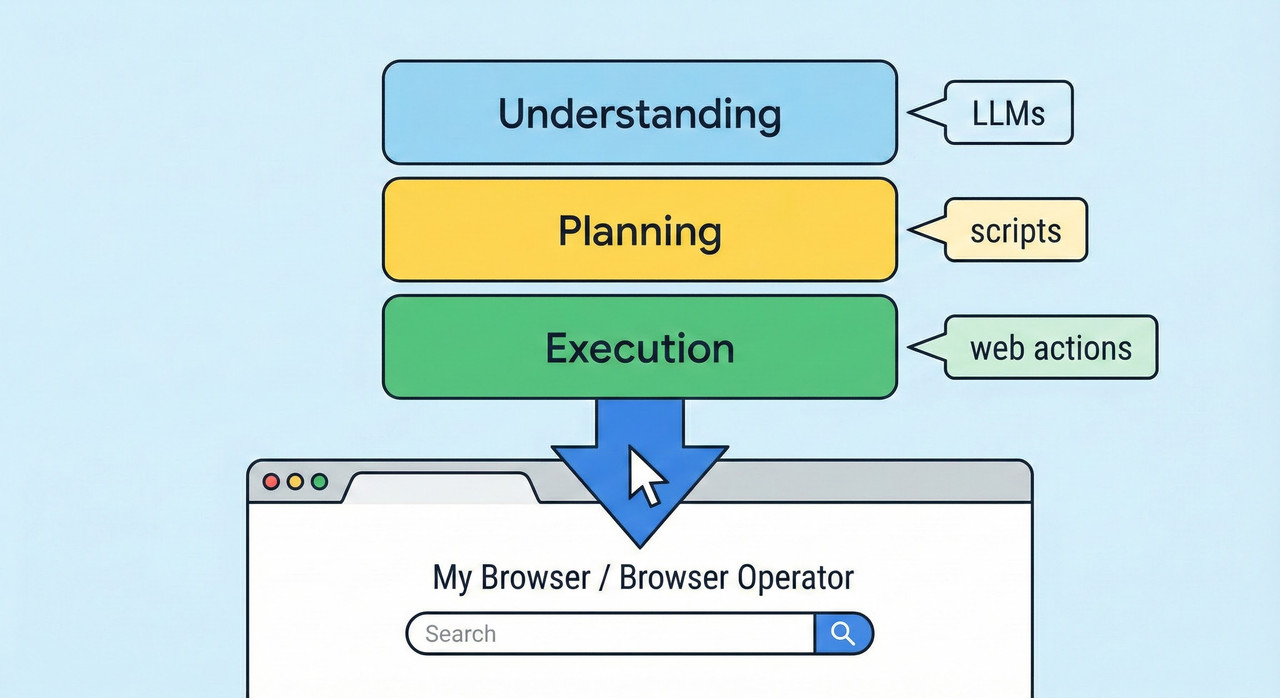
Manus AI (developed by the team at Monica) is a general AI agent. While a chatbot talks, an agent acts. It understands goals, plans multi-step workflows, and executes actions using multiple models and tools.
From Chatbot to Autonomous Agent
- Standard Chatbot: Turn-by-turn Q&A. No independent planning. If it doesn’t know the answer, it hallucinations or stops.
- Manus AI: Interprets a goal (e.g., “Audit my competitor’s pricing”), decomposes it into sub-tasks, and acts across tools with minimal babysitting.
The Three-Stage Manus Pipeline
- Understanding: Parses your natural language goal to infer what data sources and tools are needed.
- Planning: Creates a logical, step-by-step workflow (scripts) to achieve the outcome.
- Execution: This is the heavy lifting. It runs the scripts, uses the browser, and adapts if a step fails.
Models and Tools Behind the Scenes
Manus isn’t tied to one model. It orchestrates multiple LLMs (like Claude 3.5 Sonnet and fine-tuned Qwen) and specialized tools working together. This makes it “slow but deep”—it’s doing more work than a single-model chatbot ever could.
The Manus Browser Operator (“My Browser”) Explained
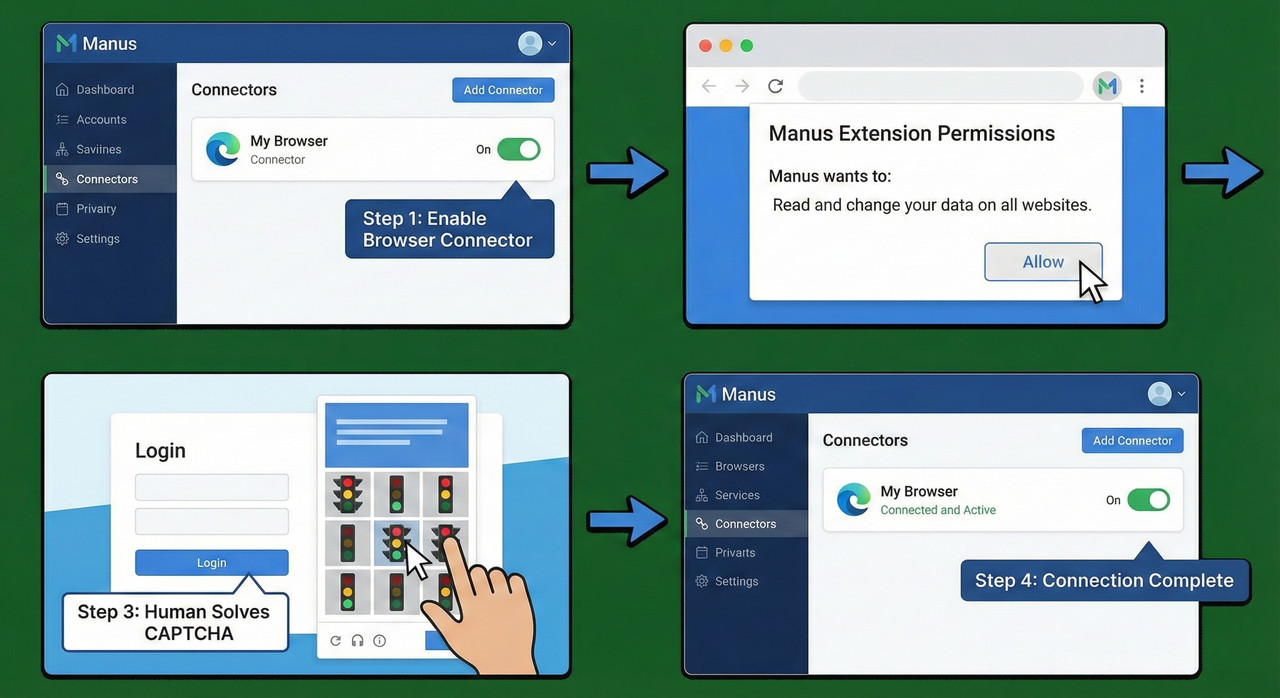
The “Browser Operator” (often labeled “My Browser”) is the secret sauce. It’s what allows Manus to act as you inside your real Chrome or Edge sessions.
What the Browser Operator Actually Does
Unlike cloud-only browsers that get blocked by firewalls or login walls, the Browser Operator uses your local cookies, logins, and IP. This means it can navigate your SaaS dashboards because it is effectively using your already-authenticated session.
Correct Setup Flow
- Manus Dashboard: Go to
Connectorsand toggle “My Browser” to ON. - Extension: Install the Manus Chrome/Edge extension.
- Permissions: Grant the required permissions when the popup appears.
- Verification: Ensure the extension icon is active.
Troubleshooting Manus AI When Tasks Stall
When the “black box” stops moving, use this structured checklist to get back on track.
Step 3 – Fix Login and CAPTCHA Roadblocks
The Fix: Manually click into the tab Manus opened, solve the CAPTCHA or log in, and then let Manus resume control.
Making Manus AI Actually Work for Your Marketing or Ops Stack
Manus delivers the most value when you stop treating it like a search engine and start treating it like a junior associate.
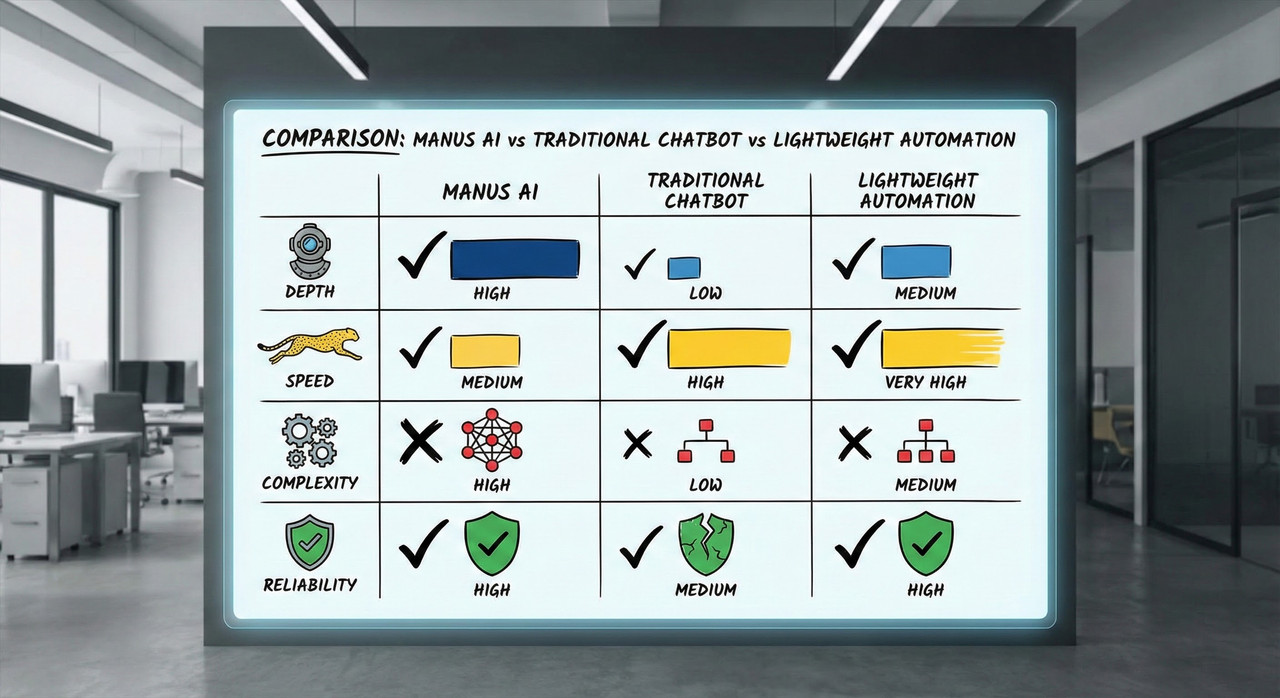
| Feature | Traditional Chatbot | Manus AI Agent |
|---|---|---|
| Data Access | Training data (old) | Real-time browser access |
| Output | Text response | Multi-file reports & audits |
| Autonomy | Zero (needs prompts) | High (self-correcting) |
Putting It All Together – A Practical Playbook
With the right mental model, Manus becomes a reliable teammate.

Leave a Reply