
Transparency Note: This article contains no affiliate links. All recommendations are based on independent research and hands-on testing.
What Is the Best AI Chatbot in 2026? (Ranked By Use Case)
Picking the wrong AI chatbot doesn’t just waste your afternoon — it can drain your budget, slow your workflow, and in the worst case, expose sensitive business data to platforms you didn’t fully vet. I’ve spent hundreds of hours testing these tools across real work scenarios, and the honest answer is: there is no single best AI chatbot. But there is a best one for you — and this guide will help you find it fast.
What Is the Best AI Chatbot? (Quick Answer)
There is no single “best” AI chatbot for everyone. The right choice depends on your use case, ecosystem, and budget. In 2026, ChatGPT leads for versatility, Claude excels at writing and long-context reasoning, Google Gemini integrates deeply with Google Workspace, Microsoft Copilot suits M365 power users, and Perplexity is the top pick for research with real-time web search and citations — all powered by advanced multimodal models.
Who Should Use Which AI Chatbot?
I get this question almost daily: “Just tell me which one to use.” The problem is that’s like asking “what’s the best car?” without mentioning whether you’re commuting, hauling cargo, or racing. Here’s a fast-match guide based on role:
| Your Role | Best Chatbot | Primary Reason |
|---|---|---|
| Solo founder / generalist | ChatGPT Plus | Versatility, custom GPTs, API access |
| Writer / content creator | Claude (Sonnet/Opus) | Long-form reasoning, nuanced voice |
| Researcher / analyst | Perplexity Pro | Real-time web search + citations |
| Google Workspace user | Google Gemini | Native Docs/Gmail/Drive integration |
| Microsoft 365 power user | Microsoft Copilot | Native Word/Outlook/Teams integration |
| Developer / open-source | DeepSeek / Poe | Model fine-tuning, API access, flexibility |
| Marketing automator | Zapier Agents | Workflow automation, automation chatbot triggers |
| Enterprise / compliance team | Claude or Copilot | Enterprise-grade chatbot controls + data privacy |
Core Pain Points: Why Choosing an AI Chatbot Feels So Hard
Let me be honest about what I hear from readers. The problem isn’t a lack of options — it’s too many options with overlapping marketing claims. Every chatbot says it’s “smarter,” “safer,” and “more powerful.” That feature noise is the bleeding neck problem.
The hidden fear, though, is deeper: “What if I upload a client brief, a financial report, or an internal strategy doc — and that data gets used to train someone else’s model?” That fear is legitimate. I’ve seen professionals accidentally opt into training data sharing by not reading the fine print. This guide addresses both.
Key sources of overwhelm I see constantly:
- Too many pricing tiers with confusing model access (GPT-3.5 vs GPT-4o, free vs paid plan)
- Uncertainty about which chatbot actually hallucinates less
- Confusion about context window size and why it matters for long documents
- No clear understanding of data privacy policies — especially for paid vs enterprise tiers
How to Choose the Best AI Chatbot (Step-by-Step)
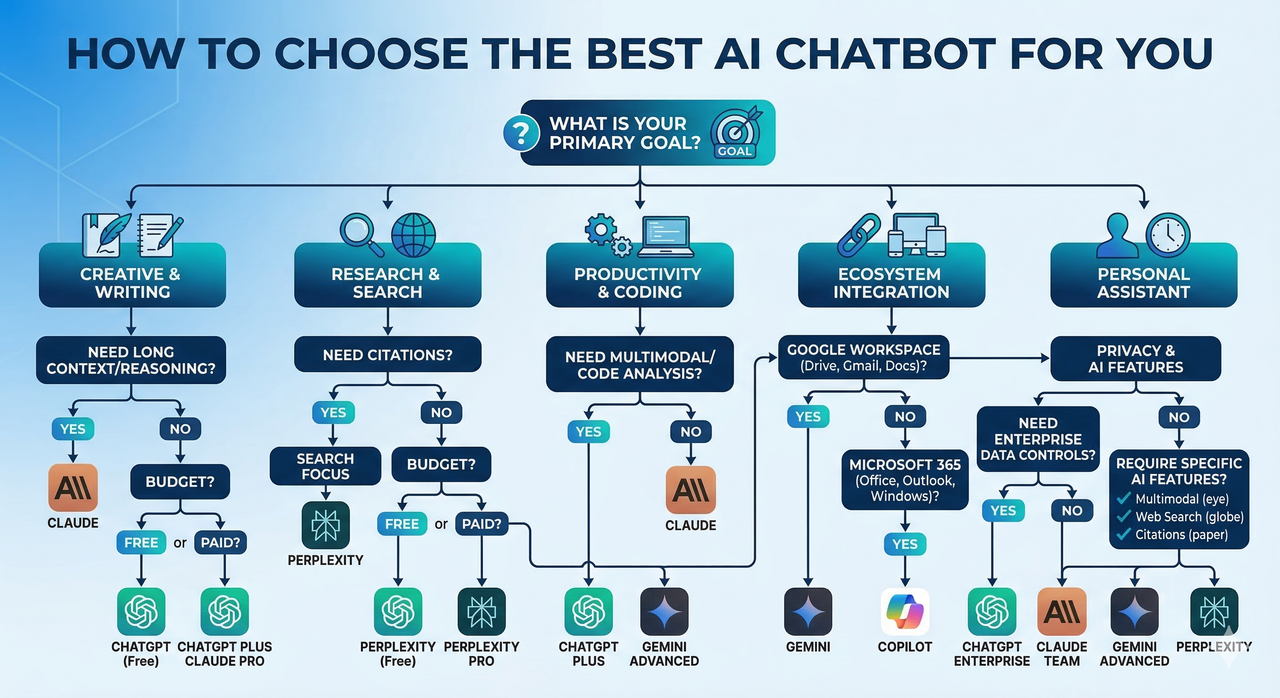
This is the framework I actually use when evaluating chatbots for clients and for my own workflows. Follow these six steps before committing to any paid plan:
- Identify your primary use case. Are you coding, writing long-form content, doing research, building a customer-support chatbot, or managing internal knowledge? The answer eliminates half the options immediately.
- Map your ecosystem. If you live in Google Workspace, Google Gemini is deeply integrated. If your team runs on Microsoft 365, Microsoft Copilot is embedded in Word, Outlook, and Teams. Fighting against your ecosystem is wasted friction.
- Audit data privacy policies. Look for: opt-out of training data use, anonymized routing, local-only history options, and enterprise-tier data isolation. According to Zapier , privacy controls vary significantly between free and enterprise plans — don’t assume the free tier is private.
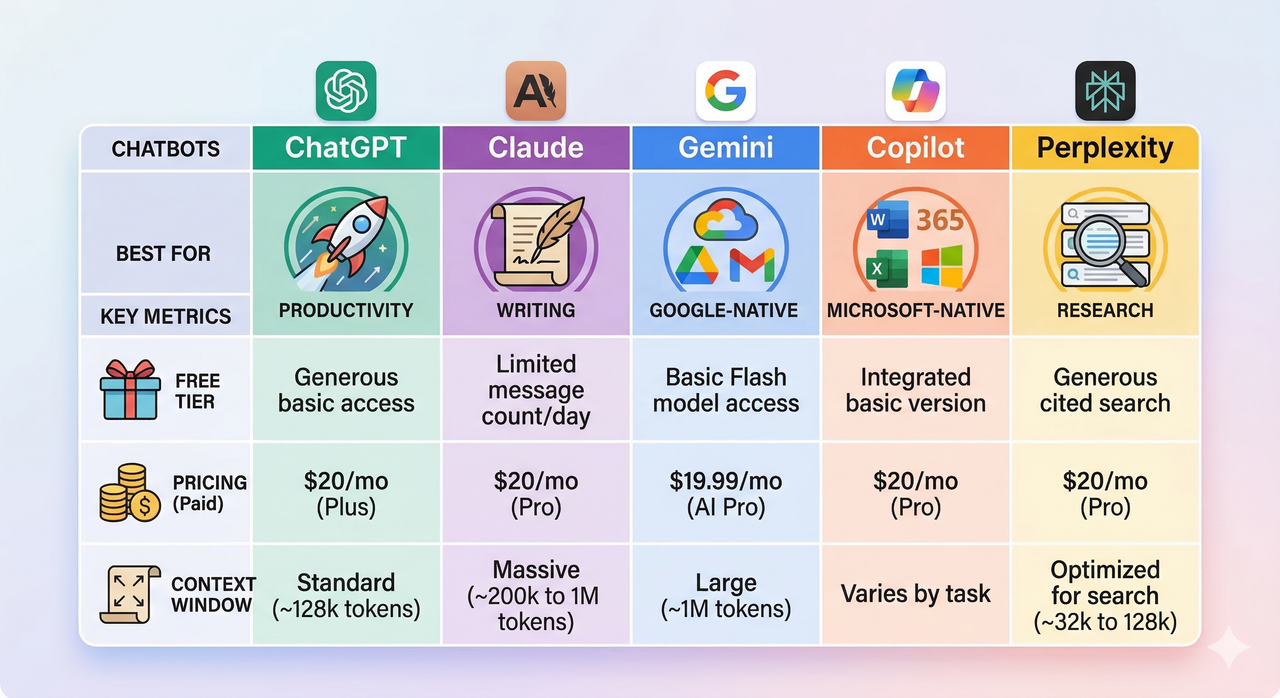
- Compare free vs paid plans and model access. The free tier of most chatbots uses older or capacity-limited models. ChatGPT Free uses GPT-4o-mini; Plus unlocks full GPT-4o. Claude Free limits message volume on Sonnet; Pro unlocks Opus. Understanding these pricing tiers prevents frustration mid-workflow.
- Run a hands-on test with your real tasks. Give each candidate a long document summarization (tests context window), a coding task (tests AI reasoning), and a fact-based question (tests hallucination rate). Source-grounded outputs from Perplexity with live citations are noticeably more trustworthy for research tasks.
- Consider advanced or niche needs. If you need multi-model experimentation, Poe lets you run ChatGPT, Claude, and others side-by-side. If you need workflow automation, Zapier Agents turns chatbots into action-takers. For BYOD (bring your own data) or knowledge base-driven chatbot setups, explore DeepSeek or custom-deployed Llama-based stacks with model fine-tuning.
Top AI Chatbots in 2026: Detailed Breakdown
ChatGPT – Best Overall & Versatile AI Chatbot
In my experience, ChatGPT (by OpenAI) is still the safest default recommendation for most people — not because it’s the “best” at everything, but because it’s the most capable across the widest range of tasks. The flagship GPT-4o model handles multimodal inputs (text, images, files, voice), supports custom GPTs for vertical-specific AI workflows, and offers the most mature API access ecosystem for developers.
What I use it for: General research drafts, coding help, client-facing document generation, and building automated workflows via the GPT Actions / API access layer.
Key specs:
- Free tier: GPT-4o-mini (limited)
- Plus plan: ~$20/month, full GPT-4o access
- Context window: Up to 128K tokens
- Strengths: Versatility, custom GPTs, plugin ecosystem, prompt engineering flexibility
- Watch out for: Can hallucinate confidently on niche or recent topics without web search enabled
As PCMag confirms in their hands-on testing, ChatGPT remains the benchmark other chatbots are measured against — but it’s not automatically the best choice for every persona.
Claude – Best for Writing & Long-Context Reasoning
Claude (by Anthropic) is the chatbot I recommend to writers, lawyers, analysts, and anyone who regularly works with long, dense documents. Its standout feature is one of the largest practical context windows available — up to 200K tokens on the Pro plan — meaning it can hold an entire book in memory during a conversation.
What I notice in testing: Claude’s outputs feel more considered. It hedges appropriately, admits uncertainty, and produces structurally sound long-form content without the “corporate word salad” tone that other models sometimes fall into. Claude Sonnet is the speed-balanced option; Claude Opus is for heavy-duty AI reasoning tasks.
- Free tier: Claude Sonnet (message-limited)
- Pro plan: ~$20/month
- Context window: Up to 200K tokens
- Strengths: Long-form writing, document analysis, nuanced AI reasoning, low hallucination on structured tasks
- Watch out for: No real-time web search on base plans; knowledge cutoff matters for current events
Google Gemini – Best for Google Workspace Users
If your daily work runs through Gmail, Google Docs, Google Drive, or Google Meet, Google Gemini earns its place by integration alone. Gemini is deeply embedded in Google’s productivity suite, meaning it can draft emails, summarize Drive documents, and pull context directly from your calendar — without copy-pasting anything.
My honest take: As a standalone AI chatbot outside the Google ecosystem, Gemini is competitive but not class-leading. Inside Google Workspace, it’s genuinely transformative. Gemini 1.5 Pro brings strong multimodal capabilities and web search integration powered by Google Search infrastructure.
- Free tier: Gemini 1.5 Flash (solid capability)
- Advanced plan: ~$20/month (Gemini 1.5 Pro)
- Context window: Up to 1M tokens (1.5 Pro)
- Strengths: Google Workspace integration, massive context window, real-time web search, multimodal
- Watch out for: Less consistent for pure writing/coding tasks outside the Google ecosystem
Microsoft Copilot – Best for Microsoft 365 Power Users
Microsoft Copilot is the enterprise-grade chatbot answer for organizations already standardized on Microsoft 365. It’s embedded in Word, Excel, PowerPoint, Outlook, and Teams — and the enterprise tier includes data isolation and compliance controls that matter for regulated industries.
Where I’ve seen it shine: Summarizing long Teams meeting transcripts, drafting replies from Outlook context, and generating Excel formulas from plain-English descriptions. For individual consumers, the free Copilot (powered by GPT-4) is surprisingly capable.
- Free tier: Copilot (GPT-4 powered, web-connected)
- Microsoft 365 Copilot: ~$30/user/month (enterprise)
- Strengths: Deep M365 integration, enterprise-grade chatbot compliance, embedded web search, data privacy controls
- Watch out for: Value proposition is heavily tied to M365 usage; limited customization for non-Microsoft stacks
Perplexity – Best for Research & Citation-Driven Work
Perplexity is the chatbot I open first when I need a factual, verifiable answer — and I recommend it to anyone whose work depends on getting things right. Every response is grounded in live web search and annotated with citations you can click and verify. This makes it the lowest-hallucination option for research-heavy workflows.
What sets it apart: Perplexity Pro unlocks access to multiple underlying models (GPT-4o, Claude, Gemini) with citation grounding — meaning you’re getting the reasoning power of top models anchored to real sources. For prompt engineering focused on accuracy, it’s the best environment to work in.
- Free tier: Perplexity Standard (limited Pro searches)
- Pro plan: ~$20/month
- Context window: Depends on underlying model selected
- Strengths: Real-time web search, inline citations, low hallucination, multi-model access
- Watch out for: Less suited for creative writing, coding, or long document generation
Advanced Features to Look For in Any AI Chatbot
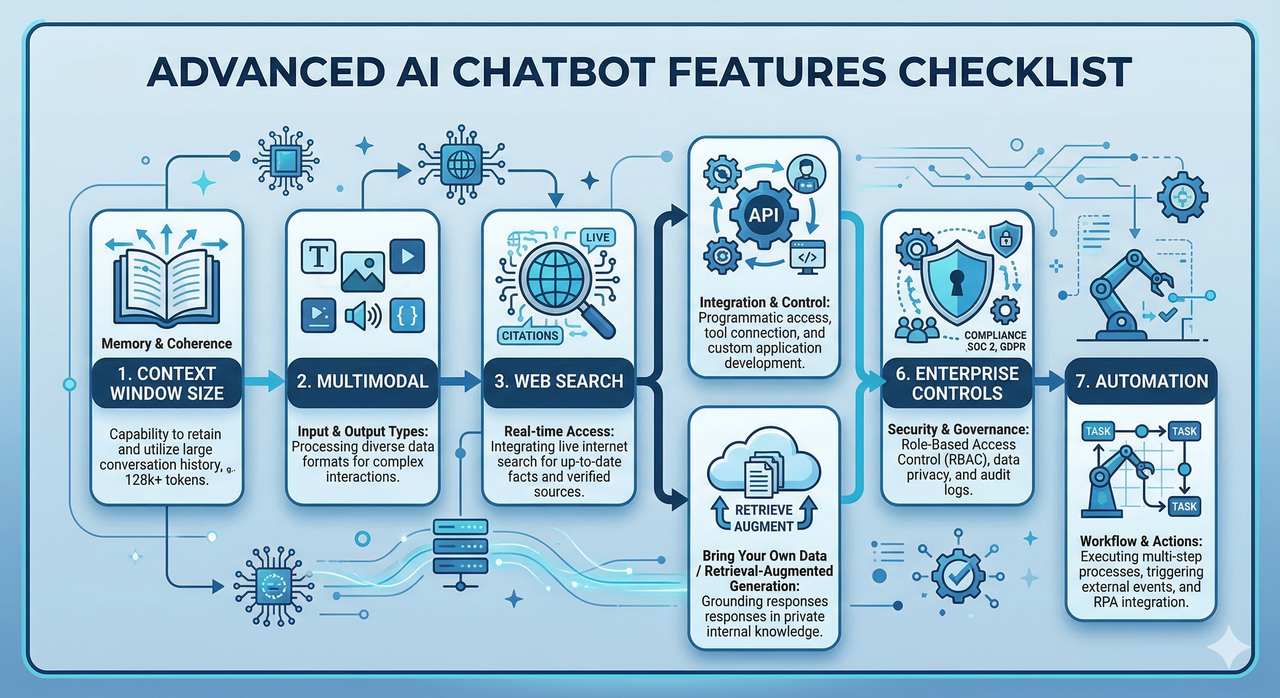
Whether you’re evaluating one of the chatbots above or considering a niche alternative like Grok, DeepSeek, or Poe, these are the features I look for before recommending any tool:
- Long-context window: Anything under 32K tokens will struggle with book-length documents or multi-turn enterprise workflows. Aim for 100K+ for serious use.
- Multimodal support: Can it process images, PDFs, audio, and video — not just text? This matters for marketing teams, analysts, and product builders.
- Web search with citations: Critical for any research or fact-dependent task. Without it, you’re relying on a model’s training cutoff.
- API access: If you want to build on top of a chatbot or integrate it into your own tools, confirm the API is accessible, well-documented, and within budget.
- Model fine-tuning / BYOD (bring your own data): For teams building a knowledge base-driven chatbot on proprietary data, look for platforms supporting BYOD ingestion, model fine-tuning, or Retrieval-Augmented Generation (RAG).
- Enterprise-grade chatbot controls: SOC 2 compliance, data residency options, role-based access, and audit logs are non-negotiable for regulated industries.
- Automation chatbot capabilities: Tools like Zapier Agents can transform a conversational chatbot into an action-executing agent — scheduling, emailing, updating CRMs — without custom code.
- Customer-support chatbot features: If deploying externally, look for live handoff, ticketing integrations, and conversation analytics.
Privacy, Safety, and Avoiding AI Hallucinations
This is the section most “best AI chatbot” articles skip — and it’s the one that gets professionals in trouble. Here’s what I tell every client before they commit to a chatbot platform:
On data privacy:
- Read the data privacy policy, specifically the section on training data. Many free tiers use your conversations to improve the model unless you explicitly opt out.
- Enterprise plans from OpenAI, Anthropic, Google, and Microsoft all offer data isolation — your inputs are not used for training. This is worth the upgrade cost for any business use case.
- For highly sensitive data (legal, medical, financial), consider self-hosted open-source models like DeepSeek or Llama-based stacks where data never leaves your infrastructure.
On AI hallucination:
- Hallucination is not a bug that gets “fixed” — it’s a fundamental trait of large language models. Every chatbot hallucinates sometimes.
- Reduce hallucination risk through source-aware prompting: ask the model to cite its sources, restrict it to provided documents, or use Perplexity for live-search grounding.
- Always verify high-stakes outputs (statistics, legal citations, medical information) against primary sources.
As confirmed by Zapier , the combination of real-time web search and citation-backed outputs is currently the most reliable safeguard against hallucinated responses in production workflows.
Bad vs. Good “Best AI Chatbot” Answers
The most common mistake I see is treating this as a single-answer question. Here’s what that looks like — and what to do instead:
❌ Bad Answer:
“ChatGPT is the best AI chatbot because it’s the most popular.”
This ignores your use case, pricing tiers, data privacy requirements, ecosystem fit, and whether you need real-time web search or a long-context window. Popularity is not the same as fit.
✅ Good Answer:
- Startup founder needing versatility + light coding + research: ChatGPT Plus (~$20/month) with GPT-4o is your best daily driver.
- Writer producing long-form structured content: Claude Pro with Sonnet or Opus gives you the best reasoning and context window for document-heavy work.
- Researcher who needs verifiable facts fast: Perplexity Pro with inline citations and web search minimizes hallucination risk.
- Google Workspace power user: Gemini Advanced integrates directly into your existing stack.
- Enterprise team on Microsoft 365: Microsoft Copilot with M365 licensing gives you compliance-grade enterprise chatbot controls.
The “best” AI chatbot is always a function of who you are and what you’re building. Use the step-by-step framework in this guide, run a short test sprint with your top two candidates, and let your actual workflow — not the marketing — make the decision.
Leave a Reply