
Transparency Note: This article contains affiliate links. If you make a purchase through these links, we may earn a commission at no extra cost to you.
Fixing Anthropic Agent SDK Skills Not Working (Step‑By‑Step Guide)
When you are deep in a demo or a sprint review, and Claude keeps insisting there are “no skills available” or throws an Unknown skill error, it’s frustrating. It feels like you’ve broken the Claude Agent SDK or that the model itself is hallucinating.
In my experience troubleshooting AI integrations, the issue is rarely the model. It is almost always a disconnect between where the skills live on your drive and how the Agent is configured to find them. If you don’t explicitly tell the SDK where to look and what to allow, it simply ignores your skills.
Here is how to fix the “skills not discovered” loop and get your agent working again.
Quick Fix Summary – Why Agent Skills Don’t Work
If you want the short version: Anthropic Agent SDK skills usually fail because the SDK cannot discover them.
This happens for three main reasons:
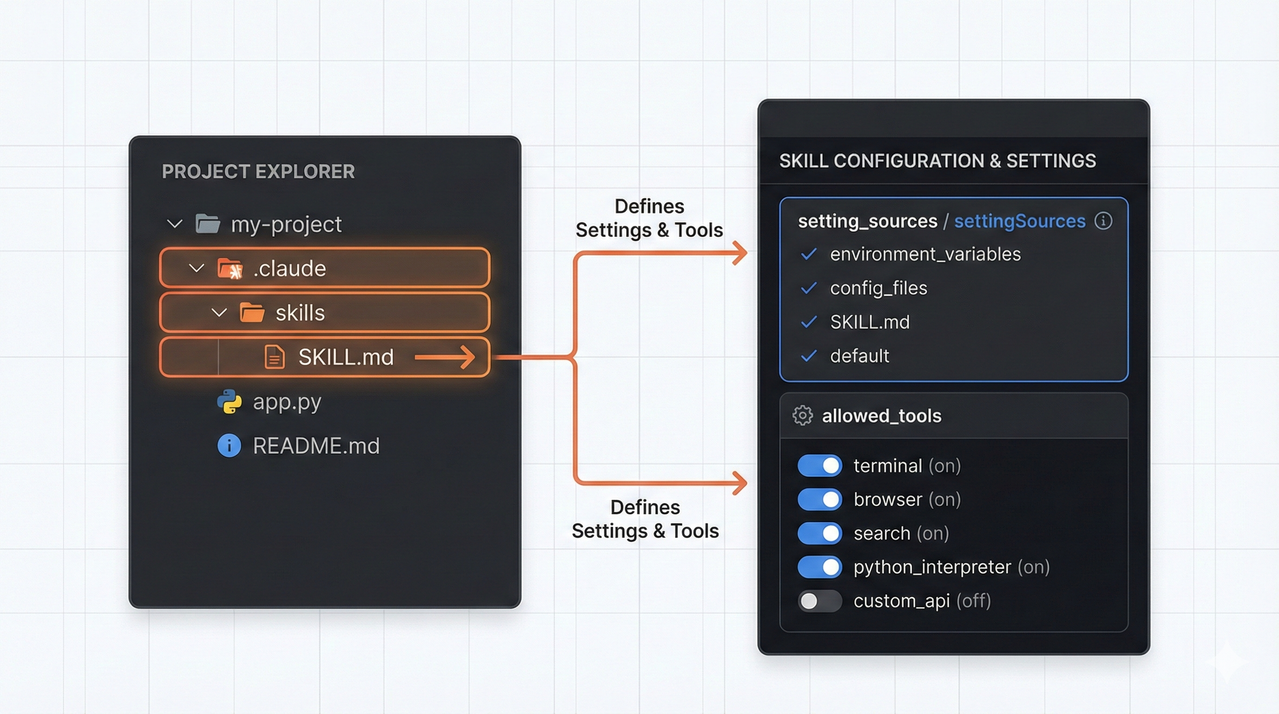
- settingSources (TypeScript) or setting_sources (Python) is not configured to look at “project” or “user” directories.
- “Skill” is missing from your allowed_tools list.
- The .claude/skills directory structure or SKILL.md file is formatted incorrectly.
- You are on an outdated SDK version (specifically around v0.1.22) which had a known bug regarding project-level skills.
Understanding Claude Agent SDK Skills
To fix this, you need to understand the difference between a standard tool and an Agent Skill.
Agent Skills are reusable, file-backed capabilities defined via a SKILL.md file. Unlike a hardcoded function in your code, the SDK must “auto-discover” these files.
The mental model works like this: Discovery → Listing → Invocation.
- Discovery: The SDK scans the paths defined in your setting_sources.
- Listing: It parses valid
SKILL.mdfiles and exposes them in the available_skills section. - Invocation: Claude reads the description, decides to use it, and the SDK executes the skill.
If step 1 fails (bad config), step 2 never happens, and step 3 results in an error.
Symptom Checklist – How Skill Failures Show Up
Before ripping apart your code, confirm you are seeing one of these specific behaviors:
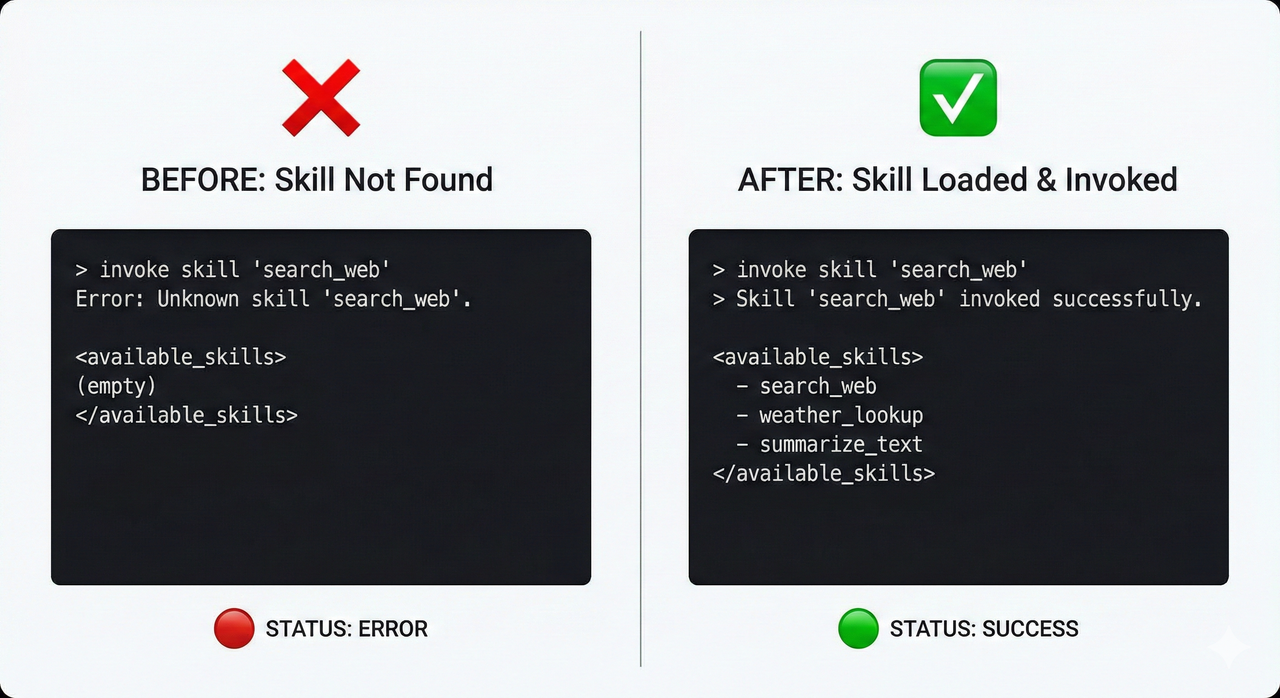
- Empty Available Skills: You ask “What skills do you have?” and the agent returns an empty list or generic tools only.
- The “Unknown Skill” Error: The agent tries to call a skill (e.g.,
use_skill("invoice_parser")) but the console returnsUnknown skill errororUnknown skill: invoice_parser. - Silence: The agent simply refuses to acknowledge the skill exists, falling back to general conversation.
I have seen developers assume this is a prompt engineering issue, but if the available_skills section is empty in your logs, no amount of prompt engineering will fix it.
Root Causes – Why Anthropic Agent SDK Skills Are Not Detected
1. Missing or Incorrect settingSources
This is the most common mistake I see. Even if your .claude/skills folder is perfect, the SDK ignores it by default. You must configure settingSources (TS) or setting_sources (Python) to include "project" or "user".
2. "Skill" Missing from allowed_tools
Discovery is useless if execution is banned. The SDK will not call Skills unless "Skill" is explicitly whitelisted in allowed_tools.
3. Incorrect Directory Structure
According to the Anthropic Claude Docs — Agent Skills (SDK) , the structure is strict. You cannot just drop a markdown file anywhere. It must follow the path: .claude/skills/<skill-name>/SKILL.md.
4. SDK Version Bugs
If you are doing everything right and it still fails, check your version. There was a specific issue in versions around 0.1.22 where project-level skills were ignored regardless of configuration. This was a confirmed bug in the TypeScript SDK.
Step‑By‑Step Fix – Making Agent Skills Work Again
Follow this protocol to restore functionality.
Step 1: Confirm and Upgrade Your SDK
First, check your installed version. If you are running an older version of @anthropic-ai/claude-agent-sdk (TypeScript) or the Python equivalent, you might be fighting a solved bug.
- Action: Upgrade to the latest version (e.g.,
0.1.25+). - Why: This resolves the known issue where the SDK failed to parse the project root for skills. GitHub — anthropics/claude-agent-sdk-typescript Skills bug report
Step 2: Fix Your Project Filesystem Layout
Ensure your directory looks exactly like this relative to your project root (cwd):
my-agent-project/
├── .claude/
│   └── skills/
│       └── data-cruncher/    <-- The Skill Name
│           └── SKILL.md      <-- The Definition
├── src/
└── package.json
If SKILL.md is directly inside .claude/skills/ without a subdirectory, it often fails to load.
Step 3: Configure settingSources Correctly
This syntax differs slightly between languages. You must enable the sources.
TypeScript:
const options = new ClaudeAgentOptions({
  settingSources: ['user', 'project'], // CRITICAL
  allowedTools: ['Skill', 'Read'],
  cwd: process.cwd() // Ensure this points to the root containing .claude
});
Python:
options = ClaudeAgentOptions(
    setting_sources=["user", "project"], # CRITICAL
    allowed_tools=["Skill", "Read"],
    cwd=os.getcwd()
)
Step 4: Add “Skill” to allowed_tools
Check your tool definitions. If you only have ['Bash', 'Read'], the agent cannot invoke your custom skills. Add 'Skill' to the list immediately.
Step 5: Validate SKILL.md Metadata
Open your SKILL.md. Does it have the required front-matter? If the YAML header is broken, the parser skips the file.
---
name: data-cruncher
description: Analyzes CSV files for financial data.
---
(Your prompt instructions here)
Important: The name here should match the directory name to avoid confusion, though the internal identifier is what matters for the Unknown skill error.
Step 6: Retest Discovery and Invocation
Run your agent.
- Discovery Test: “What Skills are available?”
- Result: It should list “data-cruncher”.
- Invocation Test: “Please analyze the financial CSV.”
- Result: The agent should call the skill without throwing an
Unknown skill error.
- Result: The agent should call the skill without throwing an
Advanced Scenarios – Project vs User-Level Skills
If you are still stuck, try moving the skill to the User Level.
- Project-Level:
.claude/skillsinside your repo. Great for sharing tools with the team. - User-Level:
~/.claude/skills(Home directory). Great for personal tools you use across all projects.
In my testing, user-level skills sometimes persisted even when project-level discovery was buggy. If moving the file to your home directory makes it appear, you know the issue is specifically with your project’s cwd path or setting_sources configuration.
Example Configs – TypeScript and Python Side by Side
Here is the “Golden Config” that I use to ensure skills always load.
TypeScript Example
import { ClaudeAgentOptions } from '@anthropic-ai/claude-agent-sdk';

const options = new ClaudeAgentOptions({
  // Point to where the .claude folder lives
  cwd: '/Users/dev/my-project',

  // Explicitly tell SDK to look in both places
  settingSources: ['user', 'project'],

  // Whitelist the 'Skill' tool
  allowedTools: ['Skill', 'Read', 'Bash'],
});
Python Example
from anthropic.agent import ClaudeAgentOptions
import os

options = ClaudeAgentOptions(
    # Point to where the .claude folder lives
    cwd=os.getcwd(),

    # Python uses snake_case
    setting_sources=["user", "project"],

    # Whitelist the 'Skill' tool
    allowed_tools=["Skill", "Read", "Bash"]
)
Preventing Future Agent Skills Breakages
Once you have it working, keep it working.
- Pin Your Versions: The Agent SDK is evolving fast. Pin your version in
package.jsonorrequirements.txtto avoid auto-updating into a breaking change. - Document the Setup: Add a note in your README explaining that
.claude/skillsis required for the agent to function. New team members often ignore hidden dot-folders. - Check
cwd: If you run your script from a subfolder (e.g.,src/), verify that the SDK knows where the project root is. A mismatchedcwdis a silent killer for project-level skills.
FAQ – Common Anthropic Agent SDK Skills Questions
Q: Can I enable or disable skills dynamically?
A: Currently, the SDK loads skills found in the configured sources. To “disable” a skill, you would need to remove it from the directory or exclude "Skill" from allowed_tools entirely, though that disables all skills.
Q: Why is my skill execution slow?
A: Skills are essentially prompts. If your SKILL.md is massive, it increases the context overhead. Keep instructions concise.
Q: Where can I find official bug reports?
A: Always check the specific language repository. For example, the Unknown skill issue was widely discussed on the GitHub — anthropics/claude-agent-sdk-typescript Skills bug report .
Q: Should I use a Skill or a generic Tool (like Read)?
A: Use Agent Skills for complex, multi-step instructions (e.g., “Analyze this contract for risk”). Use generic tools like Read or Grep for simple atomic actions.
Leave a Reply