
Transparency Note: This article does not contain affiliate links. All recommendations are based on independent testing and editorial judgment.
![ChatGPT 5.3 Not Working? Fix It Now [2026]](https://i.postimg.cc/bJWwrd3v/chatgpt-5-3-hero.png "ChatGPT 5.3 Not Working? Fix It Now [2026]")
You opened ChatGPT this morning and something felt… wrong. Responses are blunter than usual, your carefully crafted workflow prompts are behaving differently, and now the dreaded “model not found” error is flashing on screen. If you’re running any automation with GPT‑5.3‑Codex, there’s a deeper fear too—could a rogue script silently wreck your file system overnight?
I’ve been through every one of these scenarios firsthand, and I’ll tell you now: none of them are unsolvable. But you need to diagnose correctly before you fix anything. Let’s do that systematically.
Quick Fix: How to Troubleshoot ChatGPT 5.3 in Under a Minute
ChatGPT 5.3 problems fall into exactly three categories: (1) behavioral and tone changes driven by the GPT‑5.3 Instant update, (2) “model not found” and access errors tied to corrupted user sessions, plan rollout timing, or API model name mismatches, and (3) dangerous or broken code output from GPT‑5.3‑Codex running unchecked. Confirm your active model, reset your session and browser cache and cookies, verify your model string or plan tier, and audit every Codex script before execution.
What Changed in ChatGPT 5.3? (GPT‑5.3 Instant Overview)
Before you can fix a problem, you need to understand what actually changed. I see too many users troubleshooting symptoms without knowing the root cause, and it costs them hours.
GPT‑5.3 Instant is now the default fast-track model for most ChatGPT users and represents a deliberate philosophical shift at OpenAI. As verified by the OpenAI GPT‑5.3 Instant overview , the model was tuned specifically to deliver more direct, less “preachy” answers—cutting unnecessary caveats, moralizing preambles, and dead-end refusals that plagued earlier versions. Hallucinations were also reduced by approximately 26.8% compared to GPT‑5.2 Instant. That sounds like a win, and mostly it is—but for workflows built around a certain style of response, it can feel like a breaking change.
What’s Concretely Different from GPT‑5.2 Instant
| Dimension | GPT‑5.2 Instant | GPT‑5.3 Instant |
|---|---|---|
| Tone | Cautious, explanatory, occasionally over-apologetic | Direct, confident, fewer hedges |
| Refusals | More frequent on borderline prompts | Reduced unnecessary refusals |
| Web Search Output | Link-heavy responses | Synthesized, reasoning-first |
| Hallucination Rate | Baseline | ~26.8% lower |
| Caveat Density | High | Low |
The second major shift is in how ChatGPT now balances web results with internal reasoning. In my testing, research-style queries that previously returned four or five cited links now return a tighter, synthesized paragraph—which is genuinely better for most use cases, but can feel like the model is “hiding its work” if you rely on source verification.
According to the ChatGPT Release Notes , the rollout followed a tiered schedule: Plus and Pro subscribers received GPT‑5.3 Instant first, followed by Free and Go accounts. This explains the flood of “my ChatGPT suddenly changed” reports—it literally did, depending on your plan tier and the date you first noticed it.
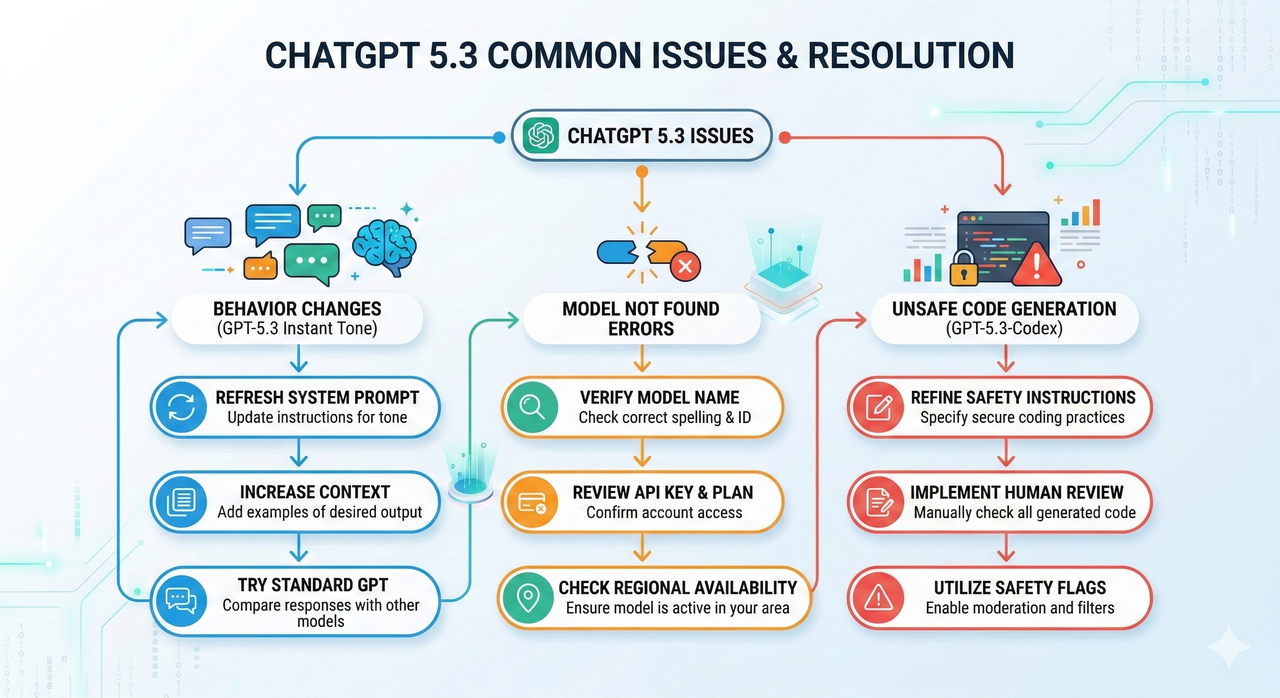
Symptom 1 – “ChatGPT 5.3 Is Acting Weird” (Behavior & Tone Changes)
How GPT‑5.3 Instant Changes Tone and Reasoning
The most disorienting part of this update—and what I hear most from developers I work with—is that the personality of the model shifted. GPT‑5.3 Instant no longer opens answers with “Great question!” or ends them with “Feel free to reach out if you need more help!” That “cringe” scaffolding is gone. What you get instead is dense, direct, task-focused output.
For most technical users, that’s an upgrade. But I’ve seen it cause real friction in two specific contexts:
- Regulated or compliance domains (legal, medical, financial) where the old “I am not a professional, consult an expert” preambles were required outputs in workflows, not annoyances.
- Junior developer guidance pipelines where the step-by-step hand-holding tone was deliberately structured into prompts to produce teaching-style explanations.
In both cases, the model didn’t break—your prompt contract with the old model did. The fix is to rebuild that contract explicitly. For a broader introduction to how ChatGPT models work, see our ChatGPT model guide.
How to Re‑Tune GPT‑5.3 Instant with Better Prompts
The common mistake I see is blaming the model when the real culprit is an implicit assumption baked into a now-outdated prompt. GPT‑5.3 Instant is highly responsive to explicit system instructions—more so than its predecessors, in my experience. Here’s how to regain control:
- Define a clear system role. Instead of a vague instruction, try: “You are a cautious senior software architect who always explains assumptions explicitly, lists potential risks before providing a solution, and flags any step that requires elevated permissions.”
- Specify tone and caveat requirements directly. Don’t assume the model will default to cautious. If you want it, ask for it: “Always include a ‘Risks & Warnings’ section. Always cite when you are uncertain.”
- Lock in output structure. GPT‑5.3 Instant respects structural prompts very well. Define your expected format: Summary → Steps → Risks → Example.
- Save templates. For repeat workflows, store your system prompt as a reusable template. Relying on memory or chat history to carry implicit instructions across sessions will fail with model updates.
Example – Before/After Prompt for Safer, More Detailed Answers
❌ Before (Vague, Breaks with 5.3):
How do I set up automated file cleanup in PowerShell?✅ After (Explicit, Survives Model Updates):
You are a cautious senior DevOps engineer. I need a PowerShell script to
automate cleanup of files older than 30 days in C:\Logs\Archive.

Requirements:
- Explain every step before writing code
- List all risks and edge cases
- Include a dry-run mode (no actual deletion until confirmed)
- Add file path validation before any destructive operation
- Output format: [Overview] → [Code] → [Risks] → [Testing Steps]| Prompt Element | Before | After |
|---|---|---|
| Role defined | ❌ | ✅ |
| Risk section required | ❌ | ✅ |
| Output format locked | ❌ | ✅ |
| Dry-run requirement | ❌ | ✅ |
| Survives model tone shift | ❌ | ✅ |
Symptom 2 – “Model Not Found” and Access Issues with ChatGPT 5.3
Common Causes of “Model Not Found” Errors
This is the second most common issue I encounter, and it has very different root causes depending on whether you’re hitting it in the ChatGPT UI or via the API.
In the UI:
- A corrupted user session from a browser that cached pre-rollout model availability data.
- A stale browser or desktop app that doesn’t yet know GPT‑5.3 Instant exists as a selectable model.
- Rollout timing—your account may be on a tier that hasn’t received the model yet, but the UI is trying to surface it prematurely.
- The dropdown showing “ChatGPT” vs “ChatGPT 5” is a known source of confusion; these are not the same model selector states.
Via the API:
- The most common culprit I see is an API model name mismatch: developers passing
“gpt-5.3”or“gpt-5.3-instant”when the correct model string differs. - Trying to access a model tier your billing plan doesn’t cover.
- A deprecated model ID that was valid three months ago but has since been removed.
Quick Fix Checklist for Web and Desktop Apps
Work through these in order—most sessions resolve by step 3:
- Check the active model selector. In the ChatGPT header, confirm the model reads as a GPT‑5 variant, not a ghost “ChatGPT” or blank label. If it shows a stale model, click and re-select.
- Log out and back in. This forces a fresh session token and clears any cached model availability state.
- Clear browser cache and cookies for
chat.openai.comspecifically. Then test in an incognito window with all browser extensions disabled—ad blockers and script injectors are a frequent silent culprit. - Disable VPN or proxy temporarily. OpenAI’s model availability endpoints are sometimes geo-fenced or rate-limited at the network level; your VPN exit node may be flagged.
- Update your browser or desktop app to the latest version. Old Electron-based app builds do not surface new model IDs.
If the error persists after all five steps, you are likely in a rollout timing gap. Check the ChatGPT Release Notes for your plan tier’s rollout status before contacting the OpenAI Help Center—this saves time on both ends.
Fixing “Model Not Found” via API
The cleanest way I’ve handled API model issues is to never hardcode model strings. Here is the diagnostic pattern I use:
Step 1 – Verify the exact model ID:
import openai

client = openai.OpenAI()
models = client.models.list()
for model in models.data:
    print(model.id)
Step 2 – Handle the error gracefully with a fallback:
import openai

PRIMARY_MODEL = "gpt-5"        # Adjust to verified model ID
FALLBACK_MODEL = "gpt-4o"      # Safe production fallback

def chat_with_fallback(messages):
    for model in [PRIMARY_MODEL, FALLBACK_MODEL]:
        try:
            response = openai.chat.completions.create(
                model=model,
                messages=messages
            )
            return response, model
        except openai.NotFoundError as e:
            print(f"[WARN] Model '{model}' not available: {e}. Trying fallback...")
    raise RuntimeError("No available model found.")
A typical model_not_found error JSON from the API:
{
  "error": {
    "message": "The model 'gpt-5.3' does not exist or you do not have access to it.",
    "type": "invalid_request_error",
    "code": "model_not_found"
  }
}
The phrase “does not exist or you do not have access to it” is doing double duty—it covers both a wrong model string and an insufficient billing tier. Check both before escalating.
Symptom 3 – Dangerous or Broken Code from GPT‑5.3‑Codex
This is the symptom that should command your most serious attention.
What GPT‑5.3‑Codex Is and Why It’s Risky If Unchecked
GPT‑5.3‑Codex is OpenAI’s specialized code-generation model, built for agentic automation, file operations, and systems-level scripting. As detailed by OpenAI – Introducing GPT‑5.3‑Codex , it is significantly more powerful than its predecessors for code generation tasks—but that power cuts both ways.
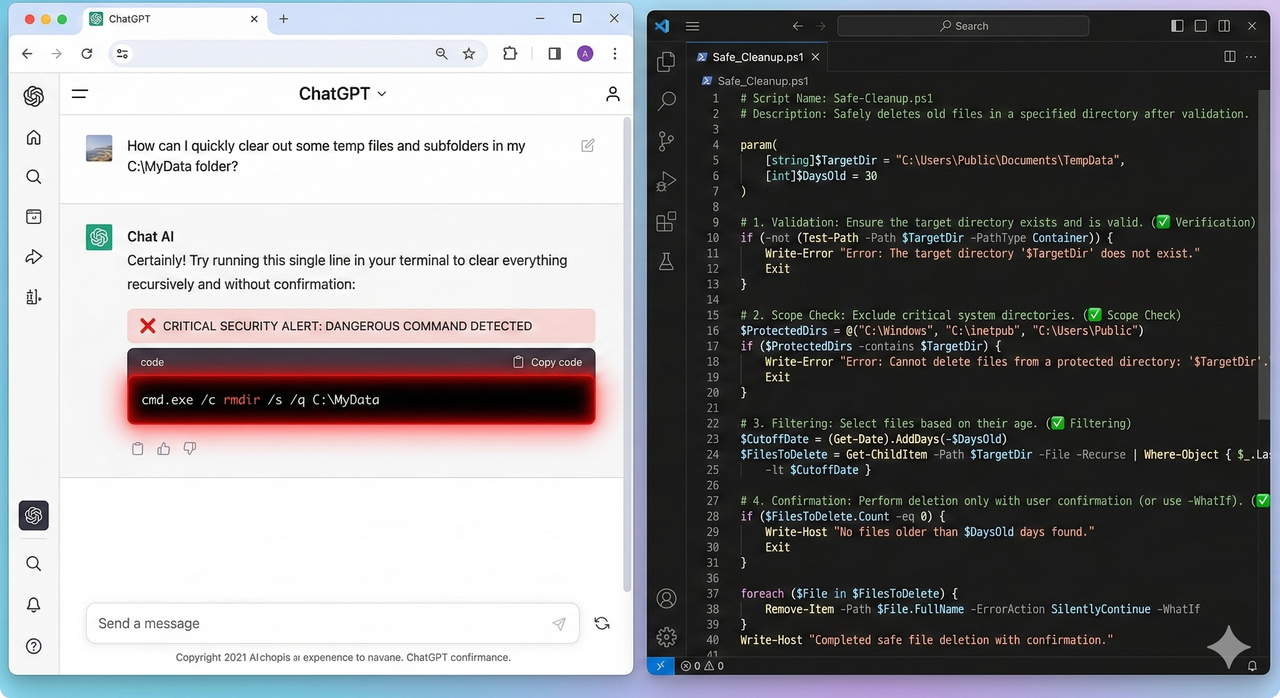
In February 2026, a widely circulated incident demonstrated the real-world stakes: a developer used GPT‑5.3‑Codex to generate a PowerShell script for file management. The script used the legacy rmdir command with an incorrectly escaped path variable. A single stray backslash caused the path to resolve to the root of the F: drive. The unsafe PowerShell script wiped the entire drive—no confirmation prompt, no dry-run mode, no backup.
The root cause was not that GPT‑5.3‑Codex generated “wrong” code in a traditional sense—the script was syntactically valid. The problem was that it used a low-fault-tolerance environment where a one-character escaping error had catastrophic scope.
Safe‑Use Checklist Before Running Any GPT‑5.3‑Codex Script
- ☐ Read every line manually. I know this sounds obvious. Do it anyway.
- ☐ Identify every destructive operation: any use of
rm,del,rmdir,Remove-Item,Format-, recursive flags (-r,-rf,-Recurse). - ☐ Verify every path string independently. Copy-paste the path into File Explorer or
Test-Pathbefore it ever touches a script. - ☐ Replace legacy commands with safer PowerShell cmdlets. Use
Remove-Itemwith-WhatIffirst. - ☐ Add a confirmation prompt. No production script should execute destructive operations without a
Read-Host “Confirm? (yes/no)”gate. - ☐ Run in a sandbox first. Use a test folder, a disposable VM, or a Docker container.
- ☐ Back up before you run. Even in test environments.
Example – Fixing an Unsafe PowerShell / rmdir Script
❌ Unsafe Pattern (Codex Output Style):
# Dangerous: legacy rmdir, no path validation, no confirmation
$targetPath = "$env:USERPROFILE\Projects\Old\"
rmdir /s /q $targetPath
✅ Safer Pattern (Hardened):
# Safe: explicit path, validation, dry-run mode, confirmation gate
$targetPath = "C:\Users\YourName\Projects\Old"

if (-not (Test-Path -Path $targetPath -PathType Container)) {
    Write-Error "Path does not exist or is not a directory: $targetPath"
    exit 1
}

Write-Host "DRY RUN: Files that would be deleted:"
Get-ChildItem -Path $targetPath -Recurse | Select-Object FullName

$confirm = Read-Host "Type 'DELETE' to confirm permanent removal of $targetPath"
if ($confirm -ne "DELETE") {
    Write-Host "Operation cancelled."
    exit 0
}

Remove-Item -Path $targetPath -Recurse -Force
Write-Host "Deletion complete. Path removed: $targetPath"| Check | Unsafe Script | Safe Script |
|---|---|---|
| Explicit, non-interpolated path | ❌ | ✅ |
| Path validation before operation | ❌ | ✅ |
| Dry-run mode | ❌ | ✅ |
| Confirmation gate | ❌ | ✅ |
| Native PowerShell cmdlet | ❌ (rmdir) | ✅ (Remove-Item) |
| Logging/output on completion | ❌ | ✅ |
Step‑by‑Step Troubleshooting Flow for ChatGPT 5.3
Step 1 – Classify Your Issue
ChatGPT 5.3 problem?
│
├─ Responses feel different / behavior changed?
│    └─ → Symptom 1: Behavior & Tone
│
├─ "Model not found" / can't access the model?
│    ├─ In the ChatGPT UI? → UI Access Fix
│    └─ Via API?           → API Model Name Fix
│
└─ Generated code acting unexpectedly or dangerously?
     └─ → Symptom 3: Codex Safety Audit
To gather a minimal reproducible example: record the exact model name, save the full prompt word-for-word, copy the exact response or error including codes, and note your plan tier and the date/time of the issue.
Step 2 – Apply the Right Fix Path
| Symptom | Fix Path | Key Actions |
|---|---|---|
| Behavior / tone regression | Prompt engineering | Rebuild system role, lock output structure, specify caveats explicitly |
| Model not found (UI) | Session reset | Log out/in, clear cache, disable extensions, test incognito |
| Model not found (API) | Model ID verification | Call /v1/models, fix string, add fallback handler |
| Unsafe Codex code | Safety audit | Manual review, path validation, dry-run, sandbox execution |
Step 3 – Escalate with Evidence
If your issue persists after applying the relevant fix path, escalate to the OpenAI Help Center with the following:
- Screenshot of the exact UI state (model selector, error message, full response).
- Minimal reproducible prompt: the simplest possible input that triggers the bad behavior.
- Full error JSON if API-based (copy the raw response body, not just the error message).
- Environment details: browser version, OS, API client version, account plan tier.
- Comparison data if possible: same prompt giving different output before and after the 5.3 update.
When writing the report, lead with facts, not frustration. “Model returns X when prompt Y is submitted on account tier Z, expected behavior is W based on release notes” gets prioritized over “ChatGPT 5.3 is completely broken and nothing works.”
Best Practices to Future‑Proof Your Workflows Against GPT Updates
Decouple Critical Workflows from a Single Model Version
- Use model aliases in configuration. Store your model name in an environment variable or config file:
MODEL_ID=gpt-5. Update the config, not the code. - Build regression test suites for prompts. For every critical prompt in your workflow, store the expected output structure and run these tests after any model change.
- Version-control your system prompts. Treat them like code. Track changes in Git. Roll back when needed.
Design “Safety Nets” Around GPT‑Generated Code
- Static analysis first. Run any generated script through a linter (e.g., PSScriptAnalyzer for PowerShell, flake8 for Python) before execution.
- Unit test generated functions in isolation. Never let a complete, untested AI-generated module run against production data.
- Permissions boundaries. Run automation agents with the minimum necessary permissions.
Prompt Patterns That Survive Model Shifts
In my experience, prompts that survive model updates share three structural properties:
- Explicit role definition that encodes the quality bar, not just the topic.
- Required output format specified in the prompt itself (not assumed from context).
- Uncertainty surfacing instruction: “If you are uncertain about any step, say so explicitly rather than guessing.”
FAQ: Common Questions About ChatGPT 5.3 Problems
Can I roll back from GPT‑5.3 to an older model?
You cannot revert the platform-level default, but you can manually select an earlier model variant from the model picker if it is still available in your plan tier. For API users, pinning an older model snapshot ID is the cleanest option. Check the ChatGPT Release Notes for currently available model IDs.
Why do my old chats behave differently now?
Continuing a previous conversation after a model update means the new model is now responding within a context window it didn’t create. The GPT‑5.3 Instant tone and reasoning style applies to all new outputs, even in old threads. For critical ongoing projects, start a new chat with a fresh, explicit system prompt rather than continuing stale threads.
Is it safe to use GPT‑5.3‑Codex for production scripts?
Not without a mandatory safety review process. As covered above, GPT‑5.3‑Codex produces syntactically valid code that can have catastrophic real-world effects if path handling, destructive commands, or environment assumptions are wrong. Treat every Codex output as a draft requiring human review—not a production-ready artifact.
Why does ChatGPT 5.3 feel both better and worse than 5.2 depending on the task?
Because the update optimized for user-perceived quality (tone, directness, reduced cringe) rather than uniform benchmark scores. Tasks that benefit from directness—debugging, summarization, factual Q&A—genuinely improve. Tasks that required the old cautious scaffolding—compliance copy, teaching pipelines, risk-heavy workflows—can regress until you rebuild the prompt contract explicitly. This is a normal and expected consequence of a tone-focused tuning update, as confirmed by OpenAI GPT‑5.3 Instant overview .
Leave a Reply