
Transparency Note: This article contains no affiliate links. All recommendations are based solely on research and experience.
Google NotebookLM Account Banned? Here’s What Really Happened (And How To Recover It)
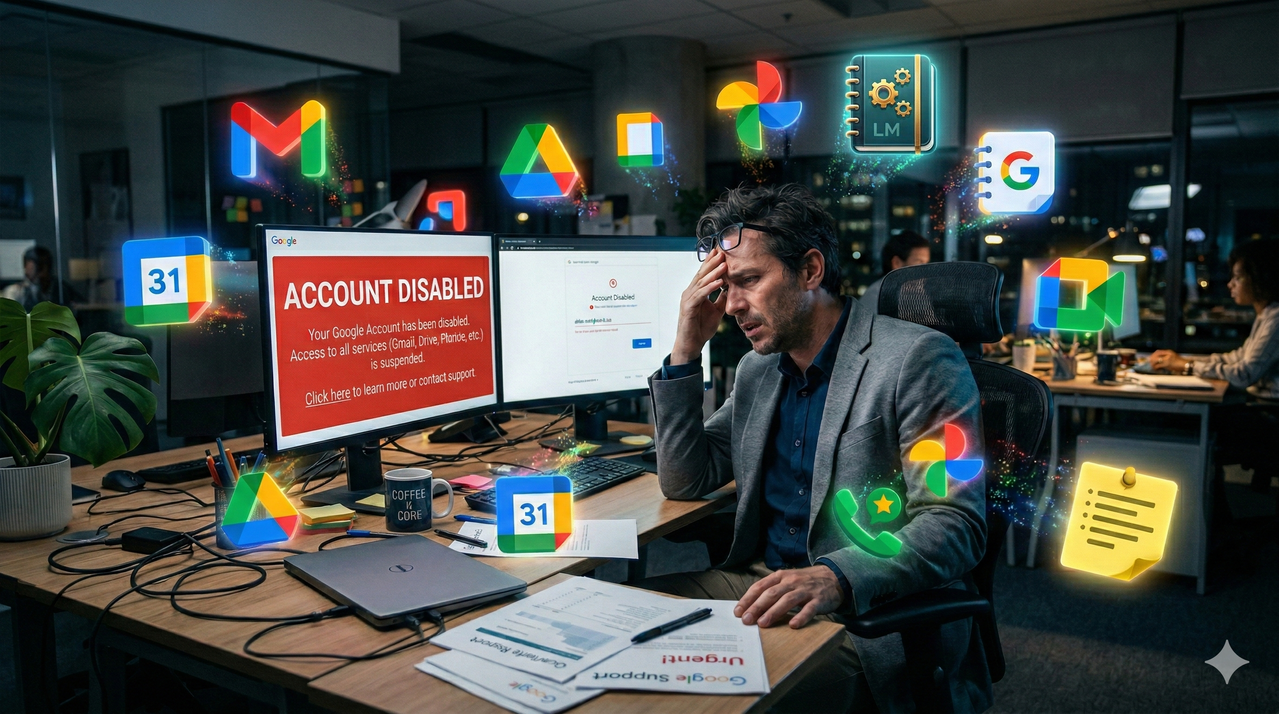
You open Gmail on a Tuesday morning, and it’s gone. Not slow — gone. Drive won’t load. Google Voice is dead. Photos returns an error. Then you remember: last night you uploaded a batch of case files into NotebookLM to prep for a deposition. Now your entire digital practice has been severed by an algorithm that had no idea you were doing your job.
I’ve seen this exact scenario play out, and the panic it creates is completely understandable. This isn’t a minor app glitch. This is your Google Account disabled — and with it, potentially years of client communications, evidence archives, and professional contacts locked behind a wall with no obvious door.
This guide walks you through exactly what happened, why it happened, and every realistic step you can take to get your account and your data back.
Quick Answer – Why Your Google NotebookLM Account Was Banned
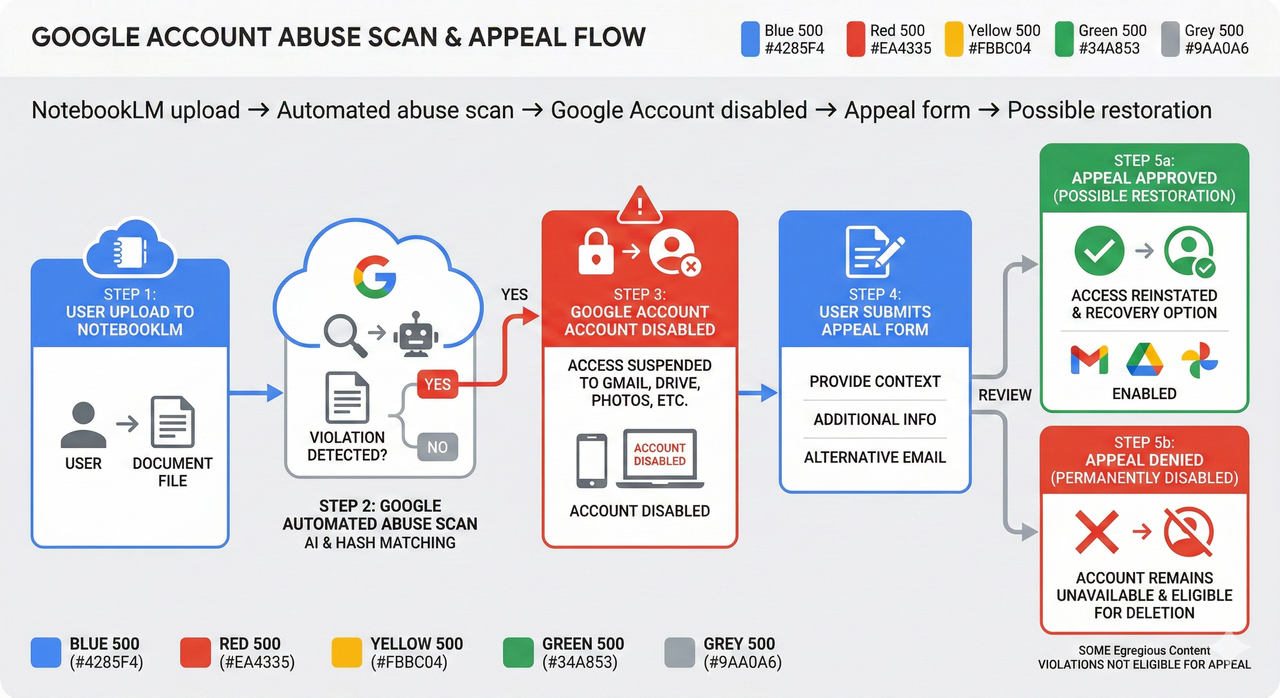
In most cases, a Google NotebookLM account banned situation is not actually a “NotebookLM ban” at all — it’s a Google Account disabled for policy violation triggered by Google’s automated abuse detection systems scanning content you uploaded. If those files contained language that pattern-matched to the abusive material policy (including child sexual abuse material (CSAM) references, even descriptive text in lawful documents), the system may have flagged and suspended your entire Google Account. Your immediate path forward involves the Google account appeal form, a clear explanation of your professional context, and using Google Takeout data export to protect your data while the review is in progress.
Understanding What Actually Got Banned
Here’s the first thing most people get wrong: they assume NotebookLM has some separate ban system. It doesn’t. NotebookLM runs entirely under your primary Google Account identity. There is no “NotebookLM-only” suspension.
When Google’s automated systems detect a potential NotebookLM Terms of Service violation — specifically content that triggers the abusive material policy — they don’t just shut down your access to one tool. Depending on the severity of the flag, they can disable the entire account. That means Gmail, Drive, Calendar, Photos, Google Voice, Meet, and every other Google service tied to that identity goes offline simultaneously.
The message you typically see is “Your account has been disabled” or a variation: “This account has been suspended.” This is categorically different from a standard sign-in error or a temporary lockout due to suspicious login activity. The former is a policy action; the latter is a security measure. Knowing the difference matters because the resolution path is completely different.
Why Lawyers, Researchers, and Journalists Are at Higher Risk
I want to be direct here: the professionals most likely to be hit by this are doing nothing wrong. Lawyers handling criminal cases, investigative journalists analyzing exploitation networks, child welfare researchers — all of these people routinely work with documents that describe illegal acts in explicit detail.
The critical and deeply frustrating reality is that Google’s automated abuse systems judge content pattern, not intent. A police forensics report that describes CSAM for evidentiary purposes looks, to an algorithm, identical to content created for exploitation. There is no “I’m a licensed attorney” flag that pre-clears your uploads. The machine reads the words and makes a decision in milliseconds.
Common Triggers Linked To NotebookLM
From what I’ve observed and researched, the following content patterns carry the highest risk when uploaded to NotebookLM:
- Unredacted police reports or forensic summaries that contain graphic descriptions of crimes against minors
- Legal briefs or indictments that quote explicit CSAM-related language verbatim for evidentiary purposes
- Bulk uploads of multiple sensitive documents in a short session (volume can amplify automated scrutiny)
- Investigative journalism notes that document exploitation rings or trafficking in detailed terms
- Even academic or clinical research papers that describe abuse patterns or use formal diagnostic language in certain combinations
The key misunderstanding people have is that “just mentioning” something is safe. It isn’t. The abusive material policy enforcement is keyword- and pattern-based at the detection stage. Context is only evaluated — imperfectly — at the human review stage, if you trigger one through an appeal.
Signs Your Ban Is Specifically Connected To NotebookLM
Not every Google Account disabled situation is NotebookLM-related. Here’s how to tell:
- The account lockout occurred within hours of a NotebookLM upload session
- You have no history of spam activity, unusual payment disputes, or security breach alerts
- The disablement message references policy or Terms of Service violations rather than “suspicious activity” or security holds
- You were not using any third-party automation tool or API integrations that might have triggered other ToS triggers
- The account in question is not a shared or workspace account that others may have misused
If all of these apply, you’re almost certainly dealing with a content-triggered automated action, not a hack or a billing issue. For a broader overview of how Google’s content scanning works across its products, see our guide on Google AI tools and content policy enforcement.
Immediate Actions When Your Google Account Is Disabled
The worst thing you can do right now is start frantically clicking around, trying workarounds, or creating backup accounts. I’ve seen people make their situation significantly worse in the first 30 minutes — here’s how to stay methodical.
Step one: document everything before you do anything else.
- Screenshot the exact error message, including any case or reference numbers
- Note the timestamp and which device and browser you were using
- Write down the last 2–3 actions you took before the lockout (especially NotebookLM uploads)
Step two: confirm the scope of the lockout.
Try accessing these individually and note which work and which don’t:
- Gmail (via browser, not the app)
- Google Drive
- Google Photos
- Google Voice
- Google Meet
- Your mobile device’s Google Account settings
If all of these are blocked, you are dealing with a full account suspension, not an app-level block. If only one or two services show errors, it may be a different issue entirely.
Critical warning: Do not create a new Google Account from the same IP address, device, or browser profile while your appeal is pending. Google’s systems can interpret this as ban evasion, which complicates your appeal considerably.
Step-By-Step Recovery Path (The Appeal Process)
As verified by Google Help – Your Account Is Disabled , the official path to Google Support account restoration begins at the accounts.google.com sign-in screen:
- Navigate to accounts.google.com and attempt to sign in normally
- Read the full error message — look for language like “disabled,” “suspended,” or “policy violation”
- Look for a “Start Appeal” button or a linked option to request a review (this appears on the account-disabled screen for eligible accounts)
- Click through to the Google account appeal form — you will be asked for your name, recovery email, and a description of your situation
- In the description field, clearly and calmly state:
- Your professional role (lawyer, researcher, journalist)
- That you used NotebookLM to process work-related documents
- That the content involved case files or reports containing references to illegal acts as evidence, not exploitation
- That you did not upload images, videos, or files containing actual illegal material
- That your use complied with applicable laws and professional regulations
- Submit the form and note any confirmation or case number provided
- Monitor your recovery email address for Google’s response
What To Expect From Google’s Review
I want to set realistic expectations here, because false hope makes the situation harder. There are three realistic outcomes:
- Full restoration: Your account is reinstated after a human reviewer confirms the professional context of your uploads. This happens. It takes anywhere from a few hours to several business days.
- Partial access / data export only: Google may offer you a window to use Google Takeout data export to retrieve your data, without restoring active account access. This is a signal that the decision is likely final.
- Permanent disablement: If Google’s investigation confirms what it categorizes as a serious breach of the abusive material policy or Google Workspace abuse suspension criteria, the account may be permanently closed with no appeal path remaining. As stated in Google Terms of Service , Google reserves the right to terminate accounts for serious violations without further negotiation.
How To Write An Effective Appeal (Without Admitting To Actual Abuse)
The appeal form is short, but what you write in it matters enormously. The goal is to give a human reviewer enough professional context to override the automated system’s decision — without writing something that reads like a confession.
Frame your identity first, before anything else. Reviewers process many appeals. If they understand within the first two sentences that you are a licensed attorney or a credentialed journalist, they approach your content differently.
Clarify the nature of the content — describe the file type, not the content itself. Say “legal case files related to a criminal prosecution” rather than repeating specific terms that may re-trigger automated filters in the review pipeline.
Make the lawful purpose explicit. Statements like “This material is subject to attorney-client privilege and is part of an active legal matter” or “These documents were produced through a formal investigative process in accordance with press freedom protections” add legitimate professional weight.
Appeal Template (Customizable)
Here is a template I’d suggest adapting to your specific situation:
“My name is [Your Name]. I am a [licensed attorney / investigative journalist / academic researcher] working in [jurisdiction/field]. I am writing to request a review of the recent disablement of my Google Account ([your email]).
I use Google services — including NotebookLM — as part of my professional work. Recently, I uploaded [type of document: e.g., legal case files, investigative reports, research notes] to NotebookLM for the purpose of [summarization / research / case preparation]. These documents contain references to serious crimes as part of [lawful legal proceedings / published investigative work / credentialed academic research]. No images, videos, or files containing illegal material were uploaded at any time.
My use of Google services is consistent with applicable laws, professional regulations, and Google’s Terms of Service to the best of my understanding. I request that a human reviewer examine this case and restore my account access. I am available to provide additional professional credentials or documentation if required.
Thank you for your time and review.”
Red Flags To Avoid In Your Appeal
- Do not quote or repeat the specific language from your uploaded documents in the appeal. Even in a defense context, this may re-trigger automated filters.
- Do not express frustration or aggression. I know it feels unjust — because it often is. But hostile appeals rarely move the queue faster, and they can hurt credibility with reviewers.
- Do not be vague about your role. “I’m just a normal user” is far less compelling than “I am a public defender in [state] representing clients in active criminal matters.”
- Do not speculate about what triggered the ban. Stick to facts: what you do, what you uploaded at a high level, and why it was lawful.
Protecting Your Data While Your Account Is At Risk
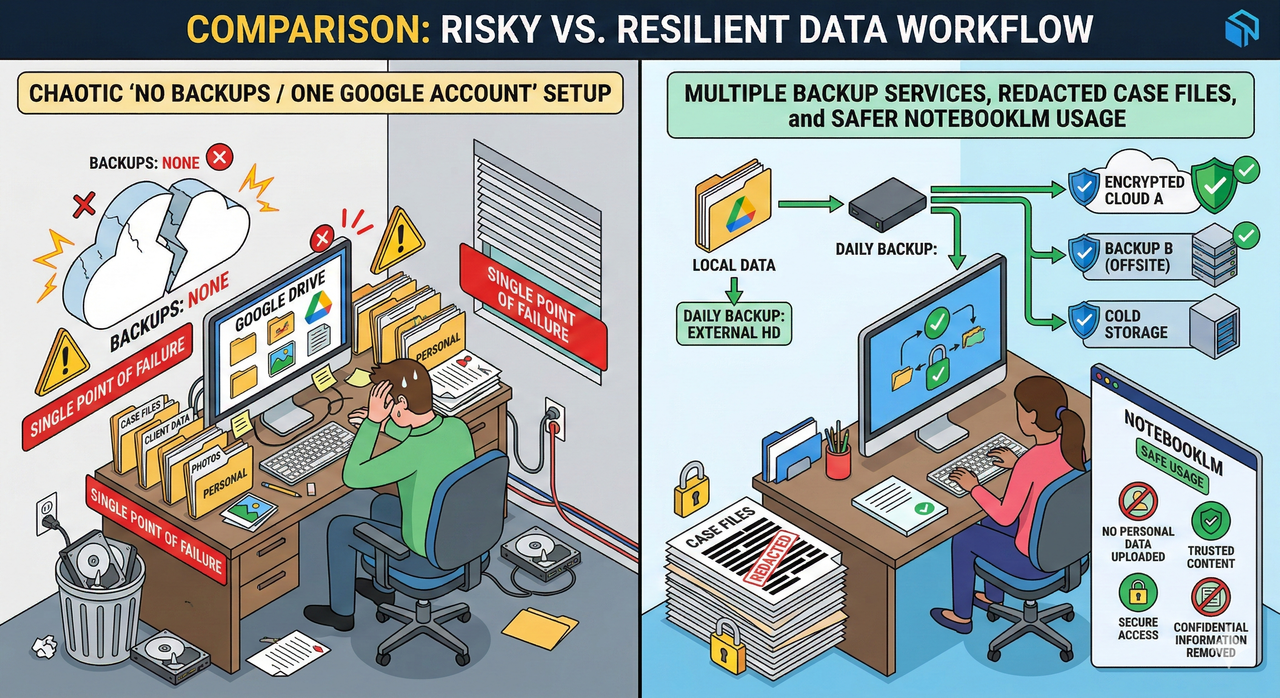
Even before your appeal resolves, your data protection strategy needs to start now. If you still have any level of account access — even limited — use it immediately.
Google Takeout (takeout.google.com) is your most important tool in this window. If your account access is partially intact, navigate there immediately and initiate an export of:
- Gmail (full message archive, including sent items)
- Google Drive (all files and folder structure)
- Google Photos (original quality)
- Google Contacts (your full communication graph)
- Google Voice (call logs and voicemail)
- Google Calendar (appointment history and recurring events)
Request the export in the largest file format available and have it sent to a secondary email address on a different provider (not another Google account).
What If You Only Get One-Time Access Back?
In some cases, Google’s response grants temporary access specifically to enable a Takeout export before final closure. If this is the window you get, treat it as exactly one chance:
- Do not spend time reviewing old emails or reorganizing files
- Immediately initiate the Takeout export on all services simultaneously
- Prioritize active client folders, ongoing matter files, and contacts over archival data
- Copy your Google Contacts CSV to your phone and to a secondary email immediately — your communication graph is often the hardest thing to reconstruct
Long-Term Risk Mitigation For NotebookLM Power Users
Once you’ve navigated the immediate crisis — or if you’re reading this before it ever happens to you — the goal is to build a workflow where no single automated system decision can collapse your entire professional operation.
Redaction & Pseudonymization Best Practices
This is the single most effective change you can make to your NotebookLM workflow:
- Before uploading any document that contains explicit descriptions of crimes, run a redaction pass that replaces graphic details with neutral placeholders (e.g., “the described act” instead of specific language)
- Use consistent pseudonym codes for individuals: “Subject A,” “Victim-01,” “Witness-C” — this preserves your analytical structure without triggering pattern-based content filters
- Store the key mapping (real name → pseudonym) in an offline, encrypted document that never touches cloud storage
- For legal filings, consider uploading summary abstracts you’ve written yourself rather than original source documents with unfiltered language
The goal is not to hide what you’re working on — it’s to give NotebookLM’s underlying systems text that describes your analysis rather than raw evidentiary language.
Operational Playbook For Sensitive Professions
I recommend implementing these as standing internal policies, not one-time fixes:
Weekly:
- Run a Google Takeout export of critical data to an external encrypted drive
- Review any new NotebookLM notebooks for uploaded content that may need redaction
Before any NotebookLM upload:
- Ask: “Does this document contain explicit language that describes illegal acts?” If yes, redact before uploading.
- Confirm you are uploading to the correct account (not your primary account if you use a dedicated research account)
Account architecture:
- Maintain one dedicated Google account for AI tool experimentation and sensitive research uploads, separate from your primary operational account
- Keep your primary Gmail/Drive/Voice on an account that never receives sensitive document uploads
- Use a business email on your own domain (via Google Workspace or another provider) as your true primary — this gives you more direct recovery options than consumer accounts
When To Stop Fighting And Rebuild Elsewhere
This is the conversation nobody wants to have, but it’s the one that protects you from wasting months on a lost cause.
After your initial appeal, if Google responds with language like “our investigation has confirmed a violation” or “this decision is final” — especially if the response does not include an option to re-appeal — you are likely looking at a permanently terminated account. Continued appeal attempts on a finalized decision rarely succeed and delay your ability to rebuild.
Signals that it’s time to move on:
- Google has responded and explicitly stated the decision is final
- Multiple appeals have received the same automated-seeming response
- You’ve been granted a Takeout window but no path to restoration
- The policy category cited maps to “severe abuse” rather than a soft ToS warning
At this point, the ethical and practical priority shifts to protecting your clients, your workflow, and your future.
Rebuilding Your Digital Stack After A Permanent Ban
- Create a new professional identity anchored to a domain you own (yourname.com or yourfirm.com), not a consumer email provider
- Use Google Workspace under your own domain or a provider like Microsoft 365 or Fastmail — these give you a business-grade account with actual human support tiers
- Notify clients and collaborators via phone or secondary channels about your new contact information; do this before you lose track of who needs to know
- For AI document analysis, evaluate tools that have clear enterprise policies and better support for legal and forensic use cases — tools that offer private deployment or explicit professional-use terms
- Consult a digital-rights attorney or cybersecurity counsel if the account contained privileged communications, as the loss of that data may have professional ethics implications depending on your jurisdiction
FAQ – Fast Answers To Common NotebookLM Ban Questions
Can NotebookLM itself be “banned,” or is it always the full Google Account?
It is always the full Google Account disabled — not just NotebookLM. NotebookLM has no independent account or suspension system. A content flag in NotebookLM triggers a Google-wide account action.
Does mentioning CSAM in a legal brief automatically violate the abusive material policy?
Not definitively — but it can trigger automated detection, which initiates a review that may result in a Google account disabled for policy violation before any human sees the context. The automated system does not distinguish professional use from exploitation at the detection stage.
How long do Google account appeals usually take?
Based on reported cases, responses range from a few hours to 3–5 business days for initial review. Complex cases involving the abusive material policy may take longer, and some receive only a final-decision response without a true human review window.
Will a ban on a personal account affect my Google Workspace account?
Generally, personal and Workspace accounts are separate entities — a personal account ban does not automatically cascade to a Workspace account on a different domain. However, if the same individual is identified as the account holder and the violation is deemed severe, Google may review associated accounts. This is uncommon but documented in Google Workspace abuse suspension policy.
Is it safe to ever upload sensitive case files to NotebookLM again?
Yes — with the right preparation. Redact explicit language, pseudonymize individuals, upload summaries rather than raw source documents, and use a dedicated secondary account for this work rather than your primary operational account. As NotebookLM Help – Report a Problem or Abusive Material makes clear, users are responsible for ensuring uploaded content complies with Google’s policies, so the burden of pre-screening falls on you.
Leave a Reply