
Transparency Note: This article may contain affiliate links. If you make a purchase through these links, we may earn a small commission at no extra cost to you.
How to Cite AI-Generated Images in APA 7 (With Ready-to-Copy Examples)
You finally got the perfect DALL·E or Midjourney image for your paper—but now you are stuck on the scariest part: how to cite AI-generated images in APA 7 without losing marks or getting flagged.
[TOC]
It’s the night before the deadline. You have the image, but the official APA manuals feel vague, and every university library guide seems to say something slightly different. Do you treat it like a photograph? Do you credit the AI as an author? Do you need a reference list entry, or just a caption?
Don’t panic. We have broken this down into a simple system that keeps your academic integrity intact.
The Problem – “I Have the Image, But No Idea How to Cite It”
Students are comfortable dropping AI images into Word or Slides, but APA 7 rules for figures, captions, and reference lists feel confusing—especially when the “author” is an algorithm.
Most online guides mix text-based AI citation advice (like citing ChatGPT text output) with image rules, leaving you unsure what belongs in the figure label, the Note, and the reference list. You might find yourself staring at your screen, wondering if you are about to commit accidental plagiarism because you missed a detail in the fine print.
Why This Matters More Than Just “Formatting”
Incorrect or missing attribution can be treated as poor academic practice or, in severe cases, academic misconduct. This is especially volatile when AI tools are involved, as professors are on high alert for AI misuse.
Getting the pattern right once saves you from reformatting every figure at the last minute before submission. It transforms a source of anxiety into a polished, professional element of your paper.
Agitation – Common Confusions About APA 7 and AI Images
Part of the frustration is that official APA materials often lag behind real classroom practice. Because the technology moves so fast, universities publish their own slightly different rules, meaning students see conflicting examples online.
Many articles only show one generic example (e.g., “Figure 1. Image from DALL·E”) and never explain the crucial distinction of when you do—or do not—need a reference list entry.
Three Questions That Keep Students Stuck
- “If I created the AI image myself, am I the ‘author’ and do I still need a reference?”
- “If I copy an AI image from a website, do I credit the website, the AI model, or both?”
- “Do I have to show the exact prompt I used, and where does that go?”
Solution Overview – A Simple Decision Tree for APA 7 AI Image Citations
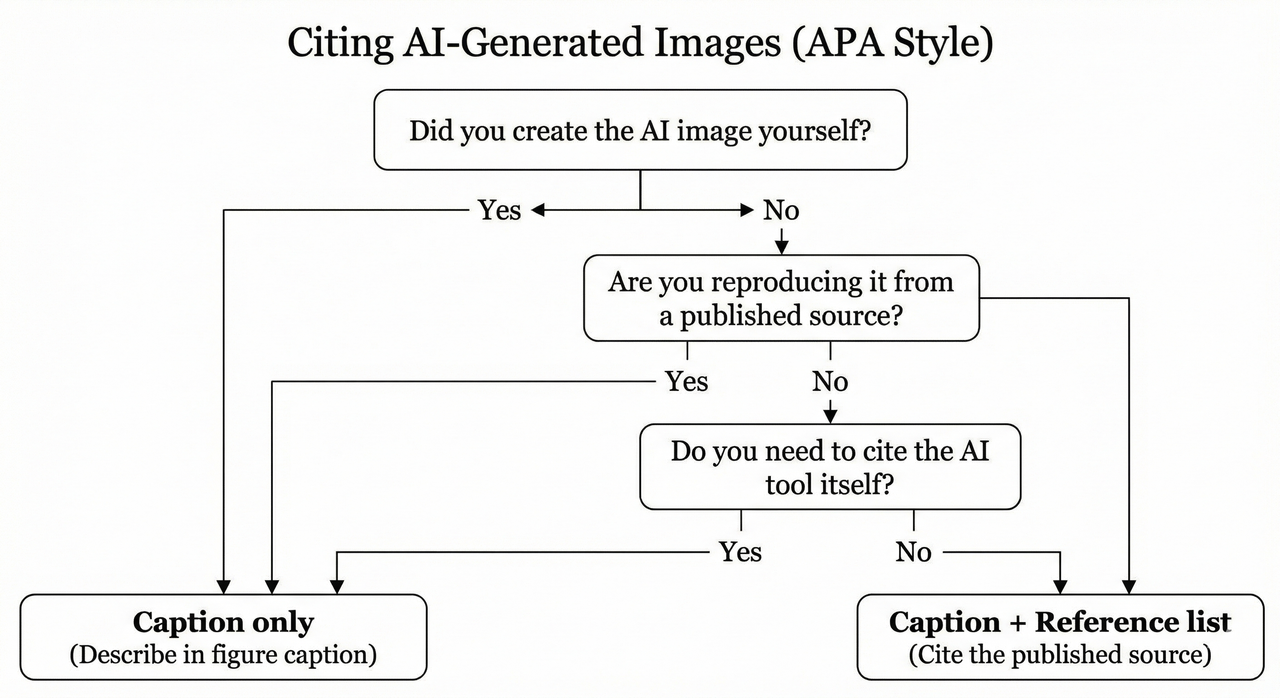
To solve how to cite AI-generated images in APA 7, you need to make one primary decision: Who created the image?
We use a simple 3-branch decision tree:
- You created it with an AI tool (DALL·E, Midjourney, etc.).
- You reproduced it from a published source (news site, blog, journal).
- You are citing the AI tool as a software resource.
For most student work, AI images you personally generate are treated as your own figures. This means you need a Figure Number, a Title, and a Note explaining it was AI-generated. Crucially, you usually do not need a separate reference list entry for the image itself.
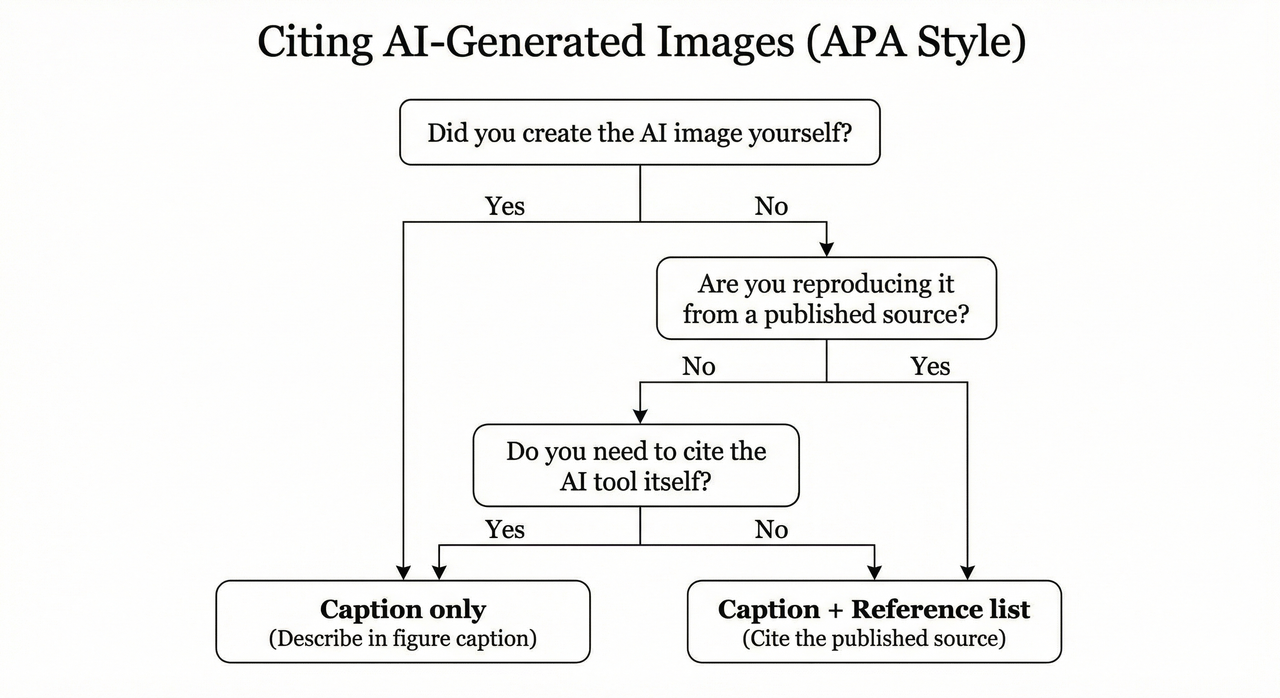
Quick Reference: Caption-Only vs Caption + Reference List
- I created the AI image myself → Caption/Figure Note only.
- I reused an AI image from an article/site → Caption + Reference entry for that source.
- I am explicitly citing the AI tool as software/data → Reference entry for the tool itself.
Note: Always check your institution’s local APA/AI policy first. Some departments may require a reference list entry even for self-generated images.
Case 1 – You Created the AI-Generated Image Yourself
When you generate an image using a tool like Midjourney or DALL·E, APA 7 treats you as the “creator” of the figure layout, but requires you to be transparent that an AI tool produced the visual content.
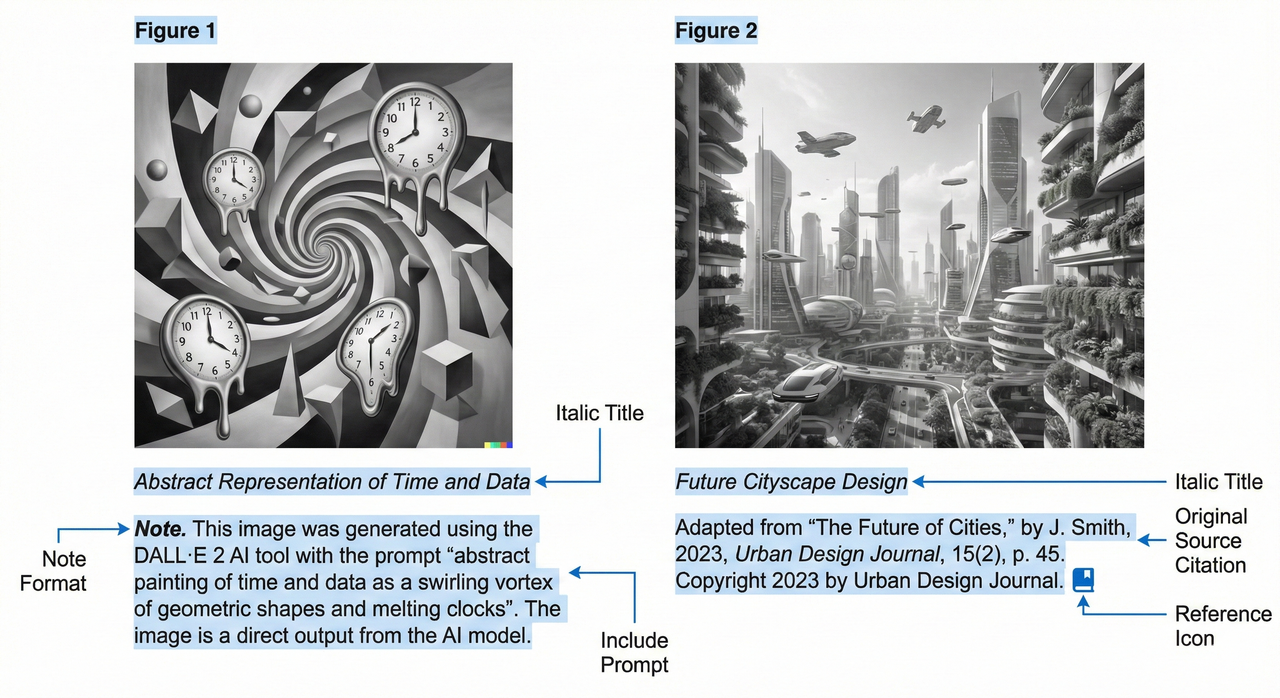
Your job is to format it as a standard figure. This includes the Figure number (bold), the Title (italic), the image itself, and then a Note beneath the image. This Note is where the magic happens: you must state the tool used, the prompt, the year, and the URL.
Step-by-Step Caption Pattern (With Template)
Use this template for your figure Note.
Template:
Note. Image generated using the prompt “[Insert your full prompt here]” by [Company Name], [Tool Name], [Year] (https://en.wikipedia.org/wiki/Tool_%28band%29).
Example Captions for Different Tools
1. A DALL·E Generated Diagram
Figure 1
Concept Map of Sustainable Energy Solutions
[IMAGE HERE]
Note. Image generated using the prompt “A clean, vector-style diagram showing solar, wind, and hydro energy sources connected to a central city grid” by OpenAI, DALL·E 3, 2024 (https://openai.com/index/dall-e-3/).
2. A Midjourney Conceptual Illustration
Figure 2
Artistic Representation of Neural Networks
[IMAGE HERE]
Note. Image generated using the prompt “Abstract visualization of a neural network, glowing blue nodes, dark background, cinematic lighting –ar 16:9” by Midjourney, Midjourney v6, 2024 (https://www.midjourney.com/).
Notice the pattern? The Reference List at the end of your paper generally does not need an entry for these, because the “author” is an algorithm, and the unique image isn’t retrievable by others. The Note provides all the necessary documentation.
Case 2 – Reusing an AI-Generated Image From Another Source
This scenario is different. If you find an AI-generated image in a blog post, news article, or stock library, you are reproducing it. You must cite the source where you found it, not just the AI model.
APA treats this like any reused figure:
- Figure Caption: Include a “Reprinted from…” or “Adapted from…” statement in the Note.
- Reference List: Include a full entry for the article or webpage.
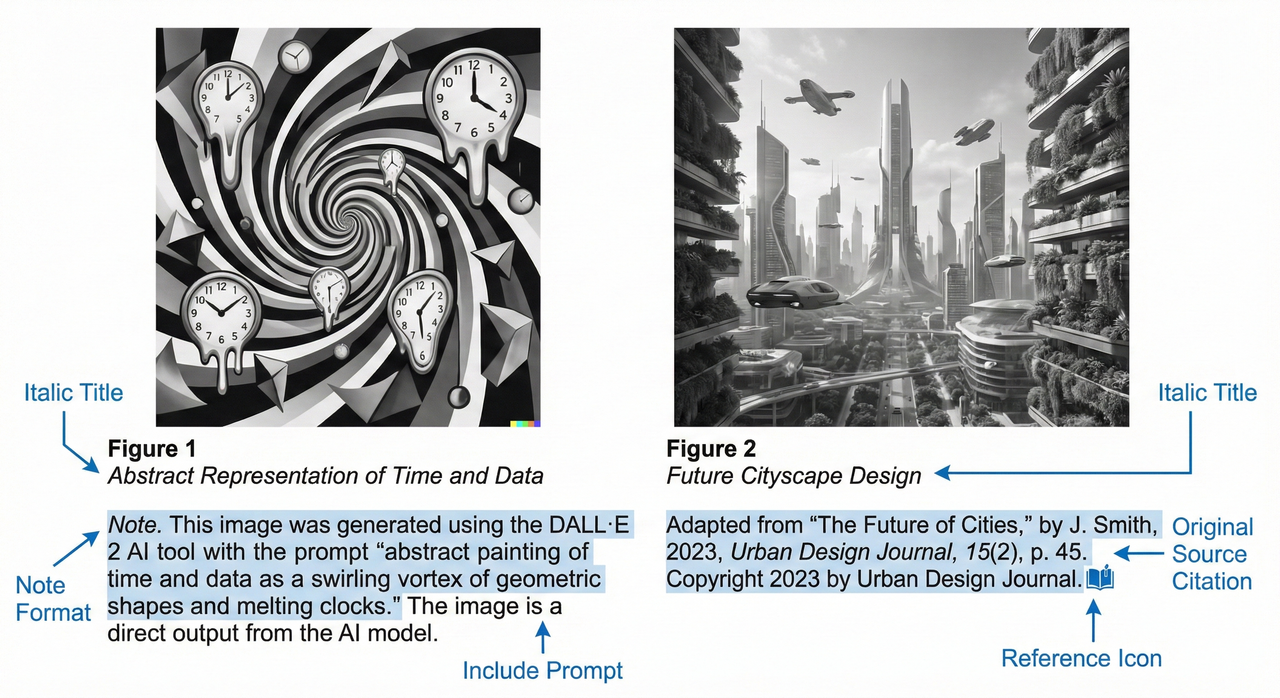
Caption + Reference List Template for Reproduced AI Images
Figure Note Template:
Note. The image was originally generated by an AI tool. Reprinted from [Title of Source], by [Author], [Year], [Source Name] ([URL]). Copyright [Year] by [Copyright Holder].
Reference List Entry Template:
Author, A. A. (Year, Month Day). Title of article or page. Site Name. URL
Example – Reproduced AI Image From a News Article
In the Text (Figure):
Figure 3
Future of Urban Transport
[IMAGE HERE]
Note. This image was AI-generated. Reprinted from How AI designs cities, by J. Smith, 2024, TechDaily (https://techdaily.example.com/ai-cities).
In the Reference List:
Smith, J. (2024, January 15). How AI designs cities. TechDaily. https://techdaily.example.com/ai-cities
Case 3 – Citing the AI Tool Itself in APA 7
Sometimes, you aren’t just showing an image; you are discussing the tool as part of your methodology (e.g., “We used Midjourney v6 to generate stimulus materials…”). In this case, you should include a reference entry for the software itself.
Example References for Popular AI Image Tools
Format these with the company as the author.
OpenAI (DALL·E)
OpenAI. (2023). DALL·E 3 [AI image generator]. https://openai.com/index/dall-e-3/
Midjourney
Midjourney. (2023). Midjourney (Version 6) [AI image generator]. https://www.midjourney.com/
Stable Diffusion (Stability AI)
Stability AI. (2023). Stable Diffusion (Version 2.1) [AI image generator]. https://stability.ai
Tip: These reference entries complement, but do not replace, the detailed Note required under every figure.
General APA 7 Figure Formatting Checklist (Applied to AI Images)
Before you hit submit, run through this checklist to ensure your formatting is crisp.
- Numbering: Is it Figure X (bold)?
- Title: Is the title descriptive and italicized?
- Note: Does the Note start with Note. (italicized)?
- Attribution: Does the Note explicitly mention the AI tool (e.g., DALL·E) and the company (e.g., OpenAI)?
- Prompt: Did you include the prompt text (or a summary of it)?
Common Mistakes to Avoid
- The “Lazy Label”: Writing only “Figure 1. Image from DALL·E” without a descriptive Note.
- The Hidden Prompt: Omitting the prompt entirely. Transparency is key in APA 7 for AI.
- The “Double Dip”: Listing the AI tool as an “Author” of the paper itself (e.g., By John Doe & ChatGPT). AI cannot be an author.
Putting It Into Practice – Fast Templates You Can Copy and Adapt
Here are your “Cheat Codes” for how to cite AI-generated images in APA 7. Copy these, paste them into your doc, and swap the bracketed info.
Scenario A: You Made the Image (DALL·E)
Note. Image generated using the prompt “Watercolour painting of a crowded coffee shop” by OpenAI, DALL·E 3, 2025 (https://openai.com/index/dall-e-3/).
Scenario B: You Made the Image (Midjourney)
Note. Image generated using the prompt “Cyberpunk city skyline –ar 16:9” by Midjourney, Midjourney v6, 2025 (https://www.midjourney.com/).
Scenario C: You Found the AI Image in a Blog
Note. Reprinted from The rise of synthetic media, by A. Jones, 2024, FutureWeb (https://futureweb.com/article).
Final Tip – Always Check Your Institution’s AI Policy
While these templates follow standard APA 7 and major university guidance, your specific course or department might have a unique policy. Some instructors may require both a caption Note and a reference list entry for every image. When in doubt, email your librarian or professor with a draft of your caption—it shows you are proactive about academic integrity.
Leave a Reply