
Murf AI Review (2025): Is This The Best Text-to-Speech Studio for Creators?
Table of Contents
1. Introduction: The Voiceover Bottleneck
You have the video script polished. The visuals are stunning. But the project is stalled because you lack the voice.
Hiring a professional voice actor is the gold standard, but it costs hundreds of dollars and adds days of turnaround time to your workflow. On the other hand, recording yourself often results in amateurish audio plagued by room echo, background hiss, and cheap microphone quality.
For years, the alternative—Text-to-Speech (TTS)—was a non-starter. It sounded robotic, mispronounced technical terms, and lacked the emotional nuance required to keep a YouTube viewer or E-Learning student engaged.
Enter Murf AI.
Murf isn’t just a voice generator; it positions itself as a full audio production studio in the cloud. It promises studio-quality voiceovers in minutes, not days. But is it worth the monthly subscription? Does the AI actually sound human, or is it just a slightly better robot?
In this guide, I will dissect the features, expose the real limitations of the free plan (that they don’t explicitly tell you on the landing page), and help you decide which paid tier fits your budget.
2. What is Murf AI? (Snapshot)
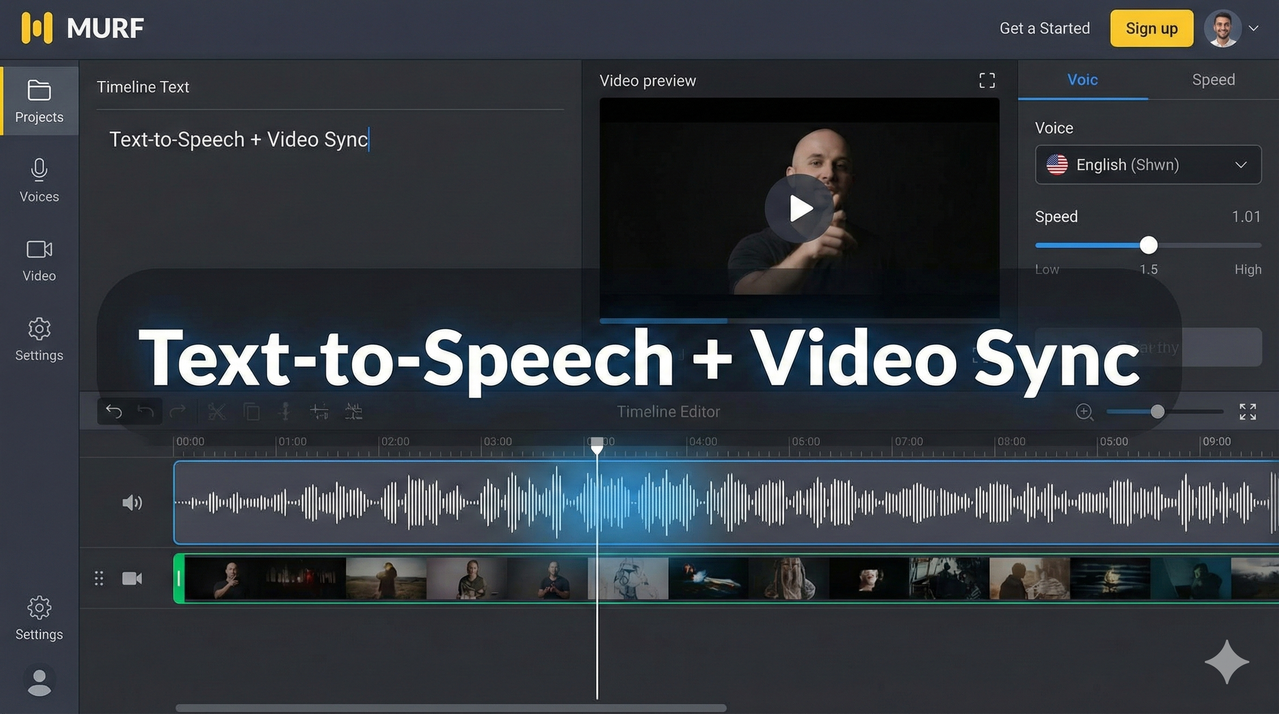
Murf AI is a cloud-based SaaS platform that converts text into ultra-realistic speech using advanced AI. Unlike basic TTS tools that just read text, Murf provides a “Studio” interface where you can time, pace, and mix your audio with background music and video.
The Core Stats:
- Voices: 200+ Voices across 20+ Languages.
- Interface: Timeline-based editor (similar to video editing software).
- Sync: Ability to upload video or slides and match voice timing directly in the browser.
- Target User: Content Creators (YouTubers), L&D (Learning & Development) professionals, and Marketers who need scalable narration.
3. The “Free Plan” Reality Check
Before you sign up, we need to address the elephant in the room. This is the #1 complaint from new users who don’t read the fine print.
The Limitation: The Murf AI Free Plan is a Sandbox.
You get 10 minutes of voice generation time to test the quality of the voices and play with the editor. However, you cannot download the audio files.
If you spend three hours perfecting a video voiceover on the Free plan, you will not be able to export the MP3 or WAV file to use in your video editor. The Free plan exists strictly for you to verify if the voices sound good enough for your standards.
4. Key Features Breakdown
The Voice Library
The “secret sauce” of Murf is the quality of its AI models. These aren’t the standard Siri or Alexa voices.
- Quality: The voices include breath pauses, natural intonation shifts, and “human” imperfections that sell the realism.
- Variety: The library is categorized by use case. You can find “Promo” voices (energetic, punchy) for ads, and “Educator” voices (calm, authoritative) for training modules.
The Studio Editor (The Real USP)
Most TTS tools are just a text box: you type, you click generate, you get a file. Murf offers a Timeline Editor.
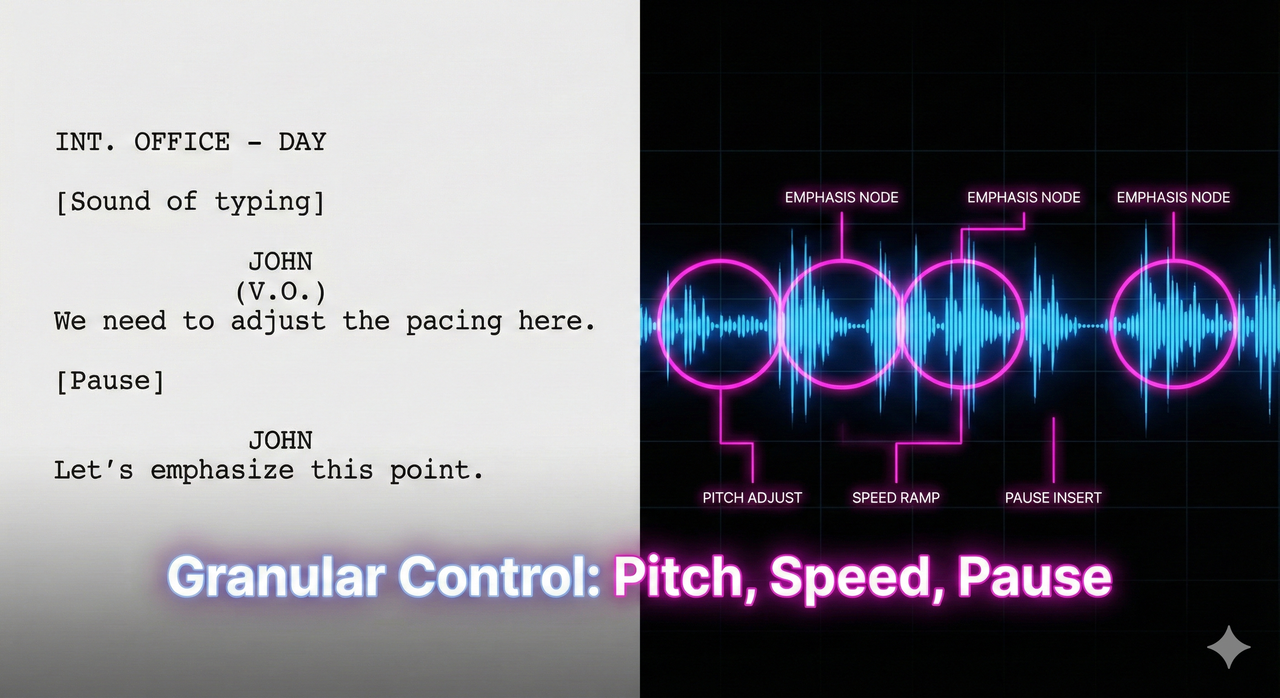
- Pitch & Speed: You have granular control. Want the voice to sound younger or more urgent? Bump the pitch by +10% and speed by 1.1x.
- Emphasis: This is critical. You can highlight specific words in your script to force the AI to stress them, preventing that monotone “reading off a page” sound.
AI Voice Changer
If you have a video recorded with your own voice (or a low-quality freelancer’s voice) but the audio quality is bad, you can upload that file to Murf. The AI will transcribe it and swap your voice with one of their professional AI voices while keeping the original pacing.
5. Pricing Tiers: Which One Fits You?
Murf’s pricing can be confusing because of the “per user” limits and “generation hours.” Here is the honest breakdown.
| Feature | Free Plan | Creator Plan | Business Plan | Enterprise |
|---|---|---|---|---|
| Cost | $0 | ~$19/mo (Annual) | ~$39/mo (Annual) | Custom |
| Downloads | None | Unlimited | Unlimited | Unlimited |
| Generation Time | 10 mins (Total) | 24 Hours / Year | 96 Hours / Year | Unlimited |
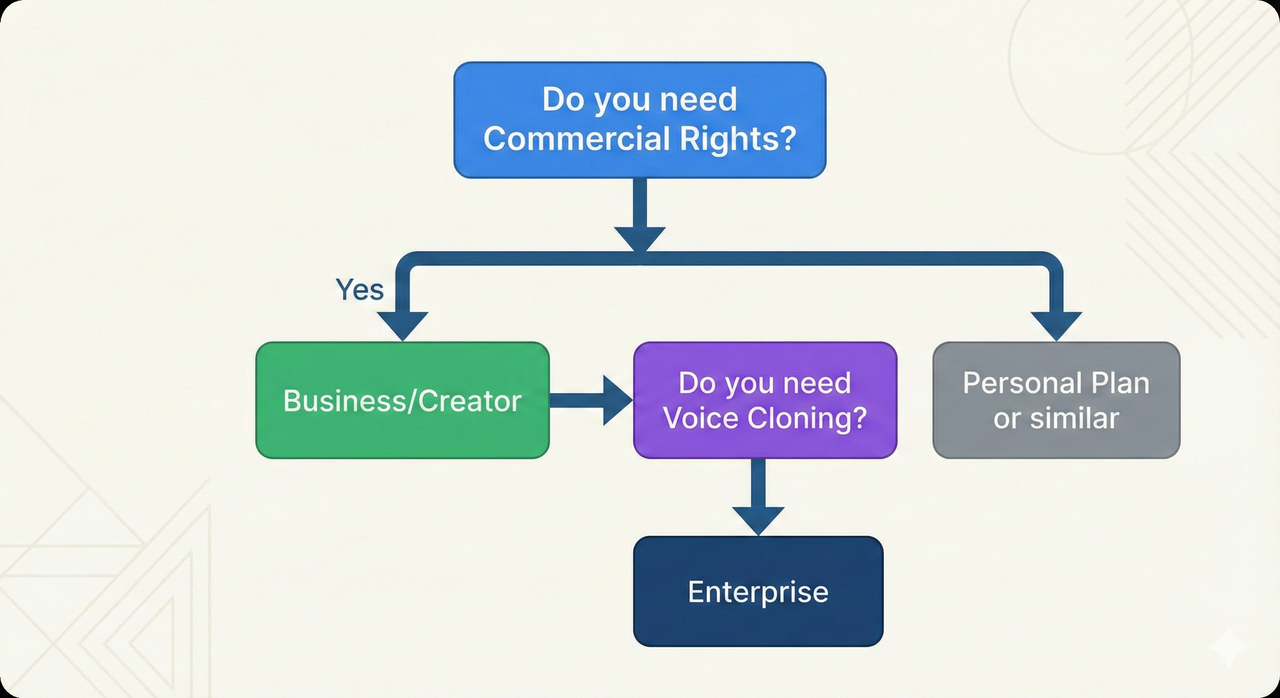
| Commercial Rights | ❌ No | ✅ Yes* | ✅ Yes | ✅ Yes |
| Voice Cloning | ❌ No | ❌ No | ❌ No | ✅ Yes |
Creator Plan (~$19/mo)
- Best for: Solo YouTubers, Hobbyists, Freelancers.
- The Deal: You get 24 hours of voice generation per year. For most solo creators making 1-2 videos a week, this is sufficient.
- Rights: Includes commercial rights for YouTube, Social Media, and Podcasts.
Business Plan (~$39/mo)
- Best for: SMBs, Agencies, Heavy Content Teams.
- The Deal: Bumps you up to 96 hours of generation per year.
- Key Upgrade: Includes the AI Voice Changer feature and collaborative workspace features. If you are a team, this is the entry point.
Enterprise
- The Gatekeeper: This is the only tier that offers Voice Cloning (creating a digital twin of your CEO or brand voice). If you need cloning, you must talk to sales.
6. Pros & Cons (The Honest Truth)
| Pros | Cons |
|---|---|
| Ultra-realistic voices: Some of the best “off-the-shelf” voices in the industry. | “Free” plan has zero export: You cannot use it for actual work without paying. |
| Timeline Editor: Acts like video software, making syncing easy. | Voice Cloning is gatekept: Unlike some competitors, you can’t clone voices on the cheap plans. |
| Media Library: Includes stock music to mix directly with voiceover. | Strict Content Filters: Murf is “brand safe,” so it may block scripts with NSFW or extreme political content. |
| Commercial Rights: Clear licensing for YouTube monetization on paid plans. | Cost: Per-minute cost is higher than using raw API tools. |
7. Step-by-Step: Creating Your First Voiceover
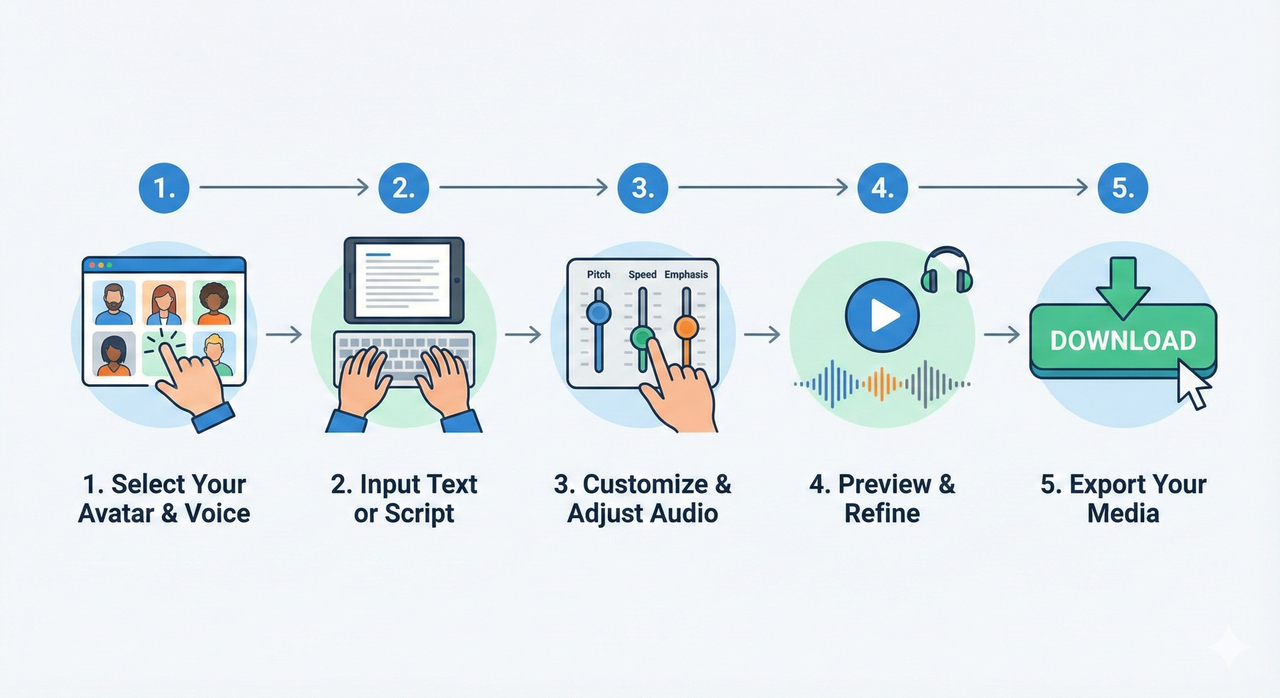
- Select a Voice: Don’t just pick random voices. Use the filters to find “Narrative” or “Promo” styles. Listen to the samples.
- Enter Script: Paste your text into the blocks. Pro Tip: Break long paragraphs into shorter sentences. The AI handles short bursts better than walls of text.
- Tweak Performance: If a sentence sounds flat, use the “Emphasis” node to highlight the key verb or noun.
- Add Media (Optional): Upload your video or slides to the background track to ensure your voiceover matches the visual timing.
- Render & Download: Click “Export.” You can choose MP3 (audio only) or MP4 (if you added visuals).
8. Alternatives & Competitors
If Murf doesn’t feel right, here are the two main competitors I recommend looking at:
- Murf vs. ElevenLabs: ElevenLabs currently holds the slight edge on raw voice realism and offers voice cloning on cheaper plans. However, ElevenLabs lacks Murf’s detailed Studio Editor. If you just need raw audio files, go ElevenLabs. If you need to build a full video/audio mix, go Murf.
- Check out my detailed breakdown: ElevenLabs vs. Murf AI Comparison
- Murf vs. Lovo (Genny): Lovo is very similar to Murf but leans heavier into video editing features (AI art generation + voice). Murf feels slightly more “corporate/professional” in its voice selection.
For a broader look at the market, check out our full list of tools in the resources hub.
9. Final Verdict
Should you pay for Murf AI?
If you are a Video Editor, L&D Manager, or Content Creator who wants a “Google Docs for Audio” experience—where you can edit, tweak, and mix voiceovers without touching a microphone—Murf AI is the best workflow tool on the market. The time you save on recording and editing pays for the subscription.
However, if you are a developer looking for a cheap API, or a hobbyist who wants free unlimited downloads, this is not the tool for you.
Leave a Reply