
How to Set Up a RAG Workflow With No Coding (2026)
I’ve spent over three decades in IT, and one thing I’ve learned to recognize immediately is the difference between a genuinely hard technical problem and a problem that only looks hard because of how it’s explained. How to Set Up a Simple RAG Workflow Without Coding Experience falls firmly into the second category, and I want to walk you through exactly why, because I’ve watched too many capable non-technical people talk themselves out of building something they absolutely could have finished in an afternoon.
How to Set Up a Simple RAG Workflow Without Coding Experience means using a visual, drag-and-drop platform to connect document upload, search, and chat-generation steps into a working AI assistant, with no scripts or programming required. For example, n8n’s own documentation confirms you can build an entire RAG agent in its visual builder “from uploading to retrieving your data, without writing a single script.”
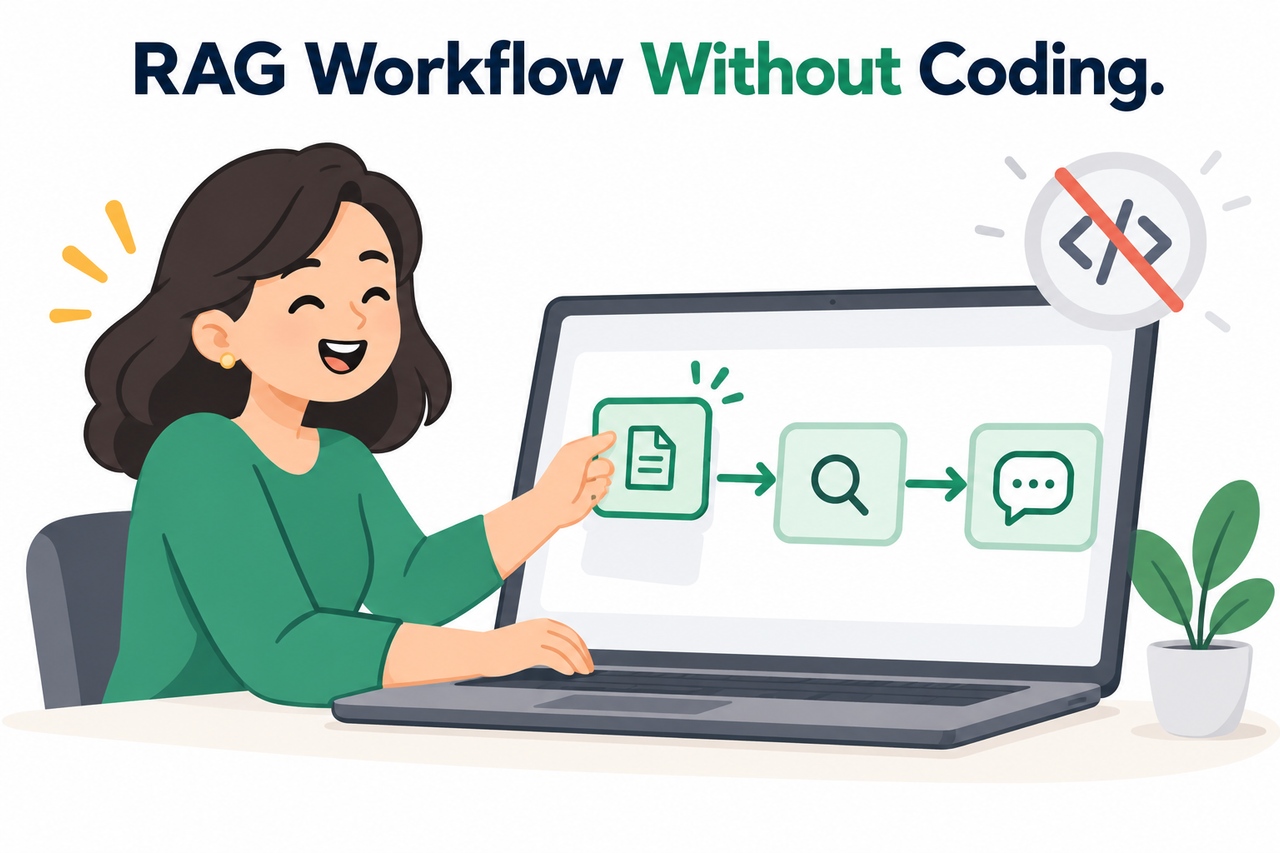
If you closed a RAG tutorial the moment you saw a “pip install” command and assumed this entire category of tool was permanently out of reach without learning to code, you were working from outdated information — and that assumption is costing you time, money, or both.
Can You Really Set Up a Simple RAG Workflow Without Coding Experience?
Quick Answer
Yes — dedicated no-code platforms let you build a complete RAG pipeline through point-and-click configuration, covering document upload, chunking, embedding, vector storage, and chat generation. n8n’s official documentation confirms you can build “an entire RAG agent in n8n’s drag-and-drop visual builder… without writing a single script.” The only requirement outside the platform itself is a copy-paste API key from an LLM provider.
I want to say this plainly before anything else, because I know how discouraging the initial research phase can be: I’ve tested several of these platforms myself, and the gap between “developer-only tutorial” and “genuine no-code tool” is real and significant. You are not missing some hidden prerequisite skill. The tools genuinely do what they claim.
Why Does RAG Look So Intimidating to Non-Coders?
Before I walk through the actual setup, I want to address why this topic feels so much harder than it needs to be, because understanding the source of the confusion matters.
Most Tutorials Are Written for Developers, Not Beginners
Search results are dominated by Python-based guides that open with install commands, giving the false impression that coding is mandatory for any RAG pipeline. I’ve seen this happen to smart, capable business owners constantly: they search “how to build RAG,” land on a developer tutorial, see a terminal command in the first paragraph, and close the tab without ever discovering that an entirely different category of tool exists for exactly their situation.
The Terminology Sounds More Complex Than the Actual Task
Words like “document embeddings,” “vector store,” and “chunking documents” describe simple, automated steps that no-code platforms handle entirely through dropdown menus and settings panels. In my experience, the vocabulary itself does more damage to people’s confidence than the actual underlying task ever would.
Dedicated No-Code Platforms Already Exist and Work
Official documentation from multiple platforms confirms a full RAG pipeline can be built with zero scripting, using products specifically designed for this exact use case. n8n This isn’t a workaround or a simplified toy version — it’s the same underlying architecture that a developer would build manually, just assembled through a visual interface instead of code.
What Does a RAG Pipeline Actually Consist Of?
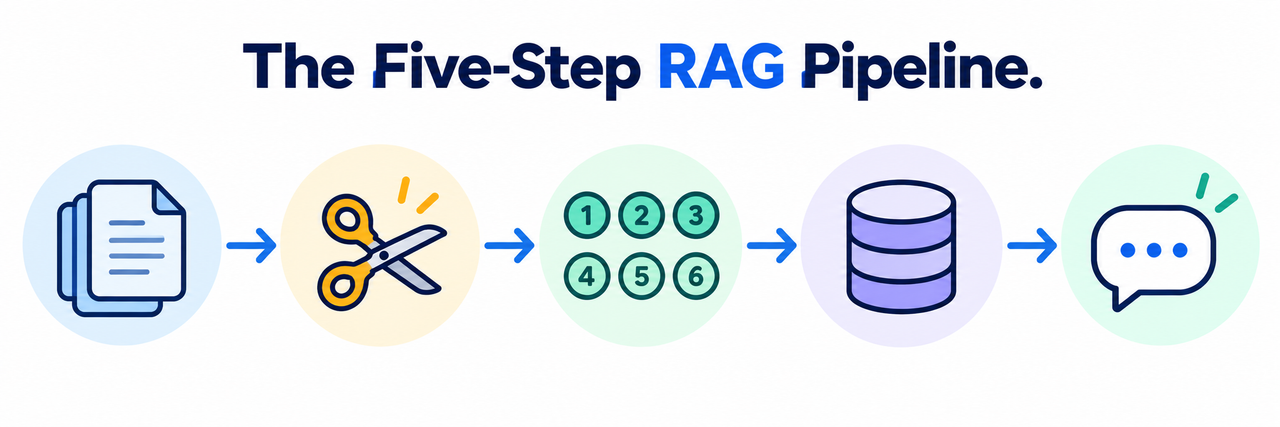
I think it helps enormously to understand the five pieces that make up every RAG system, regardless of which tool you use, because once you see them laid out plainly, the intimidating vocabulary stops being intimidating. First, you have a data source — your actual documents or website content. Second, a chunking step splits those documents into smaller pieces, typically 500 to 1,000 characters each.
Third, an embedding model converts each chunk into a numerical vector, which is just a format a computer can search through quickly. Fourth, a vector database stores those vectors for fast similarity search — platforms like Pinecone, Qdrant, Supabase, or AstraDB all do this. Fifth and finally, a generation step uses an LLM to answer questions using the retrieved chunks as context. That’s the entire system. No-code platforms simply let you configure all five pieces by clicking rather than scripting.
| RAG Component | What It Does | How You Configure It (No-Code) |
|---|---|---|
| Data Source | Holds your raw documents or web content | Upload files or paste URLs into an interface |
| Chunking | Splits documents into smaller searchable pieces | Default settings work; adjust a number field if needed |
| Embedding Model | Converts text chunks into searchable numerical data | Select from a dropdown menu |
| Vector Database | Stores embeddings for fast retrieval | Automatically connected by the platform |
| Generation (LLM) | Writes the final answer using retrieved context | Paste in an API key from your chosen provider |
How to Set Up a Simple RAG Workflow Without Coding Experience: Step by Step
This is the part I actually want you to walk away with, because reading about the theory doesn’t get your chatbot built — following the actual sequence does.
- Choose a platform built specifically for RAG. Pick a dedicated no-code RAG tool rather than a general automation platform that only supports it as an add-on feature. Prisme.ai
- Gather your source documents first. Collect your PDFs, web pages, or Word documents before opening any platform, since disorganized source material is the most common cause of a stalled setup.
- Create a knowledge base and pick an embedding model. Name your knowledge base container and select an embedding model from a dropdown menu, a choice that affects quality and cost but requires no technical understanding.
- Upload your documents directly. Upload files or paste source URLs into the platform’s interface, letting it automatically parse, clean, and convert your content into searchable data.
- Adjust chunk size only if needed. Most platforms default to roughly 500-1,000 characters per chunk, which works for a first attempt without any manual configuration.
- Connect your knowledge base to a chat agent. Attach your knowledge base to an agent or chatbot interface through a simple dropdown or “Capabilities” menu to enable retrieval-based answers.
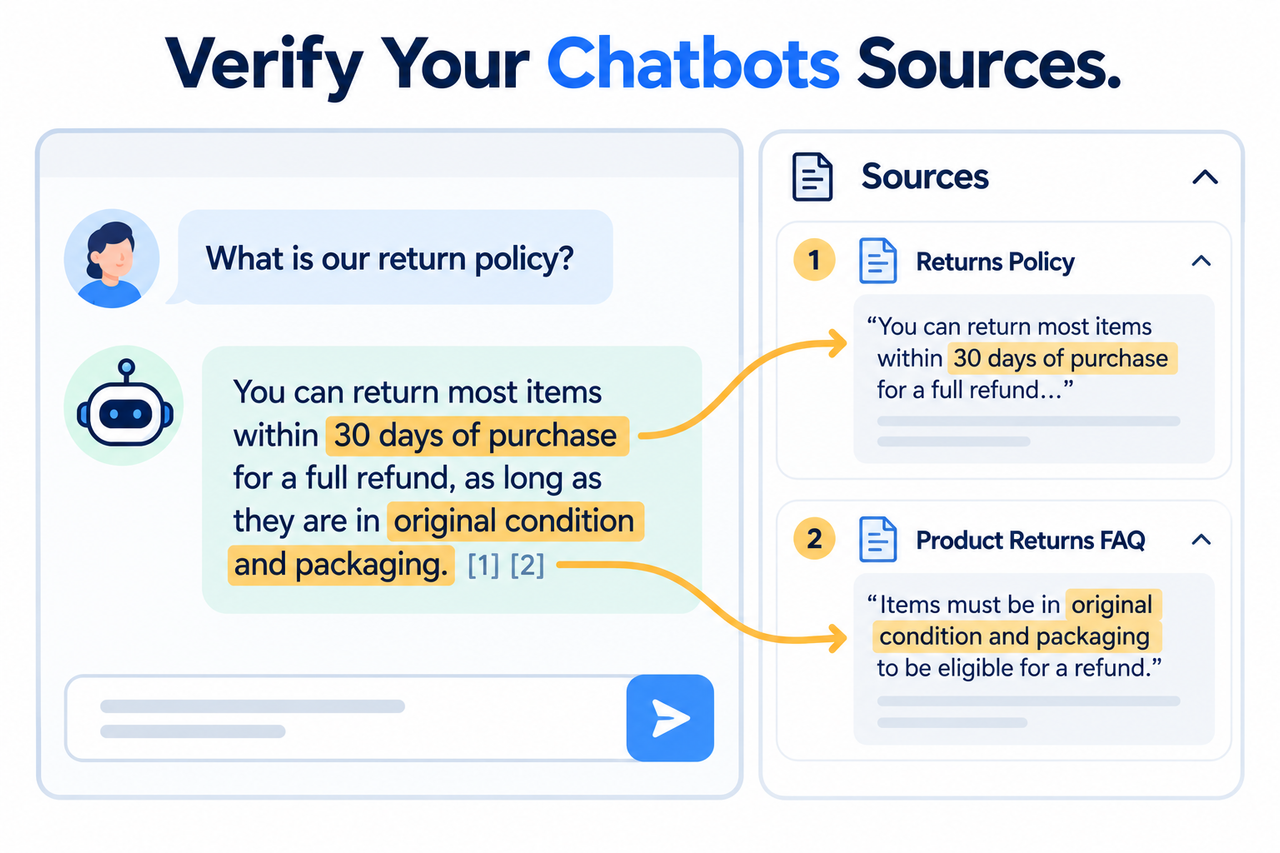
- Test in the built-in playground before launch. Verify your setup works correctly and confirm each answer displays the actual source chunks it was pulled from.
- Get one API key from an LLM provider. Copy an API key from a provider like OpenAI into the platform’s settings, the one external step required even in a fully no-code build. Unstructured
I want to spend a moment on step 7, because it’s the step I see skipped most often by people in a hurry, and it’s the one that actually tells you whether your setup is working correctly. A genuine RAG system should show you exactly which document chunks it pulled from to generate each answer.
Test Check (Illustrative example)

Ask your new chatbot a question you know the answer to from your
own documents.

Good sign: the response includes or links to the specific source
chunk it used, and the answer matches your actual document content.

Bad sign: the response sounds plausible but doesn't match anything
in your actual documents, and the tool shows no source attribution
at all — which means you can't verify whether it retrieved real
information or just generated confident-sounding text.
If your chosen platform doesn’t show source attribution at all, that’s worth treating as a red flag before you rely on it for anything client-facing or business-critical.
What Do the Official Platforms Actually Say?
I always prefer pointing directly at a vendor’s own documentation rather than paraphrasing secondhand, especially on a claim this important to get right. n8n’s documentation states plainly that you can build a RAG agent in its visual builder “without writing a single script” n8n, while Unstructured’s own tutorial concludes with the confirmation that you’ll have “a fully functional RAG AI assistant with absolutely no code.” Unstructured
Prisme.ai’s official tutorial backs this up with an actual walkthrough rather than just a marketing claim, splitting the process into a Knowledge Base tool for ingestion and retrieval and an Agent Creator tool for the chat interface, with every single step completed by clicking buttons like “+ Create” and “Add Documents.” Prisme.ai Three separate official sources, three separate platforms, all converging on the same answer.
What Mistakes Actually Derail a First Attempt?
In my experience helping people through their first attempt at this, the failures are almost never about the platform itself. They’re about preparation and testing discipline. The most common mistake is skipping document preparation entirely — uploading a messy folder of inconsistently formatted files and expecting clean results, when a little organization beforehand saves significant troubleshooting time later.
The second most common mistake is never testing with questions you already know the answer to, which means you have no way to catch a broken retrieval setup before a client or customer does. The third is picking a general-purpose automation tool and trying to bolt RAG functionality onto it as an afterthought, rather than choosing a platform actually built around this specific workflow from the start.
Bad vs. Good Way to Approach Your First RAG Setup
Let me put these side by side, because the difference in approach is the entire difference between finishing this in an afternoon and giving up halfway through.
Bad: “I opened a RAG tutorial, saw a pip install langchain command in the first line, and closed the tab assuming this entire category of tool was off-limits to me without learning to code first.”
Good: “I found a no-code platform specifically built for RAG, uploaded my PDFs directly through its upload button, picked an embedding model from a dropdown, connected the resulting knowledge base to a chat agent with one click, and tested it in the built-in playground — all without writing a single line of code.”
The bad approach stops at the first unfamiliar-looking technical detail. The good approach keeps looking until it finds the tool actually built for someone in exactly this position.
How Do You Know If Your Setup Is Actually Good Enough to Launch?
Once you’ve got a working chatbot, I’d recommend a short evaluation period before pointing real customers or clients at it. Write down ten to fifteen real questions people are likely to ask, based on what’s actually in your documents, and run every single one through your new setup.
Check each answer against two things: did it answer correctly, and did it show you the source material it pulled from. If you’re getting wrong answers on questions you know your documents cover, the issue is almost always in how your documents were chunked or how clearly they were written in the first place, not a fundamental flaw in the no-code approach itself. Adjusting chunk size or rewriting a confusing source document usually resolves this faster than people expect.
What Should You Do Once the Basic Version Is Working?
Once you have a working baseline, resist the urge to immediately add every advanced feature the platform offers. Get comfortable with the core loop first: uploading new documents, watching them get processed, and confirming the chatbot picks up the new information correctly.
From there, most platforms let you layer in refinements like adjusting how many source chunks get retrieved per question, switching to a more capable embedding model if retrieval quality feels weak, or connecting your finished chatbot to a website widget or messaging platform. Each of these is still a configuration choice inside the same visual interface, not a new coding requirement.
How Much Does a No-Code RAG Setup Actually Cost?
I think it’s worth addressing budget directly, because “no-code” doesn’t automatically mean “free,” and I’ve seen people get surprised by unexpected costs after launch. Most dedicated no-code RAG platforms operate on a tiered pricing model, often with a free tier generous enough to build and test a small knowledge base before committing to a paid plan.
The separate cost that catches people off guard is the LLM API usage itself, since the platform handles the workflow but you’re typically billed directly by the model provider based on how many questions get asked and how much source material gets processed. For a small business knowledge base answering a modest volume of questions, this usage cost is often a few dollars to a few tens of dollars a month rather than a significant expense, but it’s worth checking a provider’s current pricing page before assuming it’s negligible for your specific volume.
Is a No-Code RAG Setup Good Enough for a Real Business, or Just a Toy?
I want to address this concern directly, because I think it’s the one holding back the most capable non-technical people from actually starting. A properly configured no-code RAG setup is not a watered-down demo version of what a developer would build — it uses the exact same underlying components: real embedding models, real vector databases, and real language models for generation.
The ceiling on quality comes from how well you prepare your source documents and how carefully you test your results, not from some inherent limitation baked into no-code tools as a category. I’ve seen non-technical founders build knowledge base chatbots handling real customer support volume this way, and the only meaningful difference from a custom-coded version is that a developer could add more unusual, highly specific logic if your use case ever grows complex enough to need it. For the vast majority of small business use cases — answering questions from a product manual, a policy document, or a website’s content — a no-code setup genuinely is the complete, production-ready solution, not a stepping stone to something else.
What Should You Do If Your First Attempt Doesn’t Work Well?
Don’t assume failure on your first attempt means the no-code approach doesn’t work for your situation, because in my experience the fix is almost always small and specific rather than a sign you need to start over with a different category of tool entirely. Start by checking whether your source documents were clean and well-formatted before upload, since messy formatting is the single most common hidden cause of poor retrieval quality.
If your documents were clean and results are still inconsistent, try adjusting your chunk size slightly, since content that’s naturally organized into short, distinct sections sometimes performs better with smaller chunks, while longer, narrative-style documents often benefit from larger ones. If neither of those fixes it, check whether you’re asking questions that are genuinely answerable from your source material at all; a surprising number of apparent failures turn out to be a mismatch between what the user asked and what the documents actually contain, rather than a flaw in the retrieval setup itself.
For a broader look at understanding AI tools and workflows without needing a technical background, see our complete guide to AI questions and answers.
Frequently Asked Questions
Do I need any programming knowledge to set up a RAG workflow?
No — dedicated no-code platforms handle document processing, embedding, and retrieval entirely through visual interfaces, with official documentation confirming full RAG agents can be built without writing a single script. n8n
What’s the one thing I still need even in a no-code RAG setup?
An API key from an LLM provider like OpenAI, which is a simple copy-paste step from the provider’s website rather than a coding task. Unstructured
How do I know my chatbot is actually using my documents and not just making things up?
Test it in the platform’s built-in playground and confirm each answer displays the specific source chunks it retrieved — if a tool doesn’t show this, you can’t verify it’s working correctly. Prisme.ai
What’s the biggest reason non-coders think RAG is too hard to set up?
Most tutorials found in search results are written for developers and open with installation commands, creating a false impression that programming is mandatory when dedicated no-code tools already solve this.
Do I need to understand what “chunking” or “embeddings” actually mean to use a no-code RAG platform?
No — these are automated background processes represented as simple dropdown choices and number fields in no-code tools, not concepts you need to master technically.
What’s the most common reason a first RAG setup attempt stalls?
Having disorganized or missing source documents before starting, since gathering clean PDFs, web pages, or files first is the actual first step, before any platform configuration begins.
Leave a Reply