
Check Whether Perplexity Citations Support Claims (2026)
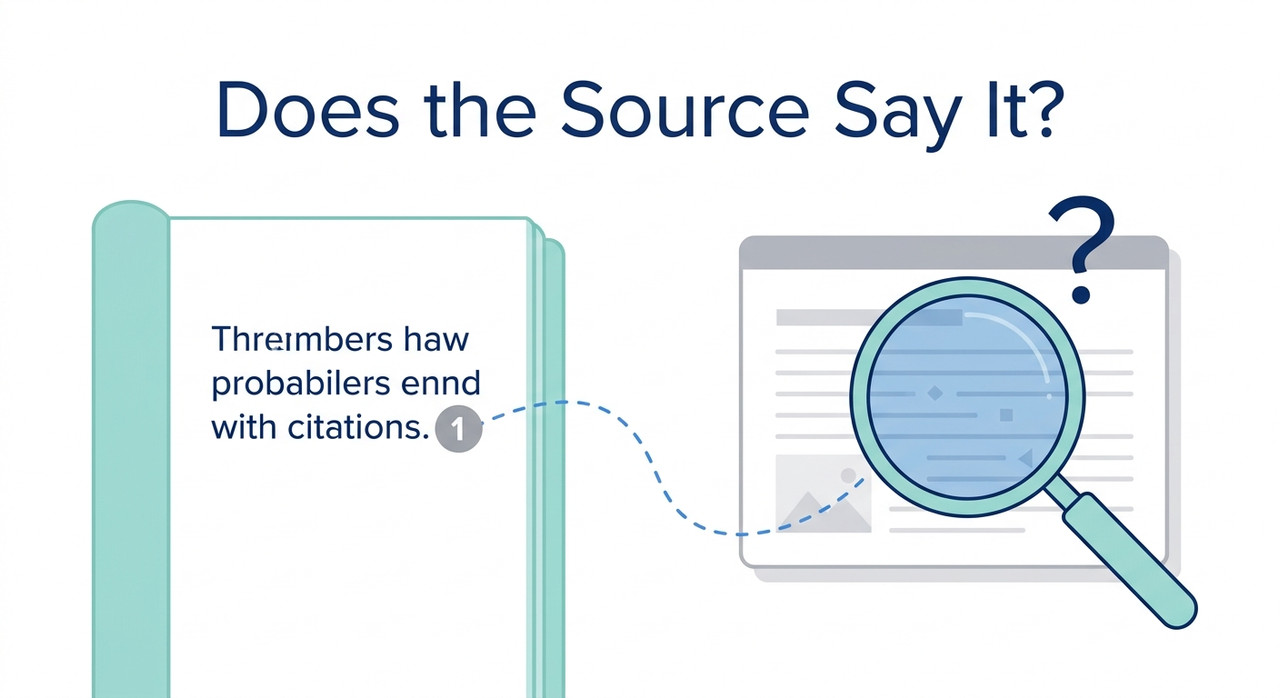
How can I check whether Perplexity citations actually support the claims attached to them is a claim-by-claim verification task: open each cited page, find the specific statement, and judge whether it supports the claim. For example, a statistic cited to a respected site is only usable once you find that number on the page.
A numbered citation looks like proof. That is exactly why a wrong claim attached to one is dangerous: it arrives wearing a footnote. How can I check whether Perplexity citations actually support the claims attached to them is the question I would want every researcher, student and writer to ask before pasting an answer into a report.
The fear underneath is specific. You quote a “sourced” statistic, someone clicks the link, and the page never says it. I have spent 33 years in IT, and the lesson that has held up longest is simple: a reference is a pointer, not evidence, until you have read what it points to.
One note on how I write this. I have not audited Perplexity myself, and I do not have a current benchmark for it. What follows comes from Perplexity’s help documentation and from published studies of AI search tools, and I label which is which.
How Can I Check Whether Perplexity Citations Actually Support the Claims Attached to Them?
Quick Answer
Open each cited page, search it for the exact number, name or quote, and read the surrounding paragraph. Label every claim supported, partly supported, unsupported or contradicted. Don’t treat a source label as proof: labels rate whole websites, not individual claims. Verify high-stakes claims against a second independent source.
The figures in this guide come from general studies of AI search tools, not from a current Perplexity benchmark. None of them tells you how your own answer will perform. That is why the last step is to measure your own results.
The method takes a few minutes per answer. It is slower than trusting the footnotes, and that is the point.
Why Can a Perplexity Citation Fail to Support Its Claim?
A search-based assistant works in two stages. It retrieves pages, then a language model writes an answer and attaches citations. That design is called retrieval-augmented generation, and the second stage is where mistakes enter. The writing step can paraphrase loosely, combine two sources, or attach a citation to a sentence the page does not actually make.
I want to be careful here. That is my explanation of the general design, not a statement about how Perplexity behaves on any given answer. Two published studies show the wider pattern.
| Evidence | What it tested | What it doesn’t tell you |
|---|---|---|
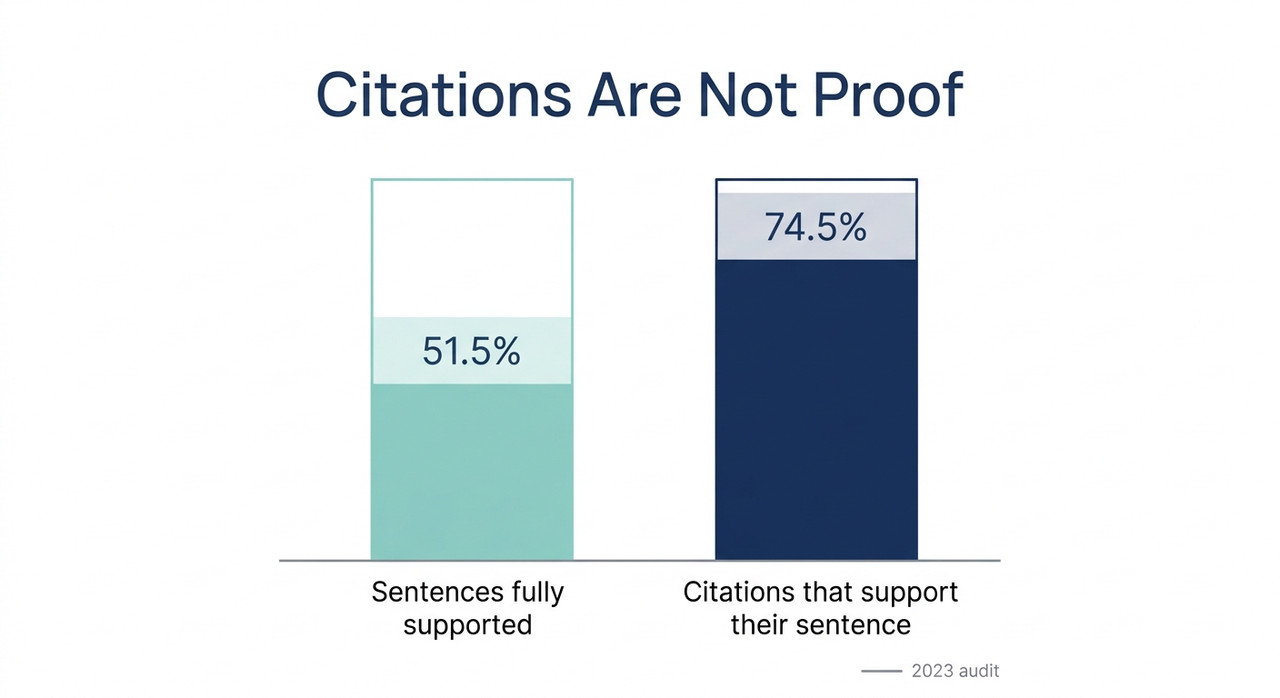
| Stanford-led audit, EMNLP 2023 arXiv | Four generative search engines, including perplexity.ai. On average, 51.5% of sentences were fully supported by citations, and 74.5% of citations supported their sentence | How today’s Perplexity performs. The systems tested were earlier versions |
| Tow Center, February 2025 Columbia Journalism Review | Eight AI search tools asked to identify news articles from excerpts. Perplexity answered 37% of queries incorrectly | Whether claims are supported. It tested article identification: headline, publisher, date and URL |
| Tow Center syndication finding Columbia Journalism Review | Tools often cited syndicated copies, such as Yahoo News, instead of the original publisher | How common this is outside news content |
A Numbered Footnote Is Not Proof
A citation tells you where the system pointed. It does not tell you that the page states the claim. The arXiv paper separates two questions that are easy to blur.
Citation recall asks whether the claims are supported by citations at all. Citation precision asks whether each citation really supports the claim it is attached to. A good answer needs both, and you can check both by hand. arXiv
The 2023 Audit Found Roughly One in Four Citations Didn’t Support Its Sentence
The paper reports that only 74.5% of citations supported their associated sentence, so about 25.5% did not. It also found that on average only 51.5% of generated sentences were fully supported. arXiv
Treat this as a warning about the category, not a score for Perplexity today. The study is from 2023 and tested earlier versions of several products. Your answer may do better or worse.
Paid Tiers Can Be More Confidently Wrong
In the Tow Center test, Perplexity had the lowest error rate of the eight tools at 37%. That is still more than one wrong answer in three. Reporting on the study adds that Perplexity Pro answered more prompts correctly but was also more likely to give a confident wrong answer instead of declining. Columbia Journalism Review
This was a different task from claim checking. I mention it only because it cuts against an easy assumption: paying for a higher tier or a Pro Search mode does not remove the need to check.
Syndicated Copies Can Stand In for the Original
The Tow Center found that the tools often sent users to syndicated copies of an article instead of the original publisher. News coverage of the study says Perplexity frequently cited syndicated versions of Texas Tribune articles. Columbia Journalism Review
The words on a republished page may be identical. The problem is attribution. If you cite the copy, you are crediting the wrong site and trusting a version you did not confirm. That is why Step 2 below asks you to land on the original.
What Do Perplexity’s Source Labels Tell You?
Some Perplexity citations carry a small shield icon with a label such as Government, Academic or Trusted. These source labels are easy to mistake for a stamp of approval on the claim. They are not one.
Labels Describe the Website, Not the Claim
As I read Perplexity’s help page, the labels rate the website a source comes from, not each individual page. Perplexity Help Center A label tells you something about the kind of site. It cannot tell you whether the sentence in front of you appears on a given page.
So a Government label on a citation means a government site was cited. It does not mean the cited page says what the answer says.
No Label Does Not Mean a Low-Quality Source
The absence of a label is not a verdict either. Many perfectly good sources will not have one. I would use a label only as a hint about where to look first, never as a shortcut past the check. Perplexity Help Center
How Do You Check Whether Perplexity Citations Actually Support the Claims Attached to Them, Step by Step?
This is the method I would use. It is claim-level verification: you check each claim against its source instead of judging the answer as a whole. Steps 1 to 7 are my own method, borrowing the precision and recall idea from the Stanford paper.
Step 1 — Break the Answer Into Individual Claims
Copy the answer into a note and split it into separate claims. Mark the ones that matter: numbers, dates, names, quotes, and cause-and-effect statements.
Next to each claim, write the citation number attached to it. This takes a minute and makes everything after it faster.
Step 2 — Open Every Cited Link and Confirm It Is the Original
Click each link for the claims you marked. Check that you landed on the original source, not a syndicated copy, a mirror or a homepage.
Syndicated copies were a documented problem in the Tow Center study. Columbia Journalism Review If you land on a republished version, find the original publisher’s page and check there. Cite the primary source wherever one exists.
Step 3 — Find the Exact Statement on the Page
On the cited page, press Ctrl+F or Cmd+F and search for the number, name or key phrase. Then read the whole paragraph around it.
Context matters. A figure may refer to a different year, a different country, or a subset of the data. A page that mentions your topic is not the same as a page that supports your claim.
Step 4 — Label Each Claim
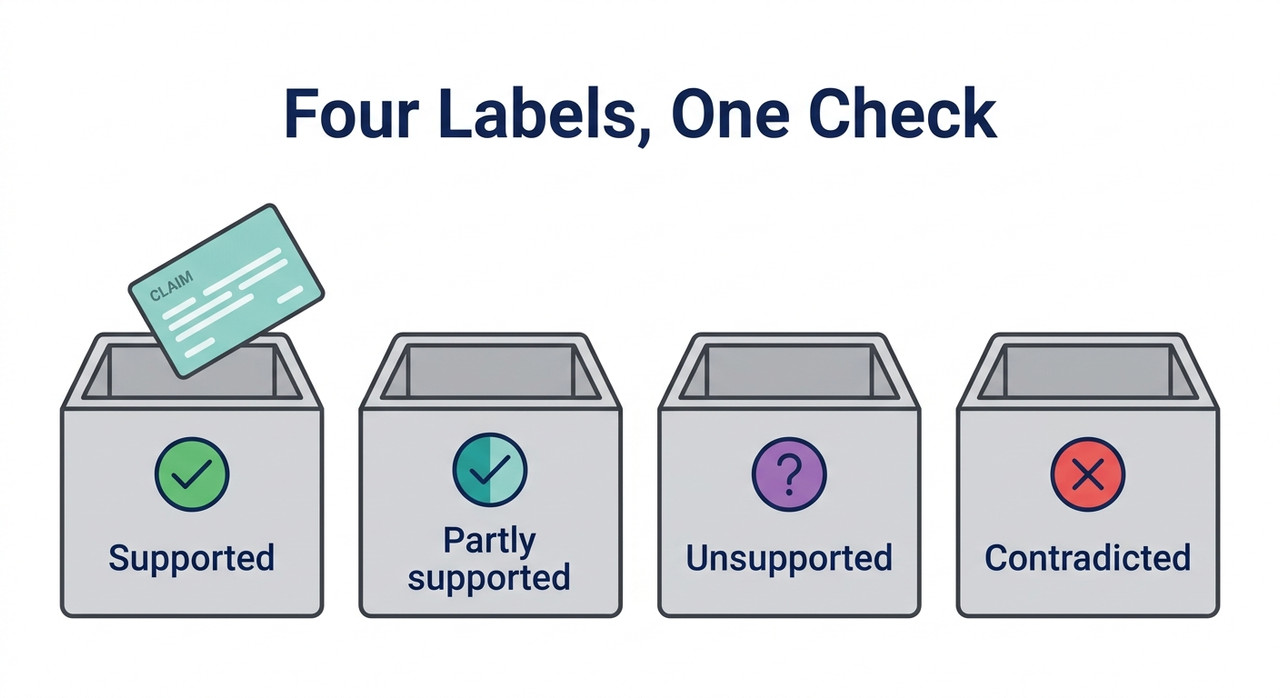
Give every claim one of four labels. Supported means the page states it explicitly. Partly supported means the page covers the same topic but the wording is stretched. Unsupported means the page does not say it. Contradicted means the page says something different.
Be strict. A “partly supported” claim is a warning that the answer has drifted from its source, even if the gist feels right.
Step 5 — Check Claims That Have No Citation
Look the other way too. An important claim with no citation, or a sentence with several claims and only one footnote, needs independent verification or should be dropped.
This is the recall side of the Stanford framework. arXiv A well-cited paragraph can still contain an uncited claim that carries the weight of your argument.
Step 6 — Verify Numbers and Quotes Character by Character
Compare each figure and quote with the page, not from memory. A paraphrase that shifts a number or changes the meaning of a quote is a common failure.
If the answer puts something in quotation marks, find those exact words on the page. If you cannot, do not present it as a quote. This is where hallucination most often hides: a plausible sentence that nobody wrote.
Step 7 — Don’t Use a Source Label as a Substitute for the Check
I repeat this because the habit is strong. A Government, Academic or Trusted label describes the site, not the sentence. Perplexity Help Center
Use it to decide which source to open first. Then do Steps 2 to 6 anyway.
Step 8 — Ask for the Supporting Sentence, Then Confirm It Exists
If a citation does not support a claim, ask Perplexity for the exact sentence from that source that supports it. This is my own technique, not a documented feature.
Then confirm that sentence is really on the page. Do not accept the quote on trust. If it is missing, you have found an unsupported claim, and you should treat the rest of that answer with more caution.
Step 9 — Confirm High-Stakes Claims With a Second Independent Source
For anything that drives a decision, a published figure, or a statement about a person, confirm it with a second independent source. A primary document is better still.
A claim that survives two independent sources is far less likely to be a quirk of one page, or of one answer.
Step 10 — Calculate Your Own Hit Rate
Check about 20 claims across several answers and divide the supported ones by the total. If 15 of 20 are supported, your hit rate is 75%.
That number is yours, for your topics and your questions. It is more useful than any published figure, because it tells you how much checking your own work needs. The Stanford paper’s 74.5% is only a rough reference point. arXiv
What Does a Claim Check Look Like?
Here is how the four labels translate into action. Use it as a quick reference while you work.
| Label | What it means | What to do |
|---|---|---|
| Supported | The page states the claim explicitly | Use it and cite the original page |
| Partly supported | Same topic, but the wording is stretched | Rewrite the claim to match what the page says |
| Unsupported | The page does not say it | Find another source or drop the claim |
| Contradicted | The page says something different | Correct it and note the error |
Below is an illustrative log of a short check. It is a made-up example showing the format I would keep, not a real transcript or a real error message.
Claim 1 "Report X found a 12% rise" SUPPORTED (page 4, para 2)

Claim 2 "driven mainly by demand" PARTLY (page says "partly")

Claim 3 "largest increase since 2010" UNSUPPORTED (not on page)

Claim 4 "quote: 'a turning point'" UNSUPPORTED (words not found)
(Illustrative example)
In this example, one claim is used as written, one is rewritten, and two are re-sourced or dropped. Out of four claims checked, one is fully supported. That is the kind of result that makes the habit worth keeping.
How Do You Check Citations Fast When You Are on a Deadline?
You rarely have time to check every sentence. Prioritize. Start with the claims that would hurt most if they were wrong: statistics, dates, names, legal or medical statements, and anything you plan to quote.
Check those first, then work down. A background sentence that is slightly loose usually costs you less than a wrong number in your headline.
Two shortcuts help. First, search the page for the key number before reading anything else, since a missing figure is the fastest sign of an unsupported claim. Second, if a page is blocked or behind a paywall and you cannot read it, treat the claim as unverified. Do not assume it is fine because the source sounds respectable.
The Tow Center found that tools can behave in surprising ways around paywalled content, which is one more reason you cannot infer what a system read from what it cited. Columbia Journalism Review
Bad vs. Good Way to Use Perplexity Citations
Here is the contrast I would want every reader to see. Both examples are illustrative composites, not real transcripts.
Bad: “Perplexity gave me a statistic with a next to it. The source had a respected name, so I pasted the figure into my report. Later I found the page never mentioned that number.”
Good: “For each key statistic, I opened the cited page, searched for the number, and read the paragraph around it. Two of eight claims weren’t actually stated on the page, so I dropped one and re-sourced the other from the original report.”
The difference is not distrust of the tool. It is treating the footnote as a lead to follow, not a conclusion.
For more guides on checking AI output, see our complete guide. The same verify-first habit applies across the tools it covers.
Frequently Asked Questions
Q1: Do Perplexity citations prove an answer is correct? A1: No. A citation shows where the system pointed, not that the page states the claim. Open the page and find the statement yourself. Perplexity Help Center
Q2: How often do citations fail to support a claim? A2: A 2023 Stanford-led audit of four generative search engines, including perplexity.ai, found that on average 74.5% of citations supported their sentence. That audit is old and may not reflect current Perplexity, so measure your own hit rate. arXiv
Q3: Does a Government, Academic or Trusted label mean the claim is right? A3: No. The labels describe the website, not each page or claim, so you still have to check the sentence. Perplexity Help Center
Q4: Is Perplexity Pro more reliable than the free version? A4: Not necessarily. In the Tow Center’s February 2025 test, Perplexity Pro answered more prompts correctly but gave confident wrong answers more often than the free version. That test measured article identification, not claim support. Columbia Journalism Review
Q5: What if the cited page is a republished copy? A5: Find the original publisher’s page and check the claim there. The Tow Center found that tools often cited syndicated copies instead of the original. Columbia Journalism Review
Q6: Can I just ask Perplexity to quote the source? A6: You can, but confirm the quoted sentence actually appears on the page. Don’t accept the quote on trust.
Q7: What should I do before publishing a Perplexity-sourced claim? A7: Label it supported, confirm it against a second independent or primary source, and cite the original page instead of Perplexity. arXiv
Leave a Reply