
Which AI Subscription Is Worth It for Daily Use (2026)
Which AI subscription is actually worth it for daily use in 2026 is a plan-matching decision: for most people, one plan at about $20 a month covers daily work, and the $100–$200 tiers pay off only if you regularly hit usage limits. For example, a writer who never hits a limit has little reason to buy Claude Max.
The fear behind the question “Which AI subscription is actually worth it for daily use in 2026” is rarely about the first month. It is about month six, when you notice you are paying for plans you barely open, or you hit a limit in the middle of a deadline. Prices, limits and perks keep shifting, so a choice that looked smart in spring can look wasteful by autumn.
I have spent 33 years in IT, and this problem has an old name there: shelfware. It is software you license, forget about and keep paying for. AI plans are the newest way to collect it, because each one is cheap enough to ignore.
This guide helps you pick one plan, check it against your real usage, and know when an upgrade is justified. I have not run a side-by-side test of every plan. What follows comes from the vendors’ own pricing pages and from independent reviews, and I label which is which.
Which AI Subscription Is Actually Worth It for Daily Use in 2026?
Quick Answer
For most daily users, one plan at about $20 a month is enough: ChatGPT Plus, Claude Pro, Google AI Pro or Perplexity Pro. Choose by your main job, such as writing, coding, Google apps or research. Move to the $100–$200 tiers only if you regularly hit usage limits.
Be clear about what supports that answer. The “one $20 plan” conclusion rests mostly on independent reviewers’ opinions, not on official data. Prices here are US list prices checked on October 21, 2026, and they can change.
The rest of this guide shows how to test the answer against your own usage. Two weeks of honest tracking beats any reviewer’s recommendation, including mine.
What Do the Main AI Plans Cost in 2026?
Here is the price ladder for the main assistants. The third column comes from each vendor’s own pricing page, so it describes what the vendor emphasizes, not how well it works.
| Plan | Monthly price (US) | What the official page highlights |
|---|---|---|
| ChatGPT Go | $8, may include ads | More messages, uploads and memory than Free OpenAI (official) |
| ChatGPT Plus | $20 | Projects, scheduled tasks, custom GPTs, deep research, Codex OpenAI (official) |
| ChatGPT Pro | From $100, 3 usage tiers | Everything in Plus, plus higher limits OpenAI (official) |
| Claude Pro | $20, or $17 a month billed annually | Claude Code, Research, Claude in Chrome and Microsoft 365 Anthropic (official) |
| Claude Max | $100 (5x) or $200 (20x) | More usage than Pro, plus $100–$200 a month in API credits Anthropic (official) |
| Google AI Plus | $4.99 | 2x Gemini access, 400 GB storage Google (official) |
| Google AI Pro | $19.99 | 4x access, 5 TB storage, Gemini in Gmail and Docs Google (official) |
| Google AI Ultra | $99.99 (5x) or $199.99 (20x) | Higher limits than Pro, plus more bundled perks Google (official) |
| Perplexity Pro | $17 a month billed annually | Deep research and a choice of models |
| Perplexity Max | $167 a month billed annually | Highest limits, maximum Computer usage |
Perplexity’s figures come from its own pricing page, which I did not use as a main source here. Check it directly before you decide. Third-party sites list its monthly prices at $20 for Pro and $200 for Max, but I did not confirm that on the vendor page.
Verify Prices on the Vendor Page Because Third-Party Lists Disagree
Do not copy a price from a roundup, including this one, without checking the vendor. Third-party lists conflict in places. One lists Google AI Plus at $9.99, while Google’s page shows $4.99.
Another lists ChatGPT Pro at $100, $200 or $500, while OpenAI’s page says only “from $100” with three usage tiers. Two of those three figures I could not confirm on an official page. The official ChatGPT and Google pages also hid their price numbers when I fetched them, so I took those figures from search snippets of the same pages.
Billing Rules Differ by Vendor
Annual billing can save real money, but not everywhere. Claude Pro costs $200 up front for the year, or $20 a month if billed monthly. That is $200 versus $240, a saving of $40. Anthropic (official)
OpenAI’s help center says ChatGPT Go, Plus and Pro have no annual or multi-month option. Claude Max is monthly only. So an annual discount is a reason to prefer Claude Pro or Perplexity Pro only if you are sure you will keep the plan all year.
Prices Move Mid-Year
Do not assume today’s ladder will hold. In May 2026, Google launched a $100 Ultra plan and cut its top tier from $250 to $200. Claude’s pricing page also says plans are subject to change. Anthropic (official)
That is one more reason to avoid long commitments you cannot cancel. A plan that is the best value in October may not be in January.
Why Do People Overpay or Pick the Wrong AI Plan?
Most overpaying comes from three habits. None of them is about choosing a bad product. They are about buying capacity you do not use, or the wrong kind of capacity.
Usage Limits Are the Real Price
The sticker price is only half the cost. The other half is what happens when you run out. Claude’s paid plans carry a rolling five-hour limit plus a weekly cap, and whichever you hit first stops you. Settings > Usage shows where you stand. Anthropic (official)
A cheap plan you keep exhausting costs more in lost time than it saves in money. A plan you never exhaust is the opposite problem: you are paying for headroom you do not need.
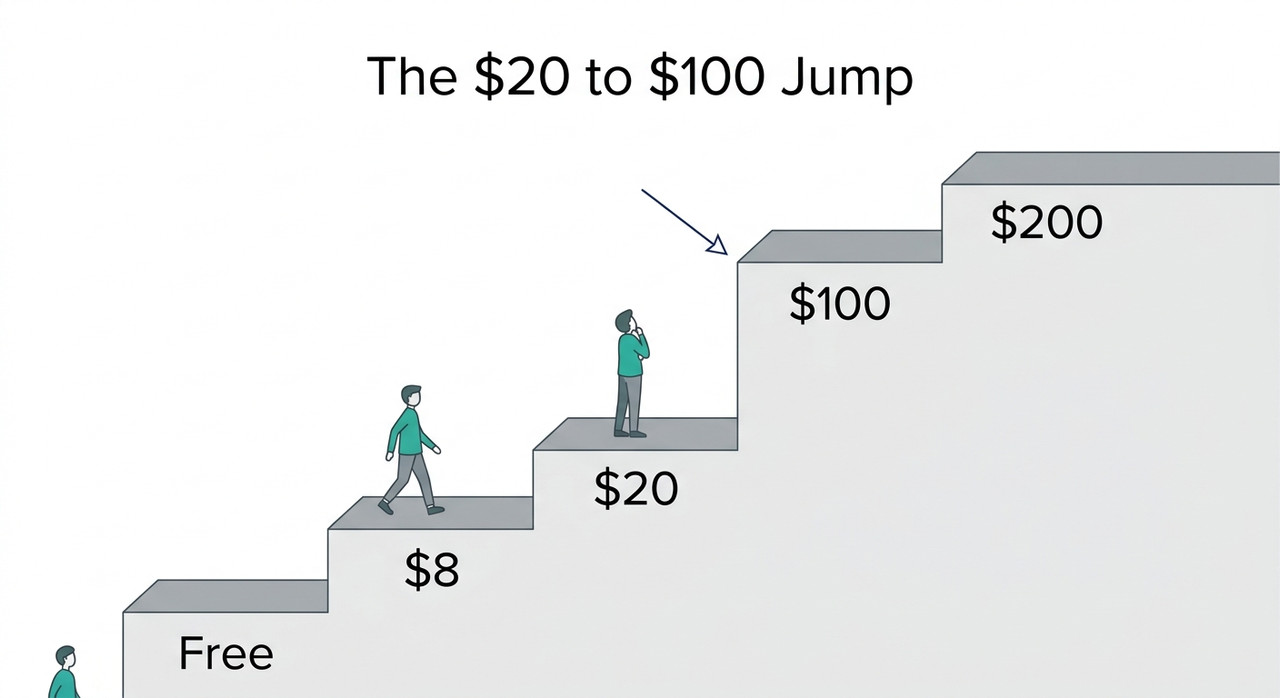
The Next Tier Up Costs About Five Times as Much
The jump from about $20 to $100 is the biggest one on the ladder. It is roughly five times the price for 5x usage on Claude Max and Google AI Ultra. ChatGPT Pro starts at $100. Google (official)
Five times the usage for five times the price is not a bargain. It is a way to buy capacity in bulk. It only makes sense if you would otherwise be blocked. One unrated measurement claims Claude Max 20x delivers about 9.7x Pro’s usage, not 20x. I would not rely on that without independent confirmation.
Stacking Subscriptions Creates Idle Spend
The third habit is subscription stacking. People sign up for several assistants because each has one feature they like, then use one daily and forget the rest. The arithmetic is worth seeing once.
| Spend | Per month | Per year |
|---|---|---|
| ChatGPT Go | $8 | $96 |
| One $20 plan | $20 | $240 |
| Four $20 plans | $80 | $960 |
| A $100 tier | $100 | $1,200 |
| A $200 tier | $200 | $2,400 |
These are straight multiplication of list prices, not measured usage. They show how a $100 tier costs five $20 plans’ worth every month, so the question is whether you would really use that much.
How Do You Decide Which AI Subscription Is Actually Worth It for Daily Use in 2026?
Here is the procedure I would follow. It is designed to make the decision with evidence from your own work, not from a reviewer’s. Steps 4 and 5 are my judgment, and I mark them as such.
Step 1 — List Your Daily Jobs
Before you compare plans, write down what you actually do. Use plain categories: writing, cited research, coding, Google Workspace work, images or video, and voice.
Then mark the one or two that take most of your time. That is the job your plan has to be good at. Everything else can be handled by a free tier.
Step 2 — Try the Free Tiers for a Week
Free plans are a cheap way to learn what you need. ChatGPT Free offers unlimited text chats with GPT-6, and Claude has a Free plan. OpenAI (official) Perplexity’s help center says its Free plan allows 3 Pro searches a day.
Use each free tier for your real work for a week. Note where you get blocked, and what you wished you could do. Those notes tell you which feature is worth paying for.
Step 3 — Pick One $20 Plan by Job
Now match one paid plan to your main job, using what the official pages say each plan includes. The table in the next section gives a starting point.
Resist the urge to pick two. One plan, used properly for two weeks, will tell you more than two plans used casually.
Step 4 — Track Every Limit You Hit for Two Weeks
Keep a simple note each time you are stopped by a limit, and how long you waited. Upgrade only if the hits are regular.
This threshold is my judgment, backed by reviewer opinion rather than data. If you hit a limit once a month, an upgrade is probably wasteful. If you hit it every day, you are already paying for the problem in lost time.
Step 5 — Compare the Price Jump Before Upgrading
If the notes justify an upgrade, weigh it honestly. Going from $20 to $100 is roughly five times the price for 5x usage on Claude Max and Google AI Ultra, and ChatGPT Pro starts at $100.
Ask whether you would really use five times as much. If your limit hits come at the end of a long project, a cheaper fix may be to spread the work across days.
Step 6 — Choose Annual or Monthly Billing Deliberately
Annual billing saves money only if you keep the plan. The Claude Pro example is $200 up front versus $240 monthly, a $40 saving. Anthropic (official)
For a plan you are still testing, I would pay monthly. For a plan you have used daily for three months, the annual discount is worth taking, where it exists.
Step 7 — Add a Second Plan Only to Close a Specific Gap
A second subscription needs a reason you can state in one sentence. Perplexity for cited research is a good example. “I might need it” is not.
If you cannot name the job the second plan does that the first cannot, you are stacking, not complementing.
Step 8 — Learn the Exit Rules Before You Subscribe
Know how to leave before you join. Claude downgrades take effect at the end of the billing period, and Anthropic advises cancelling at least 24 hours before renewal. Anthropic (official)
OpenAI’s help center says ChatGPT is billed monthly and can be cancelled anytime. Put the renewal date in your calendar so a forgotten plan does not roll over.
Step 9 — Re-Audit Every Quarter
Plans, prices and limits keep changing, so a choice has a shelf life. Set a calendar reminder every three months to review what you pay and what you use.
If a plan has not earned its place, cancel it. You can always re-subscribe, and prices may be lower or limits higher when you do.
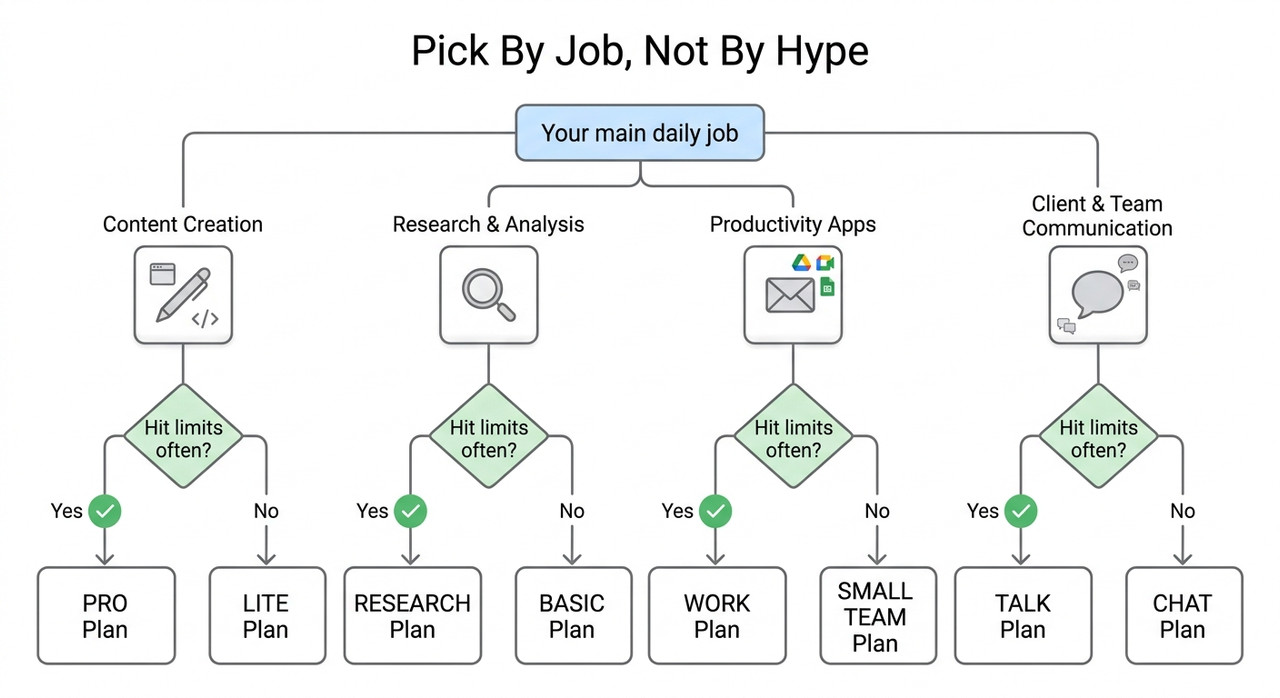
Which $20 Plan Fits Which Job?
Use this table as a starting point, not a verdict. It lists only features the official pages state. It does not rank the models by quality, because the sources I used do not measure that.
| Main daily job | Plan to try first |
|---|---|
| All-round chat with projects, scheduled tasks and custom GPTs | ChatGPT Plus OpenAI (official) |
| Writing and coding, with Claude Code included | Claude Pro Anthropic (official) |
| Life inside Gmail and Docs, with 5 TB of storage bundled | Google AI Pro Google (official) |
| Research-heavy work with deep research and model choice | Perplexity Pro |
Notice that the Google row is partly about storage and Workspace integration, not only about the assistant. If you already pay for extra Google storage, the bundled 5 TB may change the math.
What Do Independent Reviewers Say?
This section is opinion, and I want to keep it separate from the facts above. XDA Developers spent over $3,000 on ChatGPT, Claude and Gemini subscriptions and found ChatGPT Plus the easiest to recommend. It named Claude as its next pick for writing or coding.
Other roundups reach the same “one $20 plan usually covers it” conclusion, and some say the $100–$200 tiers are overkill for most people. These are unrated opinion pieces, not benchmarks. I use them as a sanity check, not as proof.
My own recommendation is a judgment too. If your work is mostly writing and coding, a $20 plan matched to that job is a sensible start. If you are unsure, the free-tier week in Step 2 is a better guide than anyone’s review.
Bad vs. Good Way to Choose an AI Subscription
Here is the contrast I would want every reader to see. Both examples are illustrative composites, not real transcripts.
Bad: “I subscribed to four assistants at once because each had one feature I liked. By month two I used one daily, never hit a limit on any, and paid for three that sat idle.”
Good: “I tracked every limit hit for two weeks, found my work was 80% writing and coding, kept one $20 plan matched to that, and added a second only when I needed cited research.”
The difference is not budget. It is whether the purchase was driven by features on a page or by notes from real use.
For more decision guides and AI tool fixes, see our complete guide. The same habit applies there: test first, then spend.
Frequently Asked Questions
Q1: Is one $20 AI plan enough for daily use? A1: For most people, independent reviewers say yes, but that is opinion, not official data. Check by tracking how often you hit usage limits over two weeks.
Q2: Which $20 plan should I start with? A2: Match it to your main job. ChatGPT Plus suits all-round chat, Claude Pro suits writing and coding, Google AI Pro suits Gmail and Docs users, and Perplexity Pro suits research. OpenAI (official)
Q3: When is a $100 or $200 tier worth it? A3: Only when you regularly hit limits on the $20 plan. The jump is roughly five times the price for 5x usage on Claude Max and Google Ultra, and ChatGPT Pro starts at $100. Anthropic (official)
Q4: Is annual billing worth it? A4: On Claude Pro it saves $40 a year ($200 up front versus $240 monthly). ChatGPT Go, Plus and Pro have no annual option, and Claude Max is monthly only. Anthropic (official)
Q5: Can I just use free plans? A5: Possibly for light use. ChatGPT Free offers unlimited text chats with GPT-6, Claude has a Free plan, and Perplexity Free allows 3 Pro searches a day, but free tiers have tighter limits. OpenAI (official)
Q6: Why do prices differ between websites? A6: Plans and prices change, and third-party lists lag or disagree. Always confirm on the vendor’s own pricing page before you subscribe. Google (official)
Q7: How do I cancel without losing access early? A7: Claude downgrades take effect at the end of the billing period, and cancelling at least 24 hours before renewal is advised. ChatGPT bills monthly and can be cancelled anytime. Anthropic (official)
Leave a Reply