
AI Music Video Tools: Choose for Better Lip Sync
How should I choose AI tools for a full music video with lip sync is a workflow-selection question: match singing quality, visual continuity, editing compatibility, and commercial permissions to your actual song before committing your budget. For example, audition fast lyrics, a held note, and a chorus, then assemble accepted performance shots and supporting scenes against the master track.
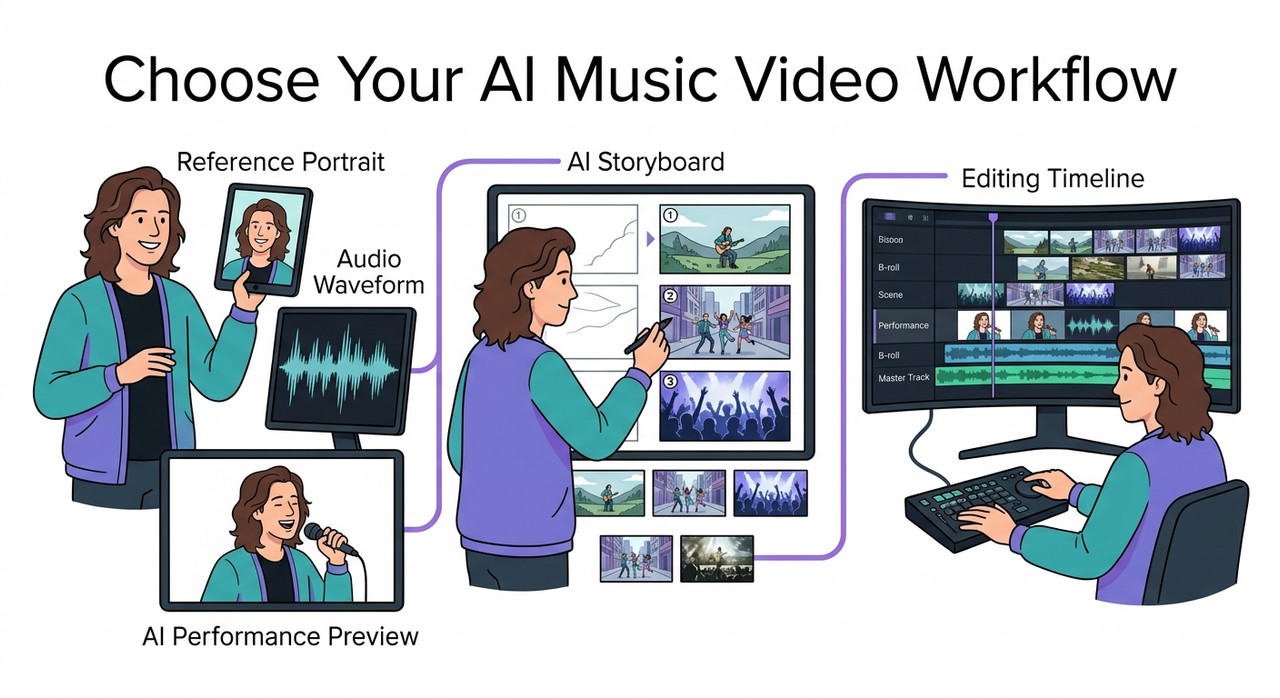
An impressive demo can make a subscription feel like the last step before release. Your own song may reveal problems the demo never showed: rushed consonants, changing faces, or a chorus that follows the backing singer.
I recommend making a small, representative sequence before funding the whole production. That gives you evidence about the work you actually need to finish.
Evidence note: This article draws on the supplied official documentation and source code. The audition below is a proposed practical test, not a completed hands-on comparison; no measured product results were supplied.
How should I choose AI tools for a full music video with lip sync?
Quick Answer
Choose AI tools by testing singing lip sync on your actual song, checking character consistency and commercial rights, and confirming that outputs fit your editing workflow. Audition fast lyrics, sustained notes, and a dense chorus before paying for full production. Select tools for performance shots, supporting visuals, and final assembly based on usable results.
Start by separating the production into three jobs: create the singing performance, produce supporting visuals, and assemble the finished edit. One platform may handle several jobs.
Audio-driven video generation turns an audio input and visual reference into a performance. Its suitability depends on whether it handles your singer’s phrasing and your intended framing.
Singing lip synchronization needs convincing mouth movements through sustained vowels, quick syllables, and pauses. A talking-avatar demonstration gives you limited evidence about those demands.
When musicians ask, “How should I choose AI tools for a full music video with lip sync?”, I recommend starting with the hardest passage. A tool that cannot handle your chorus may be unsuitable even if the verse looks excellent.
Hedra’s music-video documentation describes planning, shot creation, continuity, and editing. That supports evaluating the complete production process rather than treating generation as the finished deliverable. Hedra Documentation
Why does AI lip sync fail on a full music video?
A full song combines several challenges. The vocal changes, the camera may move, and the performer must remain recognizable across different scenes.
The useful question is where the failure begins: inside the generated performance, between independently generated shots, or after editing.
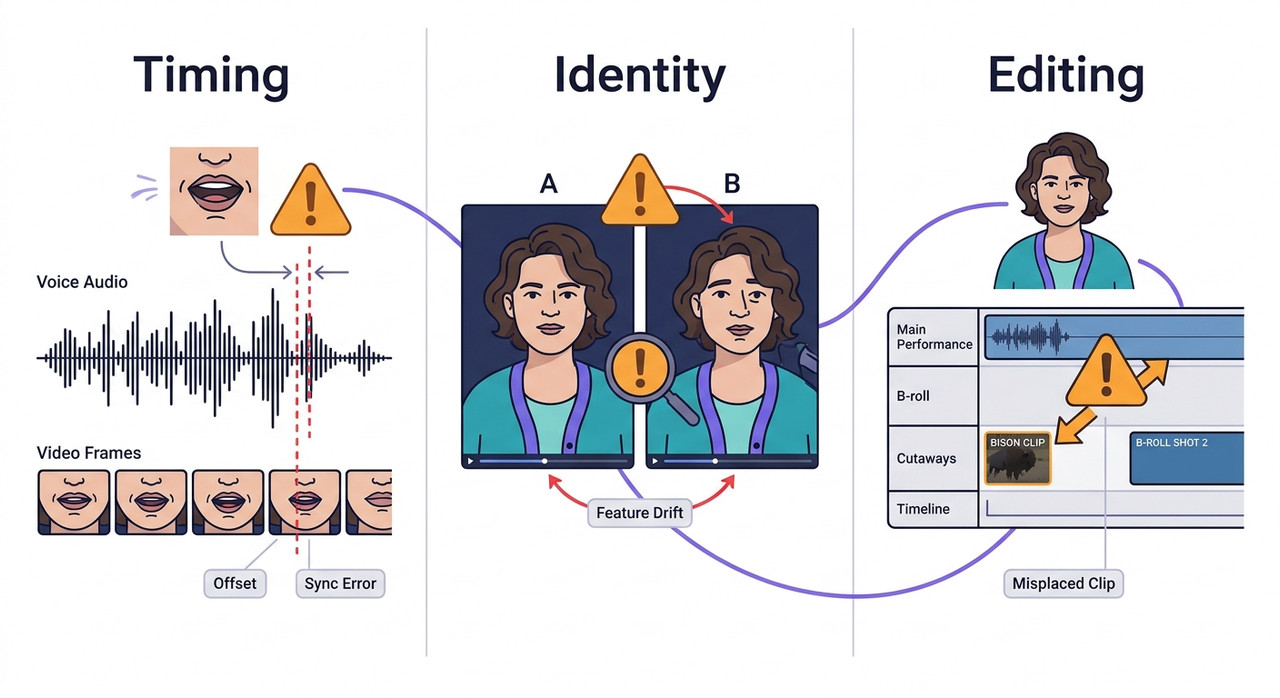
| Observed symptom | Possible cause | First diagnostic check |
|---|---|---|
| Speech looks convincing, but singing does not | Poor fit for the song’s vocal demands | Test rapid lyrics and sustained vowels |
| Mouth appears to follow another singer | Overlapping vocals or ambiguous audio | Compare the mix with an aligned lead-vocal stem |
| Processing stops around a particular frame | Missing or obscured face | Inspect the failing frame |
| Performer changes between shots | Reference inconsistency or generation variability | Compare reference, wardrobe, and framing |
| Timing deteriorates after assembly | Placement, retiming, or export issue | Compare source, timeline, and export |
These are diagnostic possibilities. An unusual mouth shape does not prove the audio is wrong, and a failed render does not automatically mean the model is unsuitable.
Singing quality and timeline timing are different problems
Phoneme–viseme alignment means matching vocal sounds to visible mouth shapes. A clip can start at exactly the right timestamp while showing an unconvincing mouth shape for a vowel.
Conversely, a convincing generated performance can look wrong when placed slightly early or late in the edit.
For “How should I choose AI tools for a full music video with lip sync?”, this distinction changes the remedy. Mouth-shape failures require generation evaluation; placement errors require timeline correction.
Audio clarity, face visibility, and continuity affect different stages
Vocal stem isolation can help identify whether overlapping voices are confusing the performance. However, separation can introduce artifacts, so an isolated vocal is a comparison input rather than a guaranteed improvement.
Face detection matters particularly in workflows that process existing footage. A face that disappears, becomes obscured, or turns away may interrupt processing.
Character identity consistency is a separate concern. Good lip sync in one shot does not establish that the next shot will preserve the same face, hairstyle, and proportions.
I would record these failures separately. Otherwise, a vague judgment such as “the tool looks bad” makes it difficult to choose the next useful test.
How should I choose AI tools for a full music video with lip sync before subscribing?
Use a staged audition. First eliminate tools that cannot meet your requirements, then compare the remaining candidates with the same material.
The following process turns a broad tool-shopping question into a repeatable production decision.
1. Write down your delivery requirements
Before comparing products, define the finished video. A vertical social cut and a landscape release video may need different framing, output options, and shot planning.
Record:
- Full song duration and intended video length.
- Delivery aspect ratio and minimum resolution.
- Number of visible singers.
- Available portrait images or recorded performances.
- Master audio and available vocal stems.
- Budget, deadline, and commercial-release requirements.
Decide how much of the video actually needs a visible singing mouth. A narrative-led video may require only selected performance sections.
“How should I choose AI tools for a full music video with lip sync?” becomes easier when the deliverable is specific. You can reject an unsuitable input format or export limitation before spending on generations.
Keep the requirements short enough to use during every comparison. They are your acceptance checklist, not a speculative list of everything a platform could offer.
2. Match each tool to the assets you already have
A portrait-led workflow starts from different material than a filmed performance. Confirm the supported inputs before evaluating output quality.
| Your starting material | Capability to evaluate | Main acceptance question |
|---|---|---|
| Artist portrait and song | Image-and-audio character generation | Does this reference produce convincing singing? |
| Recorded performance and replacement audio | Video-input lip-sync processing | Does processing preserve the intended performance? |
| Narrative concept and visual references | Supporting-shot generation | Do scenes maintain the intended visual style? |
| Accepted clips and mastered song | Timeline editing and export | Can you assemble and deliver accurate timing? |
Reference image conditioning uses a visual reference to guide generation. Its presence does not guarantee an unchanged identity across every pose or camera angle.
I would test the intended framing early. A successful front-facing close-up provides limited evidence for a wide shot with head movement.
You may already own an editor that handles assembly. Include existing software when comparing the cost of the complete workflow.
3. Verify singing support and commercial terms
Look for an explicit statement about singing, then validate it with your song. Marketing examples can help establish intended capability, but they cannot predict your acceptance rate.
The supplied Hedra Character 3 page describes talking and singing, required audio input, a maximum duration of 10 minutes, and 540p, 720p, and 1080p options. Confirm current availability for the model and account you intend to use. Hedra Character 3
Those specifications make it a candidate for evaluation. They do not establish that a continuous full-song generation will meet your creative standard.
When answering “How should I choose AI tools for a full music video with lip sync?”, I treat commercial usage rights as an early selection requirement.
The official Wav2Lip repository restricts its open-source results to research, academic, or personal use and prohibits commercial use under its stated terms. Assess any separately licensed offering under its own terms. Official Wav2Lip Repository
Also check watermark removal, export access, and permissions for your music and likeness inputs. A technically successful audition can still be unsuitable for the planned release.
4. Audition three 10–15-second song passages
Use the test scenario proposed in the research brief: rapid lyrics, a sustained note, and a dense chorus. These passages expose different weaknesses without requiring a full-song purchase decision.
Run the audition in this order:
- Select a passage with quick consonants and tightly spaced syllables.
- Select a passage with a clearly held vowel.
- Select a chorus with the song’s typical vocal layering.
- Use the same performer reference and comparable output settings.
- Review each result at normal playback speed.
- Compare a vocal stem with the full mix where supported.
Preserve the original timing when preparing stems. Removing leading silence from one input can make the comparison misleading.
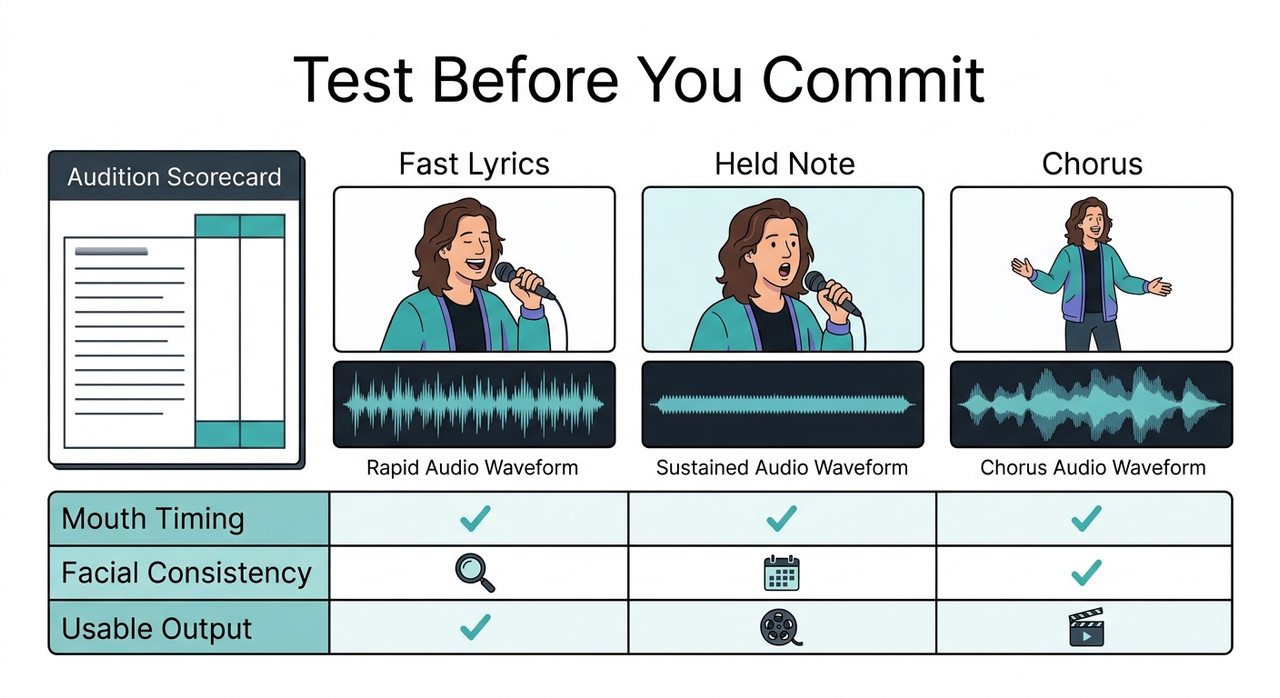
“How should I choose AI tools for a full music video with lip sync?” should lead to an audition using your actual release material. A convenient sample song may avoid the very difficulty you need to solve.
Check natural mouth closure around “m,” “b,” and “p,” sustained vowel shapes, and whether the face stays stable. Use slow playback to inspect a problem after judging the normal-speed viewing experience.
5. Measure cost per accepted second
A low generation price can become expensive when most outputs need replacement. I recommend tracking usable footage alongside spend.
Cost per accepted second = total audition spend ÷ accepted output duration in seconds.
This is a proposed editorial comparison method, not a published benchmark. Include failed generations and rerolls in the spend attributed to the audition.
Define acceptance before comparing candidates:
- Mouth timing looks convincing at normal playback.
- The performer remains recognizable.
- No visible artifact requires replacing the selected portion.
- Resolution and framing meet the delivery requirement.
- The footage fits the intended shot.
If only part of a clip passes, count only that usable portion. If nothing passes, record “no usable output”; the cost per accepted second is undefined.
For “How should I choose AI tools for a full music video with lip sync?”, this metric connects purchase price to production value. Track editing time separately, because cheap footage may require substantial repair.
6. Generate a representative shot sequence
After the singing audition, test whether the accepted tool can support a sequence. An isolated close-up cannot show whether your planned cuts feel coherent.
Generate:
- A performance close-up.
- A wider performance shot.
- A narrative or instrumental cutaway.
Reuse the performer reference and wardrobe description. Compare facial appearance, hair, clothing, lighting, and the visual relationship between shots.
Shot segmentation means dividing production into planned sections. It makes replacement and creative review more manageable, although shorter shots do not automatically improve model accuracy.
“How should I choose AI tools for a full music video with lip sync?” also means choosing a process you can revise. Replacing one weak chorus shot is easier to manage when it is clearly separated from accepted material.
Use cutaways where they serve the music and story. If you require uninterrupted visible singing, make that requirement part of the audition rather than assuming editing will solve it.
7. Fix the observed failure before regenerating
Repeatedly generating the same input without changing anything can consume the budget without explaining the failure. First identify the stage where the problem appears.
For audio–video synchronization, compare the original generated clip with its placement in the editor. If the source is correct, inspect timeline offsets and unintended speed changes.
For identity changes, compare references and shot instructions. Simplify a difficult camera angle or movement before expanding the scene again.
For face-processing failures, inspect whether the required face remains visible throughout the input.
Documented Wav2Lip exception
The supplied research identifies this exact exception in Wav2Lip’s official source code:
Face not detected! Ensure the video contains a face in all the frames.This is documented exception text, not a reproduced test log. No execution record was provided.
The source identifies temp/faulty_frame.jpg as a diagnostic image. Inspect that frame to see what the detector encountered. Official Wav2Lip Repository
The README also discusses adjusting face padding to include the chin and trying --nosmooth for certain mouth-placement artifacts. These are targeted Wav2Lip diagnostics, not universal settings for other tools.
“How should I choose AI tools for a full music video with lip sync?” includes asking how easily failures can be investigated. Clear diagnostics make it easier to distinguish an input issue from a poor capability match.
8. Review the full export against the master track
Place every performance shot at its corresponding song timestamp. If generation used an isolated vocal, restore the full mastered song for the final soundtrack.
Review the exported file, not only the editor preview:
- Check synchronization at the beginning, middle, and end.
- Inspect every transition into a visible singing shot.
- Confirm there are no unintended speed changes.
- Review identity and wardrobe continuity.
- Confirm resolution, aspect ratio, and watermark requirements.
- Recheck the applicable permissions before release.
A correct opening does not establish correct timing throughout the export. Compare any failing section against its source clip to locate where the change occurred.
Hedra’s music-video guide includes planning, continuity, and editing within the production process. Final assembly deserves its own acceptance check. Hedra Documentation
For broader diagnostic habits beyond this workflow, see the complete guide.
Which workflow fits the assets I already have?
Choose the simplest process that satisfies your delivery requirements. Additional tools should solve an observed need.
| Available assets or priority | Workflow to evaluate | Decisive check |
|---|---|---|
| Artist portrait and finished song | Audio-driven singing generation plus editing | Singing quality and identity stability |
| Recorded artist performance | Video-input lip-sync processing plus editing | Face visibility and preservation of performance |
| Primarily narrative concept | Supporting visuals with selected singing shots | Visual continuity and strong performance inserts |
| Commercial release | Tools with applicable commercial permissions | Terms for the exact model, plan, and inputs |
| Small production budget | Limited auditions before batch generation | Usable footage and editing effort |
“How should I choose AI tools for a full music video with lip sync?” does not have one product answer for every musician. Existing assets can make one workflow substantially more practical than another.
I would preserve a strong recorded performance when the project calls for it. Evaluate whether processing retains the expression and movement that made the footage valuable.
For a fictional character, test identity across the planned shot range. A close-up, medium shot, and wider performance reveal more than repeated versions of the same portrait animation.
Bad example: Buy after watching a talking-avatar demo, upload the whole song, and assume the result will be ready for release.
Good example: Test the actual singer reference and song, verify permissions, create a representative sequence, and expand only after reviewing usable footage.
How should I choose AI tools for a full music video with lip sync on a tight budget?
Limit the number of candidates and keep the audition consistent. Otherwise, you can spend the budget comparing settings without reaching a production decision.
Start with hard exclusions: unsupported inputs, unsuitable commercial terms, missing export requirements, or no credible singing capability.
Then compare the remaining candidates using your three passages. Record why footage failed so the next attempt tests a specific correction.
A simple audition sheet can contain:
- Tool and selected model.
- Passage and input audio type.
- Reference image or source footage.
- Accepted duration.
- Generation spend and rerolls.
- Main failure and editing time.
Do not assign invented scores to make the comparison look scientific. Descriptions such as “chorus mouth follows backing vocal” are often more useful than an unexplained numerical rating.
“How should I choose AI tools for a full music video with lip sync?” becomes a spending decision only after capability is established. A cheap subscription has little value if none of its output fits your video.
Frequently Asked Questions
Can one AI tool create a full music video with lip sync?
Some platforms combine character generation, supporting visuals, and editing functions. However, full-length generation support does not guarantee accurate singing or continuity throughout a song.
Test the complete process, including export. I would rely on one platform only after its performance shots, supporting scenes, and assembly meet the same requirements used to evaluate a multi-tool workflow.
Should I upload the full song or an isolated vocal stem?
Compare both where the tool supports them. An aligned lead-vocal stem may clarify which singer should drive the mouth, especially when the mix contains overlapping voices.
Separation artifacts can also reduce quality. Preserve matching timestamps and use the mastered song in the finished edit, regardless of which audio input produced the better generation.
How can I check whether a tool handles singing rather than just speech?
Test rapid lyrics, sustained vowels, and a dense chorus from your own track. Review mouth timing, facial stability, and whether the intended singer appears to drive the performance.
“How should I choose AI tools for a full music video with lip sync?” requires song-specific evidence. A spoken-avatar demonstration does not establish performance on your melody, phrasing, or vocal arrangement.
Can I use the official open-source Wav2Lip release commercially?
The supplied official repository states that its open-source results are restricted to research, academic, or personal use and prohibits commercial use under those terms. Official Wav2Lip Repository
Do not assume that a separately offered commercial service has identical terms. Check the permission that applies to the exact software, service, and output you intend to use.
Why does lip sync drift after I edit the clips?
Possible causes include incorrect placement, mismatched source timing, unintended speed changes, or timing interpretation during export. Compare the generated source, the editing timeline, and the exported file.
A constant offset suggests a different investigation from a mismatch that grows over time. Establish where the timing changes before paying to regenerate otherwise acceptable footage.
What is the most useful budget metric when comparing tools?
Use cost per accepted second: total audition spend divided by usable output seconds. Include failed attempts and rerolls, and record editing effort separately.
This proposed method measures your observed production cost. If no footage passes, report “no usable output” and investigate the failure before expanding the production.
What should I do first if I still cannot choose?
Return to your hardest song passage and your release requirements. Eliminate candidates that fail permissions, inputs, or exports, then compare the remaining tools on the same performance material.
For “How should I choose AI tools for a full music video with lip sync?”, the most useful next action is a small audition you can inspect. Choose the workflow that produces acceptable footage you can consistently assemble and deliver.
Leave a Reply