
Transparency Note: This article may contain affiliate links. If you make a purchase through these links, we may earn a commission at no extra cost to you.
Gauth AI Review: Is This Homework Helper Your Best Study Buddy or a Cheating Trap?
It’s 11:00 PM. You are staring at a deadline, totally stuck on a physics problem that might as well be written in alien hieroglyphics. Your textbook is confusing, your teacher is asleep, and panic is setting in. Then, a friend on TikTok says, “Just use gauth ai.” It sounds like a lifesaver, but you pause—is it actually accurate, safe to use, or just another way to get in trouble?
[TOC]
You aren’t alone in this dilemma. Thousands of students are turning to AI helpers to survive the academic grind, but distinguishing between a helpful tool and a “cheating trap” is harder than it looks. In this guide, we’re tearing down the marketing fluff to see if this app is worth your storage space.

The Real Problem Gauth AI Claims to Solve
Let’s be real: the core pain here isn’t just “hard math.” It’s time pressure. Students today are juggling packed schedules, sports, and social lives, often leaving them with zero bandwidth to decode complex equations late at night. You want an instant, camera-based solution because watching a 45-minute video lecture just to solve one problem feels impossible.
There is also a massive emotional component. No one wants to be the student who falls behind or is labeled “bad at math.” There is a genuine fear of wasting money on an app that promises the world but delivers wrong answers, or worse, using a tool that gets you flagged for academic dishonesty. Gauth AI positions itself as the bridge over that gap.
Why Traditional Study Methods Feel Too Slow
Why not just email your teacher or hire a tutor? Because at midnight before an assignment is due, those aren’t options. Traditional help—like booking a human tutor—is often too slow for modern deadlines and too expensive for student budgets.
Tools like Gauth AI match modern habits: they are mobile-first, instant, and cover multiple subjects. It’s the difference between waiting days for a reply and getting an answer in seconds.
What Gauth AI Actually Is (and How It Works)
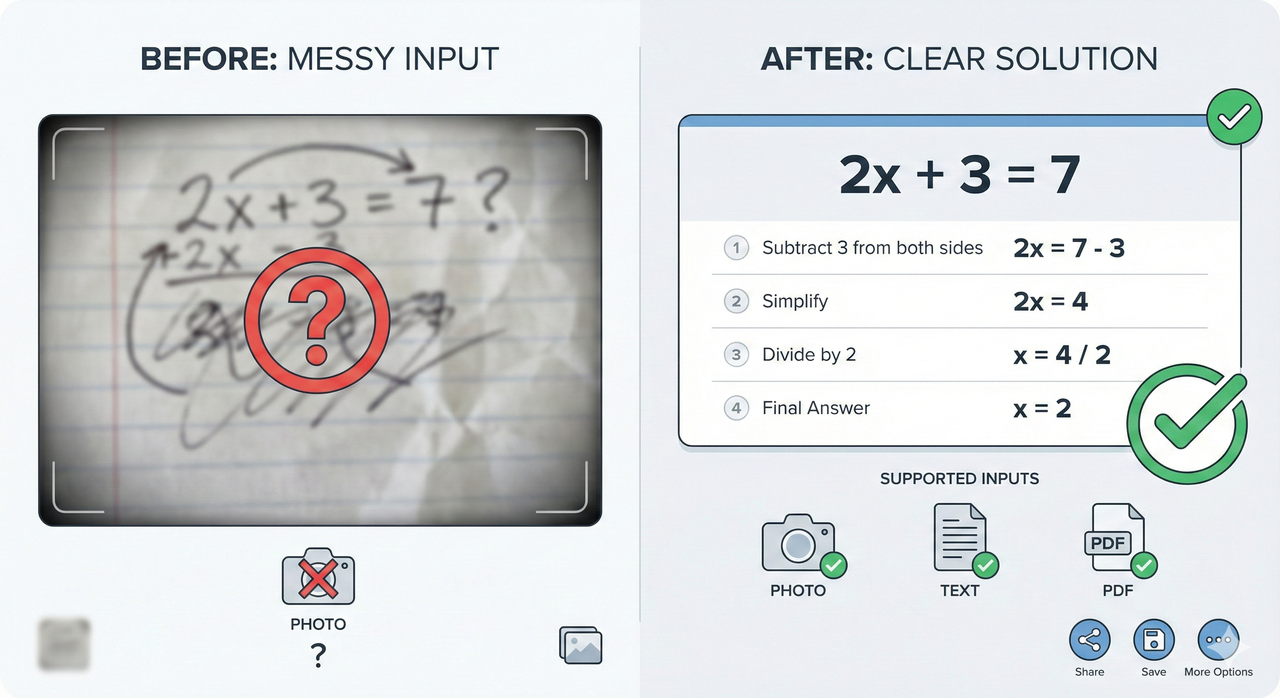
So, what is under the hood? Gauth AI (formerly Gauthmath) is an AI-powered homework helper and study companion designed to unblock you instantly. It allows you to send a photo, type a question, or upload a full PDF to get step-by-step solutions across a wide range of subjects.
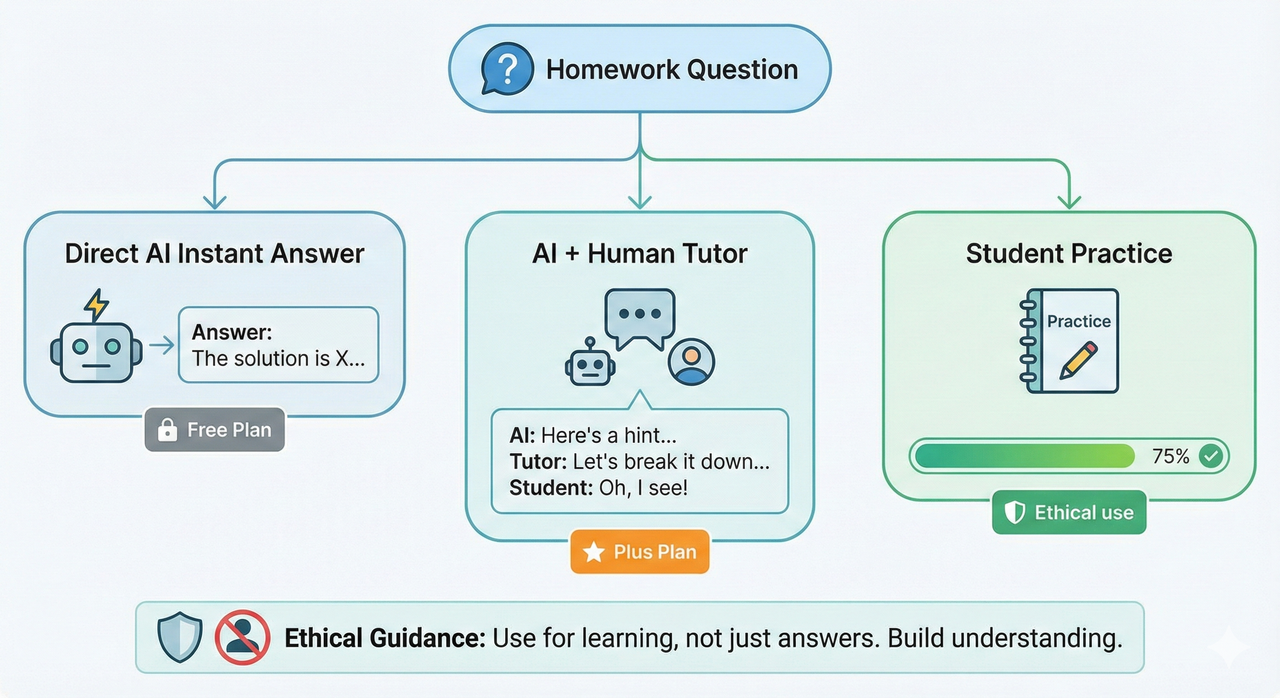
Unlike basic calculators, it operates on a hybrid model. The AI engine handles the vast majority of standard questions instantly. However, for paid plans, there is a “safety net”—if the AI struggles, hard questions can be routed to real human experts available 24/7 within the same interface.
Core Features at a Glance
- Multi-Format Input: Whether it’s a blurry photo of a textbook, a typed word problem, or a PDF worksheet, the app ingests it.
- Instant Worked Solutions: You don’t just get the answer (e.g., “x=5”); you get the “work”—the steps showing how it got there.
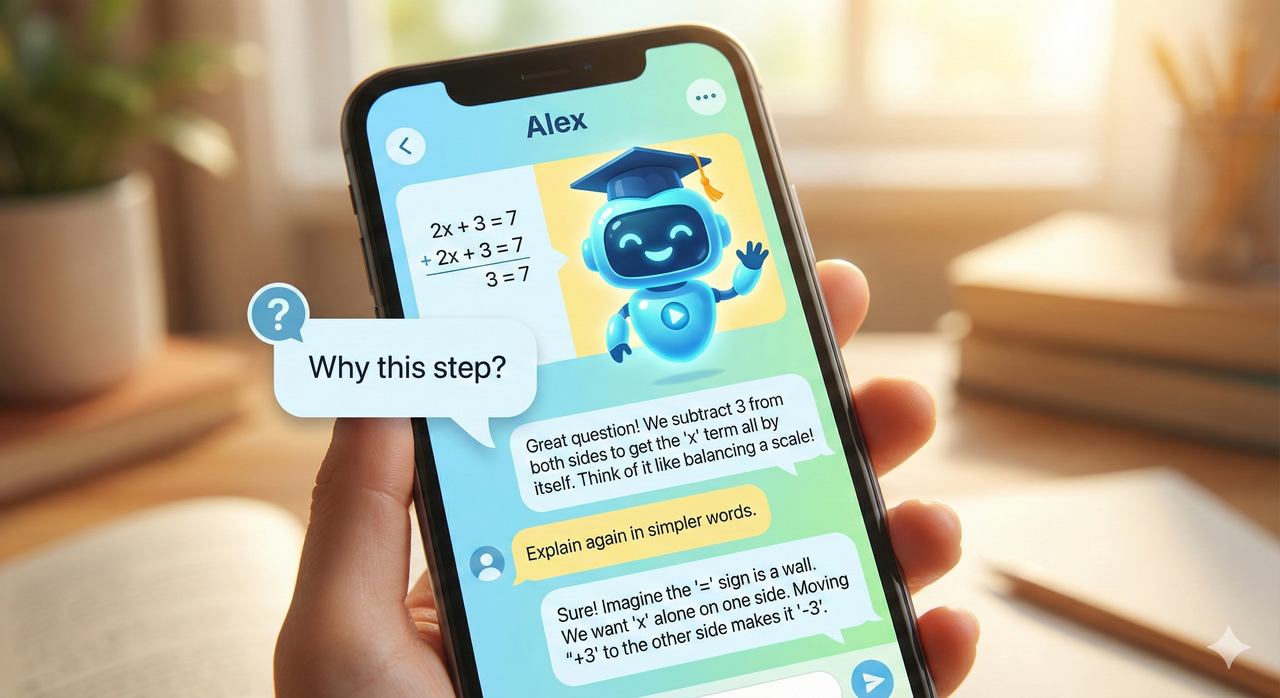
- Follow-Up Chat: If step 3 makes no sense, you can chat with the AI to ask, “Why did you divide by 2 here?”
- Premium Add-ons: Higher tiers include human tutor access, study planners, focus modes, and a “Super” AI mode that prioritizes deep reasoning over speed.
Platforms and Availability
Accessibility is key for students. Gauth AI is available on iOS and Android, meaning it lives in your pocket. There is also a Chrome extension and a web version, so you can seamlessly switch to your laptop when writing papers or doing heavy research.
Note on Privacy: As with any AI tool, signing up involves data collection. Be mindful that the app collects user content (the problems you upload) and identifiers. Always use a secondary email if you are privacy-conscious.
Pricing, Free Limits, and What You Really Get
This is where many students get frustrated. Gauth AI operates on a “freemium” model.
- The Free Tier: You get a limited “daily quota” of questions (often around 11/day, though this changes). You will likely see ads, and the response speed might be standard.
- The Plus/Pro Subscription: This unlocks unlimited solves, faster processing, and access to the “Super” AI and human tutors.
Pricing typically hovers around $11.99 USD per month, with discounts for quarterly or yearly commitments. While reasonable compared to a private tutor ($50/hour), it’s a sting if you forget to cancel after the free trial. Pro Tip: Always check the renewal date immediately after signing up for a trial.
Is the Free Version Enough for You?
If you just hit a roadblock once or twice a week on a tough algebra problem, the free version is perfectly adequate. However, if you are taking AP Calculus or a heavy physics load and need constant verification for hours of homework, the daily limits will wall you off quickly, pushing you toward a subscription.
How Accurate Is Gauth AI? (Honest Benchmarking)
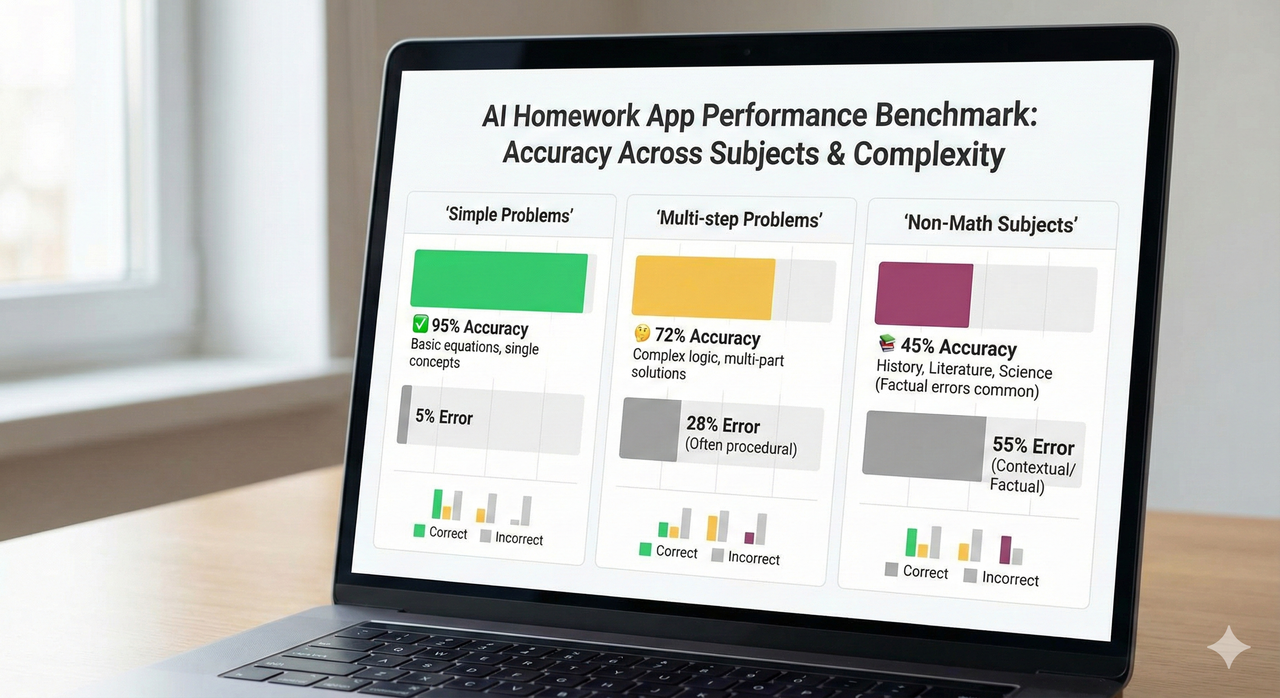
We need to be honest here: AI is not magic. Gauth AI is incredibly fast and generally accurate on straightforward math and standard textbook-style questions. If you feed it a quadratic equation or a standard chemistry balancing problem, it shines.
However, benchmarks show it can be “hallucinatory.” On complex, multi-step word problems, niche proofs, or high-level university logic questions, it can confidently give you the wrong answer. Reviews frequently mention frustration with “made-up” math rules when the AI gets confused.
Performance by Problem Type
- Simple & Standard (High Accuracy): Algebra, basic Calculus, Geometry, balancing chemical equations.
- Multi-step & Proofs (Mixed Accuracy): If the problem requires 15 steps of logical derivation, verify every line. The AI might drop a negative sign or invent a theorem.
- Non-Math (Variable): For writing or social studies, it provides good summaries but lacks the nuance of a human writer.
The Golden Rule: Always do a “sanity check.” Compare the AI’s first step with your notes. If it starts with a formula you’ve never seen in class, pause.
Gauth AI vs. Cheating – Where Is the Line?
This is the controversy that scares teachers. A tool that can “scan your homework, get the answer” is obviously capable of being a cheating device. If you use Gauth AI to copy answers onto a worksheet you hand in, you aren’t learning—you are transcribing.
But the app itself isn’t “cheating”; your intent is. The ethical line is simple: Are you using it to understand the method, or just to get the result?
Safe, Teacher-Friendly Ways to Use Gauth-Style Tools
- Green Zone (Safe): Checking your own attempt after you finish, asking the AI to explain a concept (“Explain Pythagorean theorem simply”), or generating extra practice problems.
- Red Zone (Danger): Scanning a take-home test, copying answers blindly, or using it during an exam.
Step-by-Step: How to Use Gauth AI Without Getting Burned
Don’t let the tool make you lazy. Use this workflow to actually boost your grades:
- Attempt First: Try the problem on paper for at least 5 minutes.
- Snap & Solve: Scan it with Gauth AI.
- Audit the Steps: Don’t just look at the final number. Read the step-by-step breakdown.
- Reproduce: Close the app and try to solve the problem again in your notebook. If you can’t do it without the screen, you haven’t learned it yet.
Example Prompts That Turn Gauth-Style AI into a Tutor
- Bad Prompt: “Solve
5x^2 - 3x + 7 = 0.” (This just gives you a fish). - Good Prompt: “I am a 10th-grade student. Solve
5x^2 - 3x + 7 = 0step-by-step. Explain the quadratic formula parts you are using and tell me why we can’t use factoring here.” (This teaches you how to fish).
Who Should (and Should Not) Use Gauth AI?
You should use this if:
- You are a high school or college student in STEM courses.
- You genuinely want to learn but get stuck on specific steps.
- You need help at odd hours when teachers aren’t available.
You should NOT use this if:
- You are looking for a “do my homework” button.
- Your school has a zero-tolerance policy for AI tools (check your syllabus!).
- You rely on it so much you can’t solve a simple problem without your phone.
Alternatives and Complementary Tools
Smart students don’t rely on one source. Combine Gauth AI with WolframAlpha (for raw computation reliability) or Khan Academy (for deep concept videos). Use the AI for the “quick fix” and the others for the “deep dive.”
Verdict – Is Gauth AI Worth It for You?
Gauth AI offers huge convenience. It is a powerful pocket tutor that can save you from hours of frustration. However, it requires discipline. If you use it to bypass the struggle of learning, it will hurt your test scores in the long run.
- Light Homework Load: Stick to the Free Tier as a backup.
- Heavy STEM Load: The Plus Subscription is worth the investment for the speed and human tutor backup—if you use it responsibly.
- Just want to cheat? Skip it. You’ll eventually get caught or fail the final exam.
Leave a Reply