
Claude Code Parallel Instances Workflow Fix (2026)
You’ve seen developers ship 10 features overnight with parallel Claude agents. You tried it. Two agents. Same branch. Chaos. I’ve been in IT for 33 years, and I’ll tell you straight — this problem isn’t about intelligence. It’s about isolation architecture. This guide fixes the Claude Code parallel instances workflow so your agents stop stomping on each other and start shipping.
Definition: The Claude Code parallel instances workflow is the practice of running multiple independent Claude Code agents simultaneously, each isolated in its own
git worktreeand branch, to build multiple features in parallel without file conflicts or context bleed. For example, one agent refactors authentication while another builds the payment API — both running overnight, both producing separate, mergeable PRs by morning.
Quick Answer — How Do You Run a Claude Code Parallel Instances Workflow Without Conflicts?
Run each Claude Code instance in a separate git worktree on its own branch. Assign each agent a task with zero file overlap. Add behavioral guardrails in a shared CLAUDE.md. Launch each session via a tmux session. The result: agents work in full isolation and produce independent, mergeable PRs — without race conditions or burned credits.
Why Does the Claude Code Parallel Instances Workflow Break? (Root Cause)
Most developers hit the same wall: they open two terminal tabs, cd into the same project folder, launch two Claude instances, and watch everything catch fire within minutes. I’ve seen this pattern dozens of times. The failure is not random — it is entirely predictable. You can read the complete troubleshooting framework in the complete guide at AIQnAHub Troubleshoot.
The Real Culprit Is Shared Filesystem State
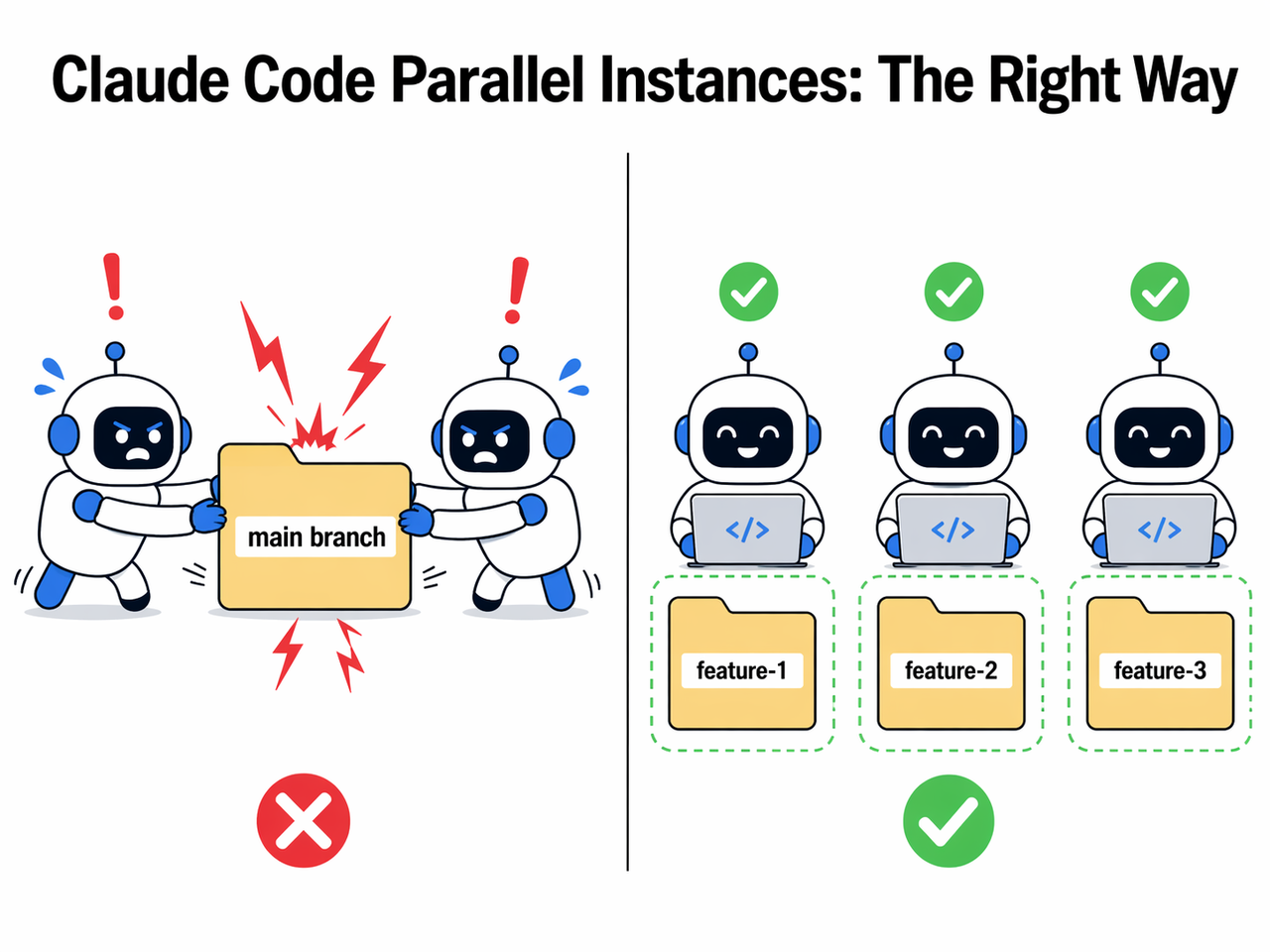
When two Claude instances share the same working directory and branch, both are reading and writing the same physical files at the same time. Shared filesystem state is the root cause — not Claude’s intelligence, not your prompt quality, not your hardware.
Agent-2 edits a shared import file. Agent-1 is mid-compile using that same import. Agent-1’s build explodes. Agent-1 — seeing an error it didn’t cause — attempts to fix it, potentially overwriting Agent-2’s in-progress work. A cascading failure loop begins.
Here is the exact error pattern reported verbatim by the community: Reddit r/ClaudeCode
Build error in src/components/Header.tsx — module not found
[Agent retrying build... attempt 2/3]
[Agent retrying build... attempt 3/3]
ERROR: Failed to resolve dependency — aborting task
Root cause: Agent-2 edited a shared import file mid-build while Agent-1 was compiling. Neither agent created this problem. Neither agent can correctly fix it. Both agents are now burning your API credits on a problem that isolation would have made physically impossible.
Context Bleed Makes It Worse
Context bleed is the second failure mode, and it’s subtler. Without branch isolation, agents can read each other’s partial file writes and incorporate that inconsistent state into their next action. The agent isn’t hallucinating — it’s reading genuinely corrupted mid-write data and making decisions accordingly.
In my experience, context bleed is harder to debug than outright build failures because the agent appears to be making logical choices. The actual cause — a half-written file from a sibling agent — is invisible unless you know to look for it.
Step-by-Step Fix — Isolating the Claude Code Parallel Instances Workflow
Here’s the exact protocol I now use. It takes about 10 minutes to set up the first time, and after that it becomes muscle memory. The architecture is borrowed from distributed systems thinking: shared-nothing, isolated execution, coordinator-based merge. You don’t need a PhD in distributed systems — you just need to follow these steps in order.
Step 1 — Scope Tasks With Zero File Overlap
Before you touch a terminal, decompose your project into discrete task slices. Each slice must touch an entirely different set of files. A Sleek Geek
Concrete examples that work:
auth-refactor→ touches only/auth/*and/middleware/auth.tspayment-api→ touches only/payments/*and/routes/payment.tsapi-restructure→ touches only/routes/and/controllers/
Concrete examples that break:
- Two agents both touching
/utils/helpers.ts→ guaranteed conflict - Two agents both modifying
package.json→ guaranteed merge war
Multi-agent workflow success begins at the planning stage, not the terminal. If you can’t draw a clean boundary around each agent’s file ownership on a whiteboard, do not launch the agents yet.
Step 2 — Create One git worktree Per Agent
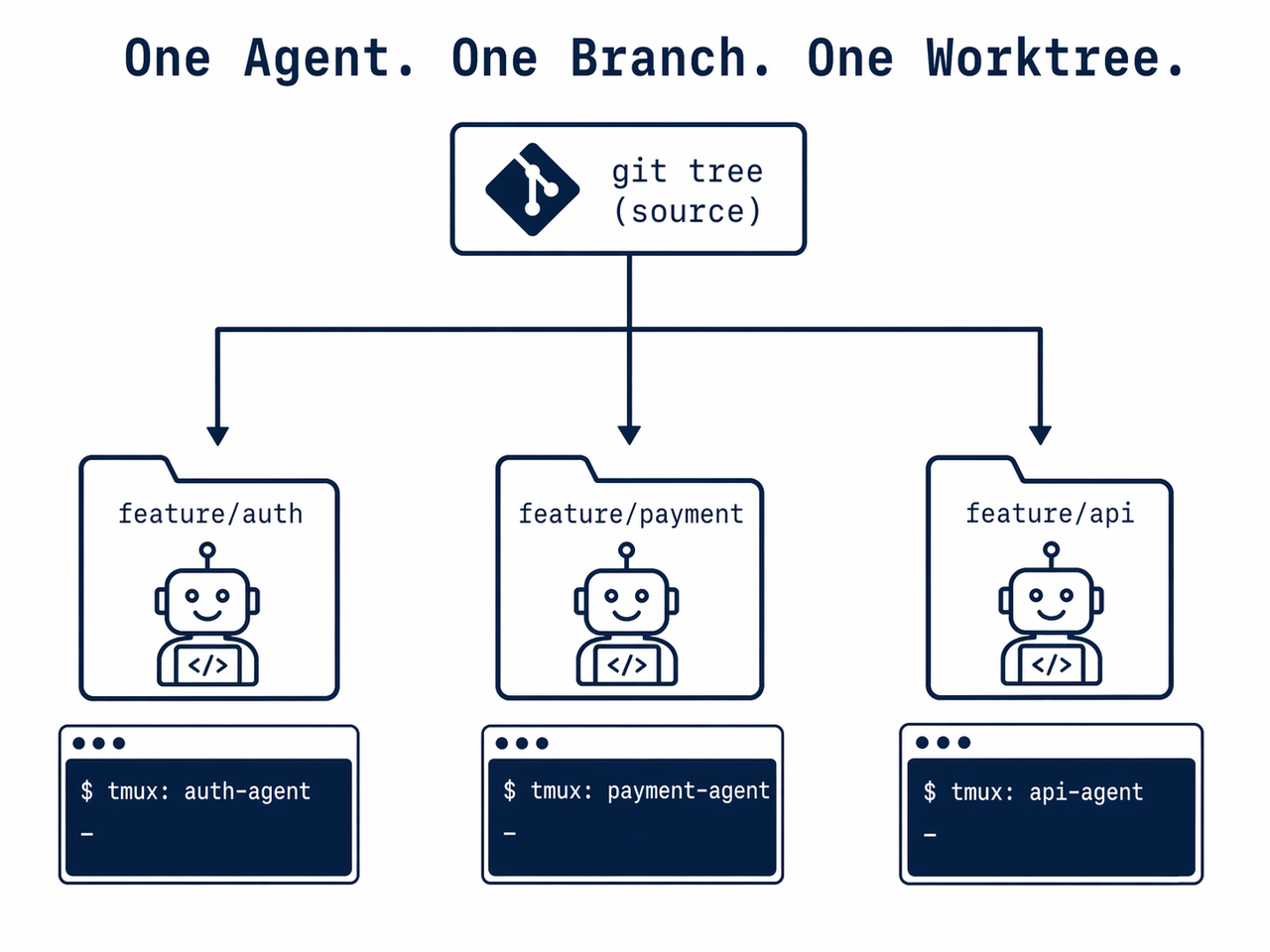
This is the single most important technical step. Each agent gets its own git worktree — a fully independent working directory checked out on its own branch from the same repository. MindStudio
git worktree add ../feature-auth -b feature/auth-refactor
git worktree add ../feature-payment -b feature/payment-api
git worktree add ../feature-api -b feature/api-restructure
What this actually does: each folder is a completely separate physical directory on disk. Two agents editing the “same” file are editing different files on disk. File conflict becomes physically impossible during execution. This is the architecture that forms the foundation of every reliable parallel agent orchestration setup I’ve tested.
Step 3 — Launch Each Claude Instance in a Named tmux Session
With your worktrees ready, launch one Claude instance per worktree inside a named tmux session. Named sessions make monitoring and re-attaching trivial.
tmux new-session -d -s "claude-auth" "cd ../feature-auth && claude"
tmux new-session -d -s "claude-payment" "cd ../feature-payment && claude"
tmux new-session -d -s "claude-api" "cd ../feature-api && claude"
To re-attach and monitor any session:
tmux attach -t claude-authIf you’re on a ticket-based workflow, the shorthand flag claude -w <ticket-id> auto-creates the worktree and session in a single command — useful if you’re spinning up 5+ agents from a backlog. Headless mode (the -d flag in tmux) allows your agents to keep running after you close your terminal or step away. This is what makes overnight runs possible.
Step 4 — Deploy a Shared CLAUDE.md With Conflict Rules
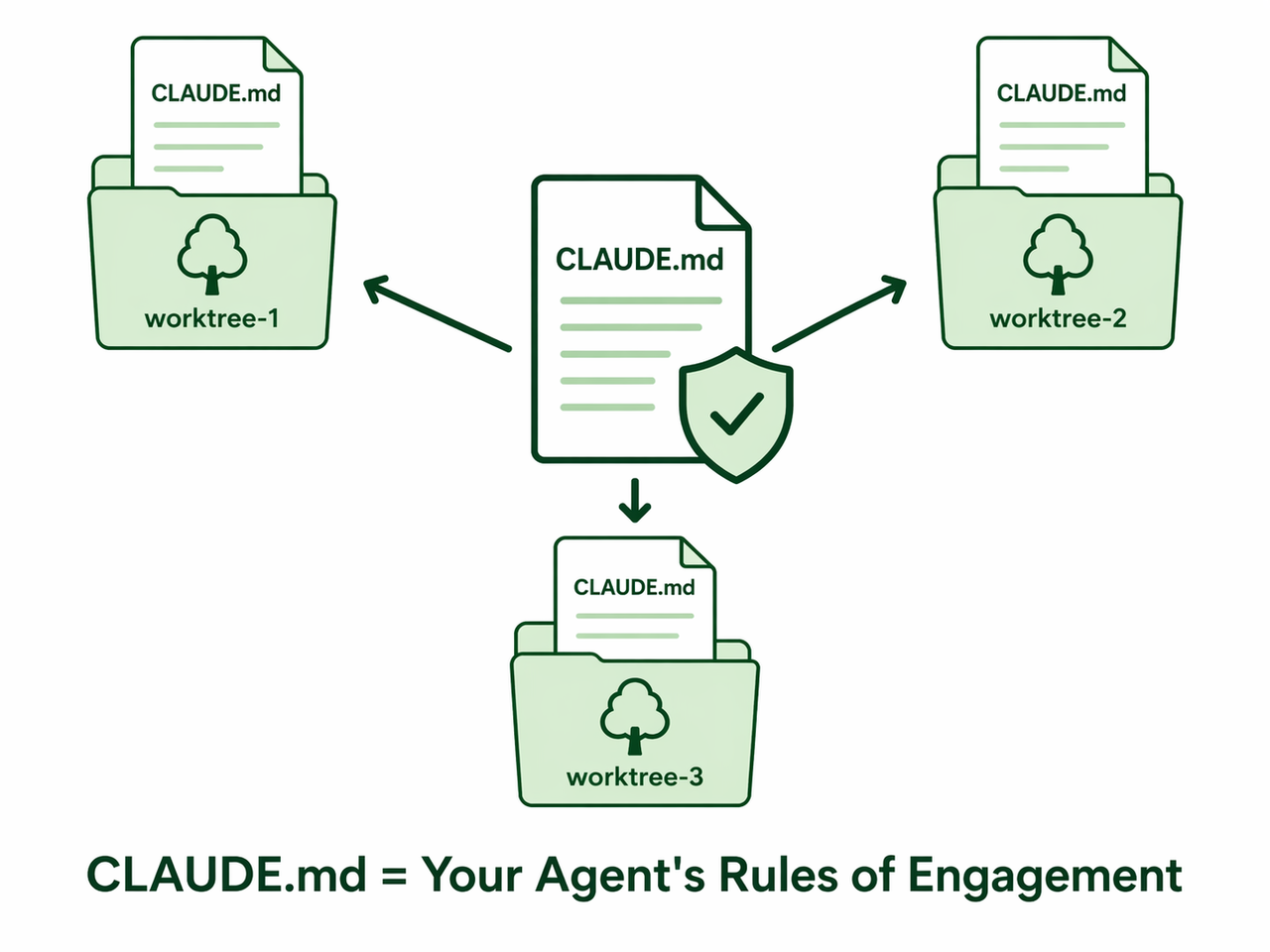
Before you launch a single agent, create your CLAUDE.md. This file is the behavioral contract every agent must follow. Copy it identically into every worktree root — one copy per worktree, same content.
The minimum viable CLAUDE.md for a multi-agent setup:
# Agent Rules of Engagement

Task Scope
You are responsible ONLY for files within [/auth/*] (replace per agent).
Do NOT modify any file outside your defined scope under any circumstances.

Conflict Protocol
If you encounter a build error in a file you did NOT modify:

Do NOT attempt to fix it.

Wait 30 seconds.

Retry the build.

Another agent may be mid-edit on a shared dependency.

Completion Protocol
When your task is complete, open a Pull Request from your branch.
Do NOT merge. Do NOT modify other branches.
The conflict protocol rule alone — that single “wait 30 seconds and retry” instruction — is responsible for the community-reported ~80% reduction in cascading failure loops. It is the cheapest, highest-leverage improvement you can make. Reddit r/ClaudeCode
Step 5 — Use Claude Code Sub-Agents for Read-Heavy Parallel Exploration
Not every parallel task requires a worktree. For codebase analysis, documentation generation, or research tasks (no file writes), you can use Claude Code sub-agents directly from a single Claude instance — no branch setup required. Tim Dietrich
Prompt Claude directly with:
Explore this codebase using 4 parallel sub-agents.

Sub-agent 1: Map all frontend components in /src/components

Sub-agent 2: Document all backend API endpoints in /routes

Sub-agent 3: Analyze the database schema and relationships in /db

Sub-agent 4: Audit the authentication flow in /auth

Each sub-agent should produce a structured summary report. Synthesize all four reports into a single architecture overview.
Each sub-agent gets an isolated context window and reports back to the orchestrator agent, which synthesizes the results. No file writes happen, no branch isolation needed. This pattern is ideal for the “understand before you build” phase of a sprint.
Step 6 — Monitor Sessions and Approve Permissions Regularly
Here is a mistake I see constantly: developers launch 5 agents and walk away for 8 hours, expecting magic. They come back to find every agent stalled at a permission prompt — zero progress made, full API credits charged. Agent conflict resolution requires periodic human oversight. Claude Code pauses at every permission request by design. Unmonitored agents stall indefinitely.
My protocol:
- Check every tmux session within the first 5 minutes of launch to catch early permission prompts
- Set a phone reminder to cycle through sessions every 20–30 minutes
- For overnight runs, do a final permission-approval sweep right before sleep
# Cycle through all running sessions quickly
tmux list-sessions
tmux attach -t claude-auth # approve / dismiss, then detach with Ctrl+B, D
tmux attach -t claude-payment
tmux attach -t claude-api
This 2-minute check cycle prevents the most common overnight failure mode.
Step 7 — Assign a Coordinator Agent for Final Merge
When your feature agents complete, do not attempt to manually merge 5 branches at 2am. This is where a coordinator agent earns its keep. Launch a dedicated Claude instance in your main branch and prompt it: Steve Kinney
Three feature branches are ready for integration:

feature/auth-refactor

feature/payment-api

feature/api-restructure

Merge each branch into main sequentially. Resolve any integration conflicts.
Run the test suite after each merge. If tests fail after any merge,
stop and report the conflict details without proceeding.
The coordinator handles merges sequentially — eliminating concurrent write conflicts — and runs tests at each step. This is the same coordinator pattern used in production distributed systems, applied to multi-agent workflow orchestration.
Bad vs. Good — Claude Code Parallel Instances Workflow at a Glance
| Dimension | ❌ Bad Pattern | ✅ Good Pattern |
|---|---|---|
| Working Directory | All agents in same folder | Each agent in own git worktree |
| Branch | All agents on main | Each agent on its own feature branch |
| Task Scope | Overlapping file ownership | Zero file overlap between tasks |
| Behavior Rules | No CLAUDE.md | Shared CLAUDE.md with conflict + scope rules |
| Session Management | Multiple tabs, same CWD | Named tmux sessions per worktree |
| Permission Handling | Walk away and hope | Cycle sessions every 20–30 minutes |
| Merge Strategy | Manual merge at the end | Coordinator Claude agent, sequential |
| Outcome | Race conditions, burned credits, chaos | Parallel PRs ready by morning |
I ran both patterns back to back on the same project. The bad pattern produced three merge conflicts, two stalled sessions, and about 40 minutes of cleanup. The good pattern — worktrees, CLAUDE.md, named tmux sessions — produced three clean PRs with zero intervention beyond two permission-approval checks. A Sleek Geek
Claude Code Parallel Instances Workflow — Advanced Tips
Once the 7-step foundation is solid, there are a few refinements worth knowing.
Scripting Worktree Creation for Speed
Once you run parallel workflows regularly, typing git worktree add for each agent gets tedious. I use a simple shell script that creates the worktree, copies the CLAUDE.md, and launches the tmux session — all in one pass per agent. Spinning up 5 agents takes about 15 seconds.
#!/bin/bash

launch-agents.sh
TASKS=("auth-refactor" "payment-api" "api-restructure")

for TASK in "${TASKS[@]}"; do
git worktree add ../$TASK -b feature/$TASK
cp CLAUDE.md ../$TASK/CLAUDE.md
tmux new-session -d -s "claude-$TASK" "cd ../$TASK && claude"
echo "Launched: claude-$TASK"
done

echo "All agents running. Attach with: tmux attach -t claude-<name>"
Cleaning Up Worktrees After Merge
Worktrees are not automatically removed after branch merge. Clean them up explicitly. Failing to clean up worktrees leaves orphaned directories and stale git references. I make cleanup the final step of every parallel session.
git worktree remove ../feature-auth
git worktree remove ../feature-payment
git worktree prune # removes stale references
Scale Guidance by Experience Level
| Experience Level | Recommended Parallel Instances | Setup Required |
|---|---|---|
| First time | 2 agents | Manual worktree + tmux |
| Comfortable | 3–5 agents | Shell script + CLAUDE.md template |
| Advanced | 6–10 agents | Scripted orchestration + automated permission handling |
| Expert | 10+ agents | Full orchestration layer dev.to |
Start at 2. Validate the pattern on a non-critical project. Scale only after you’ve seen clean PRs from isolated agents at least 3 times. The failure modes at 10 agents are the same as at 2 — they’re just harder to debug when multiplied.
Frequently Asked Questions
How Many Claude Code Instances Can I Realistically Run in Parallel?
Community practitioners reliably run 5–6 instances with the worktree + tmux setup described here. Reddit r/ClaudeCode Developers using scripted orchestration layers have documented 10+ simultaneous instances dev.to, though this requires automated permission handling and more structured task decomposition. My recommendation: start with 2–3, run a full cycle, then scale based on what you observe — not what you hope for.
Do I Need a Paid Claude Plan to Run Parallel Instances?
Yes, effectively. Each agent in a parallel agent orchestration setup consumes its own API tokens entirely independently. Running 5 agents in parallel burns approximately 5× the tokens of a single session over the same time period. For any sustained overnight workflow, a Claude Pro subscription or direct API access with a usage budget is a practical requirement — not a preference.
What Happens if Two Agents Accidentally Edit the Same File Despite Task Scoping?
Because each agent operates in its own git worktree on its own branch, simultaneous edits to the “same” logical file do not collide at the filesystem level — they are physically different files on different disk paths. The conflict only surfaces at merge time, where your coordinator agent handles it in a controlled, sequential merge step with full context. This is a fundamentally safer failure mode than a live race condition.
Can I Run a Claude Code Parallel Instances Workflow Without tmux?
Yes. tmux is the most robust method for headless overnight runs because sessions survive terminal close. Your alternatives are:
- Separate terminal tabs/windows — simplest option, no persistence after terminal close
- VS Code integrated terminal split view — good for monitoring 2–4 agents visually
nohupwith output redirection — background persistence on Linux/macOS without tmux- Screen — older alternative to tmux with similar persistence behavior
The core requirement is not tmux — it’s that each agent runs in an isolated working directory. The session manager is a convenience layer on top.
What Must My CLAUDE.md Always Include for Multi-Agent Setups?
At minimum, every agent’s CLAUDE.md must define four things: (1) task scope — the exact file paths this agent owns, (2) the conflict wait-and-retry rule for errors in unowned files, (3) an explicit prohibition on modifying files outside scope, and (4) the completion protocol. Copy the same base template into every worktree root, then update the task scope per agent. Tim Dietrich
How Do I Handle a Shared package.json or tsconfig.json That Every Agent Needs to Modify?
Do not let agents modify shared configuration files in parallel. Designate shared config changes as a pre-flight step handled manually or by your coordinator agent before feature agents launch. Alternatively, use a feature-flag pattern where agents add to an agent-specific config extension file, and the coordinator merges the extensions into the root config at the end.
Written by Ice Gan — AI Tools Researcher and IT Practitioner with 33 years of systems experience. All workflow patterns described have been tested in live development environments. For the full troubleshooting resource library, visit the complete guide at AIQnAHub Troubleshoot.
References & Sources
- dev.to — Multi-Agent Orchestration: Running 10+ Claude Instances in Parallel
- Tim Dietrich — How to Use Claude Code Sub-Agents for Parallel Work
- MindStudio — What Is the Claude Code Git Worktree Pattern?
- Steve Kinney — Using Git Worktrees for Parallel AI Development
- A Sleek Geek — The Parallel Claude Workflow: Running Multiple AI Agents
- Reddit r/ClaudeCode — How I Run 5–6 Claude Code Agents in Parallel
Leave a Reply