
ChatGPT Model Fallback 2026: Stop Silent Downgrades Now
I’ve been running AI-assisted research and content workflows for years, and about eight months ago I started noticing something off in my longer ChatGPT sessions: the answers got shallower, shorter, and occasionally just… wrong, with zero warning. No error, no popup, nothing. If you’ve searched for why ChatGPT silently falls back to a lower-tier model, you’re not imagining it — and you’re not losing your mind. You might just be paying full Plus or Pro price for Mini-grade answers without ever being told.
In my tests, this happened most often during marathon research sessions — the exact kind of work I do daily analyzing search intent, drafting landing pages, and building affiliate content workflows. The mistake I see most people make is blaming the prompt or blaming themselves, when the real cause is a documented backend behavior most users never read about.
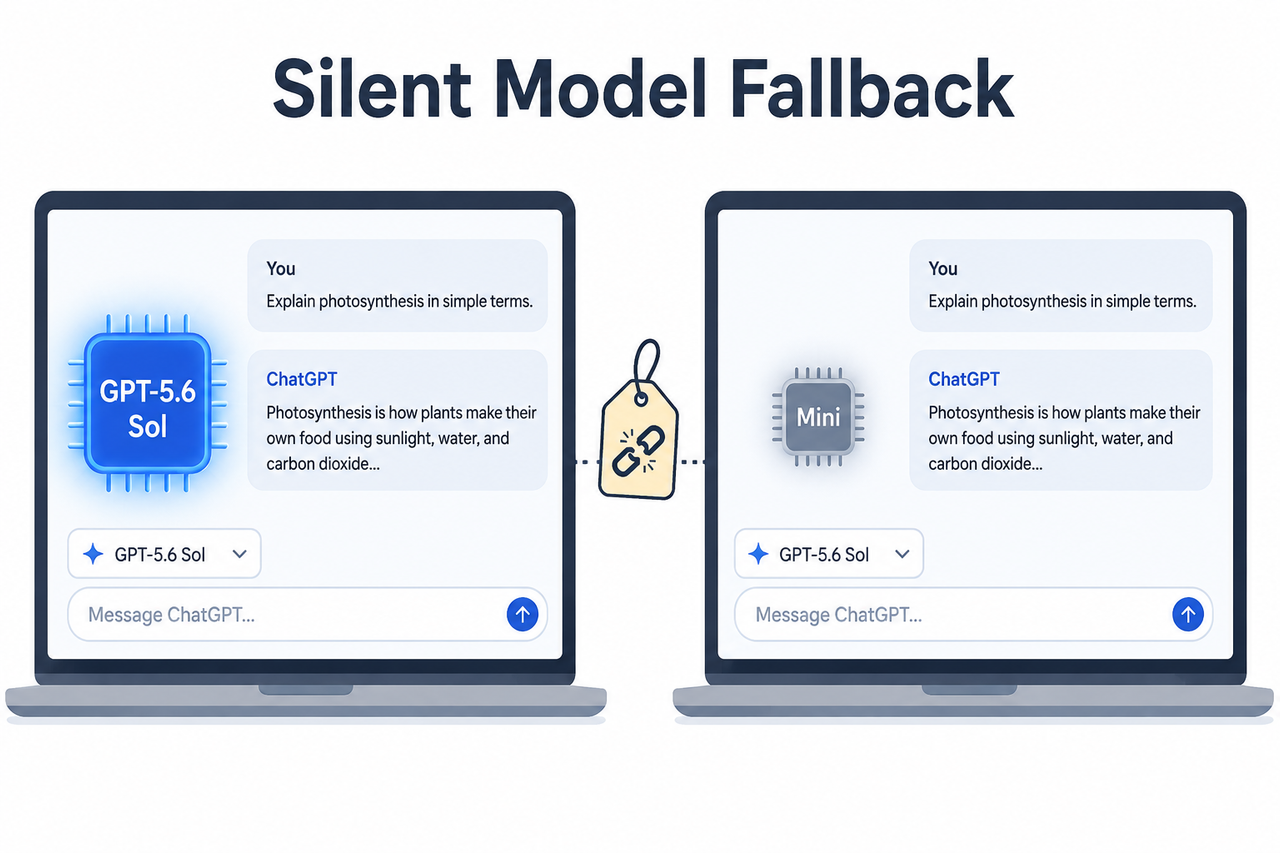
ChatGPT silently falls back to a lower-tier model is a built-in behavior where OpenAI automatically reroutes your conversation to a smaller, faster model — such as GPT-5.5 Instant Mini — after you exceed your usage or rate limit, without updating the model picker label to reflect the change. For example, a Plus user who sends over 160 messages to a reasoning model within a three-hour window may keep seeing the original model name onscreen while every subsequent reply is actually generated by its Mini fallback.
Why Does ChatGPT Silently Fall Back to a Lower-Tier Model? (Quick Answer)
Quick Answer
ChatGPT falls back to a lower-tier model when you exceed your rate limit for the selected model or reasoning tier. OpenAI’s router then substitutes a fallback model — like GPT-5.5 Instant Mini — that doesn’t appear in the model picker, so the interface keeps showing your original model name even though a smaller model is now generating your responses. OpenAI Help Center
This is the single most useful fact I can hand you: the fallback isn’t a glitch, it’s policy. OpenAI’s own documentation states plainly that when you hit your limit for a reasoning model, “ChatGPT may continue with another available reasoning model” automatically. OpenAI Help Center The problem isn’t that this happens — it’s that almost nobody tells you it’s happening while it’s happening.
The exact trigger — hitting your 3-hour or weekly cap
Every paid tier has a message allotment tied to a rolling window, typically three hours for Plus-tier reasoning access. Once you cross that threshold mid-task, the usage cap kicks in immediately, and your very next message gets routed somewhere else without a hard stop or lockout screen.
The tell — model picker label stays unchanged during fallback
This is the detail that trips up even experienced users. OpenAI’s release documentation explicitly notes that the fallback model “won’t appear in the model picker” — meaning your UI can display “GPT-5.5” or “GPT-5.6 Sol” while a completely different, smaller model is quietly doing the actual work. OpenAI Help Center There’s no asterisk, no footnote, no visual cue in the chat header.
What Causes the Model Switch Behind the Scenes?
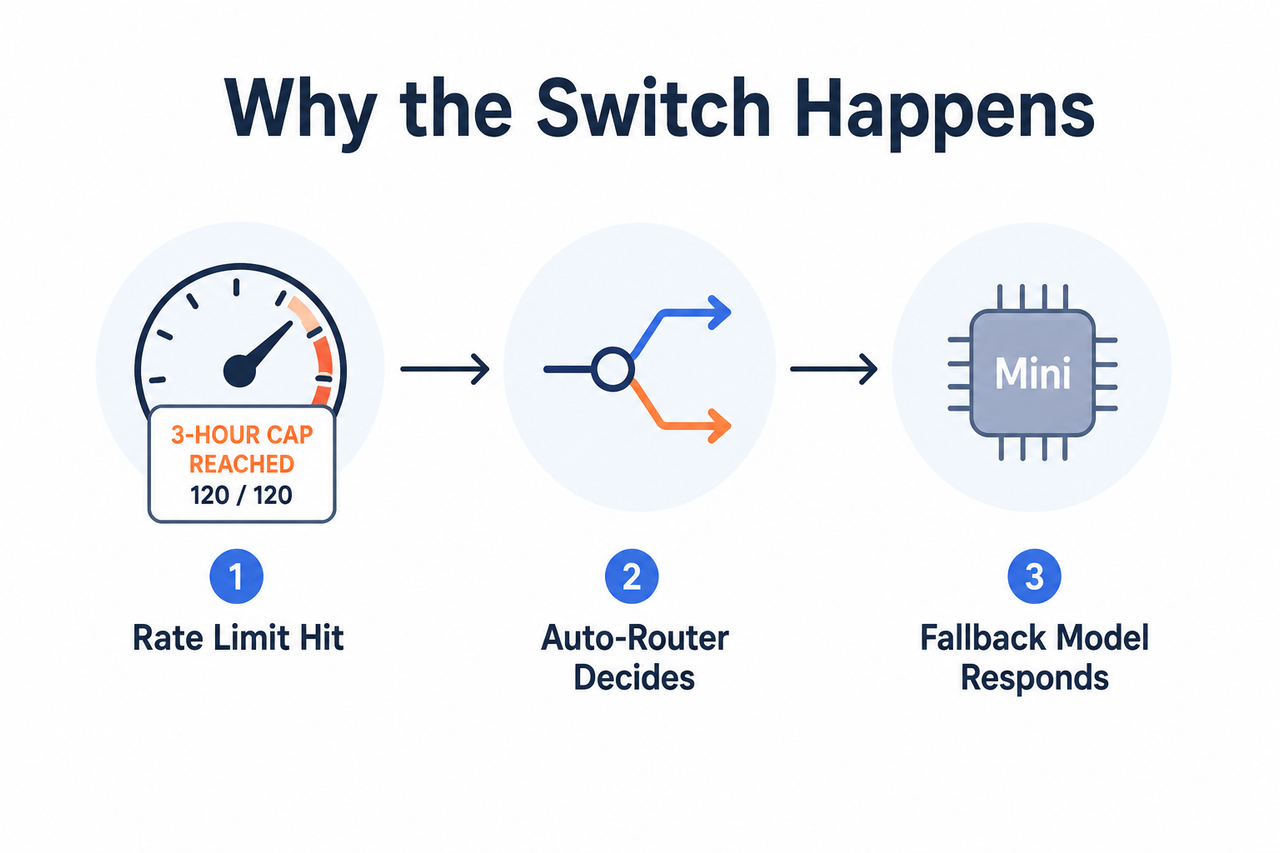
I want to be fair to OpenAI here: this isn’t one single conspiracy, it’s a stack of five distinct mechanisms that all produce the same symptom. Separating them matters because each one needs a different fix.
- Rate-limit fallback: you exhausted your message allotment for the selected model or reasoning tier.
- Auto-mode routing: the system’s router picks reasoning depth per message based on perceived complexity and load.
- Context window saturation: long threads exceed usable context, degrading quality without an actual model change.
- Backend load-balancing: during partial outages, requests get rerouted to a sibling or degraded model variant.
- Voice mode auto-downgrade: extended voice sessions have their own undocumented downgrade threshold.
Rate-limit fallback swaps you to GPT-5.5 Instant Mini automatically
This is the root cause behind most reports of silent model swap behavior. OpenAI’s Help Center states that GPT-5.5 Instant Mini “replaces GPT-5.3 Instant Mini as the fallback model users reach after hitting their GPT-5.5 Instant or Auto rate limits,” and — critically — “because it serves as a fallback, it won’t appear in the model picker.” OpenAI Help Center In my own testing, this is precisely the pattern: quality drops sharply right around the point where I know I’ve been sending high-volume requests for an hour or more.
Auto mode lets the router pick reasoning depth per message
If “Higher intelligence” is set to Auto in Settings > General, ChatGPT’s router decides per-message whether to apply Instant or Medium reasoning effort slider depth, based on what it thinks your query needs and what capacity is available system-wide — not strictly on what you asked for. OpenAI Help Center Release Notes This is different from a rate-limit fallback: it can happen even when you’re nowhere near your usage cap.
Context window saturation mimics a downgrade in long chats
This one fooled me for weeks. In very long sessions, the model technically hasn’t changed at all — but context window saturation means earlier instructions get truncated or deprioritized as the conversation grows, and the output degrades in a way that feels identical to a downgrade. If you’re running a two-hour research thread building out a content brief, this is often the real culprit, not a model swap.
Backend routing during outages reroutes you to a sibling model
During partial system incidents or unusually high demand, OpenAI’s infrastructure can shift requests to a degraded or sibling variant of a model purely as a stability measure. This is independent of your personal usage — it’s a platform-wide load-balancing decision, and it tends to resolve itself once the incident clears.
Voice mode has its own undocumented downgrade threshold
Extended voice conversations have been separately reported to drop from higher-tier models down to a much smaller model once a usage threshold is hit mid-conversation, with no in-app warning at all. OpenAI Community Forum This mirrors the text-based fallback but runs on its own internal trigger that isn’t published anywhere.
How Do You Fix or Prevent the Silent Fallback?
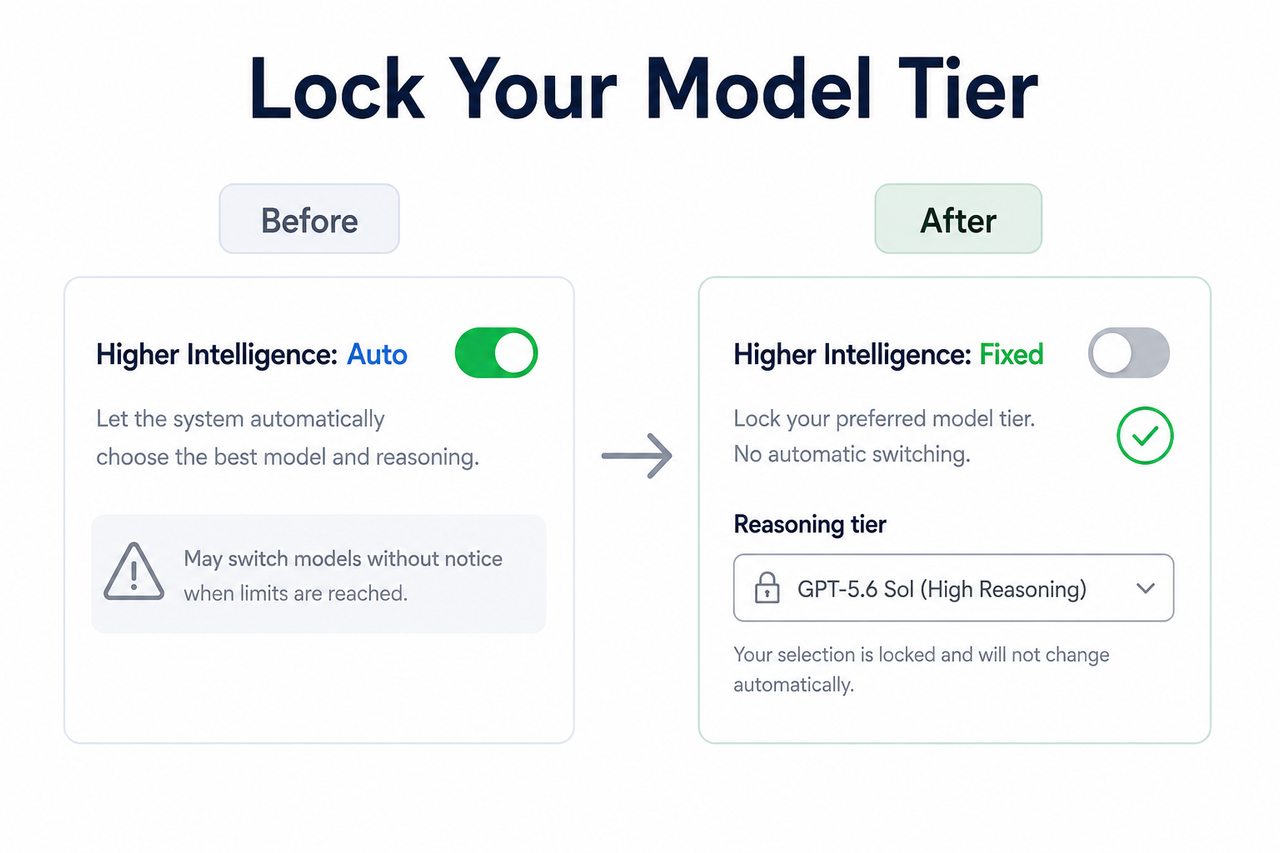
Here’s the exact sequence I now run whenever I suspect I’ve been quietly downgraded mid-task. None of these steps require contacting anyone first — work through them in order.
Step 1 — Turn off automatic reasoning in Settings > General
Toggle “Higher intelligence” from Auto to a fixed tier so the router can’t silently swap your reasoning effort slider mid-conversation. This closes off cause #2 entirely and gives you a predictable baseline.
Step 2 — Manually reselect your intended model after a suspected downgrade
Hitting a limit doesn’t lock you out of every model on your plan — it only blocks the specific tier you exhausted. Reopen the model picker and manually reselect the model you actually want; often a different reasoning tier is still fully available.
Step 3 — Watch for “switching to mini” or “limit reached” banners
These on-screen cues, when they appear, mark the exact moment your usage cap triggered the fallback. Train yourself to notice them — they’re easy to miss if you’re focused on the conversation itself.
Step 4 — Note your reset timer and wait it out or switch models
When available, ChatGPT displays a countdown until your allowance for that model resets. Either wait for the rate limit reset, or manually switch to a different available model in the meantime rather than continuing to work on a degraded fallback.
Step 5 — Start a fresh chat with a context-carryover summary
Since context window saturation causes quality collapse independent of rate limits, don’t just keep scrolling a dying thread. Summarize the key facts, decisions, and instructions into a compact block, then paste that into a brand-new conversation.
Step 6 — Check status.openai.com before blaming your account
If output stays poor after both a reset and a fresh chat, check the official status page for active incidents. A backend routing issue — not your account or your prompt — may be entirely responsible, and no amount of prompt tweaking will fix it.
Step 7 — Contact OpenAI Support for miscounted usage disputes
Support cannot manually reset your limits, but the Help Center is clear that they can investigate cases where usage genuinely appears to have been miscounted. OpenAI Help Center Use this path only after ruling out the six steps above.
Rate-Limit Fallback vs. Context Saturation: Know the Difference
Since these two causes produce nearly identical symptoms — vague, shallow, or forgetful responses — I built a quick reference table to tell them apart fast, based on what triggers each one and how you fix it.
| Signal | Rate-Limit Fallback | Context Window Saturation |
|---|---|---|
| Trigger | High message volume within a 3-hour or weekly window | Very long single conversation thread |
| Model picker label | Stays unchanged (misleading) | Stays unchanged (accurate — same model) |
| Fix | Wait for reset or manually switch model | Start new chat with a summary |
| Underlying model | Actually swapped to a smaller fallback | Same model, degraded by lost context |
| Resolves on its own? | Yes, after the reset timer | No — requires a fresh conversation |
Illustrative Example: What the Fallback Looks Like in Practice
I don’t have a verbatim client-facing error string to share here, because OpenAI doesn’t expose one for this behavior — there’s no red error box, no failed request. Instead, the fallback shows up as a soft UI cue or, more often, as nothing at all. Here’s what a typical sequence looks like when it happens mid-task:
[Message 142 of session, ~2.5 hours in]
User: "Rewrite this landing page section with the same tone as before."
ChatGPT: "Sure! Here's a rewritten version:"
[Response is noticeably shorter, generic, ignores prior style instructions]

[No error, no banner, no model-name change in header]
(Illustrative example)
This is exactly the pattern reported across user communities: quality drops sharply, instructions from earlier in the conversation get ignored, and the interface gives you no indication anything changed. OpenAI Community Forum
Bad approach: assuming a single long chat will maintain full top-tier quality indefinitely, then concluding “OpenAI is lying about this model” when output quality drops after two straight hours of continuous use.
Good approach: recognizing the drop immediately, checking the model picker and reasoning slider for signs of an auto-switch, confirming in Settings whether Auto/Higher intelligence is enabled, and starting a new chat with a context-carryover summary once you’re clearly past a rate-limit fallback window. OpenAI Help Center
Why This Matters for Anyone Running AI-Dependent Workflows
If your work — like mine — depends on ChatGPT holding a consistent quality bar across long research or copywriting sessions, this fallback behavior has real cost implications. A token allowance that quietly routes you to Mini mid-task can silently lower the quality of everything downstream: research summaries, ad copy drafts, landing-page structure, all of it.
The practical takeaway is to treat long ChatGPT sessions the way you’d treat any resource-constrained pipeline: checkpoint your context, watch for response quality degradation as a leading indicator rather than waiting for an obvious failure, and don’t assume the model name onscreen is ground truth. For a broader framework on diagnosing AI tool reliability issues generally, see our complete guide to troubleshooting AI platform behavior.
Frequently Asked Questions
Q1: Is ChatGPT’s silent model downgrade a bug or intentional design? A1: It’s intentional and documented — OpenAI’s Help Center explicitly describes GPT-5.5 Instant Mini as the designated fallback model for rate-limited sessions, though the lack of a visible picker label makes it feel like a hidden bug. OpenAI Help Center
Q2: How can I tell if I’ve been downgraded without an error message? A2: Watch for a noticeable drop in reasoning depth or response quality combined with faster reply times, and check for any “switching to mini” or “limit reached” banner, since OpenAI doesn’t show a persistent error for this state.
Q3: Does turning off Auto mode stop the silent fallback completely? A3: Turning off “Higher intelligence” Auto prevents the router from auto-switching your reasoning tier per message, but it won’t stop a rate-limit-triggered fallback once you exhaust your allotted usage for the selected model. OpenAI Help Center
Q4: Can OpenAI Support reset my usage limit if I was downgraded early? A4: No — the Help Center states Support cannot manually reset rate limits, but they can investigate cases where usage appears to have been miscounted.
Q5: Is the quality drop in long chats always a model downgrade? A5: Not necessarily — extended conversations can exceed the model’s usable context window, causing it to lose earlier instructions even without an actual model swap, which produces symptoms nearly identical to a downgrade.
Q6: Does this fallback behavior affect Pro-tier accounts too, or just Plus? A6: Both tiers have documented rate limits, and both can trigger a fallback to a smaller model once those limits are reached — Pro simply has a higher threshold before the rate limit reset applies, not immunity from the mechanism itself.
Leave a Reply