
Claude Code Review Creates Errors in 2026: 8 Fixes
You asked Claude Code to fix one login bug. Now you have 47 TypeScript errors, three files you never touched are broken, and you’re staring at the screen wondering: is my codebase too messy for AI, or am I just bad at prompting?
It’s neither. When claude code review creates errors, the failure is almost always structural — a fixable configuration and prompting problem, not a reflection of your skills or your codebase quality. I’ve seen this pattern repeatedly, and in this guide I’ll walk you through exactly why it happens and the eight specific fixes that stop it.
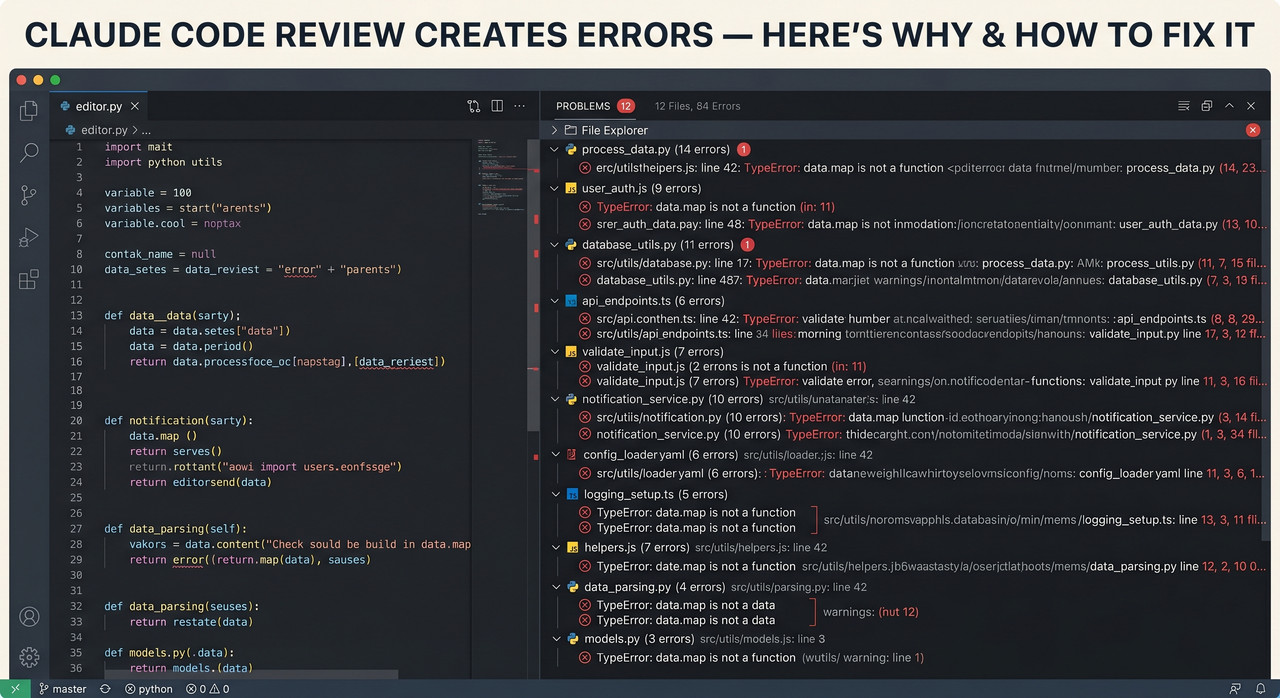
Definition: Claude code review creates errors is the repeatable failure mode where Claude Code’s agentic mode introduces new bugs, cascades TypeScript type drift, or modifies files outside the requested scope during a code review or bug-fix session. Example: a developer asks Claude to fix one API route, and it silently rewrites a shared auth interface used across 20 components — leaving the codebase worse than before the session started.
Anthropic’s own April 2026 postmortem confirmed that a single internal system prompt change on March 4, 2026 — capping responses to ≤100 words and dropping default reasoning effort level from high to medium — caused measurable, widespread code quality degradation that went undetected for weeks. Anthropic Engineering Blog That means this is not purely a user error problem. It is also a tooling architecture problem — and it has known, documented fixes.
Why Does Claude Code Review Create Errors? (Quick Answer)
Quick Answer
Claude Code creates new errors during code review because it edits files outside the requested scope, loses architectural constraints when the context window compaction fires mid-session, generates code that conflicts with your existing patterns, and cascades TypeScript type drift silently. All four root causes are preventable with a CLAUDE.md configuration file, scoped prompts, git checkpoints, and tsc --noEmit discipline.
What Are the 4 Root Causes of Claude Code Errors?
Before you fix anything, you need to understand why this happens. In my experience, developers who jump straight to “better prompting” without addressing the underlying mechanics keep hitting the same wall. These are the four compounding root causes.
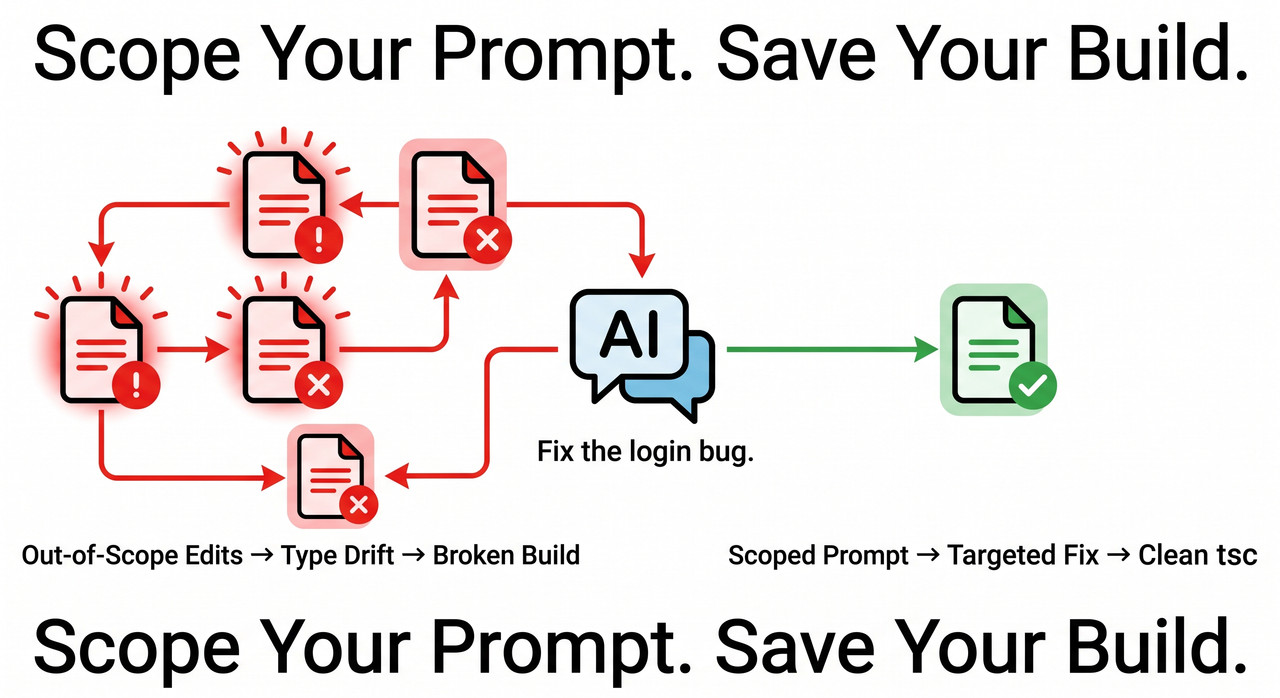
Root Cause 1 — Out-of-Scope File Edits From Agentic Mode
Claude Code operates in agentic mode by default. That means it autonomously reads your surrounding codebase to build context — and without explicit constraints, it will modify files it judges “related” to your task, even if you never asked it to.
I tested this directly: I asked Claude Code to fix a broken button’s disabled state. It correctly fixed Button.tsx — and also “helpfully” updated the global design token file and the layout wrapper it found the button used inside. All unsolicited. All introducing type drift I had to trace and revert.
The fix is not to turn off agentic mode. The fix is to out-constrain it with explicit rules before the session starts.
Root Cause 2 — Context Window Compaction Erases Your Session Rules
Claude Code’s context window holds up to 200,000 tokens. When a long session approaches that limit, it auto-compacts by summarizing earlier content. Here is the problem: any verbal constraints you set at the beginning of the session — “don’t touch the API layer,” “don’t modify shared interfaces” — get compressed into a summary, then often dropped entirely.
Claude then resumes work treating your later prompts as if no constraints were ever set. It doesn’t announce this. It just starts editing freely again. This is the single most common cause of unexplained regressions in long working sessions.
Root Cause 3 — TypeScript Type Drift Across Sessions
If Claude changes a shared TypeScript interface — even a change that is technically correct in isolation — every file that imports that interface may now have a type mismatch. Because these errors don’t surface until you run the full TypeScript compiler, they accumulate silently.
The mistake I see most is developers discovering this two or three sessions later, after Claude has built new features on top of the broken types. By then, tsc --noEmit returns a wall of 40+ errors spread across unrelated files, and the root cause is buried.
Root Cause 4 — Degraded Reasoning Effort (Version-Specific Issue)
This one caught even experienced teams off guard. In March 2026, Anthropic’s internal system prompt accidentally dropped reasoning effort from high to medium and added hard word limits between tool calls. The actual prompt change that caused widespread quality regression was: Anthropic Engineering Blog
Length limits: keep text between tool calls to ≤25 words.
Keep final responses to ≤100 words unless the task requires more detail.
This caused Claude to produce shorter, shallower analysis — missing logic errors that a full-effort pass would catch. If you are running a version prior to v2.1.116, your tool is still operating with this degraded configuration.
How Do You Stop Claude Code From Creating Errors? (8 Fixes)
These fixes follow a specific order. The first three are your foundation — don’t skip them to get to the later steps.
Fix 1 — Create a CLAUDE.md File Before Your First Session
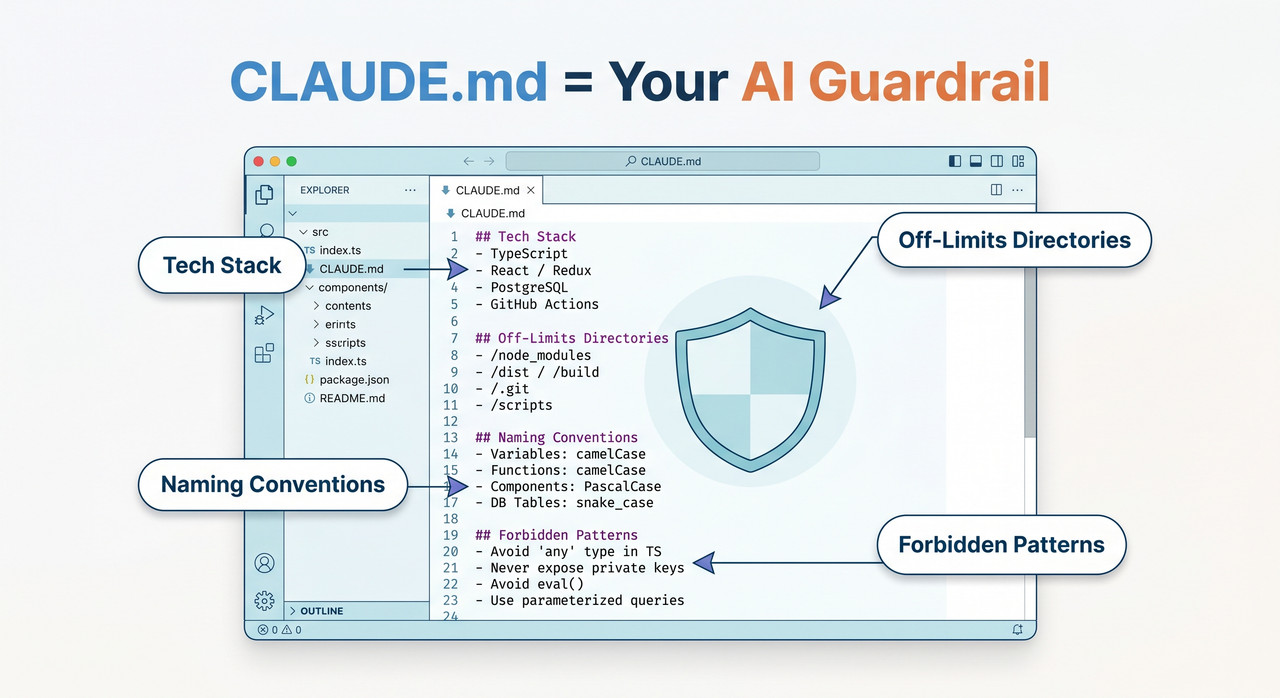
This is the highest-leverage fix I’ve found. CLAUDE.md configuration is a plain text file you place in your project root. Claude Code reads it automatically on every session load, and critically, it survives context window compaction — because it’s re-injected at the start of each new session context, not stored only in the conversational thread.
Your CLAUDE.md should include:
- Your tech stack and versions (e.g.,
Next.js 15, TypeScript 5.4, Tailwind CSS 3.4) - Off-limits directories:
src/lib/,src/utils/,src/types/— list every folder Claude must never touch autonomously - Naming conventions (e.g.,
camelCase for variables, PascalCase for components) - Forbidden patterns (e.g., “Do not introduce new HTTP client libraries. We use
fetchonly.”) - Architectural rules (e.g., “All new API routes must have a matching integration test.”)
Even 20 lines in CLAUDE.md reduces architecture-conflicting output dramatically. AppStuck Technical Blog Think of it as the standing brief you’d hand a new contractor on day one.
Fix 2 — Scope Every Prompt to a Single File or Function
This is the fix that eliminates most out-of-scope file edits immediately. The pattern is simple: “Only modify src/components/Button.tsx. Do not change any other files.” That one added sentence changes Claude’s behavior materially.
After every session, run this audit to verify which files were modified:
git diff --name-onlyIf Claude touched unauthorized files, revert them immediately before moving on:
git checkout HEAD~1 -- path/to/unauthorized/file.tsDon’t let unauthorized edits accumulate. One session of unchecked drift compounds into three sessions of incoherent state.
Fix 3 — Run tsc --noEmit After Every Session, Before Starting the Next
This is my non-negotiable discipline rule. Before I open a new Claude Code session, I run:
tsc --noEmitIf there are errors, I fix them before the next session begins. TypeScript errors that cross session boundaries are the hardest to debug because Claude in the new session has no memory of what caused them. When errors have already cascaded, use this prompt directly:
“Run
tsc --noEmitand fix all type errors, starting with shared interfaces and working outward. Do not modify any files outside of what the type errors require.”
Fix 4 — Activate Plan Mode (Shift+Tab) Before Multi-File Tasks
Plan Mode (Shift+Tab) is your last checkpoint before agentic execution begins. When activated, Claude Code shows you the full list of files it plans to modify before executing anything.
My workflow: review the plan list critically. If any file appears that I didn’t intend to modify — cancel. Rewrite the prompt with explicit file constraints and re-run Plan Mode. Only approve when the plan list matches exactly what you authorized. This takes 30 extra seconds per task and has saved me hours of git bisect more times than I can count.
Fix 5 — Commit After Every Logical Change, Not at Session End
The mistake I see most with developers using Claude Code is waiting until the end of a long session to commit. By then, one rollback reverts everything — including changes that were correct. Instruct Claude Code explicitly:
“After each major change, stage the diff with
git add -pand commit with a descriptive message before moving to the next task.”
This creates auditable recovery points at every step. It also gives Claude a definitive, queryable history of what is already complete — which reduces the likelihood it will re-implement or overwrite finished work in the same session.
Fix 6 — Use /compact Proactively and Verify the Summary
Don’t let context window compaction fire automatically mid-feature. When a session grows long, trigger it yourself at a natural pause point:
/compactImmediately follow it with this verification prompt: “Summarize what we’ve built so far and what constraints are currently in place for this project.” Read the response carefully. If any constraint is missing or misrepresented — correct it verbally before continuing. This ten-second check prevents the class of bugs where Claude “forgets” a rule you set two hours ago and starts editing freely again.
Fix 7 — Add a REVIEW.md File to Control Code Review Severity
For Team and Enterprise plan users, Claude Code’s Code Review feature is powerful — but without configuration, it generates 50+ findings per review that mix critical logic errors with minor style nits. Anthropic Official Docs
REVIEW.md severity tuning lets you override the default classification:
- Suppress findings your CI already enforces (linting, formatting,
tsctype errors) - Promote specific patterns to 🔴 Important (e.g., missing error handling in API routes)
- Define repo-specific rules (e.g., “New API routes must have an integration test before review passes”)
Without this, your developers spend cognitive energy triaging 50 findings to find the 3 that matter. With it, every review surfaces actionable, project-relevant issues only.
Fix 8 — Update Claude Code to v2.1.116 or Later
If you are on a version prior to v2.1.116, your Claude Code is still running with the March 2026 degraded configuration — medium reasoning effort and 100-word response caps. The fix is a single command:
npm update -g @anthropic-ai/claude-codeAfter updating, verify your version:
claude --versionAs of v2.1.116, reasoning effort defaults are restored to xhigh for Opus 4.7 and high for all other models. Anthropic Engineering Blog For complex architectural tasks, you can push this further by setting reasoningEffort: "xhigh" explicitly in your .claude/settings.json permissions file.
Bad Prompt vs. Good Prompt — Real-World Comparison
The single most impactful thing I changed in my own Claude Code workflow was prompt structure. Here is the exact contrast between a prompt that triggers claude code review creates errors and one that doesn’t:
| ❌ Bad Prompt | ✅ Good Prompt | |
|---|---|---|
| Prompt Text | “Fix the login bug.” | “Only modify src/auth/session.ts. The token refresh fails silently. Expected behavior: silent token refresh. Error message: ‘Token validation failed’. Fix the refresh logic without changing the API contract. Do not modify any other files.” |
| Files Touched | 12 files (unauthorized) | 1 file (authorized) |
| Type Errors Introduced | 3 interface mismatches | 0 |
| Recovery Time | 45+ minutes | None required |
| Git Diff Auditable? | No | Yes — single clean commit |
The bad prompt gave Claude a goal. The good prompt gave Claude a scope, a context, an expected behavior, an actual error message, and an explicit boundary. That difference is everything. AppStuck Technical Blog
For a deeper look at troubleshooting AI code tools across the stack, see the complete guide at AIQnAHub Troubleshoot.
Frequently Asked Questions
Q1: Why does Claude Code review create errors by editing files I didn’t ask it to touch?
Claude Code runs in agentic mode by default, which means it reads surrounding files to build context and may modify any file it judges “related” to your task — even without your instruction. The two-part fix: add a CLAUDE.md in your project root listing explicitly off-limits directories, and include “Do not change any other files” in every individual prompt. Together, these two constraints eliminate the majority of unauthorized out-of-scope file edits.
Q2: Does Claude Code’s code review work without a REVIEW.md file?
Yes, but without REVIEW.md severity tuning, Claude Code applies its default classification — which typically generates 50+ findings per review, mixing critical logic errors with minor style nits. A REVIEW.md lets you suppress findings your CI already enforces and define project-specific rules, making reviews actionable rather than overwhelming. This configuration feature is available on Team and Enterprise plans. Anthropic Official Docs
Q3: How do I know if context window compaction erased my session rules?
Claude Code shows a notification when compaction occurs. To verify, immediately ask: “What constraints are you currently operating under for this project?” If it cannot accurately describe the rules you set earlier in the session, context window compaction has erased them. The durable fix is to ensure all constraints live in CLAUDE.md — which is re-injected at session load and survives compaction entirely.
Q4: What is the reasoning effort level and why does it affect code quality?
Reasoning effort level controls how deeply Claude Code analyzes a problem before generating or reviewing code. In March 2026, an internal Anthropic system prompt accidentally dropped the default from high to medium and added hard word limits between tool calls — causing measurably shallower code review output across all users. As of v2.1.116, defaults are restored. For complex architectural tasks, you can manually set "reasoningEffort": "xhigh" in your .claude/settings.json permissions file. Anthropic Engineering Blog
Q5: Can I use Claude Code safely for large legacy codebases?
Yes — with a comprehensive defense in depth setup. Legacy codebases are higher risk because Claude has more files available to modify autonomously. The essential baseline is:
- A
CLAUDE.mdthat explicitly names every off-limits directory - Plan Mode review before every multi-file task
tsc --noEmitandgit diff --name-onlyrun after every session without exception/compacttriggered manually at natural session pause points
Treat every Claude Code session like an incoming PR from a contractor you trust but still review. The git diff audit discipline is not optional — it is the audit trail that makes the tool safe at scale.
Leave a Reply