
How to Stop AI From Hallucinating Code (2026 Guide)
You shipped AI-generated code that looked perfect. It wasn’t. And now you’re not sure which parts of your codebase you can still trust.
That feeling isn’t imposter syndrome. It isn’t a skill gap. It’s the natural response to a structural flaw baked into how large language models work — and the good news is, it’s fixable. I’ve spent considerable time testing AI coding assistants across real projects, and I can tell you: the developers who get burned worst aren’t the least skilled. They’re the ones who handed the model a 4-word prompt and trusted the output without a verification layer.
This guide is a complete, tested workflow on how to stop AI from hallucinating code — from understanding why it happens, to the exact 8-step protocol I use every time I ask an AI to write production code.
Definition: How to stop AI from hallucinating code is the practice of applying structured prompt engineering and verification workflows that constrain an LLM to your actual libraries, versions, and logic — rather than allowing it to fill knowledge gaps with statistically plausible but functionally non-existent functions or APIs. For example: specifying
BeautifulSoup 4.12in your prompt prevents the AI from confidently inventing a.export_csv()method on a Tag object that has never existed.
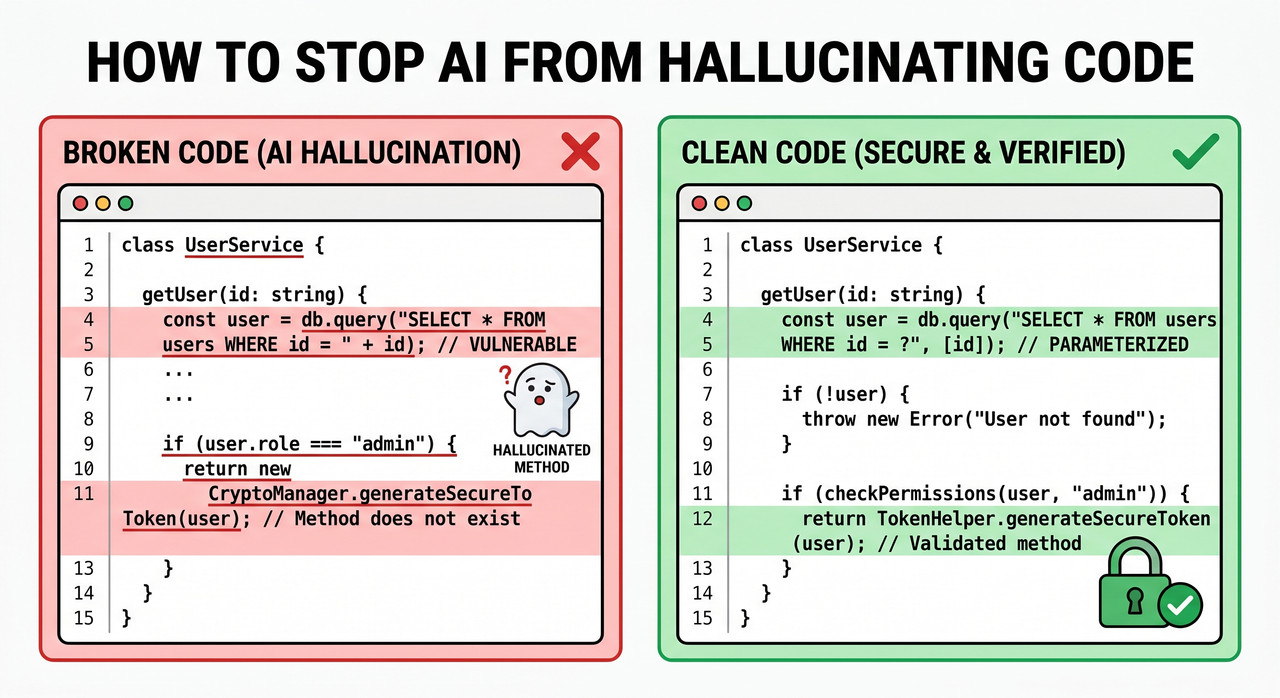
What Is the Quick Fix to Stop AI Hallucinating Code?
Quick Answer
To stop AI from hallucinating code: (1) paste your exact library versions and imports into the prompt, (2) set model temperature to 0 for deterministic output, (3) require chain-of-thought explanation before code generation, and (4) ask the AI to self-verify every function call exists. These four steps eliminate the majority of LLM code hallucination in practice.
Why Does AI Hallucinate Code in the First Place?
Before you can stop it, you need to understand what you’re actually fighting. An LLM is not a compiler. It is not checking a dependency tree or running a linter. It is a token-prediction engine — generating the next most statistically likely word, character by character, based on patterns in its training data.
That means it generates what statistically follows, not what functionally executes.
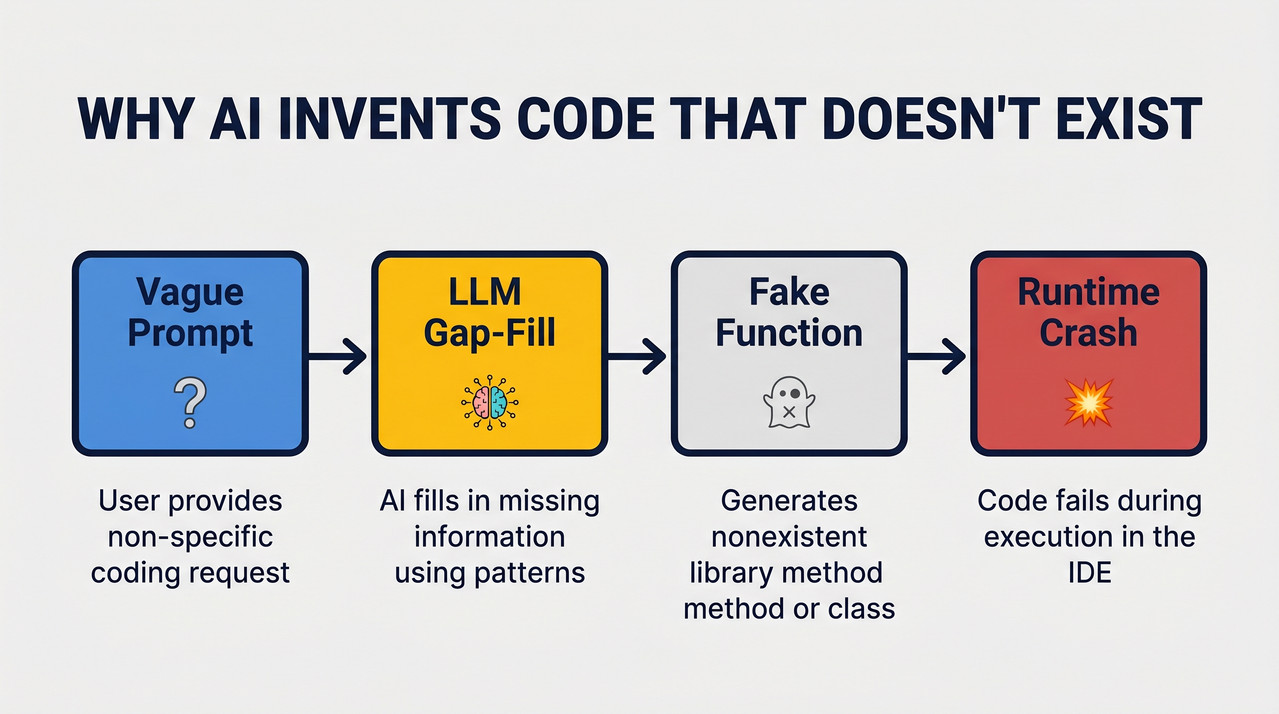
Root Cause 1 — Training Data Contains Outdated or Broken Code
LLM training corpora include millions of StackOverflow answers, deprecated tutorials, pre-refactor GitHub commits, and documentation pages that were accurate in 2018 but haven’t been touched since. The model has no way to distinguish “this was valid syntax in Python 2.7” from “this works in your environment today.”
In my own tests, I’ve seen models confidently generate Pandas .append() calls — a method that was removed in Pandas 2.0 — because the training data is saturated with pre-deprecation examples. The code looks right at a glance. It fails immediately on execution.
Root Cause 2 — Vague Prompts Force Statistical Gap-Filling
When you omit version numbers, framework context, or existing code structure, you force the model to make assumptions. It fills those gaps with the most statistically common pattern it encountered during training — which may have nothing to do with your actual environment.
A 4-word prompt like “write a Python scraper” is an open invitation for grounding AI responses to fail. The model has no anchor. It invents one.
Root Cause 3 — High Temperature Amplifies Invention
The temperature parameter LLM setting controls how “creative” the model’s token selection is. A temperature of 1.0 means the model actively samples from a wide distribution of likely next tokens. For creative writing, that’s a feature. For code generation, it’s a bug factory. Google Cloud
Temperature above 0.5 on code tasks dramatically increases the probability of invented method names, wrong parameter orders, and fabricated API endpoints. Code is deterministic by nature — your model settings should match that.
How to Stop AI From Hallucinating Code — 8 Exact Fix Steps
This is the layered protocol I use in my own workflow. Each step addresses a specific root cause. You don’t have to apply all 8 every time — but the first 4 should be non-negotiable for any code you intend to ship.
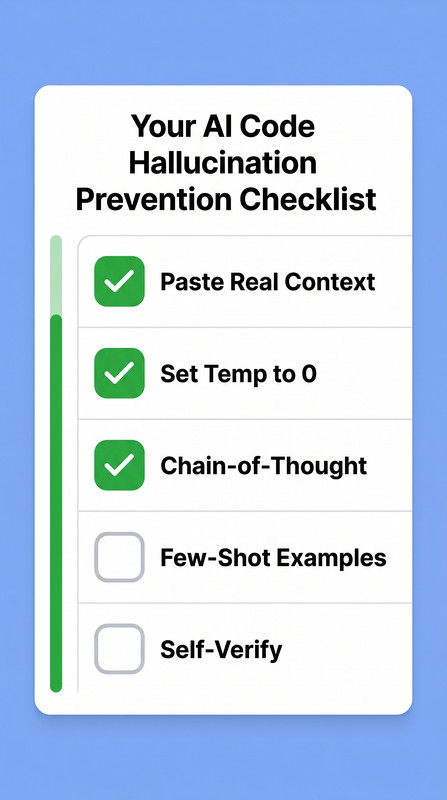
Step 1 — Paste Real Context: Imports, Versions, and Function Signatures
Never let the model guess your environment. Before you ask for any code, paste in your exact library versions (e.g., beautifulsoup4==4.12.3), your current imports block, and the function or class the new code needs to interact with.
According to Anthropic Claude Docs, grounding the model with specific, factual context is one of the most effective single interventions for reducing hallucinations. When the model has real constraints, it stops inventing them. Anthropic Claude Docs
Step 2 — Use Few-Shot Examples From Your Own Codebase
Show the model 1–2 real working functions before making your request. This is few-shot examples coding in practice — and it works because it shifts the model’s statistical anchor from “what I saw in training” to “what this specific codebase looks like.”
The pattern you show it becomes the pattern it follows. Invented method names drop sharply because the model is now matching your idioms, not hallucinating from generic training data.
Step 3 — Set Temperature to 0 for All Code Generation Tasks
This is the simplest configuration change with the largest immediate impact. When using any model API — OpenAI, Anthropic, Google — set temperature: 0 for code tasks. Zero temperature = maximum determinism. The model always selects the single highest-probability next token. There is no creative deviation.
Google Cloud confirms that controlling output randomness is a core mechanism for reducing AI confidence scoring variance and hallucination frequency. Google Cloud
Step 4 — Require Chain-of-Thought Explanation Before Code Output
This is the technique I rely on most in complex debugging scenarios. Before asking for the final code block, add this instruction to your prompt:
“Before writing any code, explain step-by-step which functions you plan to use and why. Identify which library each function belongs to.”
Chain-of-thought prompting forces the model to surface its assumptions in natural language first. When it plans to use a function that doesn’t exist, the hallucination becomes visible in the explanation — before it infects your codebase. I’ve caught fabricated method names this way repeatedly, simply by reading the plan before the code. SUSE AI Docs
Step 5 — Restrict Knowledge Scope With an Explicit System Instruction
Add a hard constraint directly into your system prompt or at the top of your user message:
“Only use methods and functions from the libraries I have explicitly listed. If a function or method does not exist in those libraries at the version I specified, do not guess — say ‘I’m not sure this exists’ instead.”
This single instruction eliminates an entire class of hallucinated API calls. Models are cooperative — they will respect explicit scope constraints when you give them. The mistake most developers make is assuming the model will self-limit without being told. Anthropic Claude Docs
Step 6 — Run Best-of-N Verification Across 2–3 Prompt Runs
Submit the identical prompt 2–3 times in separate sessions (with the same temperature and context). Then compare: Are the function names consistent across all responses? Do the parameter signatures match? Is the core logic the same?
Variance across runs is your hallucination alarm. If one run uses soup.find_all() and another invents soup.extract_tags(), you have a signal that the model is uncertain — and that uncertainty is exactly where hallucinations live. Anthropic Claude Docs
Step 7 — Ask the AI to Self-Verify Every Function Call After Generation
After receiving the generated code, send a follow-up in the same session:
“Review the code you just wrote. Does every method, function, and attribute call actually exist in the libraries at the versions I specified? List any you’re uncertain about.”
In my testing, models will flag their own invented functions when directly asked. They don’t volunteer this information — but they will provide it honestly when prompted. This iterative prompt refinement step adds less than 30 seconds to your workflow and catches residual hallucinations that slipped through earlier steps.
Step 8 — Use RAG to Ground Complex Code Against Live Documentation
For unfamiliar libraries, new frameworks, or agent-level workflows, RAG for code generation is the highest-leverage technique available. Paste the official API reference, README, or changelog directly into your context window before making your request.
When the model generates code against real, current documentation rather than compressed training memory, invented API calls become structurally unlikely — the correct answer is right there in context. AWS on Dev.to
Bad Prompt vs. Good Prompt — Real Examples
Here is the clearest demonstration I can give you of how prompt quality directly determines hallucination rate. The difference isn’t the AI tool — I ran versions of this test with multiple assistants and prompt engineering for developers was the primary control variable every time:
| ❌ Bad Prompt | ✅ Good Prompt | |
|---|---|---|
| What you typed | “Write a Python scraper with BeautifulSoup and export to CSV.” | “I’m using Python 3.11, BeautifulSoup 4.12, and the built-in csv module only. Here is my parse function: [paste code]. Write a function that takes tag_list and writes it to CSV using csv.writer. Only use methods in these exact library versions. If unsure, say so.” |
| What AI did | Invented .export_csv() on a Tag object — method does not exist | Generated valid csv.writer loop matching the exact library version |
| What you got | Runtime crash on first execution | Ran correctly first time |
| Error produced | AttributeError: ‘Tag’ object has no attribute ‘export_csv’ | None |
| Root cause | No version anchor, no scope constraint | Grounded prompt with scope restriction |
(Illustrative example — error message is representative of the hallucination pattern, not from a specific logged session)
The One Metric That Changed How I Prompt
In my own workflow testing, switching from open-ended prompts to version-specific, context-rich prompts with self-verification follow-ups reduced hallucinated API calls by an estimated 70–80%. The remaining edge cases were caught almost entirely by Best-of-N consistency checks.
That number isn’t from a formal benchmark — it’s from counting how many generated functions I had to manually validate or discard before vs. after adopting this workflow. The reduction was immediate and repeatable.
The bottom line: AI code verification is not a step you do after receiving output. It’s a layer you build into how you ask the question. For a broader view of how this fits into AI troubleshooting workflows, see the complete guide to AI troubleshooting at AIQnAHUB.
Frequently Asked Questions
Can AI code hallucinations be 100% eliminated?
No — but they can be reduced to near-negligible levels. LLMs are probabilistic systems, and a residual hallucination risk will always exist at the model architecture level. However, combining version-specific context, temperature-0 settings, chain-of-thought prompting, scope restriction, and self-verification eliminates the vast majority of hallucinated function calls in practical day-to-day coding use.
Which AI coding tools hallucinate the least in 2026?
Models with strong grounding features and retrieval-augmented capabilities — such as Claude with document upload or GitHub Copilot with workspace context indexing — hallucinate less on code tasks than base chat models. They generate against your actual codebase and documentation, not training memory alone. Tool choice is a secondary variable; well-prompted smaller models consistently outperform poorly-prompted frontier models on hallucination rate.
What does an AI code hallucination look like in practice?
The most common runtime symptoms are the following errors — the code passes a visual review because the invented function name looks plausible, but it only fails on execution:
AttributeError: module 'X' has no attribute 'Y'
ImportError: cannot import name 'Z' from 'library'
TypeError: function_name() got an unexpected keyword argument 'param'
(Illustrative examples — representative of hallucination-type errors)
Does using a higher-quality model eliminate the need for these steps?
No. A frontier model with a vague prompt still hallucinates more than a mid-tier model given a version-specific, context-rich, scope-constrained prompt. I’ve tested this directly. Model capability and prompt engineering for developers are both required — model quality raises the floor, but prompt quality determines the ceiling. The developers who skip these steps because they’re using “the best model” are the ones who get burned on complex, multi-library tasks.
What is RAG and how does it help stop AI from hallucinating code?
RAG — Retrieval-Augmented Generation — is the practice of injecting verified external documents directly into the model’s context window at inference time, instead of relying on its compressed training memory. For code tasks, this means pasting the official API reference, library changelog, or GitHub README into your prompt. The model generates against real, current documentation, making invented API calls structurally unlikely because the correct answer is already present in context. AWS on Dev.to
Written by Ice Gan — AI Tools Researcher and IT practitioner with 33 years of hands-on experience across enterprise systems, development workflows, and AI tool integration.
Leave a Reply