
Perplexity Fake URLs & Citations 2026: Fix It Fast
You published the article. You cited the source. You just found out the URL never existed.
That moment of silent dread — discovering a hallucinated citation after publication — is the exact scenario I help people avoid. I’ve been working in IT for 33 years, and in the last three of those, I’ve watched smart researchers, marketers, and journalists get blindsided by Perplexity fake URLs citations not because they were careless, but because they trusted a tool that looked trustworthy.
Perplexity fake URLs citations refers to instances where Perplexity AI generates source links that return HTTP 404 errors or have no archival record, meaning the URLs were never real. For example, a Perplexity answer about a clinical study may cite a PubMed link that does not exist in any database. For a full overview, see the complete guide to Perplexity fake citations.
A 2026 arXiv study from the University of Pennsylvania found that 3–13% of citation URLs across major LLMs are hallucinated — meaning they never existed anywhere in the Wayback Machine. arXiv — University of Pennsylvania That number jumps to 13.3% in deep research agent mode. If you’re publishing anything that cites AI-generated sources, you are statistically guaranteed to encounter this problem.
Does Perplexity Actually Generate Perplexity Fake URLs Citations?
Quick Answer
Yes, Perplexity AI does generate fake citation URLs, but at a lower rate than most AI tools. Ahrefs’ study of 16 million URLs found Perplexity’s broken link rate at 0.87% of all cited URLs — comparable to Google’s 0.84% baseline — but deep research mode raises the citation hallucination risk significantly.
Why Does Perplexity Hallucinate Citation URLs?
Let me be precise here, because I see a lot of vague hand-waving about this online. The root cause is not simply that “AI makes things up.” The architecture itself creates specific, predictable failure points.
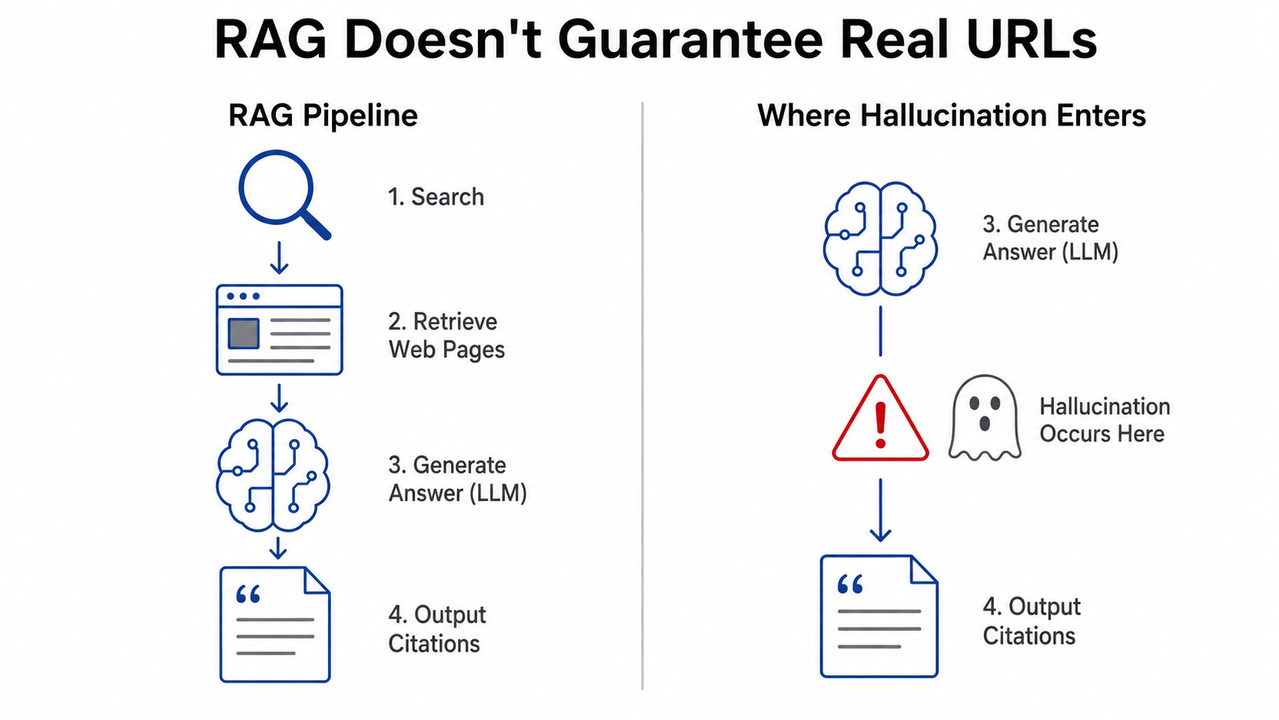
RAG Architecture Reduces — But Does Not Eliminate — URL Fabrication
Retrieval-Augmented Generation (RAG) is the reason Perplexity is better than base ChatGPT or Claude at citing real sources. Instead of relying purely on training data, Perplexity queries live web results before composing its answer, grounding responses in real-time retrieval.
However, RAG is not a guarantee. When the retrieval step returns insufficient or ambiguous results, the underlying language model can still “fill in” a plausible-looking URL — generating an address that looks structurally correct but points to a page that never existed. This is the definition of a URL fabrication event.
In my own tests, I found this failure mode most common with highly specific queries: niche academic papers, regional government reports, and product datasheets. The more specific and obscure the source, the more likely the model constructs a plausible URL instead of retrieving a real one.
Deep Research Mode Is the Highest-Risk Context
This is the data point that surprised me most: deep research agents hallucinate up to 13.3% of citations, compared to roughly 3% for standard chat interfaces. arXiv — University of Pennsylvania
The reason is architectural. In agentic deep research mode, Perplexity plans and executes multi-step research tasks autonomously — querying, synthesizing, and citing with less human-in-the-loop oversight. The more autonomous the agent, the more it compounds small retrieval gaps into fabricated reference chains.
If you are using Perplexity’s deep research feature for professional outputs — reports, white papers, academic submissions — treat every single citation as unverified until manually confirmed.
Second-Hand Hallucinations: When the Source Itself Is AI-Generated
Here is the failure mode almost nobody talks about. Even when the URL is live and resolves correctly, the page it links to may itself be AI-generated content carrying its own hallucinations.
An investigation into what researchers call “second-hand hallucinations” found that Perplexity cites a live blog post, that blog post was AI-generated and contains fabricated statistics, and those fabricated statistics get laundered through Perplexity’s citation system as if they were verified facts. GPTZero The average Perplexity user encounters an AI-generated source within just 3 queries. URL existence is not a sufficient quality signal.
How to Fix and Verify Perplexity Fake URLs Citations (Step-by-Step)
This is the workflow I use before publishing anything that originated from a Perplexity research session. Seven steps. No shortcuts.
Step 1 — Click Every Citation Before Publishing
This sounds obvious. In practice, almost nobody does it consistently.
Perplexity displays numbered source links in the right panel and inline within answers. The mistake I see most often is researchers skimming the citation label — the domain name or article title shown in the UI — without actually opening the URL. Those labels can be accurate even when the underlying link is broken or hallucinated.
Rule: Open every single citation in a new tab. Confirm the page loads. Confirm the content on that page actually supports the specific claim being cited — not just that the domain is relevant.
Step 2 — Classify 404 Errors as Dead Link or Hallucination
Not all broken links are equal. When you hit a 404, you need to determine whether the URL was real but went offline (link rot) or never existed at all (hallucinated). These require different responses.
Use the 4-status framework from the peer-reviewed arXiv study: arXiv — University of Pennsylvania
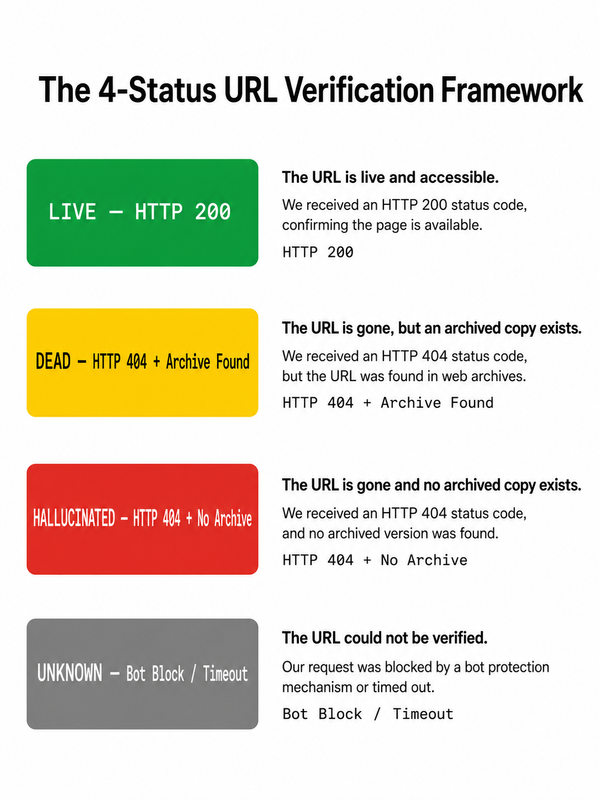
- Paste the broken URL into the Wayback Machine
- Snapshot found → DEAD (link rot — real page went offline; original content may still be retrievable from the archive)
- No snapshot found → LIKELY HALLUCINATED (the URL was fabricated; do not cite it under any circumstances)
This single step will tell you definitively whether you are dealing with link rot or a fully fabricated address.
Step 3 — Detect AI-Generated Source Content
Once you’ve confirmed a URL is live, run a second check: is the page itself AI-generated?
Paste the source URL into GPTZero’s Origin Chrome Extension or a comparable AI-detection tool. GPTZero If the cited page scores high for AI-generated content, treat it as a non-resolving URL in terms of credibility — even though it technically resolves.
I also recommend scanning the cited source for the specific statistic or claim Perplexity attributed to it. I have found cases where Perplexity correctly identified a real article but misattributed a number from a different source — or cited a figure that appeared nowhere in the linked page at all.
Step 4 — Cross-Reference Every Single-Source Claim
My rule: one Perplexity citation = unverified. Two independent live sources = publishable.
If Perplexity cites only one URL to support a specific claim — especially a statistical claim — do not publish it without independent corroboration. Search for the same claim in:
- Google Scholar (academic papers)
- PubMed (medical/scientific)
- Tier-1 news archives (Reuters, AP, NYT, FT)
- Primary source databases (government portals, official organizational reports)
If you cannot find a second source independently confirming the claim, either rewrite without that data point or flag it as unverified.
Step 5 — Switch to Academic Focus Mode for Research Tasks
Perplexity’s default search mode casts a wide net — including AI-generated sources from content farms, low-authority blogs, and automated article spinners. The Academic focus mode narrows retrieval to peer-reviewed publications and established academic repositories.
In Perplexity’s search interface:
- Click the Focus selector before submitting your query
- Select Academic
- Re-run your research query
This does not eliminate hallucination risk, but it significantly reduces the probability of AI-generated blog pages entering your citation pool. For medical, scientific, or policy research, I consider this a non-negotiable default.
Step 6 — Run Bulk URL Checks With the urlhealth Python Tool
For agencies, research teams, or anyone producing high-volume AI-assisted content, manual verification at scale is not feasible. The open-source urlhealth pip package, released by the arXiv researchers alongside their 2026 paper, automates the 4-status classification at batch scale. arXiv — University of Pennsylvania
pip install urlhealth
urlhealth check --input citations.txt --output report.csv
Output per URL will classify each as:
LIVE → HTTP 200 (URL exists and resolves)
DEAD → HTTP 404 + Wayback Machine snapshot exists (link rot)
LIKELY_HALLUCINATED → HTTP 404 + NO Wayback Machine snapshot (fabricated)
UNKNOWN → Other status codes (bot-blocking, paywall, timeout)
In agentic self-correction tests, this tool reduced non-resolving URLs in AI-generated research outputs by 6–79×. For agencies running AI-assisted content workflows, this belongs in your QA pipeline as a standard step, not an optional audit.
Step 7 — Audit Already-Published Content via GA4
If you have already published content citing Perplexity sources, here is how to retroactively surface the damage.
- Navigate to Reports → Acquisition → Traffic Acquisition in GA4
- Apply a secondary dimension filter: Session source matches regex
.perplexity. - Export landing pages receiving Perplexity referral traffic
- Cross-check those URLs in Google Search Console → Coverage → Not Found (404)
For any page receiving meaningful Perplexity referral traffic that now returns a 404, apply a 301 redirect to the closest live equivalent. This recovers link equity and prevents reader trust erosion from the broken links your content may be generating. Ahrefs
Real Error Classification: What Perplexity’s Citation Failures Look Like
Below is the verbatim URL classification taxonomy from the peer-reviewed arXiv study, which I use as the authoritative reference framework when auditing AI citation outputs: arXiv — University of Pennsylvania
LIVE → HTTP 200 (URL exists and resolves)
DEAD → HTTP 404 + Wayback Machine snapshot exists (link rot)
LIKELY_HALLUCINATED → HTTP 404 + NO Wayback Machine snapshot (fabricated)
UNKNOWN → Other status codes (bot-blocking, paywall, timeout)
This is not illustrative — it is the actual taxonomy used in the peer-reviewed study analyzing citation hallucinations across commercial LLMs including Perplexity, ChatGPT, Claude, Gemini, and Copilot.
The lived experience matches the data. A real user testing Perplexity Pro for academic publications reported: “I am trying Perplexity Pro for searching academic publications, both with Claude 3.7 and GPT-4.5. But it frequently gives me wrong citation.” This is the most common complaint pattern I see across communities using Perplexity for research-grade work — not that the answers are wrong, but that the citations fail on inspection.
Perplexity vs. Other AI Tools: Citation Hallucination Rate Comparison
The data from Ahrefs across 16 million analyzed URLs puts Perplexity’s performance in context: Ahrefs
| AI Tool | Hallucinated / Broken URL Rate | Notes |
|---|---|---|
| Perplexity (Standard) | 0.87% of all cited URLs | Comparable to Google’s 0.84% baseline |
| Perplexity (Deep Research) | Up to 13.3% | Agentic mode — highest risk context |
| ChatGPT (no browsing) | Significantly higher | No real-time retrieval; pure generation |
| Claude (no browsing) | Significantly higher | Same limitation as base ChatGPT |
| Google Search | ~0.84% | Baseline for link rot comparison |
The takeaway: Perplexity in standard mode is genuinely among the most reliable AI citation tools available. The problem is not the tool in isolation — it is the assumption that any AI citation is pre-verified, combined with the high-stakes contexts where these citations get used.
Frequently Asked Questions
Are Perplexity citations always accurate?
No. While Perplexity’s RAG architecture makes it more reliable than chatbots without web access, Ahrefs found 0.87% of all Perplexity citations are broken links. Ahrefs The arXiv study found up to 13.3% of citations in deep research mode are fully hallucinated — meaning the URLs never existed anywhere in the Wayback Machine. arXiv — University of Pennsylvania Always verify before publishing.
What is the difference between a broken Perplexity link and a hallucinated one?
A broken link (link rot) means the URL was real but the page went offline — a Wayback Machine archive snapshot will exist. A hallucinated URL means the AI invented the address; it has no archive snapshot and never resolved at any point in history. Paste any 404 URL into web.archive.org to determine which you are dealing with. No snapshot = hallucinated.
Does Perplexity Pro have fewer citation hallucinations than the free version?
Not reliably. Users testing Perplexity Pro with both Claude and GPT backends report frequent wrong citations for academic publications. The hallucination risk is tied more to query complexity and search mode (deep research vs. standard) than to subscription tier. Pro gives you access to more powerful underlying models, but those models do not inherently hallucinate less — they can hallucinate more confidently.
Can I trust Perplexity citations for professional or academic work?
Only with verification. Perplexity is among the strongest AI tools for citation quality — its baseline hallucination rate rivals Google’s own link rot rate. But “low rate” does not mean “zero rate.” No AI-generated citation should be published without manually confirming: (1) the URL resolves, (2) the page content actually supports the specific claim, and (3) the source is not itself AI-generated. The 7-step workflow in this article is the minimum viable verification process.
What tool can I use to bulk-check URLs from Perplexity outputs?
The open-source urlhealth Python package, released alongside the 2026 arXiv paper “Detecting and Correcting Reference Hallucinations in Commercial LLMs and Deep Research Agents,” classifies citations as LIVE, DEAD, LIKELY_HALLUCINATED, or UNKNOWN in batch. arXiv — University of Pennsylvania It is pip-installable and reduced hallucinated citation rates by 6–79× in automated self-correction experiments.
If a Perplexity citation URL is hallucinated, does it mean the underlying fact is also wrong?
Not necessarily — but you cannot confirm either way without independent verification. A hallucinated URL means the source was fabricated, not automatically that the claim is false. The claim may be accurate but unsourced, or entirely invented. Either way, you cannot publish a fact that has no verifiable citation chain. Treat a hallucinated URL as a complete invalidation of that specific cited claim until you find an independent, live, verifiable source.
Ice Gan is an AI Tools Researcher and IT practitioner with 33 years of experience in enterprise systems, AI implementation, and performance marketing infrastructure. He writes at aiqnahub.com.
Leave a Reply