
Transparency Note: This article contains affiliate links. I only recommend tools I’d personally use or suggest to a junior dev I’m mentoring.
What Is COBOL? The Legacy Language Powering Modern Banking and Government Systems
When I first bumped into COBOL, it looked like a relic from a museum—until I realized it was quietly moving salaries, taxes, and card payments behind the scenes. The common mistake I see is writing it off as “dead,” and then being blindsided when a mainframe role or modernization project suddenly needs it.
Quick Answer – What Is COBOL? (Position Zero)
COBOL (Common Business-Oriented Language) is an English-like, compiled procedural programming language created in 1959 for business data processing on mainframe systems. It still powers high‑volume financial, government, and administrative applications, and modern standards like COBOL 2002 and COBOL 2023 add object-oriented COBOL features and better interoperability.
Why Developers Still Ask “What Is COBOL?”
I see the same pattern with junior devs: they confuse COBOL with “the mainframe” itself, or even with an operating system. In reality, it’s just a language—purpose‑built for business workloads—and that context immediately makes its design choices less mysterious.
- COBOL is a programming language, not an OS and not a hardware platform.
- It resurfaces in banking, insurance, and government job descriptions because those sectors still rely heavily on business data processing at massive scale.
- The perception gap is real: on social media it’s “dead,” but in production it’s often the critical infrastructure backbone that nobody wants to break.
The Typical Searcher: Junior Devs and CS Students
When I talk to web or backend devs who live in JavaScript, Python, or Java, their questions about COBOL usually boil down to:
- “Is this worth my time, or is it career regression?”
- “Is there anything technically interesting here, or is it all boring forms and reports?”
- “Does it actually pay better, or is that a myth?”
You’re likely not trying to become a mainframe historian—you just want to know whether learning a bit of COBOL could unlock better opportunities.
The Bleeding-Neck Problem
The pain hits when you’re:
- Reading a legacy system doc and suddenly see
IDENTIFICATION DIVISIONandPROCEDURE DIVISIONeverywhere. - Skimming a job post that wants “COBOL + mainframe experience” and you have no idea if that’s a quick upskill or a multi‑year detour.
- Trying to estimate effort for a modernization project that depends on existing COBOL divisions and file layouts.
At that point, you don’t need a thesis—you need a clear, sober explanation and a feel for the learning curve.
The Hidden Fear: Becoming Obsolete
The deeper fear I hear a lot is this: “If I learn COBOL, am I going backwards while everyone else is doing AI and cloud?” My answer is: it depends how you combine it.
If you treat COBOL as your only skill, you risk boxing yourself into a narrow niche. But if you layer COBOL on top of modern skills (APIs, cloud, DevOps), you suddenly become the bridge between old and new—exactly the role organizations are struggling to fill.
COBOL Explained – From Name to Core Concepts
Here’s how I mentally break down COBOL when I teach it.
What “Common Business-Oriented Language” Actually Means
When you expand the acronym, Common Business-Oriented Language tells you almost everything about its design:
- “Common”: intended as a standard across vendors, which later became the ANSI COBOL standard and ISO COBOL standard.
- “Business-Oriented”: optimized for business data processing—think transactions, records, and reports, not 3D graphics or games.
In practice, that means COBOL is very good at:
- Representing money and structured records.
- Processing huge batches of transactions reliably.
- Generating predictable summaries and reports.
COBOL as a Procedural Programming Language
At its core, COBOL is an imperative, procedural programming language: you tell the machine step by step what to do.
The twist is that modern COBOL standards (starting with COBOL 2002) added object-oriented COBOL features—classes, methods, and encapsulation—so you can structure large codebases more cleanly. According to IBM’s overview, this evolution is part of how COBOL remains relevant on modern platforms. IBM – What Is COBOL?
COBOL Divisions: The Four-Block Mental Model
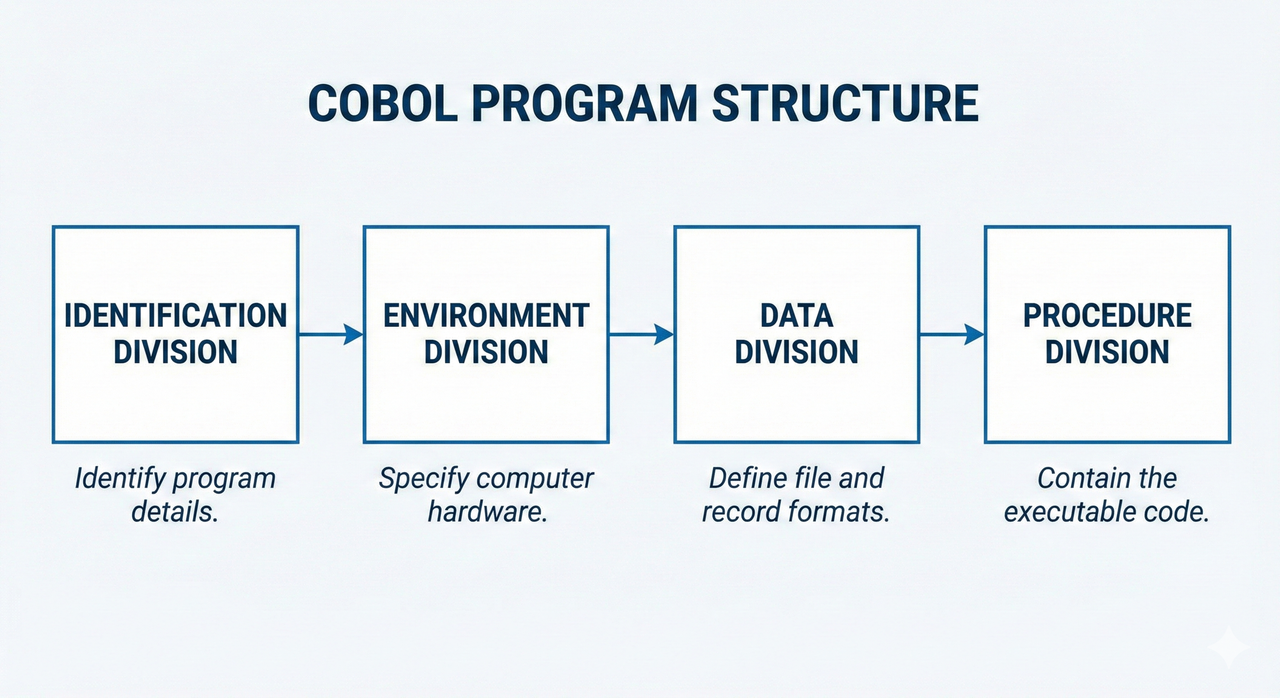
The most useful mental model I’ve found is to think in four big boxes, the COBOL divisions:
- IDENTIFICATION DIVISION – who/what this program is.
- ENVIRONMENT DIVISION – which machine, files, and external resources it talks to.
- DATA DIVISION – all the data structures, records, and file layouts.
- PROCEDURE DIVISION – the actual business logic and processing steps.
Once you stop seeing these as “weird shouting headers” and start seeing them as an enforced project structure, the language feels less alien.
Syntax Style: English-Like and Verbose
COBOL leans heavily into English-like keywords:
MOVE AMOUNT TO TOTALDISPLAY "HELLO"ADD A TO B
The upside is that non‑specialists (like analysts or managers) can often follow the logic. The downside is verbosity: code is longer, but it’s self-describing in a way that’s rare in newer languages.
A Brief History – From 1959 to COBOL 2023
Understanding the timeline helps you appreciate why COBOL is still taken seriously in 2026.
Origins with CODASYL and the U.S. Department of Defense
COBOL started in 1959 from a push led by CODASYL, with the U.S. Department of Defense pushing for a portable business language so they wouldn’t be locked into a single vendor’s proprietary system. That “portability first” mindset later solidified into formal standards.
ANSI and ISO COBOL Standards
The language matured through stages—1968, 1974, and 1985 standards—under ANSI COBOL standard governance, and later under ISO COBOL standard processes. These milestones ensured that COBOL code written for one system could (in principle) be moved to another with minimal changes, which is a big reason why so much COBOL survived platform migrations. Wikipedia – COBOL
Modern Standards – COBOL 2002, COBOL 2014, COBOL 2023
The more recent standards matter if you’re working on modern tooling:
- COBOL 2002: introduced object-oriented COBOL, exception handling, and more modern constructs.
- COBOL 2014 and COBOL 2023: refine and extend the language, add better numeric types (including IEEE‑style floating), and improve interoperability.
As verified by IBM’s documentation and vendor introductions like Micro Focus, these updates keep COBOL compatible with contemporary architectures rather than freezing it in 1980. IBM – What Is COBOL? Micro Focus – Introduction to the COBOL Language
Where COBOL Runs Today – Mainframes and Beyond
What surprised me most was how often I’d touch a system as a user—ATM, payroll, tax portal—only to discover later there was COBOL in the core.
Mainframe Systems and Business Data Processing
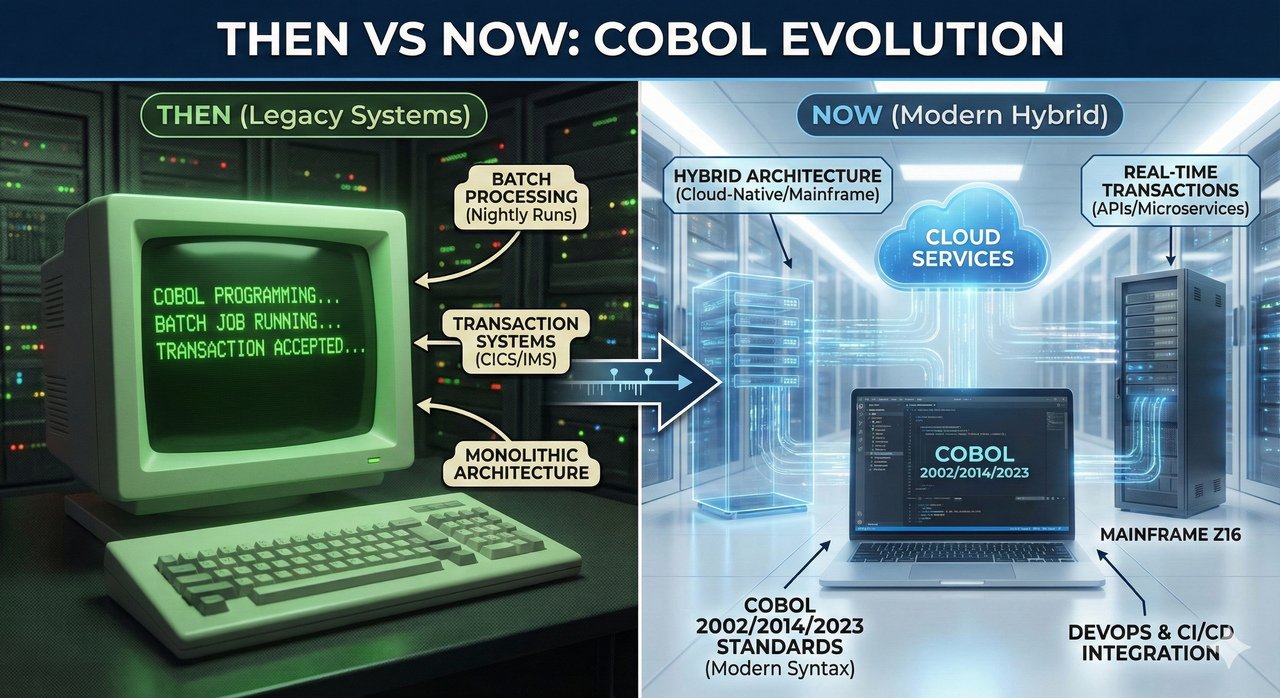
COBOL is tightly associated with mainframe systems because they’re both optimized for the same thing: high‑volume, reliable business data processing.
Typical patterns you’ll see:
- Massive nightly batch jobs (billing runs, interest calculations, statement generation).
- Online transaction systems that must not fail (card authorization, account balance checks).
- Strict SLAs around uptime and data integrity.
Typical Use Cases
In practice, COBOL shows up in:
- Core banking systems (accounts, cards, settlements).
- Payroll and HR systems for large enterprises.
- Government tax, benefits, and social security platforms.
- High-volume reporting and reconciliation processes.
If your work touches any of these domains, understanding COBOL—even at a read‑only level—makes you much more effective in cross‑functional teams.
“If It Works, Don’t Rewrite It” – Why COBOL Persists
The reason companies don’t just “rewrite it in Java” is risk, not laziness:
- The business rules are deeply encoded and often poorly documented.
- A bug in a core COBOL system can stop salaries, payments, or benefits overnight.
- Rewrites often balloon in cost and scope, while existing COBOL systems are already stable and battle‑tested.
So instead of ripping everything out, organizations increasingly wrap and integrate COBOL systems into newer architectures.
Is COBOL Worth Learning Today?
Let me be blunt: I don’t recommend COBOL as a first language. But as a second or third skill in the right context, it can be a big differentiator.
Demand vs Perception
There’s a growing mismatch:
- Many senior COBOL developers are retiring.
- The number of people who can confidently debug COBOL 2002+ code on mainframe systems is shrinking.
- At the same time, the systems themselves are still mission‑critical.
This is why you see organizations offering training programs or premium pay for engineers who can bridge COBOL with modern stacks.
Where COBOL Fits in a Modern Skill Stack
The sweet spots I’ve seen:
- Modernization projects: pairing COBOL with Java, .NET, or Python to expose legacy functions as APIs.
- Cloud + mainframe integration: using your cloud skills while understanding how the COBOL side behaves.
- Data engineering in regulated environments: understanding COBOL file layouts makes ingesting mainframe data far less painful.
In these scenarios, COBOL isn’t your identity; it’s your edge.
Pros and Cons of Learning COBOL
Pros:
- Strong demand in specific industries (banking, insurance, government).
- Access to systems that are central to how money and data move globally.
- Less competition compared to trendy languages.
Cons:
- Fewer greenfield projects; much of the work is maintenance or modernization.
- Tooling can feel dated compared to web or cloud ecosystems.
- Some skills are highly domain‑specific and less portable outside enterprise environments.
How COBOL Works – A Simple Program Walkthrough
Let’s make this concrete with a high‑level picture rather than a wall of code.
Minimal COBOL Program Structure
A tiny COBOL program outline might look like this conceptually:
- IDENTIFICATION DIVISION – Program name and metadata.
- ENVIRONMENT DIVISION – Which machine, files, and external resources are involved.
- DATA DIVISION – Definitions for records, fields, and file formats.
- PROCEDURE DIVISION – The actual steps: read, calculate, write, report.
When I teach beginners, I focus on mapping: “Which division would you put X in?” Once that mental classification sticks, reading existing COBOL becomes much easier.
Basic Operations: Data, Arithmetic, and I/O
The building blocks are straightforward:
- Data: declare records and fields with precise sizes and types.
- Arithmetic:
ADD,SUBTRACT,MULTIPLY,DIVIDEoperations that read almost like English. - I/O: reading from and writing to files or databases used in batch or transaction flows.
The main challenge isn’t the syntax; it’s understanding the business rules encoded in decades‑old logic.
From Source to Execution
The lifecycle in a mainframe context is typically:
- Write or modify the COBOL source.
- Compile it into an executable module.
- Link it into the appropriate environment or job.
- Run it as part of a batch job or online transaction system.
Different shops wrap this with their own tooling and governance, but the core flow is similar.
Modern COBOL – Object-Oriented and Integrated
One of the biggest misconceptions I encounter is that COBOL is frozen in procedural stone. That hasn’t been true for a while.
Object-Oriented COBOL in COBOL 2002 and Beyond
With COBOL 2002, you can define classes and methods, encapsulate behavior, and structure large systems more like you would in Java or C++. It’s still distinctly COBOL in syntax, but the architectural possibilities open up.
Interoperability with Modern Systems
In real projects, I’ve seen COBOL:
- Exposed as services via APIs or message queues.
- Called from modern applications that treat COBOL components as stable business modules.
- Integrated into hybrid architectures that split responsibilities between cloud and mainframe.
The key is to understand what the COBOL component does, then design the right boundary around it.
COBOL 2014 and COBOL 2023 Enhancements
Later standards like COBOL 2014 and COBOL 2023 continue to refine the language:
- Better numeric support, including IEEE‑style types for interoperability.
- Cleaner features that reduce friction when interacting with modern runtimes.
According to both standards summaries and vendor documentation, these changes are all about keeping COBOL usable in mixed environments rather than isolating it. Wikipedia – COBOL
Common Misconceptions About COBOL
These myths come up so often that I proactively address them whenever I onboard someone to a COBOL‑adjacent project.
“COBOL Is an Operating System”
Reality: COBOL is a programming language. It typically runs on mainframe operating systems (like z/OS), but it is not the OS itself. Treat it like Java or C in that sense: code that runs on top of an OS.
“Nobody Uses COBOL Anymore”
Reality: usage isn’t loud, but it’s deep. The systems are often too critical to advertise widely, and they “just work,” so you don’t hear about them until something goes wrong. Many core banking, insurance, and government platforms still rely heavily on COBOL logic.
“COBOL Can’t Work with Modern Tech”
Reality: I’ve seen COBOL services called via REST, messages on queues, and integrated into CI/CD pipelines. The trick is architecture and tooling, not the language’s ability to participate.
Getting Started with COBOL – Practical First Steps
If you’re COBOL‑curious, here’s how I usually guide someone.
Environment Options
You generally have three paths:
- Local or cloud‑based emulators that simulate a mainframe system for learning.
- Educational sandboxes offered by vendors or training providers.
- Managed mainframe access through courses or corporate environments.
Pick the one that gets you to “I can compile and run a tiny COBOL program” with the least friction.
Learning Roadmap
A simple progression that’s worked well for my mentees:
- Learn the four COBOL divisions and where things belong.
- Get comfortable with basic data types and record definitions.
- Practice file I/O—reading and writing simple reports.
- Study a small, realistic example: payroll calculation or ledger posting logic.
The goal isn’t to memorize every keyword; it’s to recognize patterns you’ll see in real systems.
How Much COBOL You Actually Need
Your depth of COBOL should match your role:
- Modernization / integration roles: enough to read, reason about, and safely refactor existing COBOL.
- Mainframe specialist roles: deeper knowledge of performance tuning, debugging, and business data processing patterns at scale.
You don’t need to become “the COBOL person” overnight—start with literacy.
Summary – COBOL in One Mental Model
If I had to give you one mental model to walk away with, it’s this:
COBOL is a standardized, English-like procedural programming language built for high‑stakes business data processing on mainframe systems, extended by COBOL 2002, COBOL 2014, and COBOL 2023 to support object-oriented COBOL and modern interoperability. It’s not glamorous, but it’s stable, battle‑tested, and still running the parts of the world we really can’t afford to break.
To dive deeper into mainframe concepts alongside COBOL, check out this mainframe basics guide once it’s available on AIQnAHUB.
Leave a Reply