
Transparency Note: This article contains affiliate links. If you purchase through these links, we may earn a small commission at no extra cost to you.
Claude Sonnet 4.6 Not Working? Real Fixes for Slow, Stuck, or Broken Runs
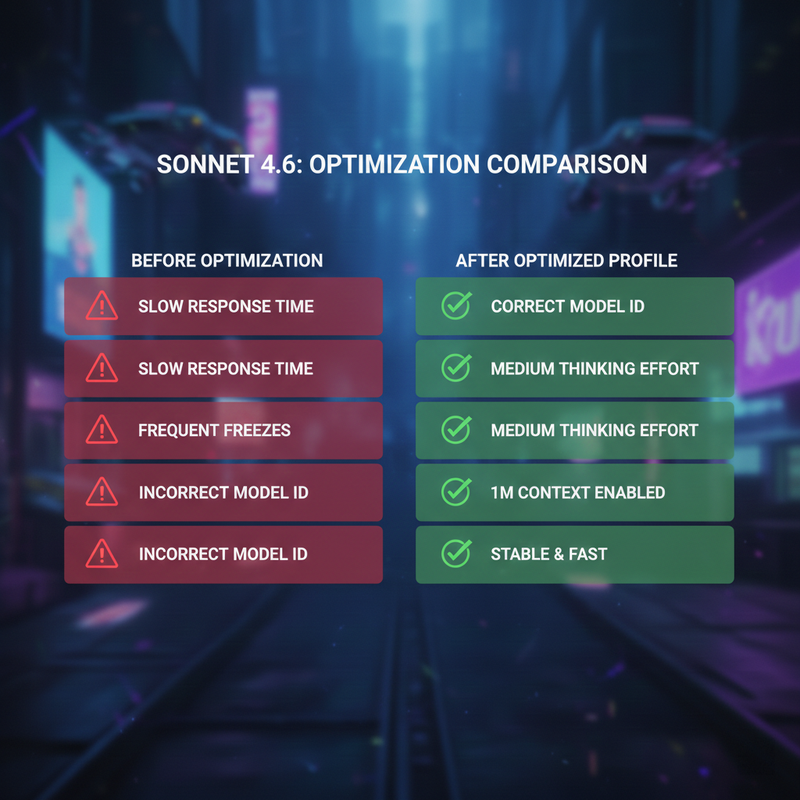
If Claude Sonnet 4.6 feels slow, unreliable, or “dumber” than you expected, I can tell you right now: the issue is almost certainly your setup and prompts, not the model itself. In my experience auditing AI pipelines, fixing a few core settings can instantly unlock its full power.

Quick Fix: How to Troubleshoot Claude Sonnet 4.6 in Under a Minute
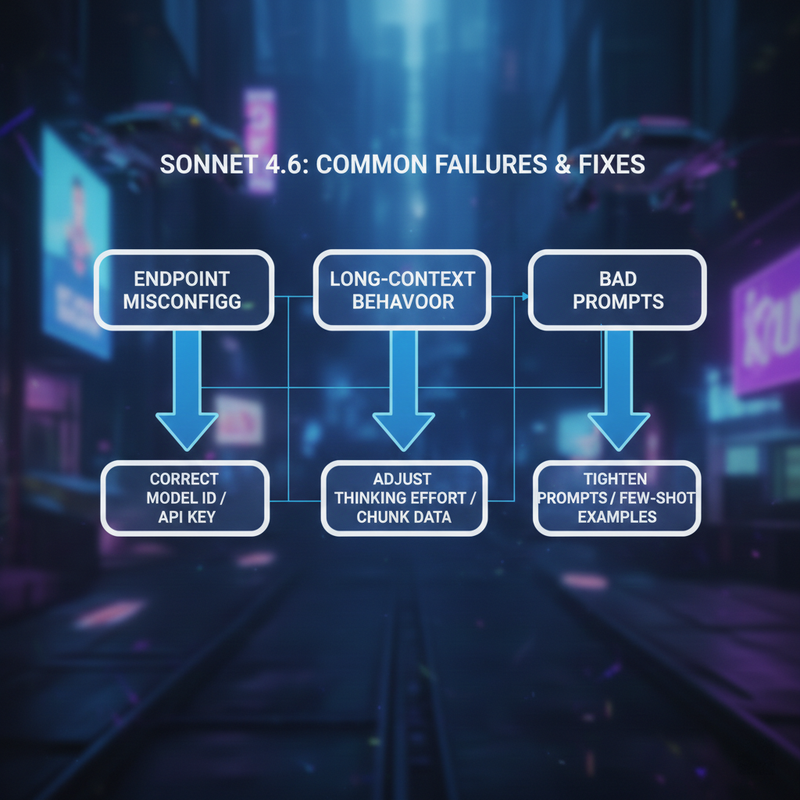
The common mistakes I see usually fall into three buckets: a wrong model endpoint, overly aggressive extended thinking, or vague prompts and tool configurations.
To fix it fast:
- Confirm you are using the correct model identifier claude-3.5-sonnet-4.6 (or the exact string required by your provider).
- Lower the thinking effort for simple tasks.
- Tighten your prompts with clear scopes, file boundaries, and explicit formats.
What Claude Sonnet 4.6 Actually Is (and Why It Feels Different)
Claude Sonnet 4.6 is Anthropic’s mid‑tier workhorse, specifically designed for coding, autonomous agents, and massive context work. But because it introduces new cognitive capabilities, it behaves differently than earlier iterations.
First, it uses an adaptive thinking mode and extended thinking, which means it will intentionally trade speed for deeper reasoning. This is why users often experience what looks like “freezes” on heavy prompts—the model is actually just thinking.
Second, it brings powerful new tools to the table, like the 1M token context window and context compaction (which makes handling massive codebases cheaper and faster). Whether you access it via the Claude API models endpoint, the Claude Developer Platform dashboard, or through an AWS Bedrock / Google Vertex AI deployment, understanding these features is key to making it work efficiently.
For a deep dive into these new baseline metrics, I always recommend checking out the official release data: Anthropic – “Introducing Claude Sonnet 4.6” .
The 3 Root Causes When Claude Sonnet 4.6 “Doesn’t Work”
1. Misconfigured or Missing Sonnet 4.6 Endpoint
A wrong or outdated model name, region, or provider setup prevents Claude Sonnet 4.6 from being called correctly. You’ll usually see this manifest as 404/400 errors, silent fallbacks to older Sonnet versions, or the model simply not appearing in your UI or model picker.
- Checklist:
- Confirm access in the Claude Developer Platform dashboard, AWS Bedrock, or Google Vertex AI.
- Check the exact model identifier and supported regions in the API docs.
- Ensure your project or workspace has the right feature flags enabled (e.g., the 1M context beta).
2. Extended / Adaptive Thinking Making It “Slow” or “Stuck”
High effort settings are fantastic for complex reasoning, but they are absolute overkill for simple tasks. If the model appears frozen, takes ages to answer, or burns through tokens internally, you are likely over-taxing the reasoning engine.
- Checklist:
- Reduce thinking effort to “medium” or “low” for routine, interactive API calls.
- Disable extended thinking entirely on trivial, single-step tasks.
- Cap max tokens and reasoning settings to prevent runaway costs.
3. Prompt and Tool Patterns That Fight Sonnet 4.6’s Design
Vague, over-broad instructions lead to highly agentic but incorrect behavior. When it comes to tool use / programmatic tool calling, poor tool schemas or missing termination rules cause endless loops, half‑finished runs, or “silent” failures.
- Checklist:
- Specify exact files, scopes, and explicitly forbidden actions.
- Use clear, strictly typed tool definitions and deterministic responsibilities.
- Define explicit success criteria and stopping conditions.
Step‑by‑Step Troubleshooting Checklist for Claude Sonnet 4.6
Step 1 – Verify Access and Model Identifier
Don’t guess the model name. Verify that Claude Sonnet 4.6 is actually enabled in your chosen platform’s quotas or workspace settings.
- Action List:
- Check project settings and toggle Sonnet 4.6 to “enabled”.
- Update environment variables with the exact model identifier claude-3.5-sonnet-4.6 (or the latest regional equivalent).
- Align your region and endpoint settings exactly with provider requirements. You can verify the current strings here: Anthropic – Claude API Docs .
Step 2 – Update SDKs, Plugins, and Tools
If your editor plugins or CLI tools don’t list Sonnet 4.6, they are outdated. Older SDKs won’t support newer parameters like adaptive thinking mode or context compaction.
- Action List:
- Upgrade official SDK/CLI versions to the latest release.
- Refresh editor integrations (VS Code, JetBrains, cursor/terminals).
- Re‑scan model lists and verify Sonnet 4.6 availability.
Step 3 – Tune Thinking Effort and Context Settings
You must map your task types to the appropriate effort levels. Quick Q&A requires low effort; complex refactors require deep reasoning.
- Action List:
- Create code presets: “fast interactive”, “balanced”, and “deep reasoning”.
- Enable the 1M token context window only where needed to monitor latency and cost.
- Document default settings for your team.
Step 4 – Harden Your Prompts for Deterministic Outcomes
I found that turning open‑ended prompts into strictly structured instructions is the single best way to tame this model.
- Action List:
- Always specify: goal, input files, allowed changes, and output format.
- Use checklists and bulleted constraints inside your system prompts.
- Add negative constraints (e.g., “DO NOT modify layout CSS”).
Step 5 – Escalate: Bugs, Missing 1M Context, or Platform Issues
Sometimes, it really is a platform issue. If the 1M context option suddenly disappears, or the model consistently hallucinates despite perfect guardrails, check the Claude Sonnet 4.6 System Card for known limitations before filing a bug.
- Action List:
- Capture minimal reproducible examples (prompts + code).
- Check provider status pages and open developer issues.
- File a ticket including your logs, request IDs, and exact configuration settings.
Example Prompts: Bad vs Good for Claude Sonnet 4.6
Bad Prompt: Over‑Agentic and Unbounded
“Use Sonnet 4.6 to fix my app, just do whatever you think is best and read any files you want until it passes tests.”
Why it fails:
- No scope or file boundaries.
- No definition of success.
- It encourages unnecessary extended thinking and highly risky edits (like breaking UI layouts while trying to fix a backend bug).
Good Prompt: Scoped, File‑Aware, and Effort‑Aware
“You are Claude Sonnet 4.6 running in adaptive thinking mode at medium effort. Your task: update only the localization keys in `en.json` to match the new spec in `LOCALIZATION_GUIDE.md` without inventing new keys. Do not touch layout files. When done, output a unified diff and a short checklist of what changed.”
Key Learning Points:
- Explicit model mode (adaptive thinking mode, medium effort).
- Clear file constraints and designated non‑editable areas.
- Requires an output format (unified diff) that’s easy for a human to review.
When to Use Sonnet 4.6 vs Other Claude Models
Sonnet 4.6 vs Opus and Previous Sonnet Versions
Think of Claude Sonnet 4.6 as the daily workhorse. Route your trivial text generation to Haiku or smaller models. Keep Sonnet 4.6 for coding, heavy data structuring, and multi-step agents. Reserve Opus strictly for ultra-hard, rare analytical tasks.
| Model | Ideal Use Case | Speed / Latency | Context Need |
|---|---|---|---|
| Claude 3.5 Haiku | Quick Q&A, basic formatting, categorization | Extremely Fast | Low to Medium |
| Claude Sonnet 4.6 | Deep coding, agentic workflows, tool use | Medium (depends on thinking effort) | Massive (1M token context window) |
| Claude 3 Opus | Ultra-complex academic reasoning, high-level strategy | Slower | Medium to High |
Designing a “Sonnet 4.6 Profile” for Your Team
In our tests, teams that standardize their API calls save thousands of dollars and countless hours. Store your configuration as code so all services behave consistently.
- Checklist for your internal profile:
- Approved model identifier claude-3.5-sonnet-4.6.
- Default effort levels for different microservices.
- Max token limits.
- Standardized JSON schemas for tool use / programmatic tool calling.
FAQ: Common Claude Sonnet 4.6 Errors and Quick Answers
“Why is Claude Sonnet 4.6 so slow?”
It is likely using extended thinking or a high-effort adaptive thinking mode. For faster responses, explicitly lower the thinking effort in your API parameters or system prompt.
“Why can’t I see the 1M token context option?”
The 1M token context window is often gated behind beta flags or specific workspace permissions depending on whether you use Anthropic’s console, AWS, or Vertex AI. Check your provider’s specific feature toggles.
“Why does Sonnet 4.6 ignore some of my instructions?”
Because it is highly agentic, it may prioritize solving the broader problem over strict formatting if instructions conflict. Use heavily structured prompts with negative constraints (what not to do) to keep it on track.
“How do I know if it’s a bug or my configuration?”
If the issue persists after hardcoding the correct model identifier, turning off extended thinking, and testing a strictly scoped prompt, check the provider status page. Consistent 400-level errors are usually configuration; 500-level errors or feature disappearances are bugs.
Leave a Reply