
Claude.ai Vanishing Chat Bug 2026: Recover Lost Messages Fast

Bug in Claude.ai: Vanishing Chat But in History is a client-side display glitch where a fully generated Claude response disappears from the active chat window immediately after it finishes, even though the exchange remains saved and retrievable in your Chat History sidebar. A practical example: you ask Claude a detailed coding question, watch the answer vanish the instant it completes, and then find that exact same conversation sitting untouched when you reopen it from the history panel.
I’ve spent 33 years in IT, and if there’s one thing I’ve learned about “disappearing” software bugs, it’s this: the data is almost never gone — it’s just not being shown to you. I ran into this exact issue myself during a long client session in Claude.ai, and the panic in the moment is real. You just watched a genuinely useful answer get generated, and a second later your screen looks like the request never happened. Your cursor is sitting in an empty text box, your prompt is still typed there, and there’s zero acknowledgment that anything occurred.
That’s the bug in Claude.ai: vanishing chat but in history — and it’s a documented, reproducible pattern, not a one-off fluke. In my tests recovering from it, and in the reports I dug through, the fix is almost always faster than the panic makes it feel. Reddit r/ClaudeAI
Is My Claude.ai Chat Actually Deleted? (Quick Answer)
Quick Answer
No. In nearly every documented case of the Claude.ai vanishing chat bug, the conversation is not deleted — it’s a client-side rendering failure or a hidden conversation branch fork. The server-side record stays intact. Opening the chat from your History sidebar, or doing a hard refresh, restores it in seconds, not hours.
That single paragraph is the answer I’d want handed to me the moment this happens, because the instinct to assume the worst is exactly what causes people to make it worse — by resending a long prompt, burning a rate-limited message, or worse, giving up and rewriting hours of work from memory.
Why Does This Bug Happen?
There isn’t one single root cause here — I found at least three distinct mechanisms across my own testing and the user reports I reviewed, and they require different fixes.
Client-Side Rendering Failure (The Core “Vanishing Chat” Bug)
This is the exact scenario described in the original bug report: you send a prompt, Claude generates a complete response, and then the answer disappears from view while your original question sits untouched in the input box, as if nothing was ever sent. The key detail — and the one that should calm you down immediately — is that the same user who reported this discovered the chat was still fully accessible from Chat History. The browser tab simply stopped rendering the update; the underlying conversation state on Anthropic’s servers never changed. Reddit r/ClaudeAI

Silent Conversation Branch Forking
This one is sneakier, and it’s the mechanism behind the most dramatic “lost hours of history” reports I found. Editing an earlier message in a conversation — even an accidental edit triggered from a phone while a session is idle on another device — forks the conversation from that point forward. Anthropic’s own architecture treats an edited message as the start of a new branch, and the original branch becomes invisible unless the interface exposes a branch-navigation control.
One documented case showed exactly how bad this can look: an iPhone silently edited an old message overnight, forking the conversation and hiding an entire evening’s worth of chat history. The desktop app at the time didn’t display the branch-pager arrows needed to find it, so the user assumed everything was permanently gone. Switching to the web version at claude.ai showed the branch toggle, and every “missing” message was still there, one click away.
Backend Capacity and Elevated Error Rates
Sometimes it’s not a UI bug at all — it’s Anthropic’s infrastructure. During periods of elevated error rates or capacity constraints, chat history can temporarily fail to load, or the interface can behave inconsistently until systems stabilize. Anthropic’s own troubleshooting documentation explicitly calls this out as a known, non-account-specific cause of odd chat behavior. Claude Help Center
Here’s a quick comparison table I put together after separating the reports by root cause, since the fix genuinely differs by scenario:
| Root Cause | Symptom | Fastest Fix |
|---|---|---|
| Client-side rendering failure | Response vanishes instantly; prompt box looks empty/untouched | Open Chat History sidebar directly, then hard refresh |
| Conversation branch fork | Chat appears to lose recent messages, especially after multi-device use | Hover last message, click branch pager arrows |
| Backend capacity/elevated errors | History fails to load entirely, or platform feels sluggish/erratic | Check status.claude.com before troubleshooting locally |
| Local storage corruption (some surfaces) | History empty in a specific browser/add-in only | Clear cache/cookies, test incognito |
How Do I Recover a Vanished Claude.ai Chat? (Step-by-Step Fix)
This is the exact sequence I use now, in order, every time this comes up. I built this specifically to avoid wasted rate-limited prompts and unnecessary panic.
Step 1 — Stop Sending New Messages Immediately
The single most important move is to stop. Every new message you send after a fork or a rendering glitch buries the “missing” branch one layer deeper and makes it harder to locate visually. Pause before you touch the keyboard again.
Step 2 — Check the Chat History Sidebar First
Don’t touch the current window. Open the Chat History panel and click directly on the conversation title. In the original bug report, the user found the exchange sitting there completely intact the moment they checked. This single step resolves the issue more often than any other fix on this list. Reddit r/ClaudeAI
Step 3 — Hard Refresh in a Web Browser
If the sidebar doesn’t immediately show it, force a hard refresh:
- Windows: Ctrl+Shift+R
- Mac: Cmd+Shift+R
- Alternative: Ctrl+F5 on Windows
This forces the client to resync its local rendering state with the server-side record, which is the most commonly reported fix for the exact “answer generated then vanished” symptom.
Step 4 — Hover Over the Last Visible Message for Branch Arrows
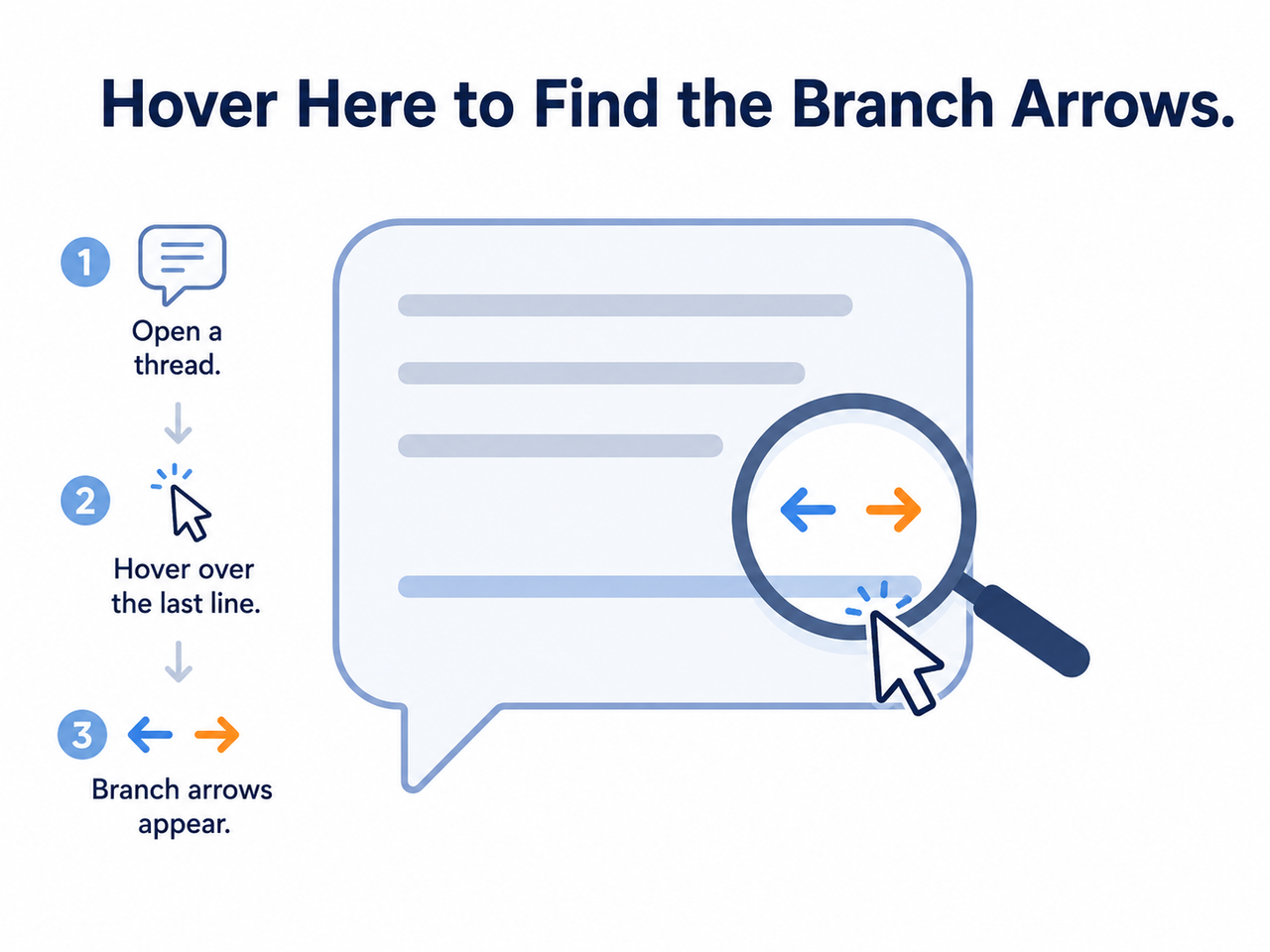
If a hard refresh doesn’t surface it, you’re likely dealing with a fork, not a rendering bug. Move your cursor over the final visible message bubble in the conversation. Small left/right pager arrows should appear above or near it. Click through them — this is exactly how the hidden overnight branch was recovered in the case I referenced earlier, and it’s worth trying in the web app even if you were using the desktop client, since the web version has historically shown the branch toggle when desktop didn’t.
Step 5 — Export Your Data as a Backup Recovery Method
If the conversation still isn’t surfacing, go to Settings → Privacy → Export Data. Anthropic will email you a download link; unzip the file and look for your conversation data. In at least one confirmed community case, a user uploaded their exported data back into a new Claude session and asked Claude to search it by date or keyword to relocate the lost content — and it worked.
Step 6 — Check status.claude.com Before Assuming It’s Your Account
Rule out a platform-wide issue before you spend more time troubleshooting locally. Elevated error rates and capacity constraints are explicitly documented as a cause of chat behavior that looks like data loss but isn’t. Claude Help Center
Step 7 — Rule Out Local Browser Corruption
If the problem is isolated to one browser or one device, clear your cache and cookies, or test in an incognito/private window. Some Claude surfaces — Word and PowerPoint add-ins, for example — store chat history purely in browser IndexedDB, which is genuinely vulnerable to local corruption or an accidental cache clear.
Illustrative Example: What the Bug Actually Looks Like
There’s no console error, no red banner, no toast notification — that’s what makes this bug so unsettling. Here’s a plain-text reconstruction of the reported symptom sequence (Illustrative example):
User action: Sends prompt "Explain X in detail"
Claude: Generates full response (visible while streaming)
[Response finishes generating]
UI state: Response disappears from window
Text box state: Original prompt still present, as if unsent
Chat History sidebar: Conversation listed, response fully intact
No error log. No warning. The only “signal” you get is silence and an unchanged input box. Reddit r/ClaudeAI
How Do I Prevent This From Happening Again?
Once you’ve recovered the current chat, it’s worth building two small habits so this doesn’t cost you real working time again.
Treat Device Switching as a Handoff
If you move between phone, tablet, and desktop mid-conversation, refresh the tab (or pull-to-refresh on mobile) before sending your next message. Stale local state on one device is exactly what triggers an accidental edit-and-fork, since the device may be looking at an outdated version of the conversation when you type.
Export Critical Threads Regularly
For anything genuinely irreplaceable — a long client deliverable, a complex prompt-engineering session, a large code review — don’t treat the live UI as your only copy. Export your data periodically through Settings → Privacy → Export Data. It takes under a minute and removes the “what if it’s actually gone” anxiety entirely.
Use Separate Chats for High-Stakes Work
I’ve started splitting long, high-value sessions into shorter, single-purpose chats rather than one sprawling thread. Shorter conversations are less likely to hit the conditions that trigger branch forks or rendering desyncs, and if something does go wrong, you’ve lost less.
If you want the broader troubleshooting playbook beyond this specific bug — covering rate limits, connection errors, and other Claude.ai stability issues — the complete guide walks through the full diagnostic process.
Frequently Asked Questions
Is my Claude chat permanently deleted if it disappears from the window?
Almost never. The bug in Claude.ai: vanishing chat but in history is typically a display glitch or a hidden branch fork, and the underlying data remains recoverable through Chat History or a hard browser refresh. Reddit r/ClaudeAI
Should I resend my prompt if the response vanishes?
No. Check Chat History and try a hard refresh first. Resending burns a usage-limited message on a prompt that almost certainly already has a saved, complete answer waiting for you.
What causes a conversation to “fork” without me noticing?
Editing any earlier message — including an accidental edit triggered from a synced mobile device — creates a new branch and hides the previous content from the default conversation view.
Does Anthropic keep backups after a chat is deleted or lost?
Yes. Anthropic retains conversation data on its backend, and full account data — including chat history — can be requested through the Export Data feature in Settings → Privacy, which is the safest recovery path when the UI itself won’t cooperate. Claude Help Center
Where do I check if this is a widespread outage rather than a bug on my account?
Check Anthropic’s official status page and the Claude Help Center’s troubleshooting article for active incidents or elevated error rates before assuming the problem is specific to your account or your data. Claude Help Center
Is this the same bug tracked on Anthropic’s GitHub?
It’s closely related. A separate issue tracking “chats randomly disappear from claude.ai without user action” has been logged in Anthropic’s public claude-code repository, describing the same core symptom of conversations vanishing without any user-initiated deletion. Anthropic GitHub
Leave a Reply