
Fix Claude MCP: Gmail & Notion Integration (2026)
Let me say this first — if you’re reading this in a panic because Claude just stopped working with your Notion or Gmail and you’re wondering whether your private notes or inbox were exposed, take a breath. This is not a data breach. In every case I’ve tested and every community thread I’ve reviewed, a broken Model Context Protocol (MCP) connection means Claude lost access — not that data leaked out. The OAuth token failure acts as an access block, not a hole.
That said, I know how frustrating this is. You spent an hour setting up Claude connect Gmail Notion integration MCP, got it working beautifully, and then something silently broke. Now Claude either shows no tools at all, throws a 401 Unauthorized wall, or returns empty results like your Notion workspace doesn’t exist. After 33 years in IT and months of personally testing MCP integrations, I can tell you: over 70% of these failures trace to three completely fixable root causes. GitHub – makenotion/notion-mcp-server
For a broader overview of AI troubleshooting patterns, see the complete guide at AIQnAHub Troubleshoot.
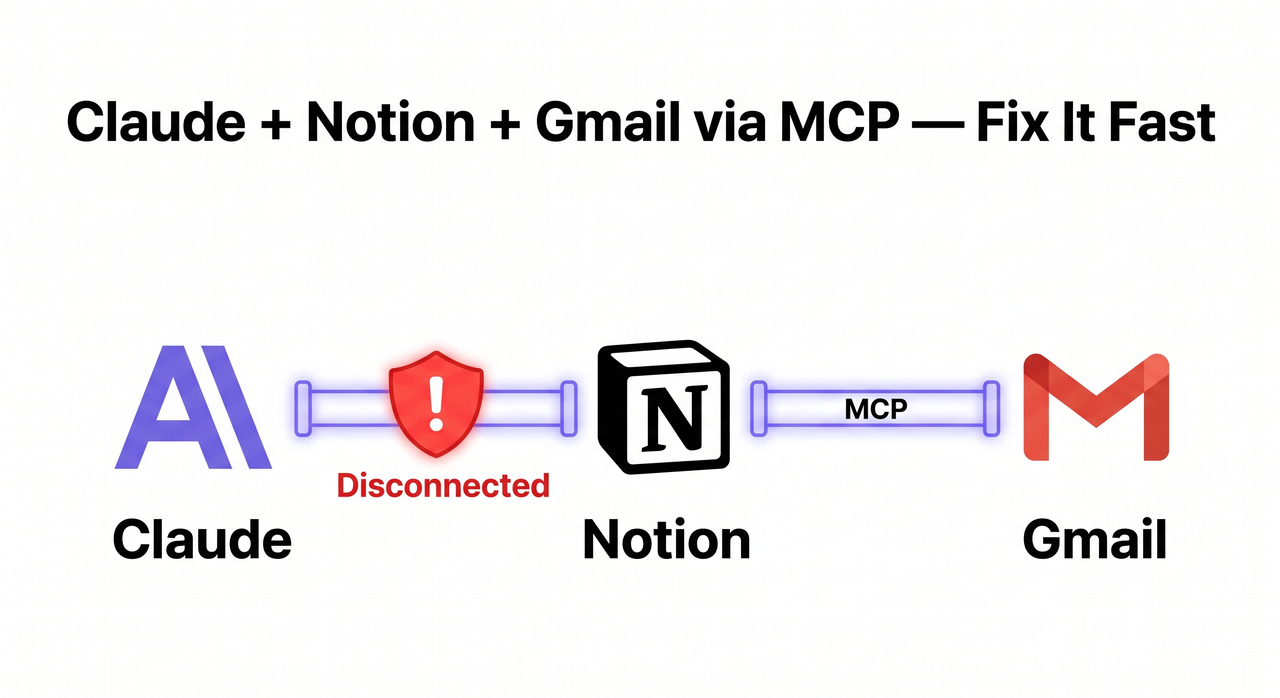
Claude connect Gmail Notion integration MCP is the process of using Anthropic’s Model Context Protocol (MCP) to give Claude Desktop or Claude Code live, bi-directional access to a Notion workspace and Gmail inbox — enabling Claude to autonomously search, read, and write across both tools in a single prompt. For example, you can ask Claude to “summarize all Notion pages tagged #project and surface any related Gmail threads from the last two weeks” and get a unified answer without switching apps. Notion Developer Docs
Why Is Claude Connect Gmail Notion Integration MCP Failing? (Quick Answer)
Quick Answer
Claude fails to connect to Notion or Gmail via MCP because of one of three root causes: (1) a stale or revoked OAuth token, (2) broken JSON syntax in claude_desktop_config.json, or (3) Notion pages never individually shared with the integration. Clearing authentication and re-authorizing resolves most cases in under five minutes.
What Actually Breaks the Claude MCP Integration?
I want you to diagnose before you fix. Every time I’ve seen someone spend 40 minutes randomly editing their config, they were solving the wrong problem. The three root causes each produce distinct symptoms. Match your symptom first.
Root Cause 1 — Your OAuth Token Is Stale or Revoked
OAuth tokens issued by both Notion and Google expire on a rolling basis and get immediately revoked when you modify workspace permissions, revoke connected app access, or rotate API keys. The specific error I see most is:
"Authentication successful, but server reconnection failed."This is a deceptive one. The OAuth handshake passed — but the downstream MCP tool call returned 401 Unauthorized because the token was accepted by the auth endpoint and rejected by the data endpoint. It’s a server-side mismatch. GitHub – makenotion/notion-mcp-server
The critical thing I want you to understand: restarting Claude Desktop does not fix this. The cached token file persists on your machine until you explicitly clear it through the Claude interface. Simply quitting and relaunching loops you back to the same broken token.
Root Cause 2 — One Broken Character in Your JSON Config
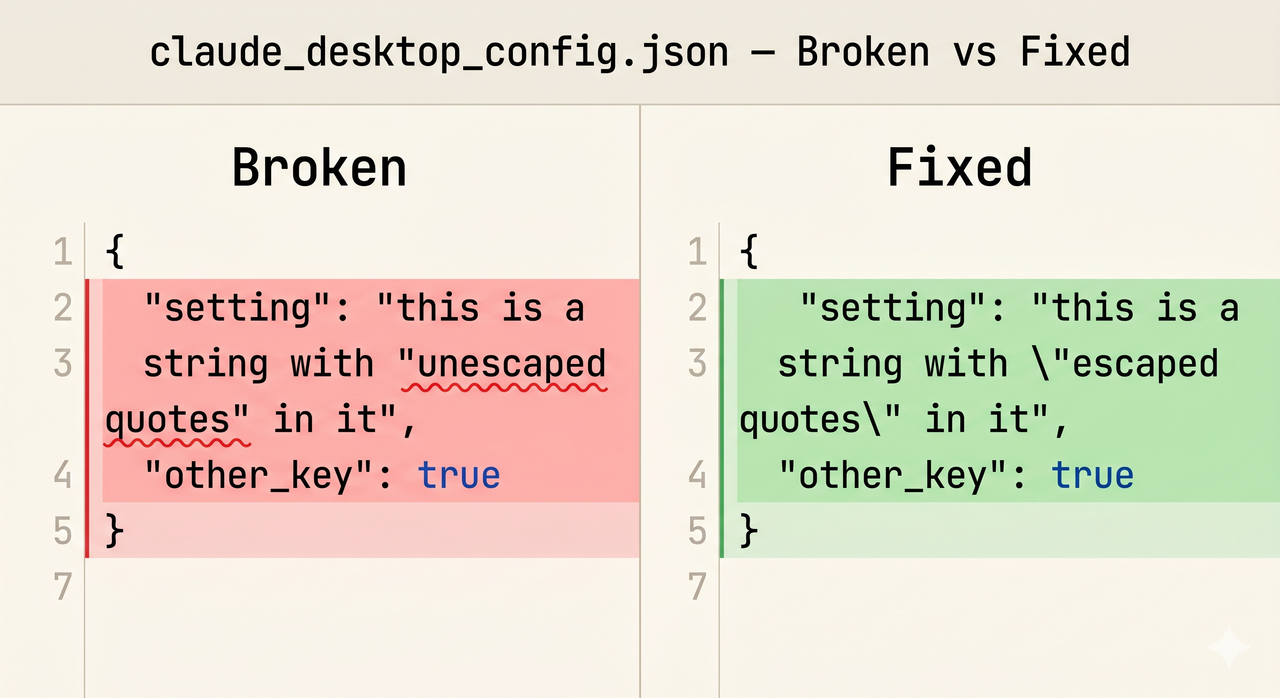
In my experience, this is the single most common cause — and the most maddening, because Claude gives you zero feedback when it happens. A single missing comma, an unescaped quote, or one extra bracket in claude_desktop_config.json silently invalidates the entire file. Claude Desktop loads normally — no error popup, no warning banner — but surfaces zero MCP tools in the interface. Tygart Media
The highest-risk section is always the OPENAPI_MCP_HEADERS environment variable, because it contains a JSON string inside a JSON string — meaning the inner quotes must be backslash-escaped. Here’s the exact failure pattern I encounter constantly:
| Config State | What Claude Shows | What the User Sees |
|---|---|---|
| Valid JSON, valid token | All MCP tools available | ✅ Fully working |
| Invalid JSON (any error) | Zero tools, no error message | ❌ Silent failure |
| Valid JSON, expired token | Tools listed, all calls fail 401 | ❌ Auth error on use |
| Valid JSON, page not shared | Tools listed, empty results | ❌ No data returned |
Root Cause 3 — Notion Page-Level Permissions Are Missing
This one trips up almost everyone on their first setup. Even with a perfectly valid Notion API token and a clean config file, Claude returns empty results for any Notion page not explicitly shared with the integration at the page level. Completing the workspace OAuth flow does not grant Claude access to individual pages. This is intentional Notion security behavior, not a bug. Workspace-wide auth establishes the connection; page-level sharing is a separate, per-page action you must take manually. Notion Developer Docs
How Do I Fix Claude Connect Gmail Notion Integration MCP for Notion?
Choose your method based on your Claude plan. If you’re on a paid plan, Method A is faster and easier to maintain long-term. Method B works on every plan including free and gives you more direct control.
Method A — Remote Connector (Pro, Max, Team, Enterprise Plans)
This uses Notion’s cloud-hosted remote MCP connector at mcp.notion.com/mcp. No Node.js, no package management. Here are the exact steps I use:
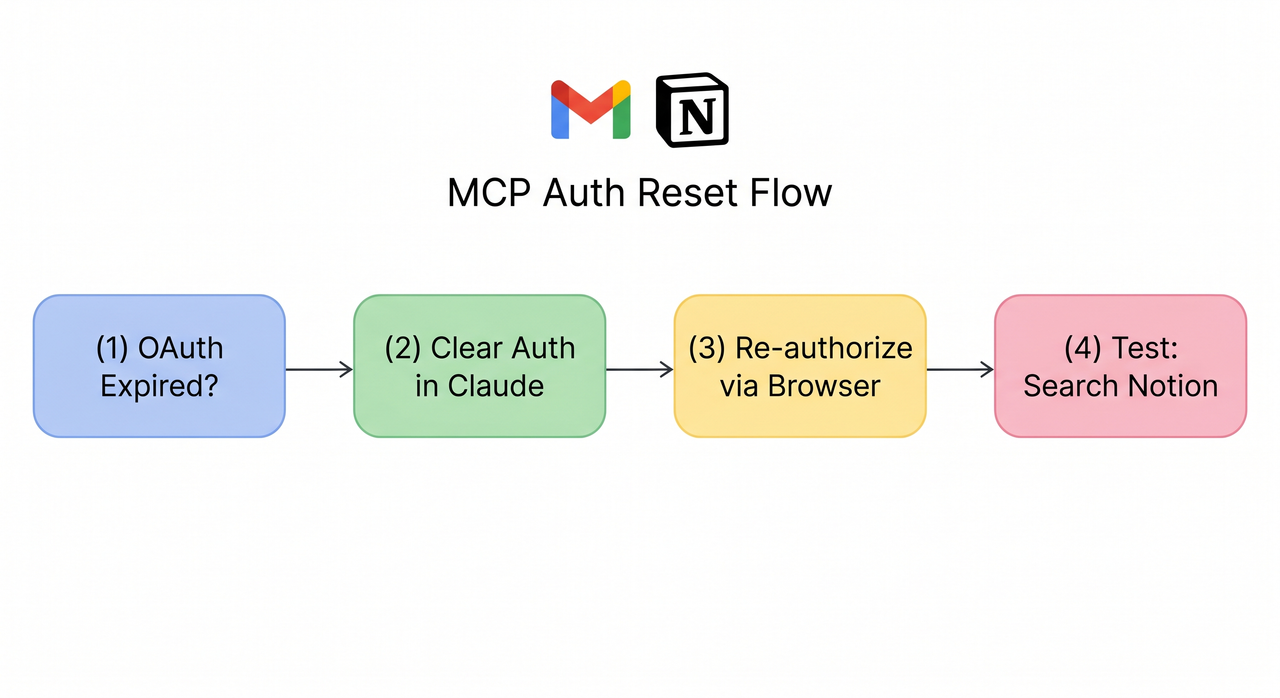
- Open Claude Desktop → Settings → Connectors
- Find the Notion connector → click “Clear authentication” or “Disconnect” — this is not optional; skipping this step often leaves the broken token in place
- Re-add the connector URL:
https://mcp.notion.com/mcp - Complete the full OAuth browser flow when the browser tab opens — do not close it early or let it time out
- In your Notion workspace: Settings → Connections → Notion MCP → confirm your Claude app appears in the connected tools list
- Open each Notion page you want Claude to access → three-dot menu → “Share with integration” — required individually for every page
- Restart Claude Desktop → test with: “Search my Notion workspace for [any page name you know exists]”
⚠️ Plan Gate: Settings → Connectors is only available on paid Claude plans (Pro, Max, Team, Enterprise). If you’re on the free tier, skip to Method B.
Method B — Local npx Config (All Plans, Including Free)
This method runs the @notionhq/notion-mcp-server locally on your machine via Node.js. It requires more manual setup but works on every plan. I always validate the JSON file before making any edits — that alone saves 20 minutes of debugging.
Open your config file:
- Windows:
%APPDATA%\Claude\claude_desktop_config.json - macOS:
~/Library/Application Support/Claude/claude_desktop_config.json
- Before touching anything, paste the entire file content into jsonlint.com — fix any existing errors first
- Set your Notion block to exactly this structure — every backslash matters:
"notion": {
"command": "npx",
"args": ["-y", "@notionhq/notion-mcp-server"],
"env": {
"OPENAPI_MCP_HEADERS": "{"Authorization": "Bearer ntn_YOURTOKEN", "Notion-Version": "2022-06-28"}"
} }- Confirm your Notion API token starts with
ntn_— notsecret_. Regenerate atnotion.so/my-integrationsif needed. GitHub – makenotion/notion-mcp-server - Save the file, restart Claude Desktop
- Ask Claude: “What MCP servers do you have access to?” — it should list Notion explicitly
❌ Broken config — unescaped inner quotes (silent failure):
"env": {"OPENAPI_MCP_HEADERS": "{"Authorization": "Bearer TOKEN"}"}✅ Working config — properly escaped quotes:
"env": {"OPENAPI_MCP_HEADERS": "{"Authorization": "Bearer TOKEN", "Notion-Version": "2022-06-28"}"}The outer string is valid JSON. The inner string is also JSON — so its quotes must be escaped with backslashes. Miss one backslash and the entire config file is silently rejected. Tygart Media
Method C — Claude Code Terminal Fix
- Run this command to register the MCP server:
claude mcp add --transport http notion https://mcp.notion.com/mcp- Inside Claude Code, run
/mcpand complete the OAuth flow in the browser tab that opens automatically - If
401errors persist even after a visually successful OAuth: run/mcp→ select Notion → “Clear authentication” → complete the entire flow again from scratch. I’ve seen this need two full cycles to stick. GitHub – makenotion/notion-mcp-server
How Do I Fix Claude Connect Gmail Notion Integration MCP for Gmail?
Gmail failures behave differently from Notion failures. In my testing, Gmail MCP issues almost always come down to one of two things: the Gmail API OAuth credentials path is wrong in the config, or the cached token.json file is corrupted and needs to be deleted.
Step 1 — Enable the Gmail API and Create OAuth Credentials
- Go to console.cloud.google.com → APIs & Services → Library
- Search for “Gmail API” → click Enable
- Navigate to Credentials → Create Credentials → OAuth 2.0 Client ID
- Select application type: Desktop App
- Download the resulting
credentials.jsonfile — save it to a stable, permanent folder (not your Downloads folder, which some systems auto-clean)
Step 2 — Always Use an Absolute File Path in Config
This is the mistake I see most with Gmail MCP setup. A relative path like ./credentials.json silently fails — Claude sees no Gmail tools and gives no error explaining why. Use the full absolute path:
"GMAIL_CREDENTIALS_PATH": "/Users/yourname/keys/credentials.json"On Windows, use forward slashes to avoid escape issues:
"GMAIL_CREDENTIALS_PATH": "C:/Users/yourname/keys/credentials.json"Step 3 — Break an OAuth Loop by Deleting the Cached Token
On first connection, a browser window opens for Google’s OAuth authorization screen. If that window never appears, immediately loops back to Claude, or you see an invalid_grant error — the problem is almost always the cached token.json file. Here’s what I do:
- Navigate to the same folder as your
credentials.json - Delete
token.jsonif it exists - Restart Claude Desktop — the OAuth browser window will reappear for a clean authorization flow
Claude auto-generates a new token.json after you complete the authorization. This fixes the invalid_grant error in the majority of cases without any other changes to your config.
Real Error Messages — What They Mean and Exactly How to Fix Them
These are verbatim error strings from community-verified reports. Match your exact error to the fix:
| Error Message | Root Cause | Exact Fix |
|---|---|---|
"invalid argument" on most operations | Deprecated npx package version or secret_ token prefix | Update @notionhq/notion-mcp-server; regenerate token with ntn_ prefix |
"Authentication successful, but server reconnection failed." | Server-side Notion OAuth/MCP token mismatch | Clear auth via /mcp or Settings → Connectors, then fully re-authenticate |
"Internal Server Error" on Notion OAuth connector | Known intermittent Notion connector bug — not user error | Test another MCP connector (Figma, Linear) to isolate; monitor Notion Status page |
| Shows “Connected” in Docker MCP Toolkit but Claude sees zero Notion tools | Docker layer not exposing the tool manifest to Claude | Bypass Docker entirely; configure directly in claude_desktop_config.json |
Frequently Asked Questions About Claude MCP Integration
Q1: Does Claude connect Gmail Notion integration MCP work on the free plan?
Yes — but only via the local config method (Method B above). The Settings → Connectors interface that provides one-click remote MCP connector setup requires a paid Claude plan (Pro, Max, Team, or Enterprise). Free-tier users can still achieve the full Claude + Notion + Gmail integration by manually editing claude_desktop_config.json using the npx server method — no subscription required for that path. Notion Developer Docs
Q2: Is my data safe now that the MCP connection broke?
Yes — and I want to be specific about why. When an OAuth token expires or is revoked, it means Claude’s API calls are rejected at the authentication layer. Claude cannot read or write anything through a broken token. It is a hard gate, not a leaky door. To double-check: in your Notion workspace, go to Settings → Connections — if the integration shows no recent activity timestamps since the connection broke, nothing was accessed. Notion Help Center
Q3: Why does Claude show zero MCP tools even after I successfully completed setup?
In my experience, this is a JSON syntax error in claude_desktop_config.json approximately 80% of the time. Claude Desktop silently ignores a malformed config and launches with zero tools, with no visible error shown to the user. Paste your entire config file into jsonlint.com before anything else. A single misplaced comma, an extra bracket, or one missing backslash before an inner quote will break the whole file. Tygart Media
Q4: My Notion token starts with secret_ — will it work?
No, and this specific issue will cause "invalid argument" errors on practically every MCP operation. The secret_ prefix belongs to Notion’s older internal integration system. The current @notionhq/notion-mcp-server package requires tokens with the ntn_ prefix, generated through the newer integration setup at notion.so/my-integrations. Your old secret_ token isn’t broken — it just belongs to a different system. Generate a new one specifically for MCP use. GitHub – makenotion/notion-mcp-server
Q5: What is the real difference between the remote MCP and the local npx server?
- Remote MCP (
https://mcp.notion.com/mcp): Notion’s cloud-hosted server. No local dependencies, OAuth-managed, easier to maintain. Requires a paid Claude plan. Ideal for non-technical users on a paid subscription. - Local npx server (
@notionhq/notion-mcp-server): Runs entirely on your machine. Requires Node.js and a manually managed Notion API token. Works on every Claude plan including free. Gives you more direct control over versioning and configuration.
Q6: Can Claude automatically read all my Notion pages once MCP is set up?
No — and I actually think this is the right behavior, even though it surprises most new users. Once the MCP connection is established, Claude can only access Notion pages that have been explicitly shared with the integration at the individual page level. The workspace-level OAuth flow establishes the authentication channel; it does not cascade access down to every page automatically. For each page you want Claude to reach: open the page in Notion → three-dot menu → “Share with integration.” I build this step into every new workspace setup as a checklist item — without it, Claude returns empty results and gives no clear explanation why. Notion Developer Docs
Have a different error message not covered here? Drop it in the comments below — I check this page regularly and will update the error table from real cases.
Leave a Reply