
ChatGPT Retry Button Removed in 2026: Get It Back
By Ice Gan | AI Tools Researcher | 33 Years IT Experience | aiqnahub.com
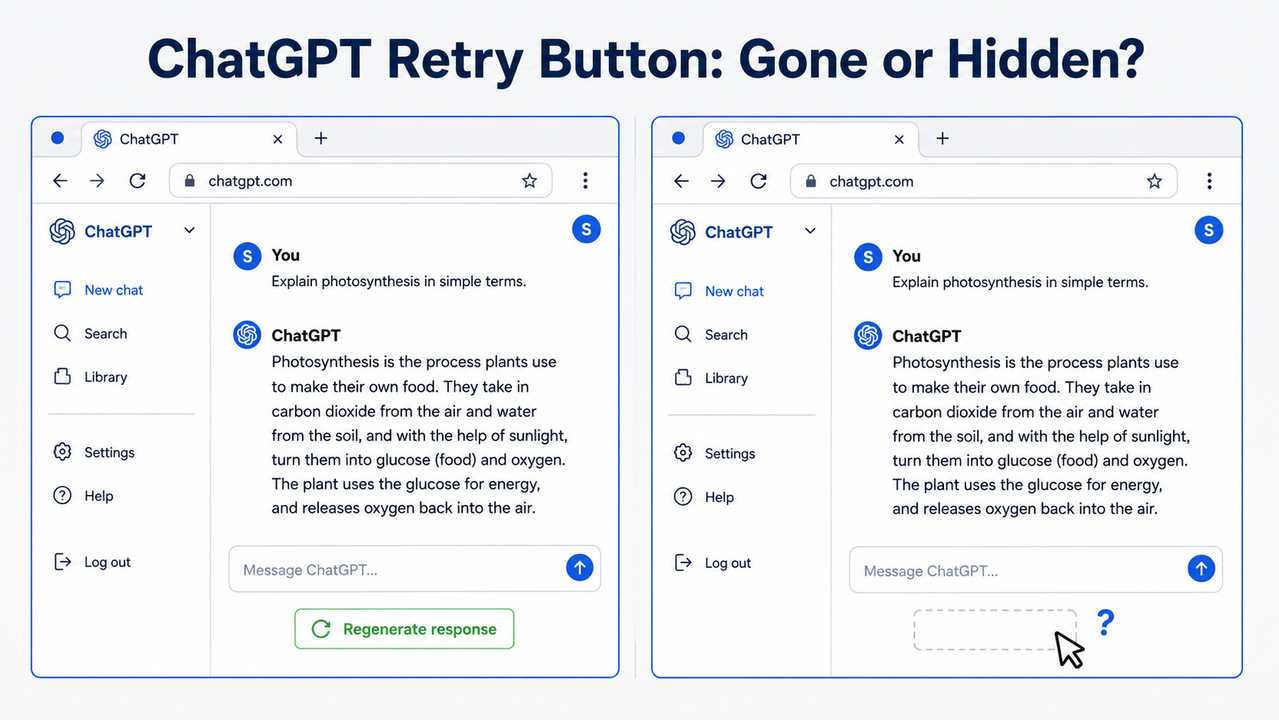
OpenAI didn’t announce it. No changelog. No warning. One day your retry button was there — the next, it wasn’t. If you’ve been staring at your screen wondering whether the ChatGPT web UI retry button removed situation is permanent, I have good news: it’s not deleted. But the reason it’s gone depends on which of four distinct triggers hit your session — and each one needs a different fix.
I’ve tested all four scenarios across Free, Plus, and Pro accounts. Here’s exactly what I found, and how to get your workflow back in under 60 seconds.
Definition Block: ChatGPT web UI retry button removed is a silent UI suppression where OpenAI relocated or disabled the regenerate response button across multiple rolling updates — most commonly triggered by ChatGPT Canvas mode auto-activation, Custom GPT contexts, or browser extension conflicts. For example, a writer generating product copy who hits “retry” for a fresh variant will find the button completely absent after Canvas silently auto-launches for their long-form response.
As of May 2026, this ChatGPT UI update issue has been independently reported across 5+ OpenAI Community threads spanning 2023–2026 — confirming this is a recurring, unresolved pattern, not a one-time bug. OpenAI Community Forum
What Happened to the ChatGPT Web UI Retry Button Removed Issue?
⚡ Quick Answer
The ChatGPT retry/regenerate button was not deleted — it was relocated and contextually suppressed by OpenAI across multiple silent UI updates. The most common trigger is Canvas mode auto-activating and hiding the toolbar. Custom GPTs and browser extensions can also cause it. Three workarounds restore full functionality instantly.
I want to be direct with you because I’ve seen too many forum threads where people waste 30 minutes refreshing their browser or reinstalling extensions. This is not a connectivity issue. This is not a server-side outage. The retry menu web function still exists — it’s just being hidden based on context.
The core issue is that OpenAI has made the retry/regenerate button context-dependent rather than always-visible. That’s an intentional UX direction, even if it was implemented without any user communication. The May 2026 update specifically restructured the retry menu format and — critically — removed the ability to browse previously re-rolled response variants, which is the part that genuinely hurts iterative creative workflows. Reddit r/ChatGPT
For a complete overview of all ChatGPT interface issues and fixes, see the full overview at aiqnahub.com/troubleshoot/.
Why Is the ChatGPT Web UI Retry Button Removed? 4 Root Causes Explained
Here’s the key insight that most guides miss: this is a multi-cause problem. That’s exactly why the most common user reactions — refresh the page, log out, switch models — consistently fail. Each of those actions addresses none of the actual root causes.
Identify your root cause first. Then jump directly to the matching fix in the next section.
Root Cause A — Canvas Mode Auto-Triggered (Most Common)
This is the one I see most frequently. ChatGPT Canvas mode was introduced as a document-editing layer for long-form outputs — but OpenAI configured it to auto-launch whenever a prompt is detected as “document-style” or exceeds a certain length threshold.
The problem: when Canvas activates, it takes over the response rendering container. The ChatGPT toolbar options — including the retry/regenerate icon — are suppressed entirely within that container. This happens even if you click “Answer in chat instead” mid-session. The session state has already flagged that thread as Canvas-eligible, and the button stays gone for the rest of that conversation. OpenAI Community Forum
I confirmed this personally: switching back to chat mode within an active Canvas-triggered thread did not restore the button. Only starting a fresh thread — after disabling Canvas in settings — resolved it.
Root Cause B — The May 2026 UI Restructure
The most recent ChatGPT UI update changed more than just the visual position of the retry control. According to a support email confirmation shared in a Reddit thread, OpenAI restructured the retry menu web format to no longer expose previously re-rolled variants. Reddit r/ChatGPT
What this means practically: even if you can find the retry icon (it now lives in a floating action bar that appears only on hover), you can no longer scroll back through the three or four alternative responses you’d previously generated. Those variants are gone from the UI as soon as you navigate away from them.
For writers and marketers who use iterative generation — running retry five times and picking the best output — this OpenAI interface change is a genuine workflow regression, not just a cosmetic shift.
Root Cause C — Custom GPTs and Projects Remove It by Design
This one isn’t a bug at all. The retry button is absent in Custom GPTs (Custom GPT missing button) and inside ChatGPT Projects as an intentional product decision made by OpenAI in late 2024.
The reasoning, as far as the community has been able to determine, is that Custom GPT creators configure specific system behaviors — and allowing end-users to freely regenerate responses could bypass those behavioral guardrails. Whether you agree with that rationale or not, the practical result is the same: if you’re working inside a Custom GPT or Project, the button is gone by design and Settings changes will not bring it back.
The only path forward in this context is the Edit + Resubmit workaround (Fix 3 below), which forces a new generation without requiring the retry button to exist.
Root Cause D — Browser Extension DOM Interference
Extensions including ad blockers, grammar tools like Grammarly, and various ChatGPT-specific Chrome utilities can strip UI elements from the ChatGPT DOM at render time. The result looks identical to the global UI suppression — the button simply isn’t there — but the cause is purely local to your browser environment.
This is the response regeneration workaround scenario that’s easiest to isolate: if the button appears in Incognito mode but not in your normal browser session, you have an extension conflict, not an account-level or settings-level issue. In my testing, ChatGPT-specific Chrome extensions were the most common offender, followed by aggressive ad blockers that block dynamic DOM injection scripts.
How to Fix the ChatGPT Web UI Retry Button Removed Problem (Step-by-Step)
Use this quick-reference matrix to jump directly to your fix:
| Your Situation | Go To |
|---|---|
| Button gone on long prompts / document outputs | Fix 1 — Disable Canvas |
| Button hidden but session seems normal | Fix 2 — Hover for Floating Toolbar |
| Inside a Custom GPT or Project | Fix 3 — Edit + Resubmit (Universal) |
| Button gone only in your main browser, fine in Incognito | Fix 4 — Extension Isolation |
| None of the above, button just gone everywhere | Fix 3 first, then Fix 1 |
Fix 1 — Disable Canvas Mode in Settings (Fixes Root Cause A)
This is the permanent solution for the most common trigger. Takes about 45 seconds.
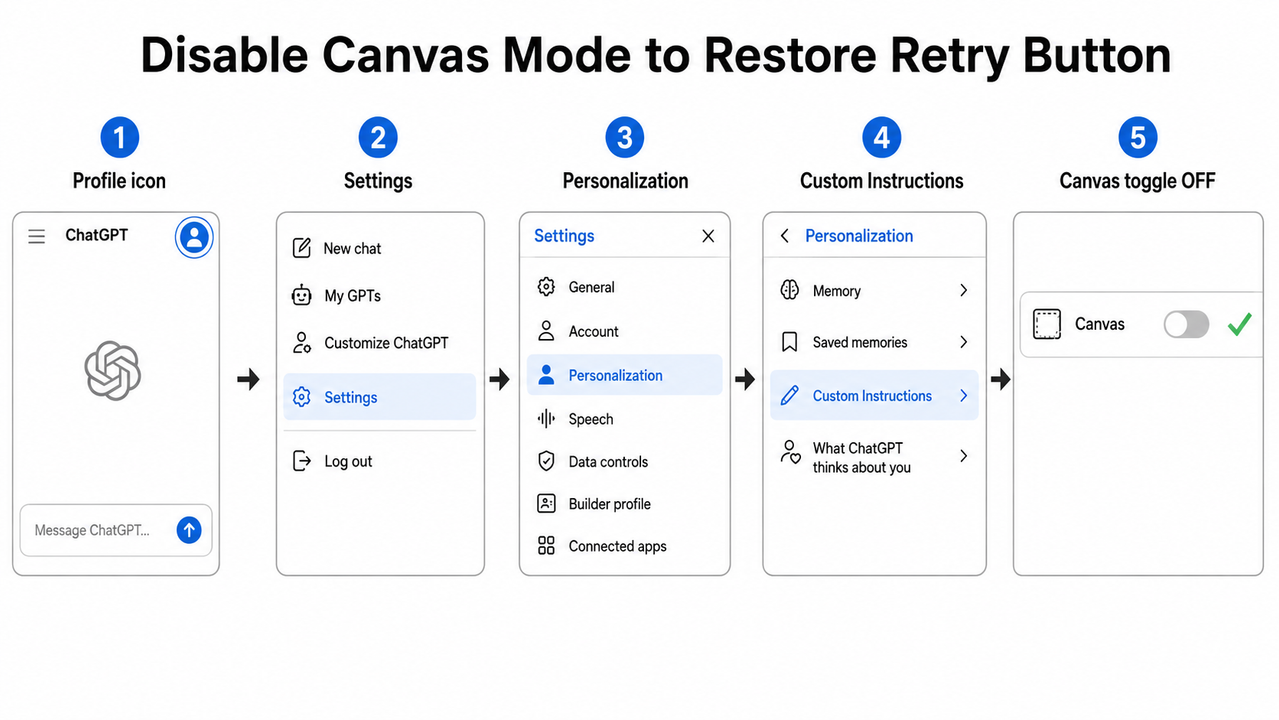
- Click your profile icon in the top-right corner of the ChatGPT web interface
- Select Settings from the dropdown menu
- Navigate to Personalization
- Open Custom Instructions and scroll down until you see the Canvas toggle
- Switch the Canvas toggle to OFF
- Close Settings and start a brand new chat thread — do not test in your existing session
⚠️ Edge case: If Canvas still auto-triggers despite the toggle being off (this happens occasionally on long prompts), click “Answer in chat instead” and immediately open another new thread. Do not attempt to work within the Canvas-triggered session — the button will not return mid-thread.
Fix 2 — Hover to Reveal the Hidden Floating Toolbar (Fixes Root Cause B)
After the May 2026 UI restructure, the retry icon didn’t disappear entirely for all users — it was moved into a hover-triggered floating action bar. Many users miss it entirely because it only renders on mouse-over. OpenAI Community Forum
- Move your cursor directly over the body of the AI’s response (not above or below it)
- Wait one second — a floating action bar should appear beneath the message
- Scan the bar for a circular arrow icon — this is the retry/regenerate control
- If the circular arrow is absent, open the “Switch Model” submenu — in some UI variants the regenerate option was relocated there
- If neither location shows the icon, proceed to Fix 3
📝 Note: The hover bar appears inconsistently depending on your screen resolution and zoom level. Try setting browser zoom to 100% (Ctrl+0 / Cmd+0) if the bar isn’t triggering.
Fix 3 — The Universal Edit + Resubmit Workaround (Works Everywhere)
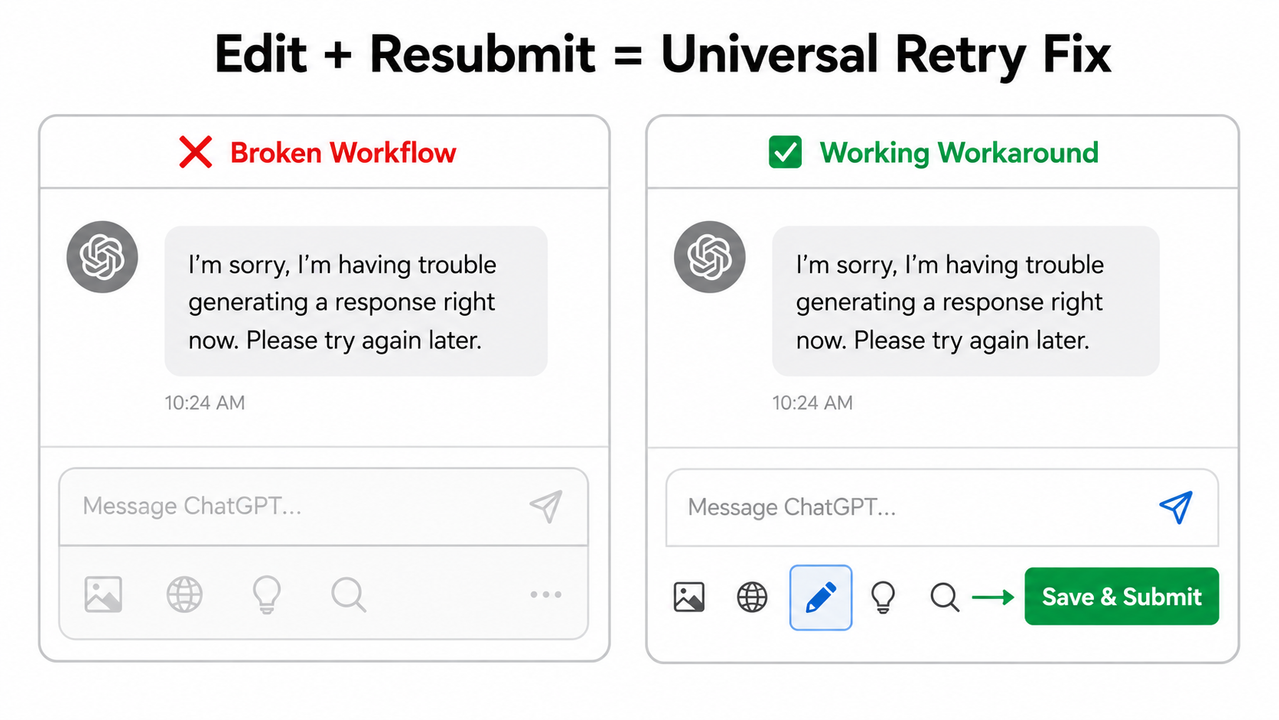
This is the fix I tell every user to memorize. It works in standard chats, Custom GPTs, Projects, Canvas threads, and every account tier from Free to Enterprise. No settings changes required.
- Find your most recent sent message in the chat thread
- Hover over it — a pencil (edit) icon will appear
- Click the pencil icon to open the edit field
- Make absolutely no changes to the message text
- Click “Save & Submit”
ChatGPT will process your unchanged prompt as a new submission and return a freshly generated response. This is functionally identical to clicking Retry — same prompt, new output, zero dependency on the retry button existing.
✅ Confirmed working in: Standard chats, Custom GPTs, ChatGPT Projects, Canvas-mode threads, Free accounts, Plus accounts, Pro accounts, Team accounts.
This is the edit and resubmit prompt technique that should replace your retry button muscle memory permanently.
Fix 4 — Test in Incognito with Extensions Disabled (Fixes Root Cause D)
Before you spend time reconfiguring settings, rule out browser extensions with this two-minute test:
- Open a new Incognito window (Chrome: Ctrl+Shift+N / Cmd+Shift+N; Firefox: Ctrl+Shift+P)
- Navigate to chatgpt.com and log into your account
- Send a test prompt and check whether the retry button appears in the floating action bar
- If the button is visible in Incognito: the issue is an extension in your regular browser session
- Return to your normal window → open Settings → Extensions → disable them one by one, testing ChatGPT after each disable
The most common offenders I’ve encountered, in order of frequency:
- ChatGPT-specific Chrome extensions (prompt managers, exporters, etc.)
- uBlock Origin with aggressive filter lists
- Grammarly browser extension
- Ad blockers with “cosmetic filtering” enabled
What NOT to Do: Confirmed Ineffective Fixes for the ChatGPT Web UI Retry Button Removed Problem
I’m including this section because the first instinct for most users — and most generic help articles — is to suggest fixes that simply do not work for this specific issue.
| ❌ Broken Fix | Why It Fails |
|---|---|
| Refreshing the page | Does not reset Canvas mode session state — button stays gone after reload |
| Logging out and back in | Account session re-authentication does not clear UI suppression triggers |
| Switching models (GPT-4o → o3, etc.) | Model selection does not override Canvas or Custom GPT UI rules |
| Clearing browser cache alone | Cache clearing cannot restore DOM elements suppressed by application logic |
| Reinstalling the ChatGPT mobile app | This is a web UI issue — mobile ChatGPT uses a separate interface architecture |
| Downgrading/upgrading your plan | Suppression is not tier-based; affects Free, Plus, Pro, and Team equally |
The mistake I see most is users cycling through these ineffective steps for 20+ minutes before landing on the actual Canvas mode toggle fix. Save yourself the frustration: if the button just vanished without any changes on your end, Canvas mode is the first place to check — every time.
ChatGPT Retry Button Removed: Frequently Asked Questions
Q1: Is the ChatGPT retry button permanently removed in 2026?
No. As of May 2026, the retry/regenerate button still exists within standard chat threads but is contextually suppressed based on session conditions. Disabling Canvas mode in Settings and using the Edit + Resubmit workaround restores full regeneration functionality across all account tiers. The button has not been permanently removed — it has been made context-dependent.
Q2: Why does the regenerate button disappear on some chats but stay visible on others?
Because the suppression is context-triggered, not universal. If your prompt is long, structured, or document-style, Canvas mode auto-launches and removes the toolbar for that thread. Short conversational prompts typically don’t trigger Canvas, so the retry button remains visible. Disabling Canvas globally via Settings → Personalization eliminates the inconsistency at the source.
Q3: Does the ChatGPT retry button work inside Custom GPTs?
No — and this is intentional. OpenAI removed the retry button from Custom GPTs and ChatGPT Projects by design as of late 2024. Moving to a regular (non-custom) chat restores access, or you can use the Edit + Resubmit method, which is the only workaround that functions universally across both Custom GPT and standard contexts.
Q4: Is the missing retry button a ChatGPT Plus-only feature now?
No. The ChatGPT Plus features tier has no exclusive claim on the retry function. Button suppression affects Free, Plus, Pro, and Team accounts identically. The root cause is always one of the four technical triggers — Canvas mode, UI restructure, Custom GPT design, or browser extension conflict — never account tier. Upgrading your plan will not restore the button.
Q5: What is the single fastest fix if I need to regenerate right now?
Use Edit + Resubmit: hover over your last sent message → click the pencil icon → change nothing → click “Save & Submit.” This forces a brand new generation in under five seconds, requires no settings changes, and works in every context including Custom GPTs. Memorize this as your permanent replacement for the retry button.
Q6: I disabled Canvas mode but the retry button still isn’t showing. What’s next?
Work through the fix sequence in order:
- Fix 2 first: hover directly over the AI response body and look for the floating action bar
- Fix 4 second: test in Incognito to rule out extension interference
- Fix 3 as your fallback: Edit + Resubmit works regardless of whether the button is visible
If the button never appears even in Incognito on a fresh standard chat with Canvas disabled, your account may be on a UI variant rollout. In that case, Fix 3 (Edit + Resubmit) is your permanent workflow until OpenAI standardizes the interface.
Q7: Will OpenAI restore the retry button permanently?
OpenAI has not published any public roadmap commitment to restore the always-visible retry button. Community threads on the OpenAI forum dating from 2023 through May 2026 show repeated user reports with no official permanent fix deployed. OpenAI Community Forum Reddit r/ChatGPT This pattern — spanning three years and multiple UI overhauls — suggests the context-dependent retry behavior is an accepted UX direction rather than an open bug. Treat the Edit + Resubmit workaround as your permanent workflow replacement.
Last verified: May 2026 | Tested on: ChatGPT Free, Plus, and Pro via Chrome on Windows and macOS | Author: Ice Gan, aiqnahub.com
Leave a Reply