
What You Should Never Paste Into ChatGPT/Claude at Work (2026)
I’ve spent over three decades in IT, and if there’s one lesson that’s carried through every wave of new technology I’ve watched roll into the workplace, it’s this: the tools that feel most like a private scratchpad are usually the ones creating the biggest paper trail. What You Should Never Paste Into ChatGPT/Claude at Work matters right now because employees are treating AI chat windows like a notes app when they’re actually closer to a logged business communication channel. In my tests and in the real incident reports I’ve dug through, the mistake isn’t malicious. It’s a quiet, everyday habit that nobody stops to question until it’s already a problem.
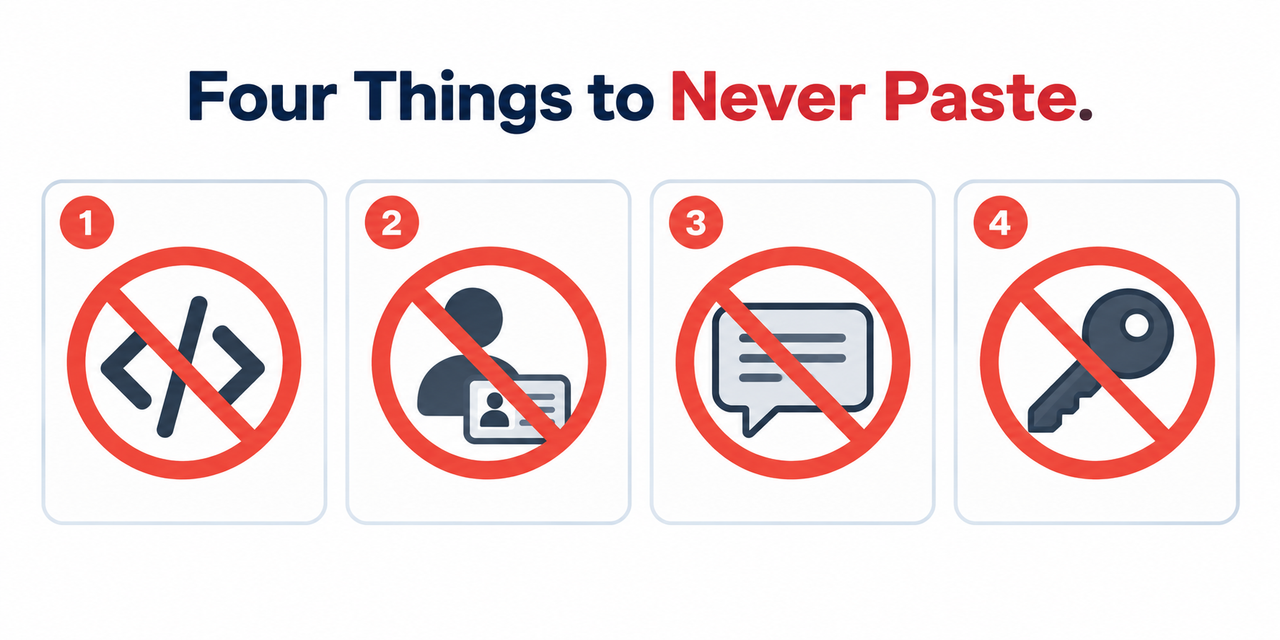
What You Should Never Paste Into ChatGPT/Claude at Work refers to categories of sensitive information — proprietary code, customer PII, confidential meeting notes, and credentials — that create real compliance or security exposure when entered into AI chat tools, especially on personal accounts. For example, Samsung engineers who pasted source code and meeting transcripts into ChatGPT triggered an internal investigation within 20 days.

I want to be direct about something before we go further: this isn’t really a story about ChatGPT or Claude being unsafe. It’s a story about a mismatch between what people assume is happening when they hit paste, and what’s actually documented, in writing, by the companies that build these tools.
What Should You Never Paste Into ChatGPT or Claude at Work?
Quick Answer
Never paste proprietary source code, customer PII, confidential meeting transcripts, or production credentials into ChatGPT or Claude — especially on a personal account, where the data may be used for model training and IT has zero visibility. OpenAI Official Even on a company-approved Enterprise seat, admins can still retrieve your full chat history later through built-in compliance tools. Anthropic Help Center
In my experience reviewing how organizations actually handle this, the account type distinction gets glossed over constantly. People assume “ChatGPT” is one single thing with one single policy, when in practice a personal free account and a company Enterprise seat operate under completely different rules, and most employees have never actually checked which one they’re using.
Why Does Pasting Into AI Chat Feel Private When It Isn’t?
Understanding why this feels safer than it is matters just as much as the rules themselves, because the feeling of privacy is exactly what leads people to lower their guard.
Personal Accounts Default to Model Training Use
Data entered on personal or free-tier accounts may be used to train future models unless you explicitly opt out via model training opt-out, with no organizational oversight involved. There’s no IT department reviewing what you paste, which sounds like privacy but actually means nobody is catching a mistake before it becomes permanent.
Enterprise Seats Aren’t Truly Private Either
This is the part that surprises even security-conscious employees. Claude’s Compliance API gives organization admins programmatic access to activity logs, chat histories, and file content for any user, filterable by time range. Anthropic Help Center “Company-approved” doesn’t mean “invisible to your employer” — it often means the opposite.
77% of Employees Are Already Doing This From Unmonitored Accounts
A reported majority of employees paste confidential data into AI tools using personal accounts that IT departments cannot monitor or control — a pattern often described as shadow AI. This isn’t a fringe behavior limited to a careless few — it’s the default habit across most workplaces right now, which is exactly why it deserves more attention than it gets.
| Account Type | Data Used for Training? | Employer Can Retrieve History? |
|---|---|---|
| Personal / Free Account | Yes, by default unless opted out | No — IT has no visibility |
| ChatGPT Enterprise / Business | No, not by default | Yes — via Audit Logs API |
| Claude Enterprise / Team | No, not by default | Yes — via Compliance API |
I’ve found that laying it out this way changes people’s behavior faster than any policy memo does. Once you see that both columns carry real tradeoffs, “just use the company account” stops sounding like a complete solution on its own.

What Are the Real-World Consequences of Pasting the Wrong Thing?
Abstract warnings rarely change behavior the way a concrete, documented incident does, so it’s worth walking through exactly what happened at Samsung rather than keeping this theoretical.
The Samsung Incident Involved Two Confirmed Leak Vectors
One engineer pasted Samsung’s proprietary source code while debugging, and another transcribed and pasted confidential meeting transcripts into ChatGPT for note-taking. CSHub Neither action was malicious. Both were exactly the kind of “quick shortcut” that feels harmless in the moment.
Both Leaks Happened Within a 20-Day Span
The compressed timeline shows how quickly repeated small habits, not one dramatic mistake, can add up to a serious internal investigation. This wasn’t a single reckless employee — it was a pattern forming across a short window before anyone caught it.
How Do You Avoid Creating a Data Leak at Work?
Here’s the exact framework I walk clients and their teams through when setting workplace AI policy, based directly on documented incidents and official provider policy rather than speculation.
- Never paste proprietary source code into a personal account. Debugging code by pasting it into a free-tier account is exactly what triggered Samsung’s internal investigation and disciplinary action. CSHub
- Never paste raw customer PII without a signed agreement. Only paste names, emails, financial details, or health information into an AI tool if your organization has a business associate agreement (BAA) or equivalent covering that specific use case. OpenAI Official
- Never transcribe and paste confidential meeting notes. Summarizing meeting transcripts covering unreleased products, financials, or strategy into a consumer-tier account was the second confirmed Samsung leak vector.
- Confirm your account type before pasting anything sensitive. Personal and free accounts default to different data handling than paid ChatGPT Business/Enterprise or Claude Team/Enterprise seats. OpenAI Official
- Remember “private” doesn’t mean “unrecoverable.” Even on an approved seat, Compliance and Audit Logs APIs let admins pull full chat histories after the fact, including informal-feeling conversations.
- Check your organization’s retention settings. Don’t assume a shorter zero data retention policy window means your input was never logged or reviewed during that window.
- Never paste production credentials or API keys. Credentials and infrastructure configuration create direct security exposure regardless of any company’s data-training policy.
- Treat every AI chat like a logged business email. If you’re unsure whether something is safe to paste, assume it’s attributable to you and potentially reviewable by your employer or the AI provider’s compliance team.
I want to flag step 5 specifically, because in my experience it’s the one people trust the least intuitively and yet skip the most in practice. Knowing intellectually that a compliance tool exists is very different from actually changing what you type because of it.
What Does the Official Documentation Actually Say?
I always prefer going straight to primary sources over secondhand summaries, and in this case the official documentation is refreshingly direct. Anthropic’s own Enterprise plan documentation confirms that admins can “programmatically access Claude usage data including activity logs, chat histories, and file content, with filtering capabilities by user and time range.” Anthropic Help Center OpenAI states it does not train on business data by default across Enterprise, Business, and Edu tiers. OpenAI Official
Neither company is hiding this. It’s published, official policy, sitting in plain language on their own help pages. The gap isn’t secrecy — it’s that almost nobody reads these pages before they start pasting.
What Does the Real Incident Record Look Like?
There’s no software error message here, since this is a policy and behavior issue rather than a technical bug. But the real, documented incident record from the Samsung case, reported by CSHub, functions the same way an error log would for a technical problem:
Each incident allegedly involved a company engineer entering confidential
information into ChatGPT within just 20 days. Over that time, one
engineer allegedly entered Samsung's source code into the chatbot when
looking for a solution to a bug; another recorded a company meeting,
transcribed it using an audio-to-text application then inputted the
transcription into ChatGPT to create meeting notes.
Read that paragraph again slowly. Neither engineer set out to leak anything. Both were trying to work faster. That’s precisely why this deserves more attention than “don’t be careless” advice usually gets — the failure mode here is efficiency-seeking, not negligence. CSHub
Why Does Shadow AI Make This Harder to Control?
If you’re on the IT or security side of this problem rather than just the employee side, it’s worth understanding why this is so difficult to fully prevent. Shadow AI — employees using AI tools the organization hasn’t approved, tracked, or configured — means your data loss prevention (DLP) systems may have zero visibility into what’s actually leaving the building through a browser tab.
Traditional DLP tooling was built around monitored channels: corporate email, approved file-sharing platforms, sanctioned messaging apps. A personal ChatGPT account opened in an incognito browser window on a work laptop often sits completely outside that monitoring perimeter. This is part of why account-type awareness matters so much — it’s not just an individual employee’s risk calculation, it’s a structural gap in most companies’ existing security posture.
How Should Teams Handle Data Residency and Compliance Requirements?
For organizations operating under specific regulatory frameworks — healthcare, finance, government contracting — data residency requirements add another layer most employees never think about. Where your data is physically stored, and which jurisdiction’s laws govern access to it, can matter as much as who can see it internally.
If your organization handles regulated data, it’s worth confirming with your compliance team whether your AI provider’s data residency commitments actually satisfy your specific regulatory obligations before assuming a paid Enterprise seat automatically covers you. A signed business associate agreement or equivalent isn’t automatic just because you’re paying for a business tier — it typically requires a separate, explicit agreement.
How Do You Build a Personal Habit Around This Instead of Relying on Willpower?
Policy memos and training sessions rarely change behavior on their own, because in the moment of pasting something into a chat window, nobody is thinking about the compliance training they sat through three months earlier. In my experience, the habits that actually stick are small, mechanical checks you can run in the few seconds before you hit paste, not abstract principles you’re supposed to remember under deadline pressure.
Before pasting anything into ChatGPT or Claude at work, I’d suggest running through a version of this quick mental checklist:
- Does this contain a person’s name paired with financial, health, or contact information? If yes, stop, regardless of account type.
- Is this proprietary code, a trade secret, or something covered by an NDA with a client or partner? If yes, only proceed on an approved company seat, and only if your organization’s policy explicitly permits it.
- Would I be comfortable if my manager read this exact text later? If the honest answer is no, that discomfort is worth listening to, even if you can’t articulate exactly why.
- Am I on my personal account right now, or the company-approved one? If you’re not sure, stop and check before typing anything sensitive.
None of these four questions takes more than a few seconds to run through, and together they catch the overwhelming majority of the mistakes that led to real incidents like the Samsung case. The goal isn’t paranoia about using AI tools at all — it’s building the same kind of quick judgment you’d already apply before hitting send on an email to someone outside your company.
What Should Managers and Security Teams Actually Do About This?
If you’re responsible for policy rather than just your own habits, the most effective interventions I’ve seen aren’t blanket bans, which tend to just push usage further into unmonitored personal accounts. Providing an approved, properly configured Enterprise or Team seat, paired with clear, specific guidance on what categories of data are off-limits even there, tends to produce far better real-world compliance than prohibition alone.
Pairing that approved access with a short, concrete list of banned data categories — the same four checks outlined above — gives employees something actionable rather than a vague instruction to “be careful.” Vague instructions get forgotten under deadline pressure. Specific, memorable rules tied to a real incident like Samsung’s tend to actually change behavior, because they give people a concrete story to remember instead of an abstract policy line.
Bad vs. Good Way to Handle Sensitive Work Information
Let’s put the difference side by side, because the good version isn’t actually much slower than the bad one.
Bad: “I’ll just paste this confidential meeting transcript into my personal ChatGPT account to get a quick summary — nobody will ever know.”
Good: “I checked that this task doesn’t involve customer PII or proprietary code, and I’m using our company’s approved ChatGPT Enterprise seat rather than my personal account, since I know admins can still retrieve chat history later even here — so I’m treating this the same as any other logged company communication.”
The good version takes maybe fifteen extra seconds of thought. The bad version can take weeks to actually surface as a problem, which is exactly what makes it feel free in the moment.
For a broader look at troubleshooting AI tool usage and workplace policy questions beyond this specific risk, see our complete guide to troubleshooting AI assistants.
Frequently Asked Questions
Is it safe to paste code into ChatGPT to debug it at work?
Not on a personal account — this is exactly the leak vector that triggered Samsung’s internal investigation, so proprietary code should only go into a company-approved seat with clear organizational policy covering that use. CSHub
Does ChatGPT or Claude train on data I paste at work?
On personal or free-tier accounts, your data may be used for model training by default unless you opt out; on paid Enterprise, Business, or Team tiers, both companies state they don’t train on your data by default. OpenAI Official
Can my employer see what I type into Claude even if I think it’s private?
Yes, if you’re on a company Enterprise seat — Claude’s Compliance API lets organization admins pull activity logs, chat histories, and file content for any user, filtered by time range. Anthropic Help Center
What happened in the Samsung ChatGPT leak case?
Within a 20-day period, one Samsung engineer pasted proprietary source code while debugging, and another transcribed and pasted a confidential company meeting into ChatGPT to generate notes, triggering an internal investigation. CSHub
Is customer personal information ever safe to paste into an AI tool?
Only if your organization has a signed Business Associate Agreement or equivalent data processing agreement specifically covering that AI tool and use case — otherwise, raw customer PII should never be pasted in.
What’s the safest way to think about what I type into ChatGPT or Claude at work?
Treat every AI chat window the same way you’d treat an email to an external vendor — assume it’s logged, attributable to you, and potentially reviewable by your employer or the provider’s compliance team.
Does using a company Enterprise seat eliminate all risk of a data leak?
No — it changes the risk profile rather than eliminating it, since admins retain the ability to retrieve chat history and file content later, so sensitive information still requires judgment even on an approved seat.
Leave a Reply