
How to Write a Reusable AI Prompt Template for Repeated Business Tasks (2026)
I’ve spent over three decades in IT, and one pattern has repeated across every technology shift I’ve worked through: the people who win aren’t the ones who work fastest in the moment, they’re the ones who build reusable systems while everyone else keeps starting from zero. How to Write a Reusable AI Prompt Template for Repeated Business Tasks matters because I still watch smart, capable professionals rewrite the same prompt from scratch forty times a month, convinced that a real template would just break the moment their inputs varied slightly.
How to Write a Reusable AI Prompt Template for Repeated Business Tasks is the process of separating fixed instructions, variable placeholders, and output format into one structured prompt that works across many similar tasks without rewriting. For example, replacing a hardcoded product name with a {PRODUCT_NAME} placeholder lets the same prompt generate descriptions for any product.
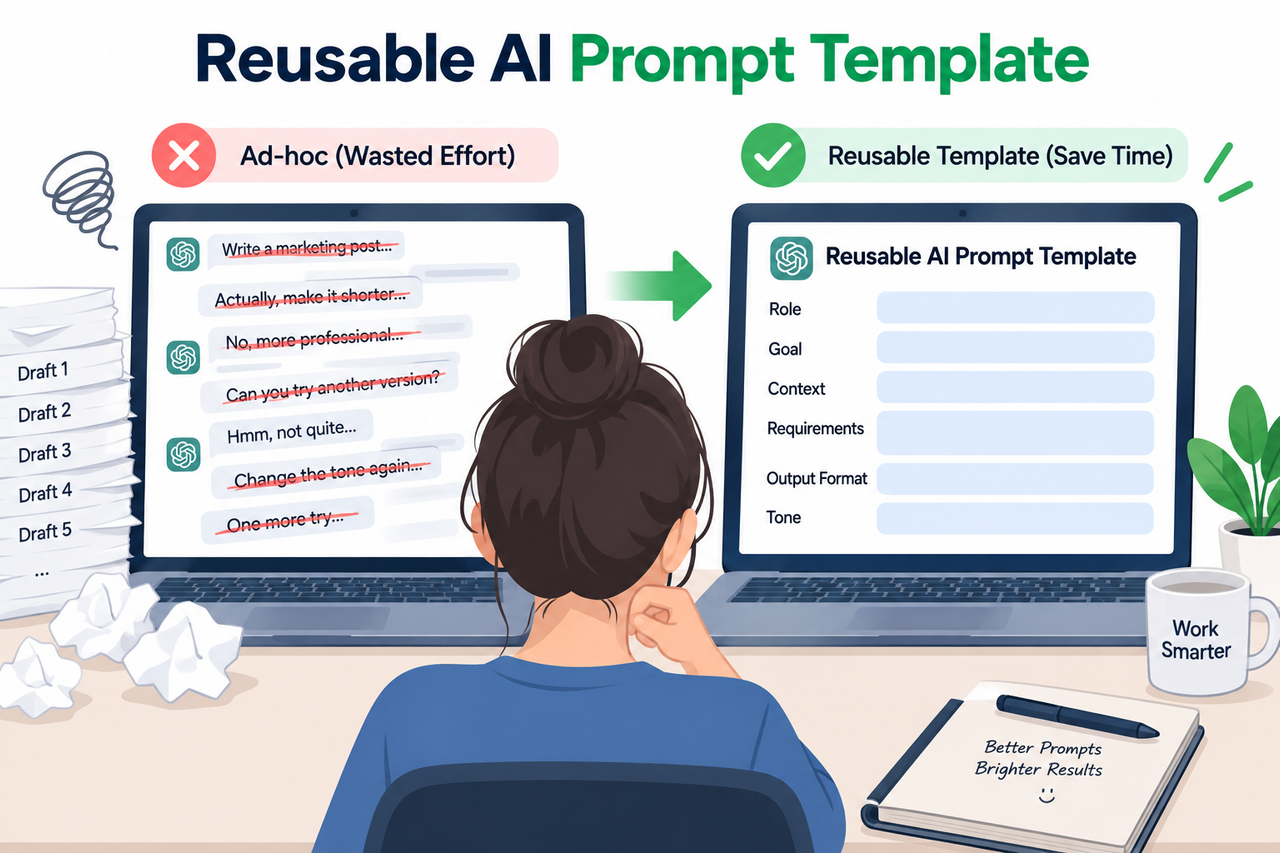
In my tests building these systems for clients, the mistake I see most isn’t a lack of skill. It’s treating every new task as a brand-new prompt-writing exercise instead of recognizing that most of the prompt never actually changes.
What Makes an AI Prompt Template Actually Reusable?
Quick Answer
A genuinely reusable prompt template separates three things ad-hoc prompts tangle together — fixed instructions that never change, variables marked with clear placeholder syntax, and an explicit output format — so only the placeholders need editing each time you reuse it. OpenAI Help Center Official OpenAI and Anthropic guidance both confirm this separation is the core technique. Claude Platform Docs
I want to be direct about this because it’s the single biggest misconception I run into: people think a “template” just means saving an old prompt and editing it by hand each time. That’s not a template. That’s just a slightly faster version of starting from scratch, and it carries the exact same inconsistency risk.
Why Do Ad-Hoc Prompts Break Down at Scale?
Before building the fix, it’s worth understanding exactly why the ad-hoc approach fails as volume increases, because the failure isn’t random.
Rewriting Prompts Wastes Time on Every Repeated Task
Manually tweaking a prompt for every new product, client, or task compounds into significant wasted time across dozens of repetitions. Five minutes per prompt sounds trivial until you multiply it by every product description, client email, or ad variant you write in a month.
Inconsistent Phrasing Produces Inconsistent Output Quality
Without a fixed instruction block, output quality varies from run to run depending on how carefully the prompt was rewritten that time. I’ve seen this firsthand: the exact same task produces noticeably different quality depending on whether you were rushed or careful when typing that day’s version.
Ad-Hoc Prompts Can’t Be Handed Off to a Teammate
A prompt that only works because of specific phrasing you happen to remember can’t be delegated without re-explaining it every time. This is the one that actually costs businesses real money — you become a bottleneck instead of building something a teammate can run independently.
| Prompt Type | Consistency | Time Cost Per Use | Delegatable? |
|---|---|---|---|
| Ad-Hoc (rewritten each time) | Low — varies by mood and memory | High — full rewrite each time | No — relies on tacit knowledge |
| Copy-Paste-Edit | Medium — inherits old mistakes | Medium — manual editing required | Difficult — unclear what to edit |
| Structured Reusable Template | High — fixed instructions stay locked | Low — only fill in placeholders | Yes — self-explanatory structure |
Seeing it laid out this way is usually what convinces people the investment in building a real template is worth the upfront time.

How Do You Build a Reusable Prompt Template Step by Step?
Here’s the exact sequence I walk through with clients when converting their repeated tasks into genuine templates, based directly on official OpenAI and Anthropic guidance rather than guesswork.
- Separate what never changes from what always changes. Identify your fixed task instruction, tone, and constraints versus the specific details that change every time, like product name or client input.
- Choose one consistent placeholder syntax. Pick a variable format — OpenAI uses curly-brace style like
{text input here}, while Anthropic recommends double curly braces inside XML tags — and apply it consistently across every template. OpenAI Help Center - Put fixed instructions first, separated by a delimiter. Place instructions at the very beginning of the template using a clear delimiter like
###or triple quotes to separate them from variable input. OpenAI Help Center - Wrap mixed content in descriptive XML tags. For prompts mixing instructions, context, and examples, wrap each type in its own named tag like
<instructions>or<context>so the model doesn’t confuse them. Claude Platform Docs - Add at least one worked example. Include a relevant, diverse example inside
<example>tags showing the exact input-to-output pattern you want the template to follow. Claude Platform Docs - Specify your output format explicitly. Describe the exact structure you want — bullet list, labeled fields, sentence count — rather than assuming the model will infer it correctly.
- Test with multiple different inputs. Run the template against two or three genuinely different variable inputs before treating it as finished.
- Save it as a standalone reusable asset. Lock in the fixed instructions, delimiters, and example, leaving only the placeholders open for future editing.
I want to flag step 7 specifically, because it’s the step people skip most often. A template that only works for the one example you had in mind while writing it isn’t actually a template yet — it’s just a well-disguised one-off.
What Do OpenAI and Anthropic’s Official Guides Actually Recommend?
I always go back to primary documentation rather than secondhand summaries, and both companies are refreshingly specific here. OpenAI’s own documentation demonstrates the {text input here} placeholder convention paired with delimiters. OpenAI Help Center Anthropic’s official guidance recommends XML tags for the same purpose, stating they “reduce misinterpretation” when a prompt mixes instructions, context, and examples. Claude Platform Docs
Neither approach is objectively “better” in isolation — they’re solving the same underlying problem with slightly different syntax conventions tied to how each company’s models tend to parse structure. What matters more than which convention you pick is picking one and applying it consistently across every template you build, so you’re not mentally switching formats every time you sit down to write a new one.
How Do Variables and Placeholders Actually Work in Practice?
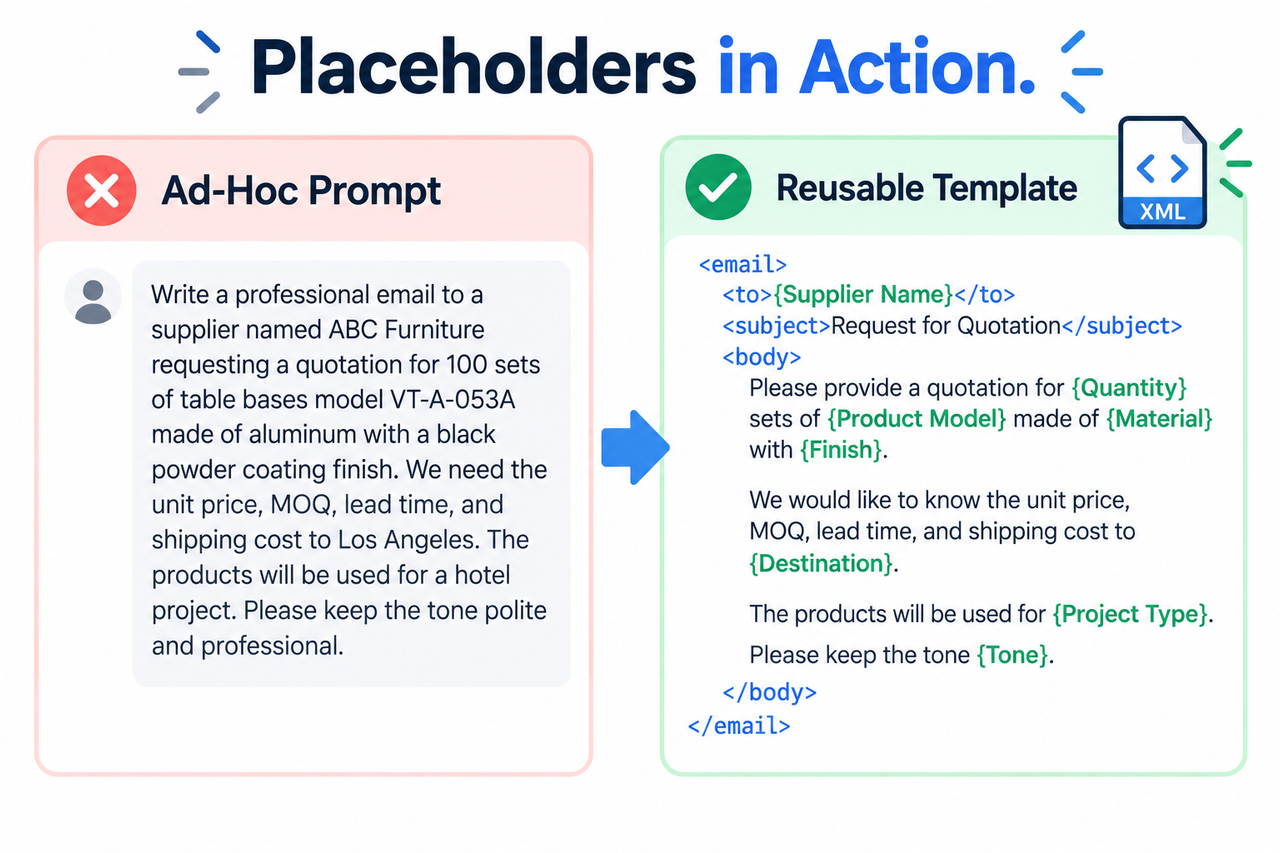
Let me walk through this concretely rather than keeping it abstract. Say you write product descriptions weekly. The instruction — “write an exciting, benefit-focused description, always mention battery life and one standout feature” — never changes. What changes is the product name and its specific features.
In an ad-hoc approach, you’d retype that entire instruction every single time, with small variations creeping in depending on how rushed you are. In a template approach, that instruction gets written once, locked in place, and the only thing you touch going forward is a bracketed placeholder like {PRODUCT_NAME} and {KEY_FEATURES}. The model reads the same careful instruction every time, and your only job becomes filling in two blanks.
This is precisely why templates produce more consistent output than even a careful person rewriting prompts by hand — the instruction quality can’t degrade over time or vary based on how much attention you paid that particular day.
Why Do Few-Shot Examples Matter More Than People Expect?
I used to underestimate this step myself, and it’s the one addition that tends to improve output quality the most for the least effort. A worked example inside your template — a single instance of exactly the kind of output you want — does more to steer tone and structure than several extra sentences of written instruction.
Anthropic’s guidance specifically recommends examples be both relevant, meaning they mirror your actual use case rather than a generic placeholder scenario, and diverse, meaning they cover edge cases you’re likely to encounter rather than only the easiest version of the task. Claude Platform Docs A single example covering only your simplest possible input teaches the model less than one that reflects a genuinely representative case.
Bad vs. Good Prompt Template Example
Let’s put this side by side, because the difference is more concrete than it might sound in the abstract.
Bad: “Write a product description for the wireless earbuds we’re launching, make it exciting and mention the battery life and noise cancellation.” (rewritten from scratch every time a new product needs a description)
Good (Illustrative example):
Write a product description for the following item. Use an exciting,
benefit-focused tone. Always mention battery life and any standout
feature explicitly.

Product: """{PRODUCT_NAME} — {KEY_FEATURES}"""

Desired format: 2-3 sentences, no bullet points, ending with a call
to action.
The instruction block stays fixed here, while {PRODUCT_NAME} and {KEY_FEATURES} are the only parts that change per use, following the delimiter-and-placeholder convention OpenAI’s own documentation demonstrates directly. OpenAI Help Center
How Do You Maintain a Template Once It’s Working?
Building the template is only half the job. In my experience, templates quietly drift out of date as your business changes — a new product line, a shift in brand voice, an updated compliance requirement — and nobody goes back to update the fixed instruction block until output quality has already degraded.
I’d recommend treating prompt versioning the same way you’d treat any piece of reusable business infrastructure: date-stamp your templates, note what changed and why each time you edit the fixed instruction block, and periodically re-test the template against a few real examples even after it’s been working fine for months. A template that was excellent six months ago can quietly become mediocre if your actual use case has shifted underneath it without the template ever being updated.
Does the Same Template Work Across Different AI Tools?
This is a question I get constantly from people managing multiple AI subscriptions, and the honest answer is: mostly, but not perfectly. The core structure — fixed instructions, delimited variables, explicit output format, a worked example — transfers well across ChatGPT, Claude, and most other major models, since the underlying problem they’re solving is universal.
What doesn’t always transfer cleanly is the specific placeholder syntax convention. A template built heavily around Anthropic’s XML-tag recommendation will still work in ChatGPT, since the model can parse XML-style structure perfectly well, but you may not get the exact same benefit that Anthropic’s own models are specifically tuned to recognize. In practice, I’d recommend building your core template structure once, then testing it in whichever tool you actually use daily, and making small adjustments to placeholder style if you notice the output quality isn’t quite matching what you’d expect.
If you regularly switch between multiple AI tools for the same recurring task, it’s worth maintaining one canonical version of each template with your fixed instructions and examples locked in, and treating the placeholder syntax as the one variable you might tweak per platform rather than rebuilding the whole template from scratch for each tool.
What Are the Most Common Mistakes When Building a Template?
I’ve reviewed a lot of “reusable” templates that weren’t actually reusable, and the failures cluster around a small number of repeated mistakes.
The most common one is leaving instructions and variables blended together in the same sentence, rather than physically separating them with a delimiter. If your instruction reads “write a description for {PRODUCT_NAME} that’s exciting and mentions {KEY_FEATURES} in a friendly tone,” you’ve technically used placeholders, but the lack of structural separation means the model has to do more work parsing what’s fixed versus what’s variable, and that ambiguity shows up as inconsistency in the output.
The second common mistake is skipping the worked example entirely, assuming that clear written instructions alone are enough. They usually aren’t. An example does work that instructions can’t fully replicate, especially around tone and formatting nuances that are much easier to demonstrate than describe in words.
The third mistake is testing a template once, with the first input that comes to mind, and immediately treating it as finished. I’ve seen templates that worked beautifully for one product category completely fall apart on a different product type, simply because nobody tested the edge cases before rolling the template out to a whole team.
How Do You Roll Out a Template Across a Team Without It Falling Apart?
Once a template genuinely works for you individually, handing it to a team introduces a new set of failure modes worth planning for ahead of time. The biggest one I’ve seen is a teammate quietly editing the fixed instruction block because they think their specific case needs a small tweak, and that small edit slowly drifts the template away from the version that was actually tested and validated.
I’d recommend treating the fixed instruction block and example as effectively locked once a template is rolled out to more than one person, with any proposed changes going through you or whoever owns that template rather than being edited ad hoc by whoever happens to be using it that day. This isn’t about being controlling — it’s the same reason a shared spreadsheet formula shouldn’t be edited by everyone who opens the file. A small, well-intentioned change by one person can quietly break consistency for everyone else relying on that same template.
It also helps to document, even briefly, why each part of the fixed instruction exists. If a teammate doesn’t understand why the instruction says “always mention battery life explicitly,” they’re more likely to remove it during an edit, not realizing that constraint was added after testing revealed the model would otherwise skip that detail entirely. A one-line comment explaining the reasoning behind a constraint tends to prevent far more drift than a stricter editing policy alone.
For a broader look at prompting techniques and building AI workflows beyond this specific template structure, see our complete guide to AI prompt engineering.
Frequently Asked Questions
What’s the difference between a reusable prompt template and a regular prompt?
A regular prompt is written fresh each time and tangles instructions with specific details, while a reusable template separates fixed instructions, variable placeholders, and output format so only the placeholders need editing on reuse.
What placeholder syntax should I use for prompt variables?
Pick one consistent convention and stick with it — OpenAI’s documentation demonstrates curly-brace placeholders like {text input here}, while Anthropic recommends double curly braces inside XML tags like {{VARIABLE_NAME}}. OpenAI Help CenterClaude Platform Docs
Do I need to include an example in my prompt template?
Yes — official guidance describes worked examples as one of the most reliable ways to steer output format, tone, and structure, and recommends making them relevant to your actual use case and diverse enough to cover edge cases. Claude Platform Docs
Why does Anthropic recommend XML tags for prompt templates?
XML tags help separate instructions, context, and examples so the model doesn’t confuse one type of content for another, which reduces misinterpretation in prompts that mix multiple components. Claude Platform Docs
How do I know if my prompt template is actually reusable or just looks reusable?
Test it against two or three genuinely different variable inputs before trusting it — a template that only works for the one example you had in mind while writing it isn’t truly reusable yet.
Where should I place instructions versus variable content in a template?
Put fixed instructions at the very beginning, separated from variable input by a clear delimiter like ### or triple quotes, since this ordering is explicitly recommended over placing instructions after the input. OpenAI Help Center
How often should I update a prompt template once it’s working well?
Revisit it whenever your underlying business context changes — new products, updated brand voice, shifting requirements — and periodically re-test even a stable template, since quality can quietly drift if the template isn’t updated alongside your actual use case.
Leave a Reply